When a store won’t connect, it’s usually one of four things. The platform isn’t offered on your account, the store address is wrong, the wrong account approved access, or another QuickSync account already has the store. Find the message we showed you in the table below, then work through the checks in order.
How connecting works
You connect every store from Settings, on the Stores tab. Click Add a store and pick the platform in Connect a store. Then sign in on the platform’s own page and approve access. Back in QuickSync, a message ending in connected successfully! confirms it (for WooCommerce, the new store card does), and we start reading the store’s products.
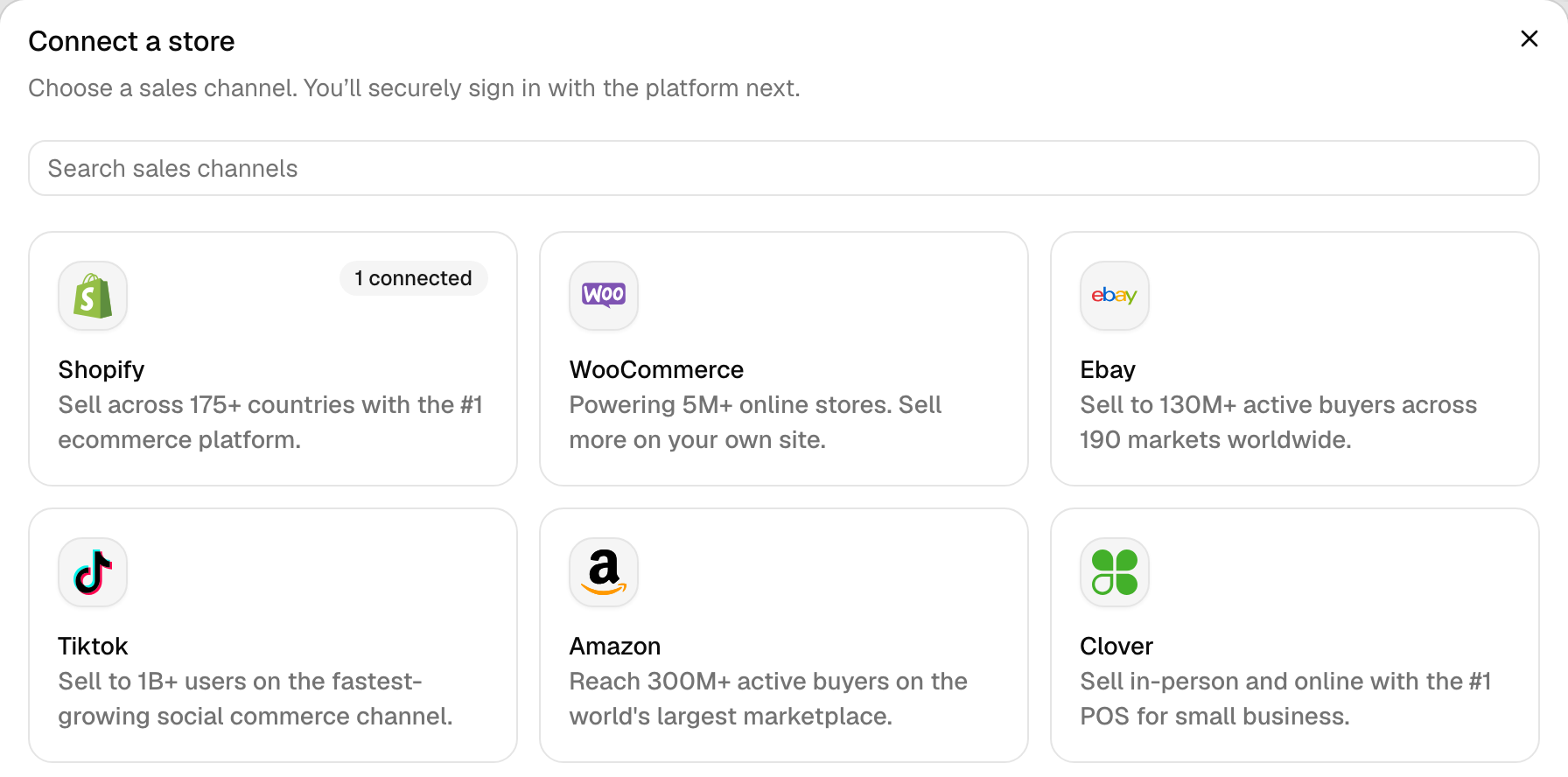
Most platforms open when you pick them. Four ask for one detail first. Fill it in, then click the button that names the platform, such as Continue to Shopify.
- Shopify: the Shopify URL. See check 2.
- WooCommerce: the Website URL. WordPress then asks you to approve our access. See check 6.
- Amazon: the Marketplace. We list the United States only.
- TikTok Shop: the Region. Pick United States for a US shop. Every other shop is Rest of the world.
Each platform’s guide lists what it needs from you: Shopify, Etsy, eBay, Amazon, TikTok Shop, WooCommerce, Wix, Squarespace, Square, Clover, Lightspeed, QuickBooks and Xero.
Error messages
We usually show one of these when a connection fails. Where a message names your platform or store, we’ve put “…” in its place.
| Message | What it means | What to do |
|---|---|---|
| Integration limit reached, or You’ve reached your integration limit. Upgrade your plan to connect more stores. | Your account already has as many stores as your plan covers, or 8. | Add room for another store. See check 5. |
| Payment is overdue. Update your payment method before connecting a new store. | A payment failed or your plan ended, so new stores are on hold. | Update your payment method or choose a plan, then connect. |
| This … store is already connected with an account: … | Another QuickSync account has this store. | See check 4. |
| This … store is already connected! | This account already has the store, and we saved a fresh login for it. | Nothing. It worked. |
| Please provide a valid shop name | What you typed as the Shopify URL isn’t a Shopify store handle. | See check 2. |
| OAuth failed due to state token mismatch, or Sorry something went wrong, Please try again. | Your browser lost track of the connection on its way back from the platform. | See check 7. |
| Your browser session didn’t survive the trip to Etsy and back | The same, on Etsy. | See check 7. |
| We can’t verify connection with your … account | The platform didn’t give us access when we asked for it. | Try again in a few minutes. If it fails twice, contact support. |
| Installation was cancelled, so nothing was connected. | You declined on Shopify’s approval page. | Start again and approve. |
| This store is still being disconnected. Wait for that to finish, then install again. | We’re still removing this Shopify store after an earlier disconnect. | Wait a few minutes, then connect again. |
| … didn’t send us its API keys, so nothing was connected. | WooCommerce never sent us the key you approved. | See check 6. |
| Sorry, this etsy account doesn’t have a shop | The Etsy account that approved has no shop. | Sign in to Etsy as the shop’s owner. See check 3. |
| Etsy says this shop is closed | The shop is closed on Etsy. | Reopen it on Etsy, then connect again. |
| Connect one Xero company at a time | You authorised more than one organisation at once. | Pick one. Each company connects as its own store. |
1. Can’t find the platform?
We don’t list Square, Clover or Lightspeed in Connect a store for accounts that started from Shopify. That’s any account made by installing QuickSync from the Shopify App Store, or by signing up with Continue with Shopify. Contact support, and we can turn them on for your account.
Don’t uninstall QuickSync from Shopify to start over. If you remove the app from the store your account started from, we delete your whole QuickSync account. That means every store, product, order and login.
2. Use the right store address
Shopify. Enter your store’s handle, such as your-store, or its full address, your-store.myshopify.com. A custom domain like yourstore.com won’t work. Neither will a link to your Shopify admin. Your handle is the part after /store/ in the admin’s address, admin.shopify.com/store/your-store.
WooCommerce. Enter the address your shop loads on, such as https://example.com. We drop the https:// and a leading www., and we keep a path such as /shop.
3. Sign in with the right account
We connect whichever account approves access on the platform’s page. The platform decides who can approve, usually the owner or an admin. If you can’t, ask the owner to connect the store.
- Etsy: approve with the account that owns the shop. An account with no shop gets Sorry, this etsy account doesn’t have a shop.
- Wix: only the site owner can open QuickSync from the Wix dashboard. Anyone else sees Sign in to QuickSync to manage this site’s syncing.
- WooCommerce: sign in to WordPress as a user who can manage WooCommerce, such as an administrator.
Did the platform sign you straight in as the wrong account? Sign out of it in your browser, or use a private window, then connect again. Sellers with more than one Etsy or TikTok shop hit this most. If the wrong store already connected, disconnect it first. That deletes our copy of its products, not your listings. On Shopify, it also uninstalls QuickSync from that shop.
4. Store in another account?
This … store is already connected with an account, followed by an email with most letters hidden, means another QuickSync account has the store. A store can belong to one account at a time. On Shopify you won’t see this: we sign you in to the account that has the store instead.
- It’s your other account. Sign in to that one instead.
- You want to move the store. Disconnect it in the other account, then connect it here. Its matches don’t move with it.
- That account started from this store. You can’t disconnect it there, and uninstalling the app would delete that account. Contact support to move it.
5. Check your store limit
Your plan covers 2 stores. Each extra store adds the plan price again, up to 8. Accounts billed through the Clover or Wix App Market are limited to 2 stores. Once you’ve used them all, Connect a store shows Integration limit reached and a View plans button instead of the platforms.
- Open Settings, then General, and click Manage next to Your plan.
- Under Compare plans, change 2 stores to the number you need, then pick a plan.
The same screen appears when a payment is overdue or your plan has ended. Check Plans & billing for that first. At the limit, you can still reconnect a store marked Needs attention.
6. WooCommerce: check the site
WooCommerce works differently. After you enter your Website URL, your site asks you to log in to WordPress and approve a key for us. WooCommerce then sends it to our servers. If it never arrives, we tell you the site didn’t send us its API keys. If it arrives but fails our check, WooCommerce shows its own error after you click Approve: An error occurred in the request and at the time were unable to send the consumer data. Either way, check these and connect again.
- HTTPS: the site loads over
https://on a public address. - Permalinks: in WordPress, Settings, Permalinks isn’t set to Plain.
- REST API: the WooCommerce REST API answers at
/wp-json/. Some security plugins block it. - Read/Write: the key has Read/Write access. We turn down a read-only key.
- Currency and country: WooCommerce has a store currency and a country set. We check both.
- 10 minutes: you approve within 10 minutes of clicking Continue to WooCommerce.
7. Finish in one browser window
Connecting is a round trip. When you start, we save a one-time code in your browser session. The platform hands it back to us. If the session is gone, or a newer attempt replaced the code, the connection fails with OAuth failed due to state token mismatch or Sorry something went wrong, Please try again. On Etsy it reads Your browser session didn’t survive the trip to Etsy and back. eBay and TikTok Shop say the connection attempt expired or could not be verified.
- Start in QuickSync and finish in the same browser window. Don’t switch browsers or devices halfway.
- Connect one store at a time. A second attempt on the same platform, in another tab, cancels the first.
- Approve within 10 minutes. Etsy and WooCommerce stop waiting after that.
- If your browser blocks or clears cookies, allow them for QuickSync while you connect.
Still won’t connect?
Contact support with the platform, your store’s name or address, and the exact message you saw. Send a screenshot of it too.
Common questions
Why can’t I see Square or Clover in QuickSync?
Square, Clover and Lightspeed don’t appear for accounts that started from Shopify, either from the Shopify App Store or through Continue with Shopify. Contact support, and we can turn them on for your account. Don’t uninstall the Shopify app to start a fresh account. Removing it from the store your account started from deletes the whole account, with every store, product, order and login.
What do I enter as my Shopify URL?
Your store’s handle, such as your-store, or its full address, your-store.myshopify.com. A custom domain such as yourstore.com won’t work, and neither will a link to your Shopify admin. If your admin’s address is admin.shopify.com/store/your-store, your handle is the part after /store/. For anything else, we show Please provide a valid shop name, and nothing connects.
Why does QuickSync say my store is already connected with an account?
Another QuickSync account already has that store, and a store can belong to one account at a time. We show that account’s email with most letters hidden. Sign in to it if it’s yours. To move the store, disconnect it there, then connect it here. If that account started from this store, contact support instead: uninstalling the app there would delete that account. On Shopify you won’t see this message, because we sign you in to that account instead.
How many stores can I connect to QuickSync?
Up to 8 per account, or 2 if you’re billed through the Clover or Wix App Market. Your plan price covers 2 stores, and each extra store adds the plan price again, so 3 stores on Pro cost $58 a month. To add room, open Settings, General, click Manage next to Your plan, and change the number of stores under Compare plans. At the limit, we still let you reconnect a store marked Needs attention.
Why did QuickSync connect the wrong Etsy shop?
Etsy uses whichever account you’re signed in to on etsy.com. Disconnect the wrong shop in Settings, Stores. Then sign out of Etsy or open a private window, and connect again with the account that owns the right shop. Disconnecting deletes only our copy of the wrong shop’s products. Its listings on Etsy stay as they are.
Next step
Once the store connects, open Products and click Sync products so we can match its products by SKU. Stock doesn’t sync until you do. Setting up for the first time? Set up your first sync goes through each screen.