
QuickSync keeps your Etsy stock in line with your other stores in both directions, sends product details to Etsy from your main store, and brings Etsy orders into the store you pack from. Etsy can’t be that packing store. It also doesn’t tell apps when stock changes, so we check it on a timer.
Etsy’s listing rules are stricter than most: 32-character SKUs, 20 photos and 400 option combinations per listing. We cover each one below, with what we do about it.
Before you start
- An open Etsy shop. We can’t connect an Etsy account that has no shop, or a shop Etsy shows as closed.
- The right Etsy login. Etsy connects the account you’re signed in with at etsy.com, because we don’t ask it to show a sign-in screen. If you run two shops, sign in as the right one first.
- A SKU on every variation. We match products by SKU, so each variation needs one, used once in the whole shop.
- A shipping profile and a return policy. We need both before we can create Etsy listings, and you make them in Etsy. We can create the processing profile Etsy also asks for.
- The right plan. Stock syncing works on every plan. Product and order syncing need Pro and above, and Etsy videos need Ultra and above.
Connect Etsy
- In QuickSync, open Settings, then Stores.
- Click Add a store.
- In Connect a store, click Etsy. We take you straight to Etsy.
- Sign in to Etsy if it asks, and approve QuickSync.
- Back in QuickSync, the Etsy card says Connecting while we read your shop, then Connected.
Reading changes nothing in your shop. We read its details, every listing except expired ones, your shipping profiles, return policies and Etsy’s categories. Orders wait until you turn on order syncing. If Etsy asks us to slow down on a big shop, we pause and retry, which can add a few hours.
Save the Review settings
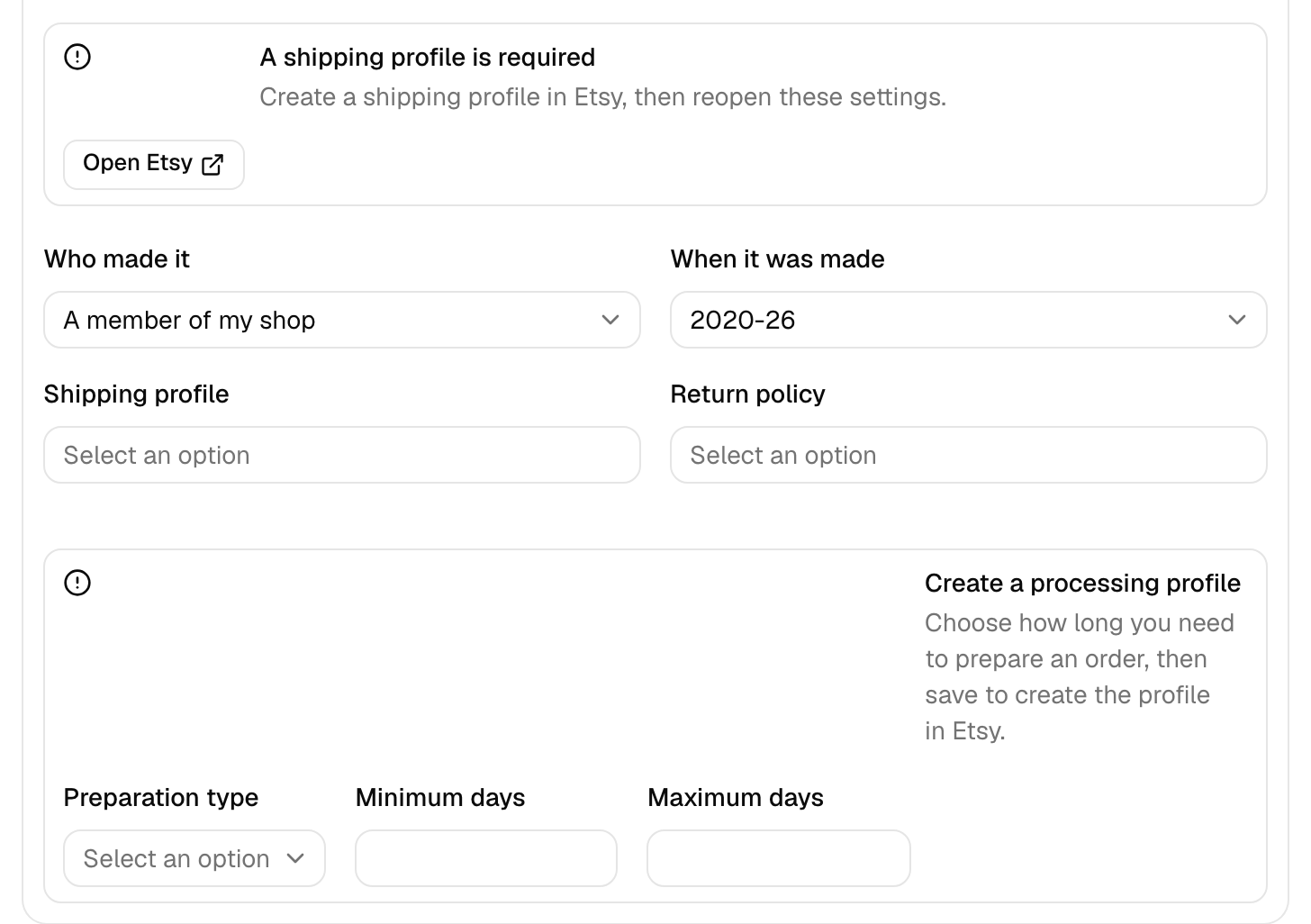
Etsy needs defaults that other stores don’t. We won’t start syncing an Etsy store until you’ve saved them once, even for stock only. In first-time setup, Continue with 2 stores opens them for you.
- On the Etsy card, click Manage, then Review settings.
- Search for and pick a Default category, then set Who made it and When it was made. Every Etsy listing we create gets these.
- Pick a Shipping profile and a Return policy. If your shop has only one of each, we use it. If a list is empty, create one in Etsy, then reopen these settings. A return policy you add later won’t appear there, but if it’s your only one, we use it for new listings.
- Pick a Processing profile. If your shop has none, fill in Preparation type, Minimum days and Maximum days, and we’ll create one in Etsy.
- For calculated shipping, where Etsy prices delivery by weight and size, set a Package preset and Default weight (lb). We use them for products without their own measurements.
- Click Save changes.
What syncs
We send a change to Etsy as soon as we have it. Etsy’s own changes take longer. Etsy doesn’t announce stock changes, so we have to ask. How QuickSync works compares the timing for every app.
| What | With Etsy |
|---|---|
| Stock into Etsy | Yes, as soon as we hear about a change in another store |
| Stock from Etsy | Yes, on a timer (see How fast) |
| Product details into Etsy | Yes, from your main store. Copying missing products works on every plan. Keeping listings updated, and listing new products as you add them, needs product syncing, Pro and above |
| Etsy as your main store | Yes. Titles, descriptions, tags, photos, prices and variations go out from Etsy. Pro and above |
| Orders from Etsy | Yes, once they’re paid. Pro and above |
| Etsy as your packing store | No |
| Tracking back to Etsy | Yes, when Shopify, WooCommerce or Square packs the order, unless Etsy restricts your shop (see Orders and tracking) |
| How fast | We check Etsy for stock changes every 2 minutes and for new orders every 5 |
Etsy rules
Listing limits
| Field | Etsy’s limit | What we do |
|---|---|---|
| SKU | 32 characters | Send a longer SKU as a shorter code that starts with QS-, still linked to your product |
| Title | 140 characters | Clean it up as below, then cut it at 140 |
| Tags | 13 per listing, 20 characters each | Keep letters, numbers, spaces, hyphens and apostrophes, drop repeats, send the first 13 |
| Description | Plain text | Turn HTML into plain text, with list items marked • |
| Photos | 20 per listing | Send the first 20, and WebP photos as JPEG |
| Video | 2 per listing | Send the first one on Ultra and above |
| Price | 0.20 to 48,250 | Raise a lower price to 0.20, and cap a higher one at 48,250 |
| Quantity | 999 per variation | Send 999 when you have more |
| Category | 1 per listing | Give each new listing your Default category, and leave it alone after that |
Each SKU can appear once in your Etsy shop, drafts and inactive listings included. Two listings sharing one both stop with Multiple same SKU found. If two long SKUs would shorten to the same code, the product stops with SKU is too long for Etsy. QuickFix can then shorten the SKU in the store the product comes from.
Title clean-up
Etsy won’t take some characters, so we clean every title we send:
- A title with two capitals in a row becomes title case, word by word: “NEW tote for USA” turns into “New Tote For Usa”. Roman numerals such as II and XL keep their capitals.
- A title that starts with a number or a symbol gets “The” in front.
- We remove $, £, ^, emoji and other symbols Etsy doesn’t accept.
- %, :, & and + can each appear once. We drop the repeats.
- A slash (/) becomes a vertical bar (|).
We don’t change & to “and” or % to “percent”, whatever older guides said.
Options and variations
- We send up to 2 option groups per listing, 70 values in each and 400 combinations in all.
- With 3 groups, we merge the two with the fewest combinations into one Etsy option, such as Size / Material. The merged option can’t go over 70 values.
- With over 70 values in a group or over 400 combinations, the product stops with Too many variant options for Etsy. With 4 or more groups, a product with more than one variant stops with Etsy could not map this product’s options. Cut the options in your main store, or split the product in two.
- Etsy needs every combination to exist, so we add the missing ones as switched-off variations.
- We leave variations without a SKU off the listing.
Drafts and listing fees
Every new listing starts as an Etsy draft. We publish it when the product is active in your main store, has at least one photo, and Create as draft is off. Otherwise it’ll wait in your Etsy drafts. After that, our product updates don’t change whether a listing is live. Only stock changes do.
To keep new listings as drafts, answer Yes to Add new products as drafts? in setup, or turn on Create as draft in the Product Syncing card’s settings. That’s most useful with product syncing on, because each product you add to your main store then goes to Etsy by itself.
Etsy charges a listing fee when a listing goes live, and again when it renews. We estimate $0.20 per new listing, one per product, and skip products whose SKU is already on Etsy. Before they create any, setup and Sync products ask you to tick I accept these estimated listing fees. QuickFix asks once per store. Drafts skip that step, because Etsy charges only when you publish one. The Product Syncing switch doesn’t ask, and neither does product syncing when it lists products you add later.
Etsy bills those fees, not us. Listings we create have Etsy’s auto-renew on, and QuickSync has no setting to turn it off.
Stock
Etsy keeps one count per variation and has no locations. If your other store has several, Etsy gets the count of the location you connect to it, not the total.
Etsy won’t keep a listing live with nothing to sell. When every variation reaches 0, we switch the listing to inactive. When stock comes back, we send the new count, and the listing’s state in Etsy decides the rest:
- Sold out: we put it back on sale, unless you create new listings as drafts.
- Inactive: it stays off. We treat every inactive listing as one you switched off, including the ones we deactivated at zero.
After a restock, activate the inactive ones in Etsy. When stock hits zero covers your other stores.
We sync active and draft listings by default. An unmatched sold-out or inactive Etsy listing shows as Inactive and stays out. To include those, click Manage on the Etsy card, tick Inactive under Product status filter, and click Save changes.
Orders and tracking
Etsy restricts shipping-address access, tracking submission and marking orders shipped for some third-party integrations. Eligibility depends on your shipping origin, integration date and Etsy’s approved-provider rules; some older connections keep access. Check Etsy’s current shipping-provider rules for your shipping origin. Where Etsy withholds access, copy the address from Etsy and add tracking and mark the order shipped there. The US examples below are one case; other shipping origins have their own dates and rules.
Etsy orders come in once they’re paid, on Pro and above. They go to your packing store with the items, prices, tax, shipping and discounts. Orders from before you turned on order syncing stay out. To fetch them, open Orders, click Actions, then Sync past orders, and turn on Backdated orders. It’ll reach back up to 14 days.
If you or the buyer cancel an Etsy order, we mark it cancelled in QuickSync, but that doesn’t reach its copy in your packing store right away. Cancel that copy yourself. Cancellations and refunds has the rules for each store.
We send the tracking number to Etsy only when Shopify, WooCommerce or Square packs the order, and we mark the Etsy order shipped. If Etsy won’t take it, say for a short number, we’ll email you the reason.
US shops have one more limit. If your shop is in the US and you first connected it to QuickSync on or after 21 October 2024, Etsy leaves the street address out of the orders it sends apps. It refuses tracking from apps too. Buyer names and emails still arrive.
When Shopify packs, the buyer’s message goes in the Shopify order’s note. On Ultra and above, each Etsy order there also carries gift details, personalization and the shipping profile with its processing days.
What Etsy won’t take
Etsy doesn’t let apps change the variations on a listing with domestic and global pricing, so we can’t sync its stock or prices. Those listings show Etsy requires a variation change in Shop Manager. Turn that pricing off in the listing’s Price and inventory section in Etsy if you want us to update it.
We don’t send shop sections, materials, styles, personalization settings, or Etsy sales and coupons. Every listing we create is a physical item.
Vacation mode
If Etsy blocks an update because your shop is on vacation, we pause the Etsy store and email you if email notifications are on. While it’s paused, we don’t check Etsy for stock or orders. To restart, turn vacation mode off in Etsy. Then click Manage on the Etsy card, open Review settings, and turn off the Vacation mode on switch. If Etsy still shows the shop on vacation, we’ll say so.
Reconnect or switch shop
If Etsy stops accepting our access, the Etsy card shows Needs attention and a Reconnect button, and we email you if email notifications are on. Click Reconnect, pick Etsy and approve the same account. Your synced products and orders stay.
To move to another Etsy shop, you’ll disconnect the old one first. That removes its products and matches from QuickSync, though its listings stay in Etsy. If Etsy was your main store, product syncing turns off. With only two stores, product syncing and order syncing both turn off.
- On the old shop’s card, click the three dots, then Disconnect, and confirm with Disconnect store.
- On etsy.com, sign out, then sign in as the new shop.
- In QuickSync, connect Etsy as above and save its Review settings.
A shop can’t belong to two QuickSync accounts at once. If another account has it, we show This Etsy store is already connected with an account and part of that email. Disconnect it there, or contact support.
If you installed QuickSync from the Shopify App Store, don’t uninstall it in Shopify to start over. That deletes your whole QuickSync account, Etsy connection included.
Common questions
Why can’t I see my synced products on Etsy?
They’re most likely Etsy drafts. Every listing we create starts as one, and we publish it only when the product is active in your main store, has at least one photo, and Create as draft is off. Check the drafts under Listings in Etsy’s Shop Manager. If a product isn’t there either, open Needs attention on the QuickSync Products page: a missing shipping profile, return policy or processing profile stops a listing before we create it.
Will QuickSync relist my Etsy item when it’s back in stock?
Only if Etsy shows the listing as sold out. At zero stock everywhere, we switch the listing to inactive, because Etsy won’t keep a live listing with nothing to sell. When stock returns, we update the count, but we treat every inactive listing as one you turned off, including the ones we deactivated. Activate those in Etsy. Sold-out listings go back on sale, unless you create new listings as drafts.
Why don’t my Etsy orders have a shipping address?
Etsy restricts shipping-address access, tracking submission and marking orders shipped for some third-party integrations. Eligibility depends on your shipping origin, integration date and Etsy’s approved-provider rules; some older connections keep access. Check Etsy’s current shipping-provider rules for your shipping origin. Where Etsy withholds access, copy the address from Etsy and add tracking and mark the order shipped there. The US examples below are one case; other shipping origins have their own dates and rules.
If your shop is in the US and you first connected it to QuickSync on or after 21 October 2024, Etsy leaves the street address out of what it sends apps, and refuses tracking from them. Buyer names and emails still arrive, and where the buyer lives makes no difference. Copy the address from the order in Etsy, and mark it shipped there. Shops connected before that date aren’t affected.
How much does Etsy charge when QuickSync creates a listing?
We estimate $0.20 per new listing, which is Etsy’s listing fee, and Etsy bills it, not QuickSync. One product is one listing, however many variations it has, and products whose SKU is already on Etsy aren’t counted. Setup and Sync products show the estimate and ask you to accept it before they create anything, but the Product Syncing switch doesn’t ask. Drafts cost nothing until you publish them. Etsy charges again when a listing renews, and ours renew automatically.
Why did QuickSync connect the wrong Etsy shop?
Etsy connects the account you’re signed in with at etsy.com, because we don’t ask it to show a sign-in screen. To fix it, disconnect the wrong shop under Settings, Stores. Then sign out of etsy.com, sign in as the right shop, and connect Etsy again. If the shop you want belongs to another QuickSync account, disconnect it there first, or ask support to move it.
Can Etsy be my packing store?
No. Etsy sends its orders to QuickSync, but it doesn’t let apps create orders in it, so it can’t be the store you pack from. Pick the store you ship from instead, usually Shopify. Etsy orders arrive there with the items and the buyer’s details, and we send the tracking number back to Etsy only when Shopify, WooCommerce or Square ships them.
Next step
Set up the processing profile Etsy needs before your first listing: Set Etsy processing profiles and ship-by dates. If a product stops with an Etsy status, What each product status means has the fix.









