
Etsy won’t list a physical item without a processing profile. That’s a label saying it’s ready to ship or made to order, plus the number of days you need before it ships. Etsy turns those days into a ship-by date on every order. QuickSync puts one profile on every listing it creates or updates. Pick it before your first sync.
Processing profiles replaced the processing times that used to sit inside shipping profiles. Since September 2025, they’re the only place Etsy keeps processing times. Your shipping profile still holds the rest: where you ship from and what delivery costs.
1. Make a profile
Make it in Etsy if you want several profiles, or a time counted in weeks. If your shop has no profile yet, QuickSync can make one for you in step 2.
In Etsy’s Shop Manager:
- Go to Settings, then Shipping settings. Your processing profiles sit there with your shipping profiles.
- Add a processing profile, or open one to change it.
- Choose Ready to ship or Made to order, set the shortest and longest processing time, and save.
Etsy also lets you give listings a profile from its Listings page: one listing at a time, each variation, or several listings at once. Etsy’s own steps are in How to Set Processing Times, Processing Profiles and “Ship By” Dates. Etsy’s UK site calls the ship-by date the dispatch-by date.
2. Pick it in QuickSync
- Open Settings, then Stores, and click Manage on your Etsy store.
- Open Review settings. We read your Etsy profiles again each time it opens.
- Under Processing profile, pick the one most of your listings should use. If your shop has only one, we’ve already picked it.
- Click Save changes.
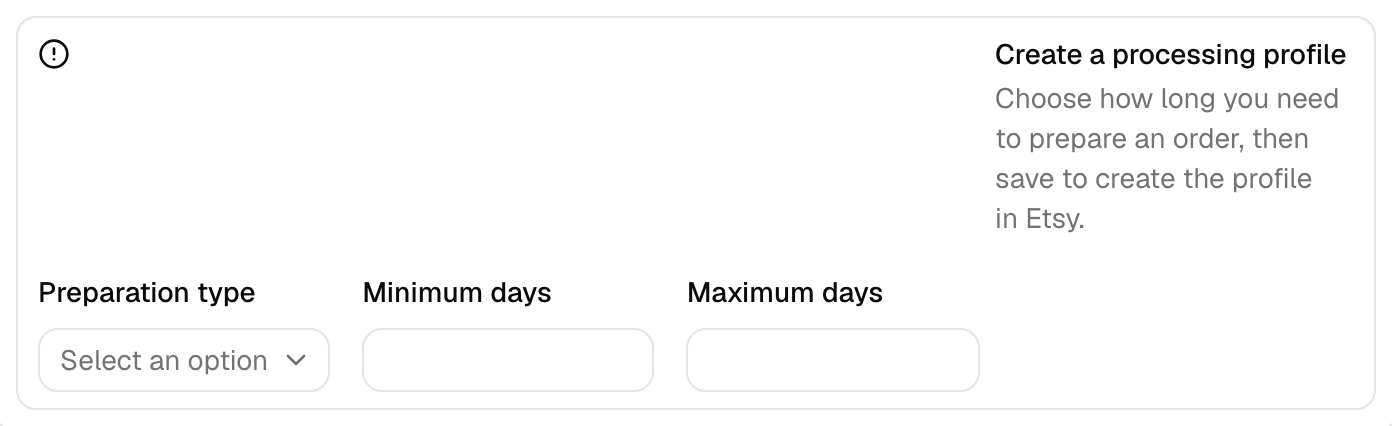
No profile in Etsy yet? Review settings shows Create a processing profile instead. Choose a Preparation type, Ready to ship or Made to order, then enter Minimum days and Maximum days, each from 1 to 10. When you click Save changes, we’ll create the profile in Etsy, or reuse one with the same settings.
How QuickSync uses it
We put that one profile on every variation of every listing we create. We set it again each time product syncing updates a listing. A stock update leaves a listing’s profile alone.
So if some products need a different time, such as made-to-order pieces that take three weeks, set their profile in Etsy. It’ll stay while only their stock changes. With product syncing on, the next update to that product in your main store puts your QuickSync profile back.
If you haven’t picked a profile, we don’t create or update Etsy listings. The product shows Etsy needs a processing profile on the Products page, and we email you about it if email notifications are on. Pick or create a profile and save. Then sync the product again.
Ship-by dates
Etsy works out each order’s ship-by date from the listing’s processing time, and shows it on the order. A listing without one gets no ship-by date.
We don’t copy the ship-by date to your packing store. On Ultra and above, when Shopify packs your Etsy orders, each one arrives with a note naming the shipping profile and its processing days. Your team sees the window without opening Etsy.
Common questions
Why does QuickSync say Etsy needs a processing profile?
Etsy won’t accept a physical listing without one, so we stop before creating or updating the listing rather than send something Etsy will refuse. Open Settings, Stores, click Manage on your Etsy store, then Review settings. Pick a Processing profile, or create one with a preparation type and minimum and maximum days, and click Save changes. Then sync the product again.
Why did my Etsy processing times change after syncing?
Every listing we create or update through product syncing gets the processing profile picked in QuickSync’s Review settings, on every variation. If a listing had a different profile in Etsy, the next product update replaces it. Stock updates don’t touch profiles. To change what we send, pick another profile in Review settings and save. A listing that needs longer keeps its own Etsy profile while only its stock changes.
What’s the difference between a shipping profile and a processing profile?
A shipping profile says where you ship from and what delivery costs. A processing profile says how long you need before an order ships, and whether the item is ready to ship or made to order. Etsy moved processing times out of shipping profiles in 2025, and every physical listing needs one of each. In QuickSync, you pick both in your Etsy store’s Review settings.
Do I need a processing profile if I only sync stock?
Not for stock updates. They keep the profile each listing already has in Etsy, so stock syncs without one picked in QuickSync. You still save the Etsy store’s Review settings once before your first sync. You need a profile picked there only when we create or update listings, which happens when you copy products to Etsy or turn on product syncing.
Next step
For the other Review settings and Etsy’s listing rules, read Connect Etsy.









