An order came in on one store, and we never copied it to your packing store. Work down these checks in order. In our support chats, most missing orders come down to three things: order syncing is off, the order came in before you turned it on, or a store lost its connection.
We also name the reason for each order on the Orders page. If you’d rather start there, jump to step 8.
1. Check order syncing is on
Open Orders. If you see a Turn on order syncing button, it’s off and nothing copies. Click it, pick your packing store, then click Start syncing.
If it says Order syncing needs a plan, your plan doesn’t include it. Order syncing needs Pro or above. We turn it off when an account drops below Pro, or a trial ends without a plan.
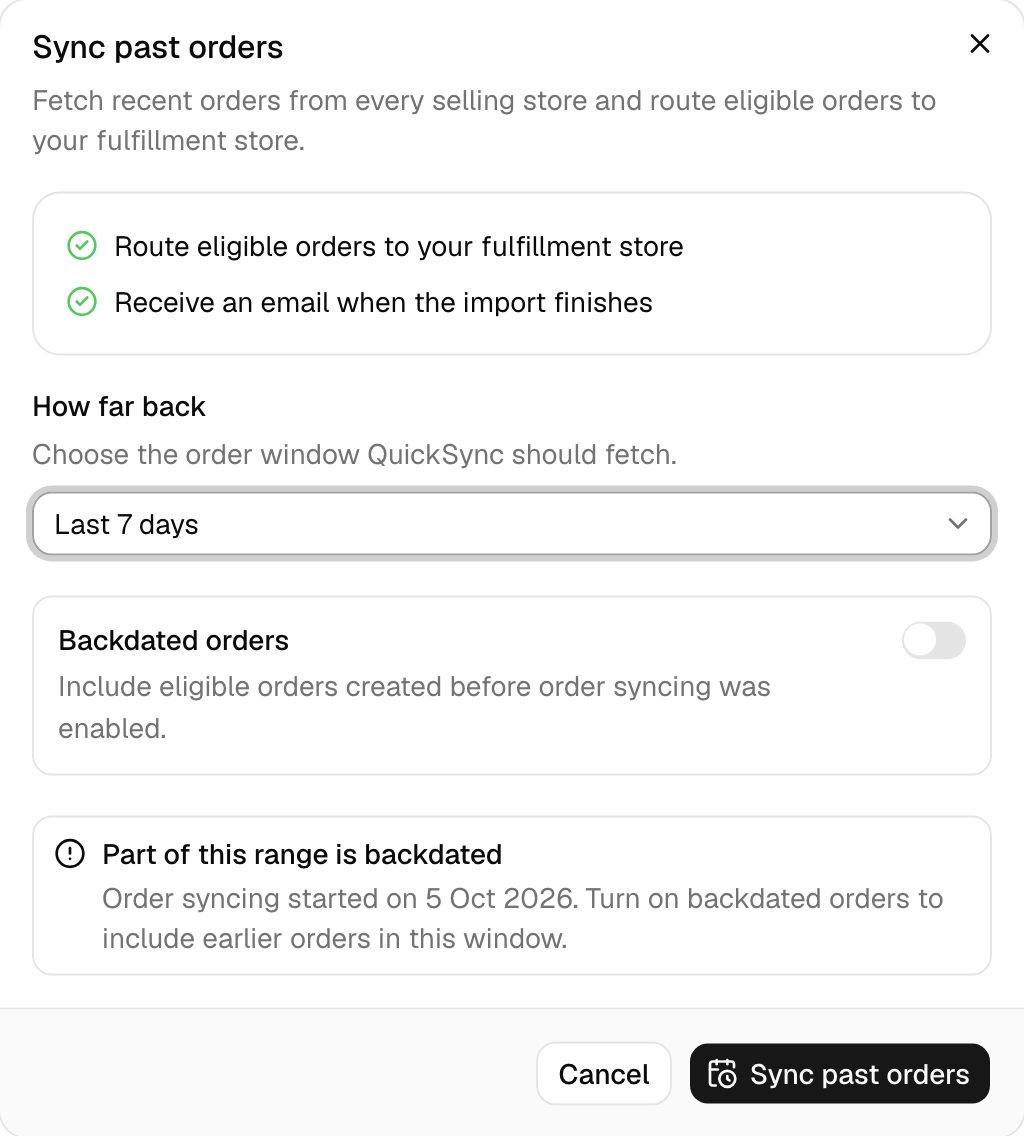
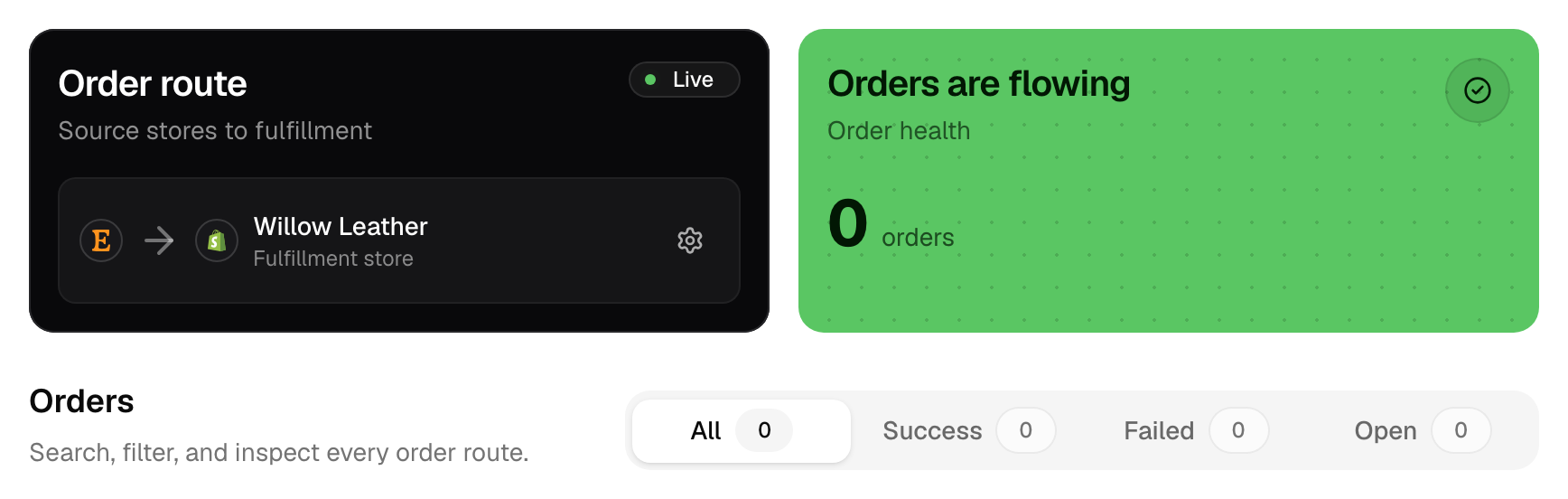
When it’s on, the Order route card says Live. We don’t copy orders placed before you turned it on, or before you last changed your packing store. Any we’ve seen show Older Order Not Synced. To fetch them, open Actions, choose Sync past orders, pick how far back to go (up to 14 days), turn on Backdated orders and click Sync past orders. After a packing store change, this also copies again any order your old packing store has that isn’t yet marked shipped where it was sold.
2. Check your packing store
The Order route card names your packing store. If it says Choose destination, there isn’t one yet. Click the card and pick a store.
That store has to be able to take orders on your account. Shopify, Clover and Lightspeed always can, except Clover EU. WooCommerce, Square, QuickBooks and Xero can on accounts created on the QuickSync website or billed through the Clover App Market. Choose your packing store has the full list. Two need a step first:
- Clover needs an order type for these orders. Without one, orders fail with No Order Type Found. See Clover order type.
- Lightspeed needs an active register, a primary user and a default tax, or orders fail with Lightspeed Order Setup Incomplete.
We don’t copy orders placed in the packing store itself. That’s by design, and the Orders page leaves them out.
3. Check the store sends orders
Every app except QuickBooks and Xero sends us its orders. Those two only receive: QuickBooks as sales receipts and invoices, Xero as draft invoices. If you’re expecting orders out of either, none will come.
4. Give it a few minutes
Most stores tell us about an order as it happens. Etsy doesn’t, so we check it for orders every 5 minutes, and we check eBay and Amazon every 2 minutes. TikTok Shop tells us as orders arrive, and we check it every 5 minutes as well. If the order came from one of these, wait. Then look again. The timing for every app is in How QuickSync works.
5. Check the order is ready
We hold each order back until it’s ready to ship. Shopify and Etsy orders copy once they’re paid, WooCommerce orders once they’re Processing, Square and Clover sales once they’re completed, and TikTok Shop orders once they’re awaiting shipment. Until then the order waits, and it doesn’t show on the Orders page unless it’s a Square sale. We copy it as soon as the store moves it on. Which orders copy has every store’s rule.
Some orders never copy:
- Cancelled first. An order cancelled before we copied it stays out.
- Already done. If we first see an order once it’s completed or cancelled, we skip it, and it doesn’t appear on the Orders page. Square, Clover and Lightspeed sales are the exception, because they reach us completed.
- Fulfilled by Amazon. Orders Amazon ships from its own stock don’t copy.
- Fulfilled by TikTok. In the US, these arrive without the buyer’s details and can go only to QuickBooks or Xero. A copy to a shop fails with Platform Fulfillment Copy Unsupported. Outside the US they don’t sync at all, and we email you about it. See Fulfilment by seller vs fulfilment by TikTok.
6. Check every line matches
We match each line in the order to a product in your packing store by SKU. A line with no match gets different treatment in each packing store:
- Shopify, Square and Clover add it by name and price, with no link to a product.
- WooCommerce refuses the whole order until every line matches exactly one product.
- Lightspeed leaves the line off the sale. If no line matches, the order fails with Order Has No Exportable Items.
- QuickBooks records the line with no item. Two QuickBooks items with the same SKU stop the order with QuickBooks item mapping needs review.
Find the product on the Products page. Give it the same SKU in both stores. Its status says what’s wrong, such as No match found. Then contact support with the order number, and we’ll send the order again.
7. Check the connections
If a store has lost its connection, orders to or from it can stop. If you retry an order from it, the order shows Store Disconnected. Reconnect it under Settings, Stores. A store disconnected has the steps.
Then bring in the orders placed while it was down: Actions, Sync past orders, with a window that covers the gap.
8. Read the order’s status
Orders from your selling stores appear on the Orders page while order syncing is on. Search by order ID, or use the Success, Failed and Open tabs. Each row has a badge:
- Synced: the copy is in your packing store.
- Processing: we’re sending it, or it’s waiting on the selling store.
- Needs attention: it failed or something blocks it. The Failed tab lists these.
- Open: it isn’t moving yet, such as a Square order that isn’t completed, or one from before order syncing started.
Click an order to open it. If we didn’t copy it, the panel names the reason, such as Older Order Not Synced or No Order Type Found. Under it you get a Next step and, where one can help, a button such as Enable older orders & sync. The Activity tab lists every attempt we made.
When Shopify packs, it refuses an order whose address it can’t accept, such as a postcode that doesn’t fit the province. We don’t guess a fix. Correct the address in the store the order came from, then retry the order from its panel.
Overview gives you a second view. Switch its activity table to Orders: each row says Syncing, Synced or Failed, and View error or View order opens the Orders page, where you can search for that order.
For many failed orders at once, click the Needs attention card at the top of the page. QuickFix groups the orders by issue, and nothing changes until you confirm.
Still missing?
Contact support with the order number, the store that took it and your packing store. The order’s panel has a copy button next to its ID. With those three, we can trace where the order stopped.
Common questions
Why are my Etsy orders not showing up in Shopify?
Usually one of four things. We check Etsy for new orders every 5 minutes, so a new one can take that long. Etsy orders copy only once they’re paid. We leave orders placed before you turned on order syncing behind until you use Sync past orders. And if the Etsy connection expired, nothing comes through until you reconnect it under Settings, Stores.
Can I sync orders from before I turned on order syncing?
Yes, up to 14 days back. On the Orders page, open Actions and choose Sync past orders. Pick how far back to look, turn on Backdated orders, then click Sync past orders. We fetch that window from every selling store, copy the orders that qualify into your packing store, and email you when it’s done. After a packing store change, it also copies again any order the old packing store has that isn’t yet marked shipped where it was sold.
Why did my orders stop syncing when they worked before?
Something changed on the account. The usual causes are a store whose connection expired, which shows Store Disconnected on its orders when you retry them; order syncing paused by someone on your team; or a plan that dropped below Pro, which turns order syncing off. Check the Order route card on the Orders page, then Settings, Stores. Sync past orders brings in the gap.
Why won’t my TikTok orders sync?
Check who ships them. Orders fulfilled by TikTok don’t copy to a shop: in the US they can go only to QuickBooks or Xero, and elsewhere they don’t sync at all. Orders you ship yourself copy once they’re awaiting shipment, so unpaid and on-hold orders wait. We hear about TikTok orders as they come in, and check every 5 minutes too.
Next step
To see what each copy holds and which orders qualify, read How order syncing works.