On most marketplaces, buyers search for what they want. On TikTok, they find it while scrolling, and buy without leaving the app.
That habit has turned into real money. According to a report by Momentum Works and Tabcut, TikTok Shop sold $15.1 billion of goods in the US in 2025. That was up 68% from about $9 billion the year before. And you don’t need an audience to get a share of it.
Getting set up is mostly paperwork, not skill. This guide shows how to start a TikTok Shop and how to sell on TikTok Shop, step by step. It covers what you need first, what it costs, and the shipping and payout rules that catch new sellers out. If you already sell somewhere else, it also covers how to add TikTok Shop without overselling.
How to sell on TikTok Shop: At a Glance
- Sign up in TikTok Shop Seller Center.
- Verify your identity or business.
- Add your warehouse and choose how you’ll ship.
- List your products.
- Link your TikTok account.
- Start selling with videos, LIVE and creators.
You don’t need any followers to open a shop. TikTok charges no listing or monthly fee, and takes 6% when something sells.
What you need before you start
Most delays happen at verification, so it helps to gather your documents first. According to TikTok’s seller requirements, every US seller must be at least 18 and live in the US. You also need a US address and a valid government ID. The rest depends on how you register.
| Seller type | Who it’s for | What you’ll need |
|---|---|---|
| Individual | Most makers and side businesses | Legal name, date of birth, US home address, last 4 digits of your SSN or ITIN, photo ID, bank account |
| Sole proprietorship | A business in your own name | Your personal details and SSN, plus your EIN if you have one |
| Corporation or partnership | Registered companies | Legal business name, EIN, a US business address, and ID for the main representative and each owner |
A few details trip people up. Your ID must be a US passport, driver’s license, state ID or permanent resident card, and TikTok rejects cropped, expired or screenshotted documents. Your phone number and email also can’t already be linked to another shop.
If you’re outside the US, the rules and seller types differ by country. Our guide to TikTok Shop countries lists where you can sell.
Step 1: Sign up in Seller Center
Everything starts in TikTok Shop Seller Center. Register with your email or phone number, then pick the seller type from the table above that matches how your business is set up.
Step 2: Verify your identity or business
Next, TikTok asks for the documents you gathered. Upload clear, uncropped photos, and make sure your name and address match exactly across every document. You’ll also add your tax details here. TikTok must collect them before it can pay you, and missing tax information triggers 24% backup withholding on your payouts.
Step 3: Add your warehouse and choose how you’ll ship
Once you’re verified, TikTok needs to know where orders ship from. Add your warehouse address, which is wherever your stock actually sits. It must be a street address, not a P.O. box, and you’ll add a return address too. Our guide to the TikTok warehouse address explains how TikTok uses it.
Then choose how you’ll ship. Most new sellers ship orders themselves, either with their own labels or with shipping labels bought through TikTok. Larger shops can send stock to Fulfilled by TikTok, where TikTok stores, packs and ships for you. Our guide to TikTok seller fulfilment compares the options.
Step 4: List your products
Now add what you’re selling. Each listing needs a title, photos, a category, a price, stock levels and shipping weight. TikTok reviews new listings before they go live. Check its prohibited products list first, and avoid claims you can’t back up, such as health benefits.
Video matters more here than on any other marketplace, because buyers expect to see the product in use. Add a short clip to each listing if you can. If you already sell on Shopify or Etsy, you don’t have to start from scratch. An integration can copy your existing listings, photos and product videos across.
Step 5: Link your TikTok account
To sell through your own videos and LIVEs, link a TikTok account to your shop as its official account. This is where the follower myth comes from, so it’s worth being clear. TikTok’s US creator eligibility policy says sellers linking an official account don’t need a minimum number of followers. The 1,000 and 5,000 follower limits apply to affiliate creators who promote other people’s products.
Step 6: Start selling with videos, LIVE and creators
With a shop and an account linked, there are three ways to get sales:
- Your own videos. Tag your products in short videos showing them being made, used or unboxed.
- LIVE selling. Go live, show products in real time and answer questions while people buy.
- Affiliate creators. Creators feature your product in their videos for a commission you set.
Creators are the quickest way to reach people beyond your own followers. Not sure what to sell first? Our list of trending TikTok Shop products shows what’s moving right now.
How much does it cost to sell on TikTok Shop?
Opening a shop is free, and there’s no monthly plan or listing fee. You pay when something sells. TikTok charges a 6% referral fee on most categories, worked out on what the buyer paid before tax. On a $50 sale, you keep $47.
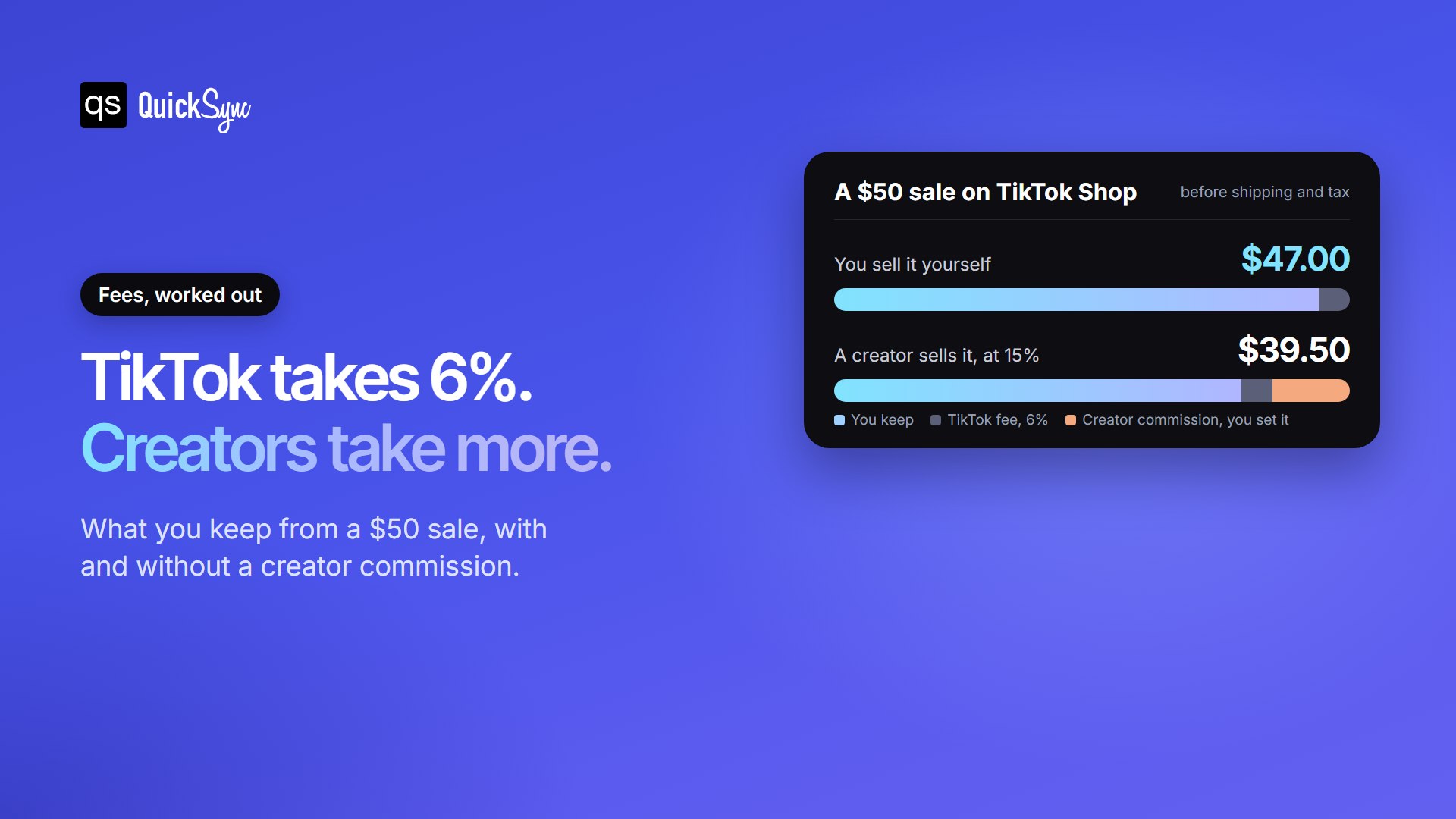
Creators change the maths. If a creator sells that $50 item at a 15% commission, you pay them $7.50 on top of TikTok’s $3, and keep $39.50. You choose the rate, so set one your margins can carry. Our TikTok Shop fees guide covers returns, payouts and every smaller fee.
The rules that catch new sellers out
Fees are easy to plan for. TikTok’s timing rules are where new shops get into trouble.
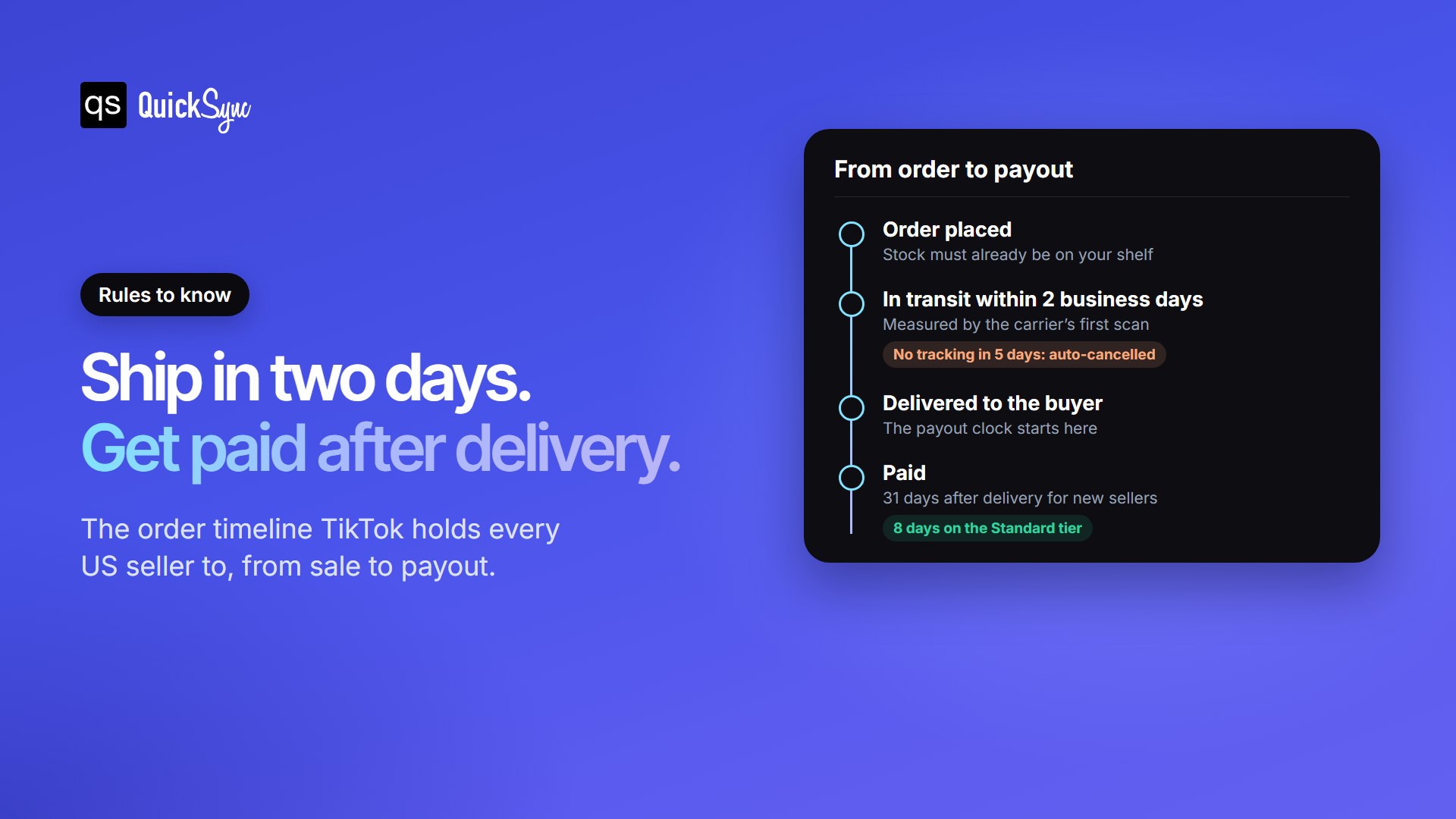
You have two business days to ship. According to TikTok’s late dispatch rules, regular orders must show as in transit within two business days. That rule applies from 26 January 2026, and it’s measured by the carrier’s first scan. TikTok recommends keeping late orders to 4% or less, and an order with no tracking after five business days is cancelled automatically.
You get paid after delivery, not after the sale. The payout clock starts when the buyer receives the order, according to TikTok’s settlement guide. New shops wait 31 days. Established shops on the Standard tier wait 8 days, and shops with high performance scores get paid faster. Plan your cash flow for that first month.
Your stock has to be right. Both rules assume the item is on your shelf when the order comes in. If it already sold somewhere else, you have to cancel, and cancellations count against your shop. That makes stock accuracy the one thing to sort out before you sell in more than one place.
Selling on TikTok Shop alongside your other store
Most TikTok Shop sellers already sell somewhere else. Etsy to TikTok Shop is the pairing we see sellers add most often at QuickSync. The upside is that TikTok tells connected apps about each sale the moment it happens, so your other stores can update almost straight away.
That only works if something is listening. With QuickSync, a TikTok sale takes the item off your other shops, and a sale elsewhere updates TikTok. You never have to cancel because the last one already sold somewhere else. Pick the store you already use:
| If you already sell on | Connect it to TikTok Shop |
|---|---|
| Shopify | TikTok Shop Shopify integration |
| Etsy | TikTok Shop Etsy integration |
| eBay | eBay TikTok Shop integration |
| Amazon | TikTok Shop Amazon integration |
| WooCommerce | WooCommerce TikTok Shop integration |
| Square or Clover (in store) | Square or Clover TikTok Shop integration |