Your store is growing, your spreadsheet isn’t keeping up, and your accountant asks the question every online seller hits sooner or later: QuickBooks or Xero?
Getting it wrong costs more than a subscription. In Xero’s February 2026 study of US small businesses, financial pressure cost owners an average of 33 working days of productivity a year. The wrong accounting tool adds to that every month, through manual fixes, payouts that don’t match, and stock counts nobody trusts.
Most Xero vs QuickBooks comparisons are written for service businesses. This one is for ecommerce sellers. It compares 2026 prices, inventory, Shopify and Amazon connections, payouts, sales tax and users, then shows what each costs a typical store per year. Prices were checked on Intuit’s and Xero’s own pages in October 2026.
QuickBooks vs Xero: the Short answer
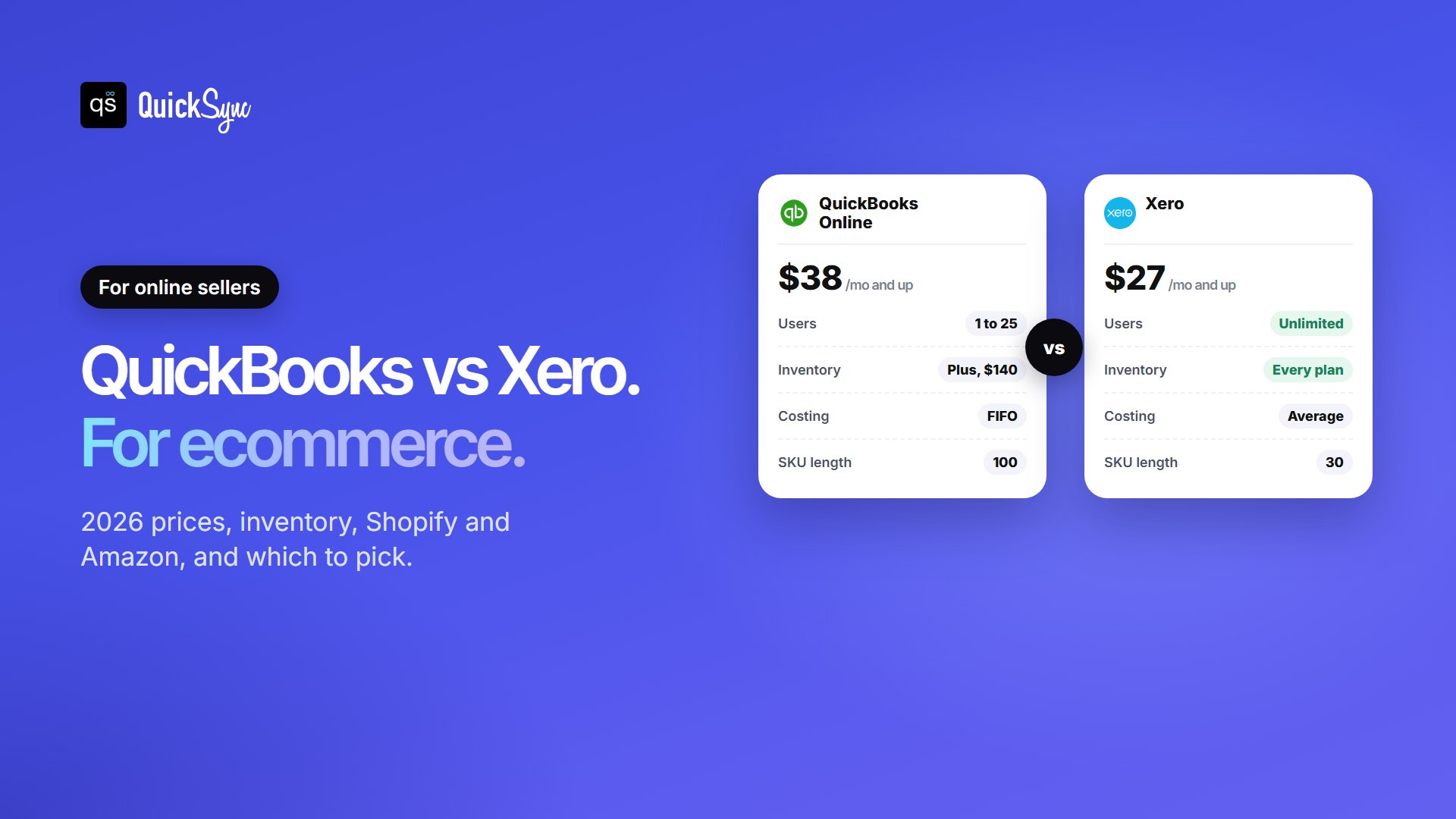
Choose QuickBooks Online if you’re a US seller who wants FIFO inventory costing, built-in US payroll, multi-currency from $85, or free connections to a Square or Clover till. Choose Xero if you want unlimited users and a lower price for basic inventory, and your catalog stays under about 4,000 items.
| Factors | QuickBooks Online | Xero |
|---|---|---|
| Price | $38 to $340 a month | $27 to $97 a month |
| Users | 1, 3, 5 or 25, by plan | Unlimited on every plan |
| Inventory tracking | Plus ($140) and Advanced | Basic tracking on every plan |
| Inventory costing | FIFO | Average cost |
| Product code length | 100 characters | 30 characters |
| Multi-currency | Essentials and up | Established ($97) only |
| Shopify connection | Free Intuit app | Free Xero integration |
| US payroll | Built-in add-on | Through Gusto |
QuickBooks Online vs Xero Pricing in 2026
Here are the US list prices, before promotions:
| QuickBooks Online | Price | Users | Good to know |
|---|---|---|---|
| Simple Start | $38/mo | 1 | No inventory or multi-currency |
| Essentials | $85/mo | 3 | No inventory tracking |
| Plus | $140/mo | 5 | Inventory, 40 classes and locations |
| Advanced | $340/mo | 25 | Unlimited classes and locations |
| Xero | Price | Users | Good to know |
|---|---|---|---|
| Early | $27/mo | Unlimited | 20 invoices and 5 bills a month |
| Growing | $59/mo | Unlimited | Unlimited invoices and bills |
| Established | $97/mo | Unlimited | Adds multi-currency |
Two things matter more than the headline price:
- Xero Early is too small for most stores. Its limit of 20 invoices a month is easy to outgrow once store sales flow in, even as one daily summary. Plan on Growing.
- QuickBooks only tracks inventory from Plus. If you want stock counts and cost of goods in your books, the real starting price is $140 a month, not $38.
Both run introductory offers. In October 2026, Intuit offered 50% off for three months, and Xero offered 90% off for six months until 2 November. Offers change often, so check before you buy, and budget on the list price.
Inventory: The Biggest Difference for Online Sellers
For a service business, inventory barely matters. For a store, it’s the main event. Here’s how the two handle stock.
QuickBooks Online: FIFO from the Plus plan
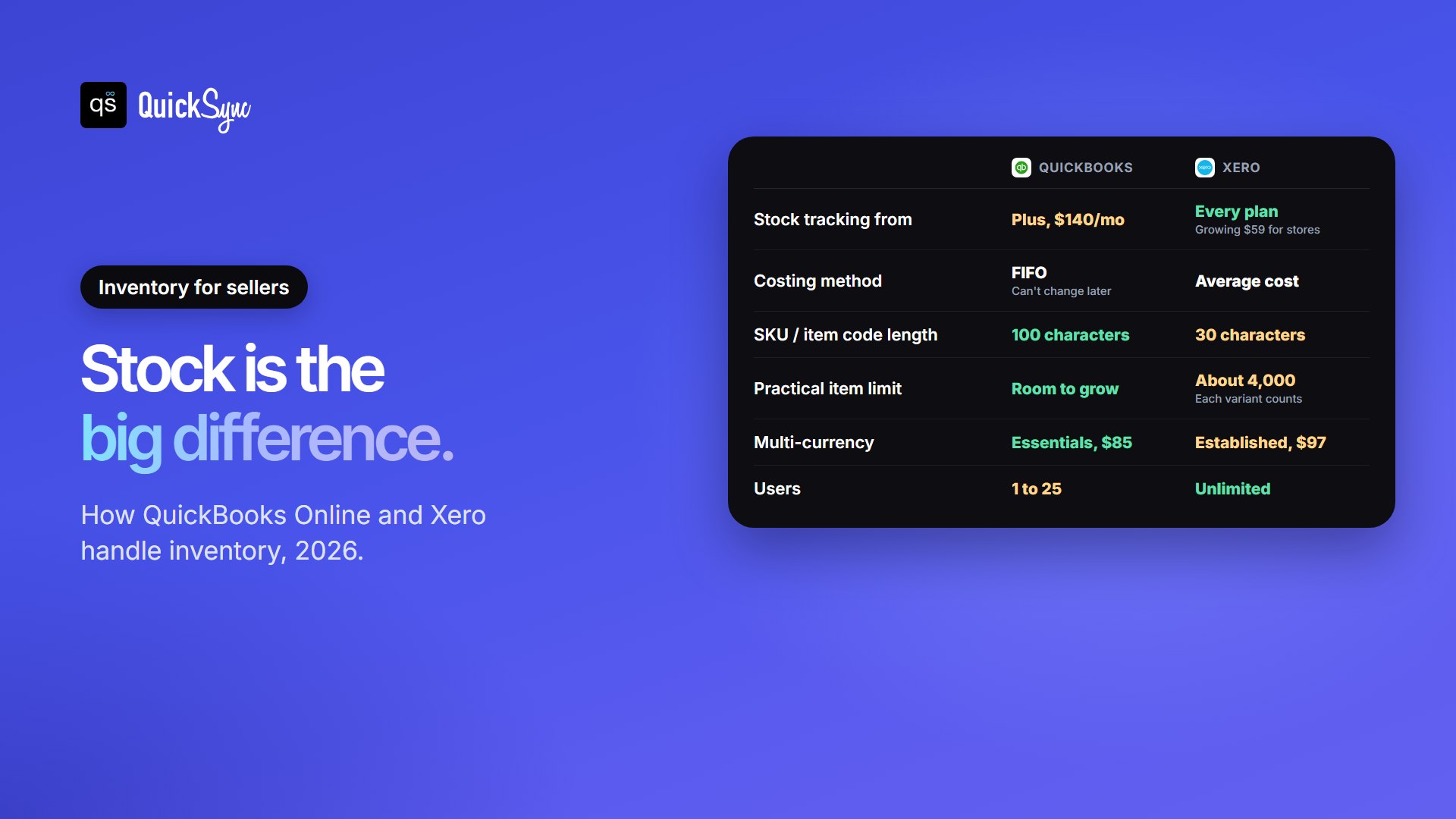
QuickBooks Online tracks quantities and cost of goods sold on Plus and Advanced. It values stock with FIFO (first in, first out), so each sale is costed at the price of your oldest units. Intuit warns that the costing method can’t be changed later, so set it up with your accountant. Product codes (SKUs) can be up to 100 characters.
Xero: average cost on every plan
Xero includes basic tracked inventory on every plan. It values stock at weighted average cost, so each sale is costed at the average of everything you’ve bought. For more advanced stock work, Xero sells an Inventory Plus add-on.
Two limits catch sellers out. First, Xero item codes max out at 30 characters, so longer SKUs from Shopify or Amazon get cut and can clash. Second, Xero-focused guides put its practical limit at about 4,000 tracked items, and every size and color counts as its own item. A clothing store with 300 styles in 15 variants is already past it.
Whichever you choose, give every product the same SKU on every channel, and keep it short enough for both. Our guide to what a SKU is covers the limits on each platform.
Ecommerce integrations: Shopify, Amazon, WooCommerce and POS
Neither tool talks to your store on its own. You connect them with an app, and the choice of apps differs by channel.
| Sales channel | QuickBooks Online | Xero |
|---|---|---|
| Shopify | Intuit’s free app: sales, refunds and fees linked to payouts (4.6 stars, 3,300+ reviews) | Xero’s free integration: a daily summary or each sale, with payouts matched |
| Amazon | Third-party apps such as A2X | Third-party apps such as A2X |
| WooCommerce | Intuit’s free connector: an invoice or sales receipt per order | Apps such as Xero for WooCommerce and MyWorks |
| Square | Intuit’s free Square Connector (US) | Apps such as Commerce Sync, from $20 a month |
| Clover | Clover’s Accounting Sync, on plans that include it | Apps such as Commerce Sync, from $31.95 a month |
For Shopify, it’s a tie: both have a free first-party app. For a shop with a Square or Clover till, QuickBooks has the edge, because both POS systems connect to it for free. For the details on each channel, see our comparisons of the best Shopify QuickBooks and best Shopify Xero integration apps, plus the WooCommerce Xero, Square QuickBooks and Clover QuickBooks guides.
Payouts and Fees: What Happens to a $100 Order
This is where most store books go wrong, in both tools. A customer pays $100. On Shopify’s Basic plan with Shopify Payments, the card fee is 2.9% + 30¢, so $96.80 lands in your bank.
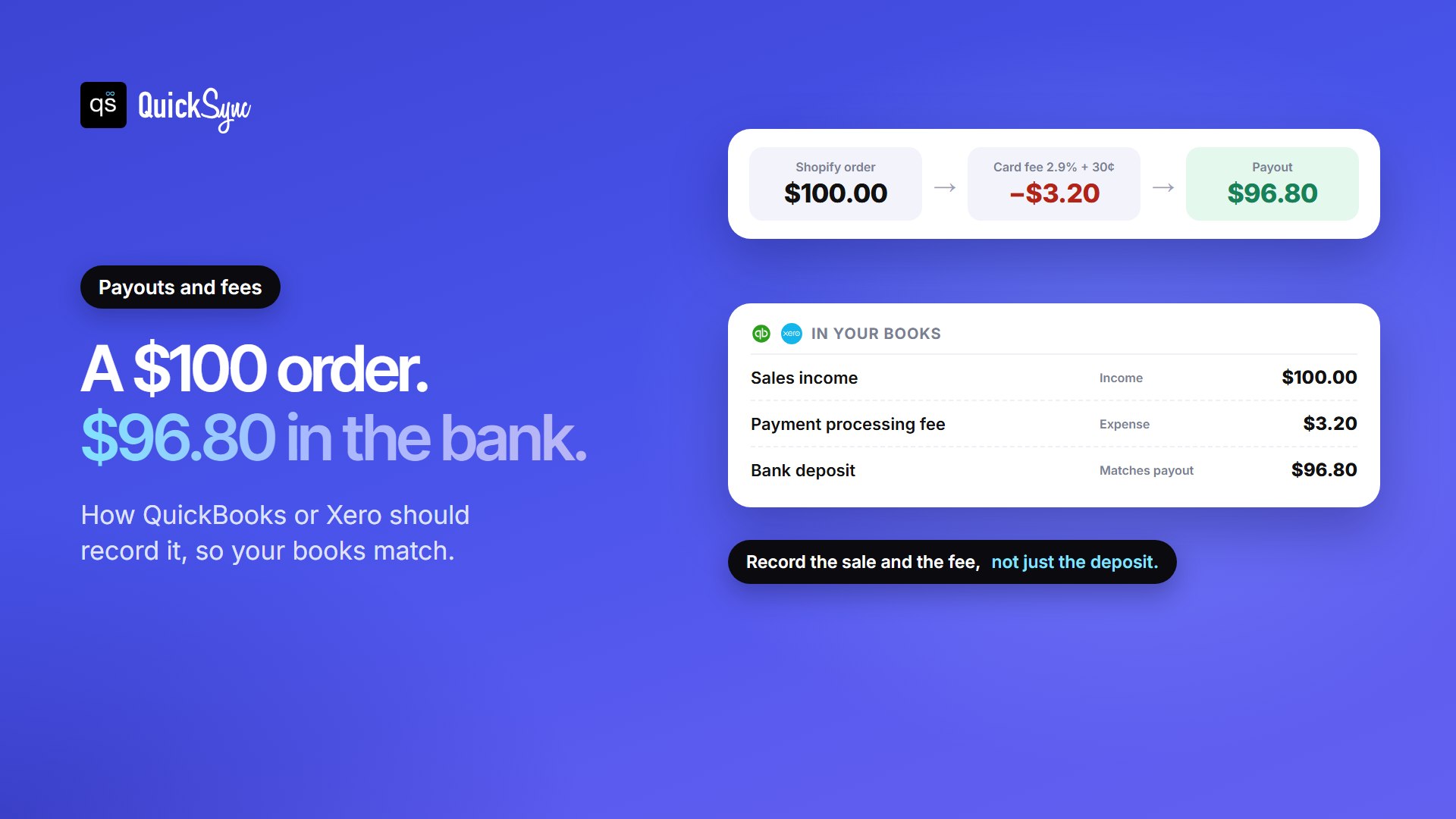
To keep your books right, the $100 has to be recorded as sales, the $3.20 as a fee, and the $96.80 as the deposit. Record only the deposit and you understate sales. Record only the order and your bank never matches.
Both tools can do this properly, and in both cases the connector does the work. Intuit’s Shopify app and Xero’s Shopify integration both tie sales and fees to each payout. For Amazon, where one payout mixes sales, fees, refunds and ads, payout apps like A2X are built for exactly this. So don’t pick on payout handling. Pick the connector that fits your channels.
Sales Tax and Selling in Other Currencies
Sales tax. QuickBooks Online calculates sales tax on invoices and sales receipts and tracks what you owe, and Plus adds a pre-filing check for discrepancies. Xero calculates US sales tax with Avalara-powered tools across 13,000 jurisdictions. Remember that marketplaces like Amazon, eBay and Etsy collect and pay sales tax on their own orders in most states, so the tax your tool handles is mainly on your own website’s sales.
Other currencies. If you sell to customers abroad in their currency, QuickBooks offers multi-currency from Essentials, while Xero keeps it for Established ($97). Two QuickBooks catches: once you turn multi-currency on, you can’t turn it off, and it doesn’t work with QuickBooks Payments.
Users, Payroll and Your Accountant
Users. Xero includes unlimited users on every plan. QuickBooks caps standard users at 1, 3, 5 or 25. If your team includes a VA, a warehouse lead and a part-time bookkeeper, that gap adds up. Your accountant’s login is separate on QuickBooks, so it doesn’t use a seat.
Payroll. QuickBooks sells its own US payroll, from $50 a month plus $7 per employee at the time of writing. Xero’s US payroll runs through Gusto, from $36 a month plus $6 per person. Both work. QuickBooks keeps it in one login.
Reporting. QuickBooks has more reports built in. Xero covers the standard ones well, such as profit and loss, balance sheet and cash flow, and leans on apps for deeper analysis. If your accountant already works in one of them, that’s a strong reason to pick it.
What It Costs a Typical Store Per Year
Take a store selling on Shopify and Amazon, run by an owner and a VA, with an outside bookkeeper, that wants stock tracked in the books. Here’s the yearly software cost at list prices:
| Situation | QuickBooks Online | Xero |
|---|---|---|
| Stock tracked in the books | Plus: $1,680/yr | Growing: $708/yr |
| Stock tracked elsewhere | Essentials: $1,020/yr | Growing: $708/yr |
| Also selling in other currencies | Plus: $1,680/yr | Established: $1,164/yr |
| Team grows to 6 or more users | Advanced: $4,080/yr | No change |
On price alone, Xero wins for most small stores, by $300 to $970 a year. QuickBooks earns its higher price when you need FIFO costing, more than about 4,000 items, built-in payroll, or free POS connections.
QuickBooks or Xero: Which is Better for Your Store?
- One Shopify store, small team: Xero. It’s cheaper, users are unlimited, and the Shopify integration is free.
- Several channels (Shopify, Amazon, Etsy): Xero if your catalog stays under about 4,000 items and your SKUs fit in 30 characters. Otherwise QuickBooks Plus.
- A shop with a Square or Clover till: QuickBooks. Both POS systems connect to it for free.
- Large catalog with many variants: QuickBooks Plus or Advanced, for FIFO and room to grow.
- Selling in several currencies on a budget: QuickBooks Essentials if you don’t need QuickBooks Payments, otherwise Xero Established.
- Growing team, in-house US payroll: QuickBooks for one-login payroll, Xero if seat count matters more.
Keeping Stock and Sales in Sync with either One
Your accounting tool records what sold. It doesn’t stop the same last unit selling twice on Shopify and Amazon. That needs one stock count behind every channel.
QuickSync works with both. With QuickBooks Online, fully paid orders become Sales Receipts and unpaid ones become Invoices, and stock syncs on Inventory items, which requires Plus or Advanced. With Xero, each Shopify order becomes a draft invoice, and stock syncs on tracked items. Products match by SKU, so keep codes within Xero’s 30 characters. QuickSync doesn’t record payouts or card fees, so pair it with your tool’s payout matching.
FAQs
More guides for sellers: best WooCommerce QuickBooks integration apps, what is Amazon FBA and the best POS system for small business.