You made your first Amazon sales. Now every evening ends with tape, boxes and a queue at the post office.
Fulfillment by Amazon offers to take all of that off your hands. Amazon says shipping with FBA costs 70% less per unit than comparable premium options from other major US shipping carriers. That’s Amazon’s own figure, and it’s only part of the picture. FBA also brings storage fees, a new surcharge and, right now, holiday peak rates.
This guide explains what Amazon FBA is, how it works, and what it really costs in 2026, with two worked examples. It also covers FBA vs FBM, and what changes when you sell the same stock on Shopify, eBay or Etsy. We checked every fee against Amazon’s own pages on 27 October 2026.
What is Amazon FBA?
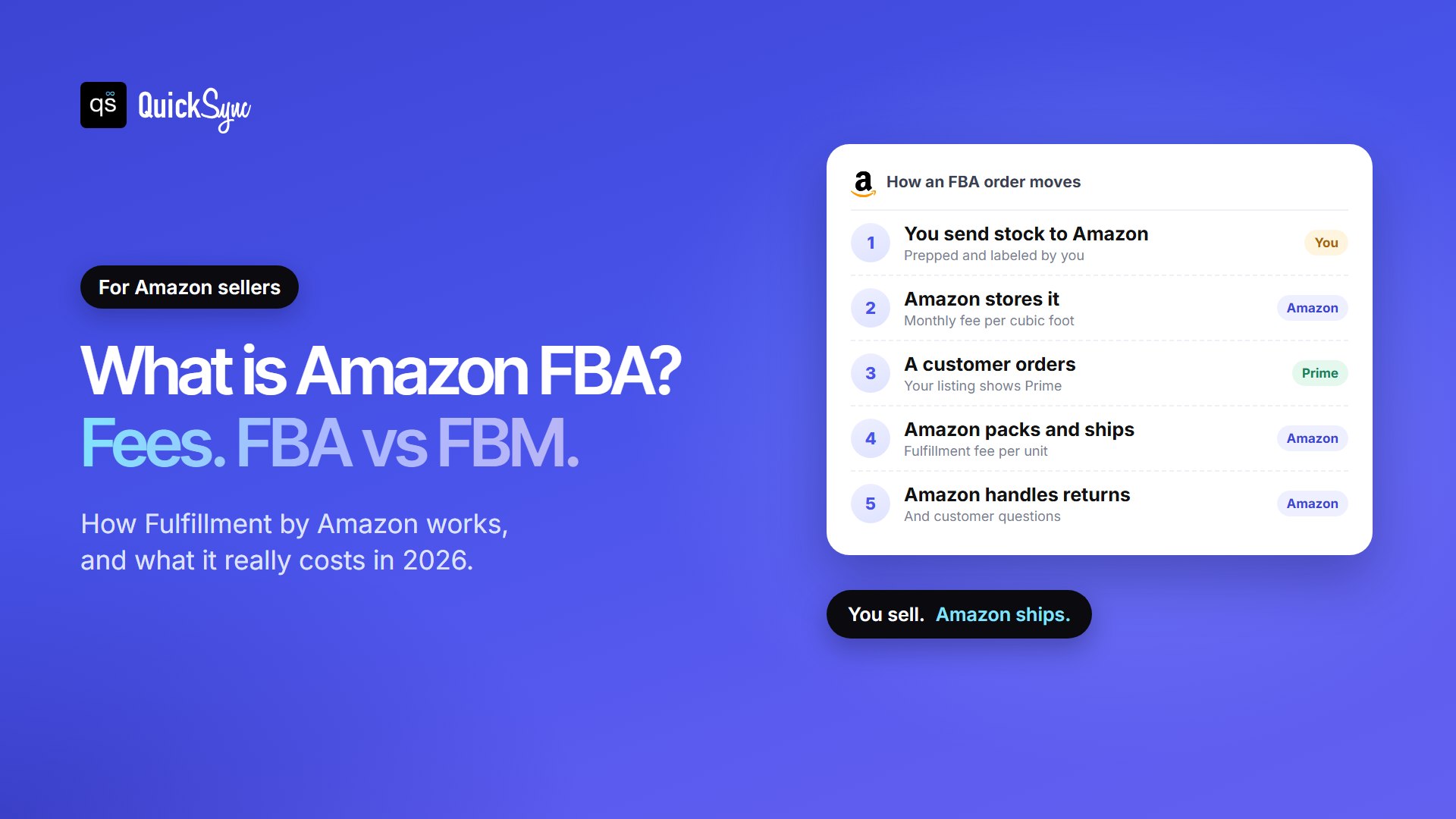
Amazon FBA (Fulfillment by Amazon) is a service where you send your stock to Amazon’s warehouses, and Amazon stores it, packs and ships each order, and handles customer service and returns. Your FBA listings can show the Prime badge. You pay a fee for each unit shipped, plus monthly storage.
So the FBA meaning is simple: Amazon does the fulfillment, and you do the selling. You still choose the products, set the prices, write the listings and decide when to restock. TikTok Shop runs a similar service, Fulfilled by TikTok (FBT), though in the US it’s by invitation only.
The alternative is FBM, Fulfilled by Merchant. With FBM, you keep the stock and ship each order yourself. Many sellers use both, product by product. We’ll compare them below.
How Does Amazon FBA work?
Here’s the process from sign-up to a delivered order, based on Amazon’s FBA page:
- Turn on FBA. In Seller Central, select the gear icon, then Account info. Choose Manage on the Seller Account Information page, then Register for FBA.
- Assign products to FBA. Pick some or all of your eligible listings. Check Amazon’s FBA product restrictions first, as some items aren’t allowed.
- Prep, pack, and label your stock. Each unit needs a scannable barcode, and some items need bagging or bubble wrap.
- Create a shipment. Use the Send to Amazon workflow to say what you’re sending and where, then ship it to the fulfillment center Amazon gives you.
- Amazon fulfills your orders. When a customer buys, Amazon picks, packs and ships the item, and handles questions and returns.
- Restock. Watch your levels in the FBA Dashboard and send more before you run out.
One change catches new sellers out. Since 1 January 2026, Amazon no longer preps or labels FBA shipments in the US. You or a prep center must do it before the stock arrives. Older guides still mention Amazon’s label service, so check the date on anything you read.
Amazon FBA fees in 2026
FBA has more moving parts than most guides admit. Amazon raised fulfillment fees on 15 January 2026, added a 3.5% surcharge on 17 April, and is charging holiday peak rates from 15 October 2026 to 14 January 2027. Here are the charges, with the official numbers.
1. Selling plan and referral fee
These apply whether you use FBA or not. From Amazon’s pricing page:
- Professional plan: $39.99 a month. Individual plan: $0.99 per item sold. Professional pays for itself at about 40 sales a month, because 40 × $0.99 is $39.60.
- Referral fee: a share of the sale price, 15% in most categories, with a $0.30 minimum. It ranges from 5% to 45% depending on the category.
2. FBA fulfillment fee
This is the main FBA fee, charged on every unit Amazon ships. It depends on three things: the item’s size tier, its shipping weight and, since 2026, its price. Small standard items (up to 15 × 12 × 0.75 inches and 16 oz) are billed on actual weight. Larger tiers are billed on whichever is greater, actual weight or dimensional weight.
Here are common rates for products priced $10 to $50, from Amazon’s 2026 US FBA fee page:
| Size tier and shipping weight | Non-peak (15 Jan to 14 Oct 2026) | Peak (15 Oct 2026 to 14 Jan 2027) |
|---|---|---|
| Small standard, 2 oz or less | $3.32 | $3.51 |
| Small standard, 6 to 8 oz | $3.54 | $3.74 |
| Small standard, 14 to 16 oz | $3.96 | $4.18 |
| Large standard, 4 oz or less | $3.73 | $3.97 |
| Large standard, 12 to 16 oz | $4.60 | $4.89 |
| Large standard, 1.75 to 2 lb | $5.82 | $6.15 |
| Large standard, 2.75 to 3 lb | $6.67 | $7.08 |
| Large standard, 3 to 20 lb | $6.97 + $0.08 per 4 oz over 3 lb | $7.51 + $0.08 per 4 oz over 3 lb |
| Small bulky, up to 50 lb | $7.55 + $0.38 per lb over 1 lb | $8.59 + $0.38 per lb over 1 lb |
Three things change the number in the table:
- Price band. Items under $10 get Low-Price FBA rates, which Amazon says are $0.86 lower on average. Items over $50 pay more, for example $3.58 instead of $3.32 for the lightest small standard item.
- The 3.5% surcharge. Since 17 April 2026, Amazon adds a 3.5% fuel and logistics surcharge to every FBA fulfillment fee in the US. A $3.32 fee becomes about $3.44.
- Apparel. Clothing has its own rate card, a little higher than the one above.
3. Monthly storage fee
Amazon charges for the space your stock takes up, measured in cubic feet. The standard-size rate triples in the last three months of the year:
| Size | January to September | October to December |
|---|---|---|
| Standard-size | $0.78 per cubic foot | $2.40 per cubic foot |
| Oversize | $0.56 per cubic foot | $1.40 per cubic foot |
Larger sellers can also pay a storage utilization surcharge on top. It only applies if you’re on the Professional plan, sent your first FBA shipment more than a year ago, store 25 cubic feet or more on average, and hold more than 22 weeks of supply. New sellers and Individual sellers don’t pay it.
4. Aged inventory surcharge
Stock that sits for 181 days or more costs extra every month, on top of storage. Amazon checks your inventory on the 15th, and counts age first-in, first-out, so each sale is taken from your oldest units.
| Inventory age | Monthly surcharge |
|---|---|
| 181 to 210 days | $0.50 per cubic foot |
| 211 to 240 days | $1.00 per cubic foot |
| 241 to 270 days | $1.50 per cubic foot |
| 271 to 365 days | $5.45 to $5.90 per cubic foot |
| 366 to 455 days | $6.90 per cubic foot or $0.30 per unit, whichever is greater |
| 456 days or more (new in 2026) | $7.90 per cubic foot or $0.35 per unit, whichever is greater |
The jump at 271 days is the one to watch. If a product hasn’t sold in nine months, removing or liquidating it is often cheaper than paying to keep it.
5. Inbound placement fee
When you create a shipment, you choose how many locations to send it to. Sending everything to one place is easier, but Amazon charges to spread it across its network. For small standard items that’s $0.14 to $0.32 per unit, and up to $1.90 for heavy large standard items. If you split the shipment across the locations Amazon picks, there’s no fee, as long as you send at least five identical cartons per item. Amazon bills it 45 days after your shipment is received.
6. Low-inventory-level fee
This one surprises people: you can be charged for having too little stock. When a standard-size or bulky product falls below 28 days of supply, compared with how fast it sells, Amazon adds a fee to each unit it ships. Keeping at least four weeks of stock at Amazon avoids it.
7. Returns, removals and disposal
Amazon charges a returns processing fee on orders where it offers the customer free return shipping. It also charges per item to send stock back to you, dispose of it or liquidate it. Check the current amounts in the Revenue Calculator before you send slow-moving products.
How Much Does Amazon Take from a Sale?
Fee tables are hard to picture, so here are two worked examples. Both use the 2026 rates for the $10 to $50 band, the 15% referral fee, the 3.5% surcharge, one month of storage, and the highest inbound placement fee (one location).
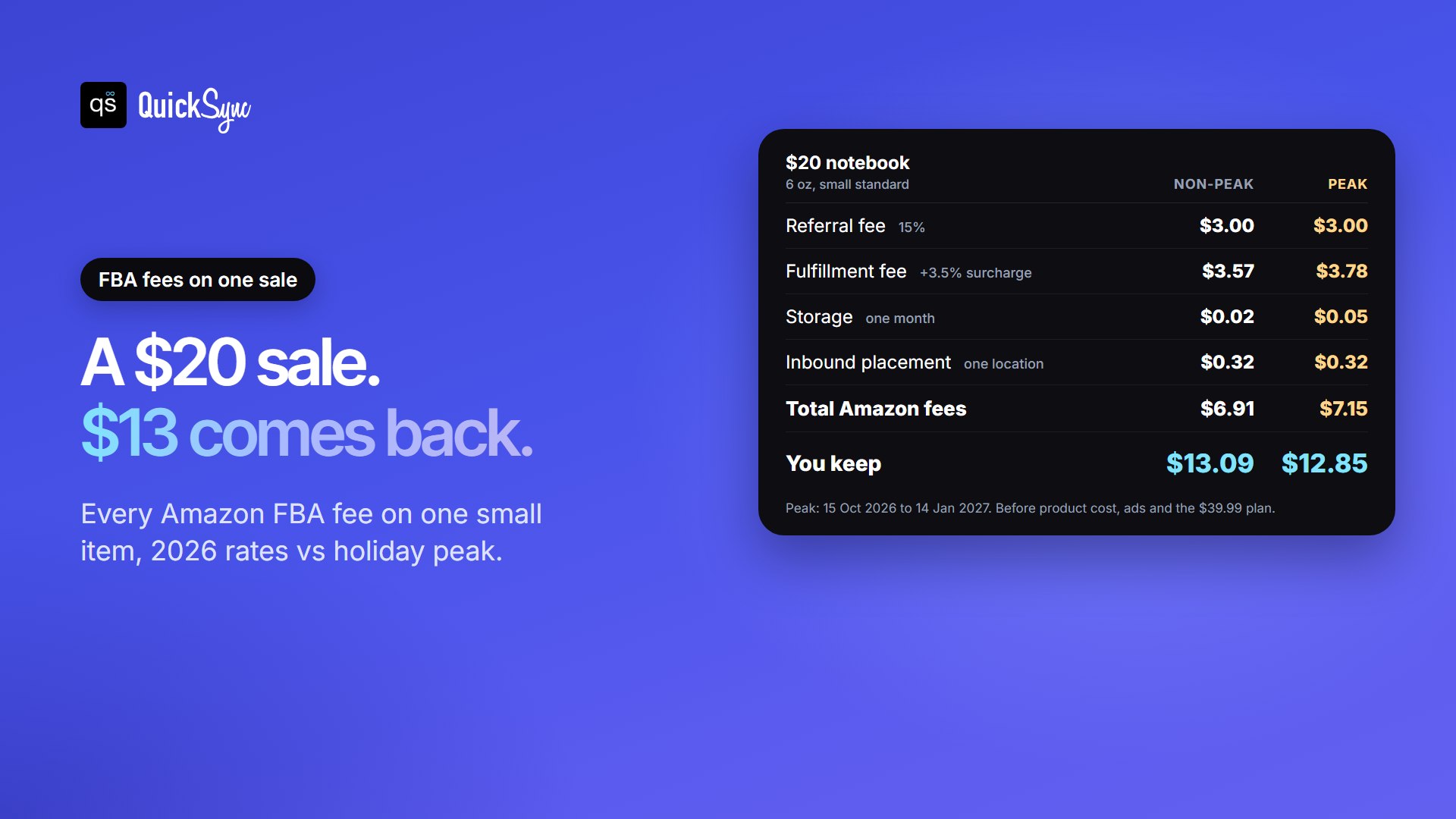
| Fee | $20 notebook (6 oz, small standard) | $35 kitchen tool (1.4 lb, large standard) |
|---|---|---|
| Referral fee (15%) | $3.00 | $5.25 |
| Fulfillment fee + 3.5% | $3.57 (peak $3.78) | $5.61 (peak $5.93) |
| Storage, one month | $0.02 (peak $0.05) | $0.09 (peak $0.26) |
| Inbound placement | $0.32 | $0.50 |
| Total Amazon fees | $6.91 (peak $7.15) | $11.45 (peak $11.94) |
| You keep | $13.09 (peak $12.85) | $23.55 (peak $23.06) |
In both cases Amazon’s fees take about a third of the price: 33% to 36%. What you keep still has to cover the product, your shipment to Amazon, ads and your monthly plan. Use Amazon’s free Revenue Calculator to run your own products before you send stock.
FBA vs FBM: What’s the Difference?
FBA means Amazon ships. FBM means you ship. That one difference decides who holds the stock, who pays for what, and how much control you keep.
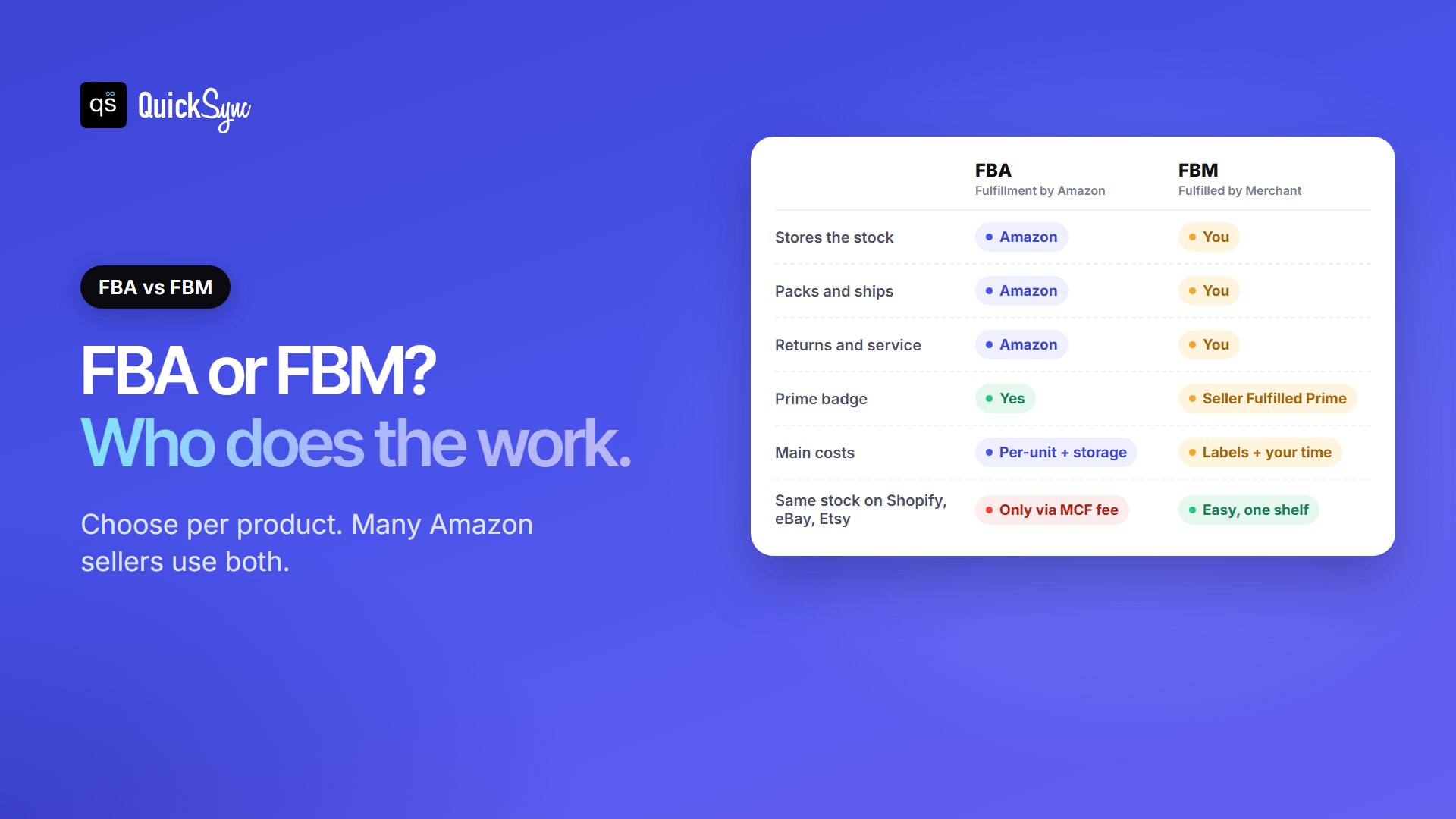
| FBA (Fulfillment by Amazon) | FBM (Fulfilled by Merchant) | |
|---|---|---|
| Who stores the stock | Amazon | You, or your own warehouse |
| Who packs and ships | Amazon | You |
| Customer service and returns | Amazon | You |
| Prime badge | Yes, on eligible items | Only through Seller Fulfilled Prime |
| Main costs | Fulfillment, storage and placement fees | Your shipping labels, packaging and time |
| Using the same stock elsewhere | Harder: it sits in Amazon’s warehouses | Easy: one shelf serves every channel |
| Best for | Small, fast-selling items with steady demand | Bulky, slow-selling or handmade items, and stock you sell on other channels |
FBM sellers aren’t locked out of Prime. Amazon’s FBA vs FBM guide says you can show the badge through Seller Fulfilled Prime. You need a Professional account, you must meet Amazon’s performance requirements, and you have to pass a 30-day trial.
You also don’t have to pick one. Amazon says many sellers use both, product by product. A common setup is FBA for your bestsellers, which move fast and earn their storage, and FBM for bulky, seasonal or one-off items, where storage and aged inventory fees would eat the margin.
Using FBA When You also Sell on Shopify, eBay or Etsy
Most guides skip this part. Once stock goes into an FBA warehouse, it’s no longer on your shelf. A Shopify or eBay order can’t be packed from it unless you pay Amazon to ship it. So if you sell on more than one channel, choose one of three setups.
Setup 1: Split your stock
Send part of your stock to FBA for Amazon orders, and keep the rest at home for every other channel. It’s the simplest setup. The risk is the stock you keep: one count has to cover Shopify, eBay, Etsy and your shop, and if those listings aren’t linked, two buyers can buy the last unit.
Setup 2: Ship other orders from FBA with Multi-Channel Fulfillment
Amazon’s Multi-Channel Fulfillment (MCF) lets you ship orders from your website or another channel out of your FBA stock. It saves you holding a second pile of stock, but MCF has its own fees. The 3.5% surcharge has applied to it since 2 May 2026, and holiday peak rates apply too. Check the MCF rate card before you route cheaper items through it.
Setup 3: Ship everything yourself (FBM)
Keep all stock in one place and list it everywhere. You give up Amazon’s logistics, but one shelf serves every sale, and nothing ages in a warehouse you pay for.
Whichever setup you pick, keep FBA and FBM counts apart in your head and in your tools. This is how QuickSync’s Amazon integration handles it. For items you ship yourself, stock syncs both ways: a sale on Amazon lowers Shopify, Etsy or eBay, and a sale there lowers Amazon. For FBA items, Amazon holds the stock and keeps its own count, so QuickSync leaves that count alone on purpose.
Matching works by SKU, so give each product the same SKU on every channel. QuickSync’s Amazon sync matches SKUs of up to 20 characters. Our guide to what a SKU is and how to create one covers the limits on each channel.
Pros and Cons of Amazon FBA
The upsides:
- Prime eligibility on your listings, with fast, free delivery for shoppers.
- No packing or post office runs. Amazon picks, packs and ships every FBA order.
- Customer service and returns handled for FBA orders.
- Room to grow without renting a warehouse or hiring packers.
The downsides:
- Fees stack up: fulfillment, storage, placement, aged inventory, the low-inventory fee and the 3.5% surcharge.
- Q4 costs more. Storage triples from October, and peak fulfillment rates run to mid-January.
- Prep is on you. Since 2026, labels and packaging must be done before stock arrives.
- Less control. Your stock sits in Amazon’s network, and selling it on other channels takes MCF or a second pile of stock.
Is Amazon FBA worth it?
FBA is worth it when the time and sales it brings outweigh the fees. Run each product through these five questions:
- Is it small and light? Small standard items have the lowest fees. Bulky items get expensive fast.
- Does it sell steadily? Fast sellers earn their storage. Items that sit for 271 days or more pay $5.45 or more per cubic foot each month.
- Does the price leave room after a third goes to Amazon? Fees took 33% to 36% of the price in our examples, before your product cost, shipping to Amazon and ads.
- Would Prime lift your sales? Shoppers can filter search results to Prime items, so in busy categories the badge can decide who gets seen.
- Do you sell it anywhere else? If most of your sales happen off Amazon, keeping that stock at home (FBM) is usually simpler.
Mostly yes? Start with your two or three bestsellers on FBA and keep everything else FBM. Compare the numbers after a month.
How to Start with Amazon FBA
- Set up your seller account. Our guide to Amazon Seller Central explains the plans and menus.
- Pick one or two test products that are small, light and already selling.
- Run them through the Revenue Calculator, at both non-peak and peak rates.
- Prep and label your units, or book a prep center.
- Send a small first shipment through Send to Amazon. Splitting it across Amazon’s chosen locations avoids the placement fee.
- Check the FBA Dashboard weekly and restock before you drop under 28 days of supply.
New sellers get help with the first costs. Amazon’s current New Seller Incentives for Professional sellers include $100 off shipments through the Amazon Partnered Carrier program and a $400 credit for inbound placement. You also get free storage and returns when you’re auto-enrolled in FBA New Selection, which happens if you create an FBA shipment within 90 days of listing your first product.
FAQs
More guides for Amazon sellers: eBay vs Amazon, Amazon Handmade vs Etsy and the best Shopify Amazon integration apps.