If you sell on WooCommerce and Amazon, a WooCommerce Amazon integration keeps stock, listings and orders in sync between the two. Without a WooCommerce Amazon integration plugin, a sale on Amazon leaves the same item for sale on your website, and the second buyer gets a cancellation instead of a parcel.
Plenty of plugins and apps do this, and most promise “real-time sync”. They differ in three ways that matter: how they handle stock Amazon ships for you (FBA), whether Amazon orders land in WooCommerce, and what they charge by. We compared seven on those points, with prices from each vendor’s own pages, WooCommerce.com and WordPress.org, checked in November 2026. QuickSync is our product, so we’ve said plainly where the others do things it doesn’t.
Short answer: if you ship Amazon orders yourself and want one stock count, QuickSync starts at $19 a month with unlimited orders. If you want a WordPress plugin with Amazon orders inside WooCommerce, look at WP-Lister Pro ($299 a year) or miniOrange Premium ($299 a year). If you sell on several marketplaces, M2E starts at $49 a month. If you have fewer than 30 orders a month across all channels, Sellbrite is free.
The 7 WooCommerce Amazon Integrations: A Quick Overview
| Tool | Type | Starts at | You pay by | FBA stock |
|---|---|---|---|---|
| QuickSync | Hosted app | $19/mo for two shops | Items; orders unlimited | Two-way for items you ship; leaves FBA counts to Amazon |
| WP-Lister for Amazon | WordPress plugin | Free (Lite); Pro $49/mo or $299/yr | License | Supports FBA |
| M2E Multichannel Connect | Plugin and cloud app | $49/mo up to $5,000 in sales | Sales value | Supports FBA |
| Multichannel for WooCommerce (miniOrange) | WordPress plugin | Free; Premium $299/yr per site | License | Imports FBA and FBM orders |
| Amazon for WooCommerce (CedCommerce) | Plugin and app | Free to install; plan price not listed | Not published | Not stated |
| LitCommerce | Hosted multichannel | $29/mo | Listings and channels | FBM only; FBA gets price sync |
| Sellbrite | Hosted multichannel | Free up to 30 orders/mo | Orders; FBA orders not counted | FBA add-on, $19/mo |
3 Questions That Decide Which WooCommerce Amazon Plugin You Need
1. Does Amazon ship your orders (FBA), or do you (FBM)?
This changes how sync should work, and it’s the first thing to check.
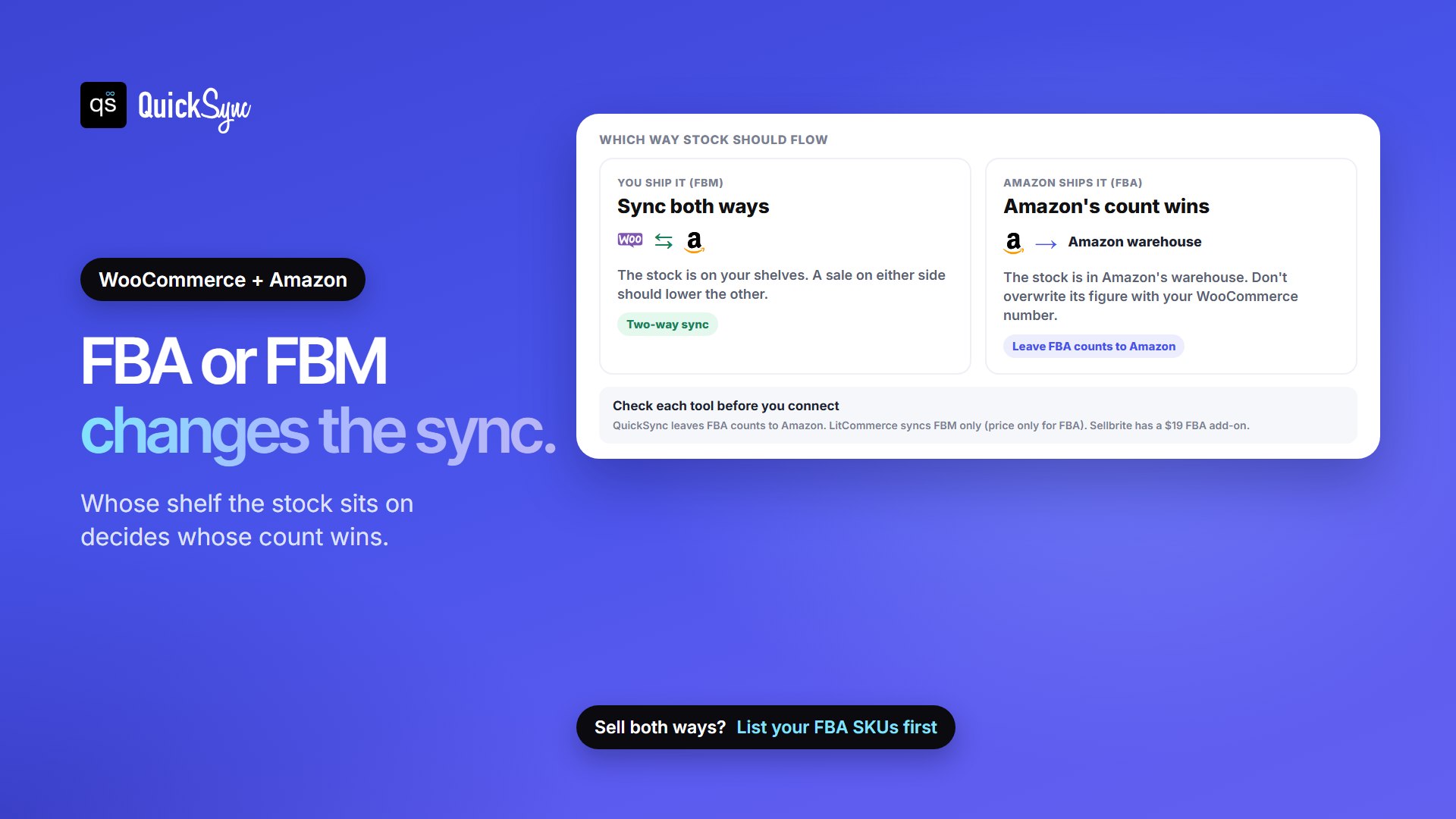
- Items you ship yourself (FBM): the stock sits on your shelves, so a sale on either side should lower the count on the other. You need two-way sync.
- Items Amazon ships (FBA): the stock sits in Amazon’s warehouse, and Amazon’s count is the true one. Writing your WooCommerce number over it would replace a real figure with a guess.
The tools handle this differently. QuickSync syncs items you ship both ways and, in its own words, leaves FBA items with “the count Amazon has”. LitCommerce says it “only syncs FBM listings” and offers price sync for FBA. WP-Lister, M2E and miniOrange support FBA listings or orders, and Sellbrite has a $19 FBA add-on. If you use FBA, ask each vendor exactly what happens to FBA stock before you connect.
2. Do you need Amazon orders inside WooCommerce?
Some sellers want every order in one admin screen. WP-Lister Pro, miniOrange and CedCommerce bring Amazon orders into WooCommerce, and QuickSync does on Pro and above when you pick WooCommerce as your fulfillment store. Others only need one stock count and ship Amazon orders from Seller Central.
Amazon also limits how much buyer detail apps can see. LitCommerce warns that, because of Amazon’s API limits, imported Amazon orders may not include the buyer’s name and address. If you plan to ship Amazon orders from WooCommerce, ask what your account will actually receive.
3. What do you pay for?
Starting prices aren’t like for like, because each tool counts something different. More on that below.
What You’re Actually Paying For
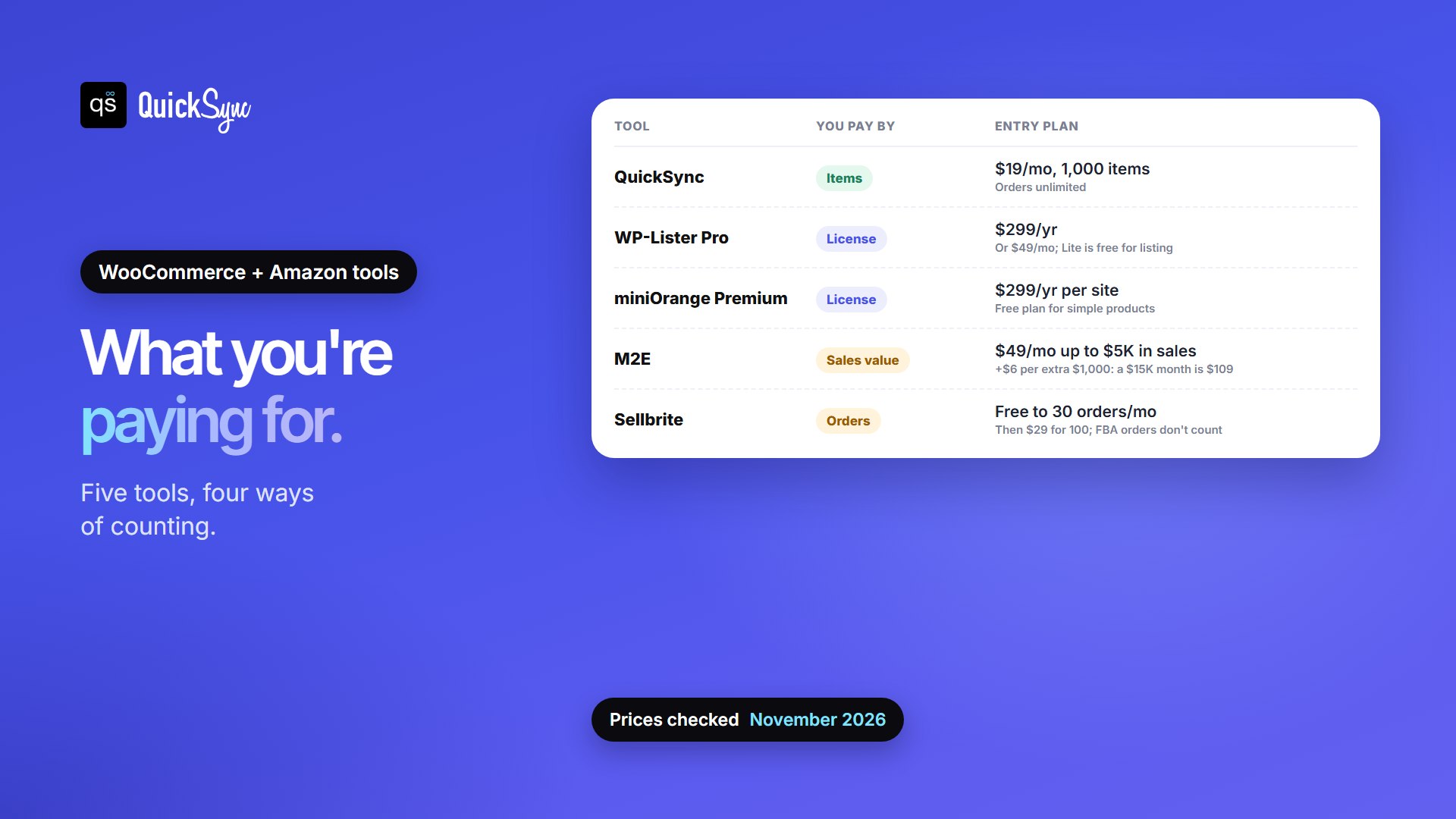
| Tool | You pay by | Entry plan |
|---|---|---|
| QuickSync | Items (variations) | Lite, $19/mo: two shops, 1,000 items, unlimited orders. Pro, $29/mo: 2,500 items |
| WP-Lister for Amazon | License | Lite free (listing only). Pro $49/mo, or $299/yr billed annually |
| M2E Multichannel Connect | Sales value | Starter $49/mo up to $5,000 in monthly sales, then $6 per extra $1,000; 3 marketplaces |
| miniOrange | License per site | Free plan; Premium $299/yr for one site, and staging sites need their own license |
| CedCommerce | Not published | Free to install, 7-day trial; plan prices shown after sign-up |
| LitCommerce | Listings and channels | $29/mo: 1,000 listings, 3 channels, unlimited orders |
| Sellbrite | Orders on all channels | Free to 30 orders/mo; then $29 (100), $79 (500), $179 (2,000). FBA orders don’t count |
Sales-based pricing climbs fastest as you grow. On M2E’s Starter plan, a month with $15,000 in sales costs $49 plus 10 × $6, or $109. License pricing stays flat, but you manage the plugin and its updates on your own WordPress site. Item pricing changes only when your catalog grows or you add shops.
1. QuickSync
Best for: sellers who ship their own Amazon orders and want WooCommerce and Amazon on one stock count, without paying more per order.
QuickSync is a hosted app. You approve it in your WooCommerce admin and in Seller Central, then existing products match by SKU. Stock syncs both ways for items you ship. For FBA items, it leaves Amazon’s own count alone. It also connects Shopify, eBay, Etsy, TikTok Shop, Square and more, up to eight shops.
- Price: Lite $19/mo for two shops and up to 1,000 items, with stock sync. Pro, at $29/mo for 2,500 items, adds product syncing and order syncing. Ultra is $69/mo for 10,000 items. Orders are unlimited on every plan, and yearly billing saves 10%. 14-day free trial, no card.
- Orders: on Pro and above, eligible Amazon orders can create a copy in WooCommerce when you choose it as your fulfillment store. Tracking can go back to eligible merchant-fulfilled Amazon orders.
- Watch for: QuickSync has fixed and percentage price rules on Ultra, but no competitor-based repricing like WP-Lister Pro or M2E Business.
2. WP-Lister for Amazon
Best for: WordPress-savvy sellers who want a long-running plugin with listing tools and a flat yearly price.
WP-Lister by WP Lab lists WooCommerce products on Amazon using Amazon’s category feeds, supports FBA, shows Buy Box and competitor prices, and can import products from Amazon into WooCommerce. The free Lite version handles listing. Pro, in WP Lab’s words, will “synchronize sales and orders across platforms” and adds automatic repricing.
- Price: Lite is free on WordPress.org. Pro is $49/mo, or $299/yr with annual renewal.
- Rating: 3.9 out of 5 on WordPress.org, 800+ active installs, updated in the past week.
- Watch for: it runs inside your WordPress site, and Amazon’s attribute rules make setup involved. Even positive reviews mention the learning curve. Lite doesn’t sync sales.
3. M2E Multichannel Connect
Best for: sellers listing on Amazon plus several other marketplaces, who want repricing and FBA support.
M2E comes from the team behind M2E Pro, the long-standing Magento extension. Its WooCommerce connector links your store to Amazon, eBay, Walmart, Temu, Shein, TikTok Shop and Kaufland, syncs listings, stock and orders, and supports Amazon FBA. The Business plan adds automated repricing.
- Price: Starter $49/mo for up to $5,000 in monthly sales and 3 marketplace connections, plus $6 for each extra $1,000. Business $199/mo for up to $50,000. 30-day free trial, no card.
- Rating: 4.5 from 8 reviews on WooCommerce.com, 2,000+ installs.
- Watch for: you pay more as sales grow, even if your catalog doesn’t change.
4. Multichannel for WooCommerce by miniOrange
Best for: trying an Amazon sync free, then paying a flat yearly fee.
This WordPress.org plugin syncs products, stock and orders between WooCommerce and Amazon. Amazon orders appear as normal WooCommerce orders, marked FBA or FBM. The free plan covers simple products and order sync from the last 24 hours. Premium adds two-way sync, scheduled stock updates and variations.
- Price: free plan; Premium $299/yr per site.
- Rating: 5 out of 5 from 4 reviews on WordPress.org, 60+ active installs.
- Watch for: a small install base so far. The license is tied to one domain, so a staging site needs its own.
5. Amazon for WooCommerce by CedCommerce
Best for: sellers with several Amazon regions who want listing tools inside WooCommerce.
Sold on WooCommerce.com, CedCommerce’s plugin bulk-uploads WooCommerce products to Amazon, matches branded products to existing ASINs by barcode, connects multiple Amazon seller accounts across regions, and syncs stock and orders.
- Price: free to install with a 7-day trial. Plan prices aren’t shown on the WooCommerce.com listing.
- Rating: 3.7 from 67 reviews, 3,000+ installs.
- Watch for: 27% of its reviews are one-star. A recent one describes recurring SKU, inventory and order-import problems.
6. LitCommerce
Best for: FBM sellers listing on Amazon and other marketplaces from one place.
LitCommerce is a hosted lister. It publishes WooCommerce products to Amazon and other channels with templates, and can bring Amazon orders into WooCommerce. New products need an ASIN or a GTIN exemption.
- Price: from $29/mo for 1,000 listings, 3 channels and unlimited orders. 7-day free trial.
- Sync: every 15 minutes, according to its pricing page.
- Watch for: it doesn’t sync stock for FBA items, only prices.
7. Sellbrite
Best for: small sellers who want a free start and plan to add FBA or other marketplaces.
Sellbrite, owned by GoDaddy, imports your WooCommerce products, lists them on Amazon, eBay, Etsy, Walmart and others, and syncs stock by rules you set. Its FBA add-on brings FBA stock into Sellbrite so you can sell it on other channels, and routes those orders to Amazon for fulfillment.
- Price: free up to 30 orders a month; then $29 (100 orders), $79 (500) or $179 (2,000). FBA add-on $19/mo. FBA orders don’t count toward your limit. 14-day trial.
- Watch for: the limit counts orders from every connected channel, including WooCommerce, and you move up a plan automatically when you pass it.
Using FBA to Ship Your WooCommerce Orders
If your stock already sits in Amazon’s warehouses, Amazon’s Multi-Channel Fulfillment (MCF) can ship your WooCommerce orders too. These apps send WooCommerce orders to MCF:
- Amazon Fulfillment (MCF) by Never Settle: $99/yr on WooCommerce.com, 3.1 from 22 reviews. It needs an Amazon Professional account and active FBA.
- M2E Multi-Channel Fulfillment: free to install on WooCommerce.com, 100+ installs.
- Sellbrite’s FBA add-on ($19/mo) and GeekSeller (from $50/mo, billed by orders, with FBA orders excluded) also route orders to MCF.
New to FBA? Our guide to what Amazon FBA is covers how it works.
Before You Connect WooCommerce to Amazon
- Check your Amazon selling plan. Amazon lists “Sell with apps and APIs” as a feature of the Professional plan, which costs $39.99 a month. Individual-plan sellers pay $0.99 per item sold instead.
- Give every product a matching SKU in WooCommerce and Amazon. Most tools link listings by SKU, and a mismatch means two counts that drift apart. Our guide to what a SKU is shows how to set them.
- List which items are FBA and which you ship. That decides which way each item’s stock should sync.
- Start small. Connect a few products, sell one through each channel and check that both counts drop.
For a step-by-step setup, see our guide to WooCommerce Amazon sync. For keeping counts right across more channels, see WooCommerce inventory sync.
Which WooCommerce Amazon Integration Should You Choose?
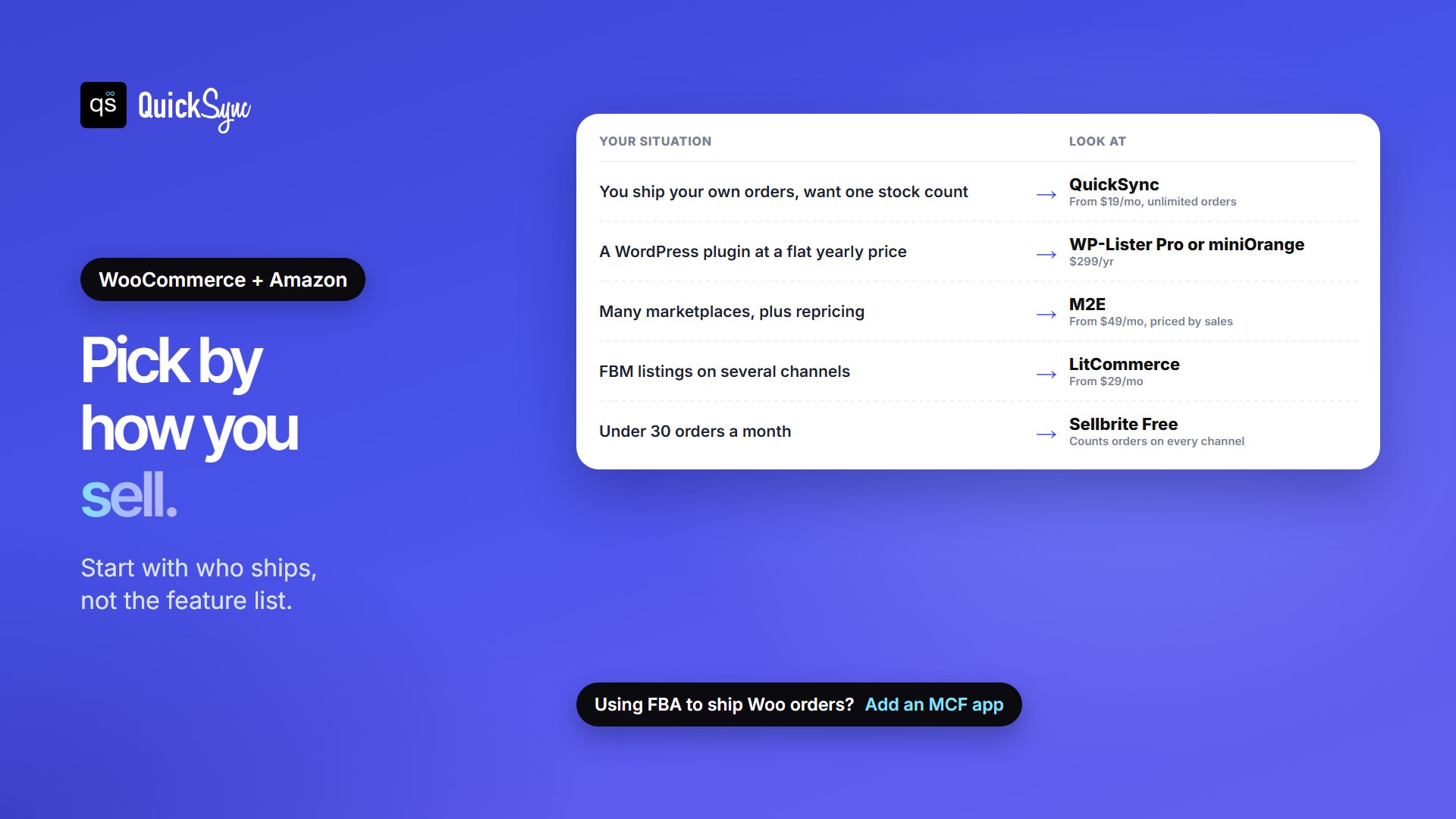
- You ship your own orders and want one stock count: QuickSync, from $19/mo with unlimited orders.
- You want a WordPress plugin with Amazon orders in WooCommerce at a flat price: WP-Lister Pro or miniOrange Premium, $299/yr.
- You sell on many marketplaces and want repricing: M2E, from $49/mo.
- You list FBM products on several channels: LitCommerce, from $29/mo.
- You have fewer than 30 orders a month: Sellbrite Free.
- You want FBA to ship your WooCommerce orders: an MCF app such as Never Settle ($99/yr), alongside any of the above.
Also sell on Etsy? We compared the best WooCommerce Etsy integration plugins the same way.
FAQs
More guides: the best Shopify Amazon integration apps, and our WooCommerce and Amazon integration pages.