If you sell on WooCommerce and Etsy, a WooCommerce Etsy integration keeps the two shops in sync. There are plenty of plugins and apps for it, and nearly all of them promise “real-time sync”. Where they actually differ is in two places: whether your Etsy orders end up inside WooCommerce, and how long a sale in one shop takes to reach the other.
We compared six WooCommerce Etsy integration plugins on those two points, plus price, import and how each one bills you. Prices and ratings come from each vendor’s own page, WooCommerce.com or WordPress.org, checked in November 2026. QuickSync is our product, so we’ve said plainly where the others do things it doesn’t.
Short answer: if your priority is one stock count, QuickSync checks Etsy every 2 minutes from $19 a month. If you want Etsy orders inside WooCommerce, look at DPL’s plugin (free for 20 products), LitCommerce or QuickSync Pro. If you sell fewer than 30 orders a month across all channels, start with Sellbrite’s free plan.
The 6 WooCommerce Etsy Integration Plugins at a Glance
| Tool | Best for | Starts at | Where Etsy orders go | Published sync speed |
|---|---|---|---|---|
| QuickSync | One stock count, short Etsy checks | $19/mo for two shops | Stay in Etsy on Lite; eligible orders copied to WooCommerce from Pro ($29/mo) | Etsy stock every 2 min, orders every 5 min |
| Etsy Integration For WooCommerce (DPL) | Trying it free | Free for 20 products and 10 orders | WooCommerce | “Real-time” (vendor’s claim) |
| LitCommerce | Listing to Etsy and other channels | $29/mo | WooCommerce, with Order Sync on | Every 15 min |
| Multichannel for WooCommerce (CedCommerce) | Lowest paid price, several marketplaces | $9/mo | CedCommerce’s dashboard | Not published |
| Sellbrite | Under 30 orders a month | Free up to 30 orders/mo | Sellbrite | Not published |
| Nembol | Crosslisting, priced by product count | $39/mo | Order transfer from the $49 plan | “At every sale” (vendor’s claim) |
Two Questions That Decide Which WooCommerce Etsy Plugin You Need
Feature lists blur together quickly. These two questions sort the field faster.
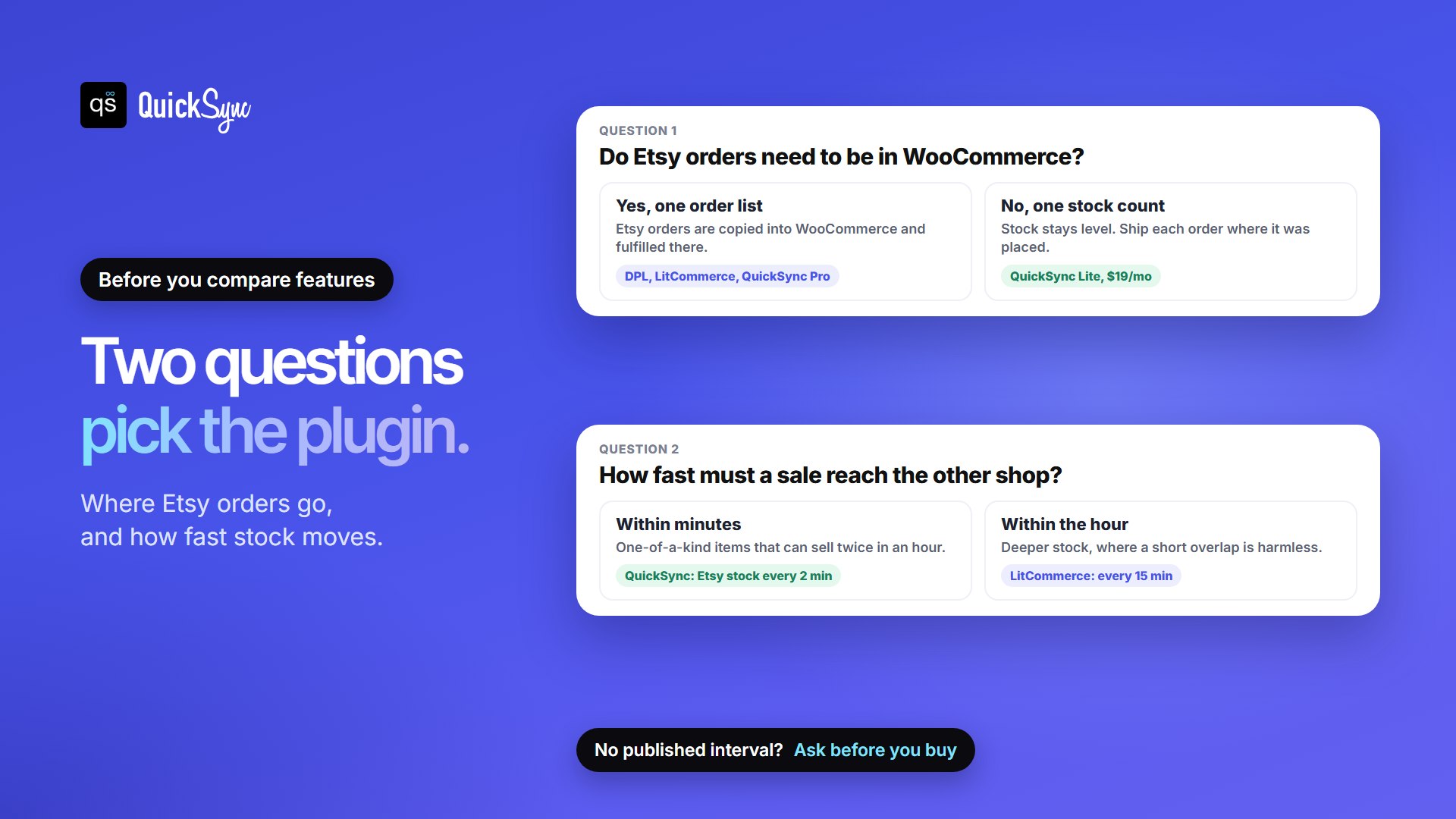
1. Do you need Etsy orders inside WooCommerce?
Some tools copy each Etsy order into WooCommerce, so you can fulfill everything from one admin screen. DPL’s plugin and LitCommerce (with Order Sync on) do this, and so does QuickSync on Pro and above. Sellbrite collects orders from every channel in its own dashboard, and Nembol transfers orders for fulfillment from its $49 plan.
If you’re happy to ship Etsy orders from Etsy, you only need stock sync. A sale on Etsy lowers the count in WooCommerce, and the order stays where it was placed. That’s what QuickSync’s $19 Lite plan does.
One catch applies to every tool here: Etsy decides how much order detail an app can see and send back. CedCommerce’s FAQ for its Etsy for WooCommerce plugin says that for new Etsy sellers in the US, Canada and Turkey, orders the plugin creates in WooCommerce no longer include billing or shipping details, and tracking can’t be sent back to Etsy through the plugin. QuickSync’s integration page says the same kind of thing: sending tracking to Etsy depends on your shipping origin and Etsy’s access rules. If you’re a newer shop and want Etsy orders fulfilled from WooCommerce, ask the vendor what your shop will actually get before you pay.
2. How fast does stock need to move?
Most tools check Etsy on a schedule rather than hearing about each sale as it happens. Until the next check, the item is still for sale in WooCommerce. With a gap of a few minutes, that rarely matters. With a gap of an hour, a one-of-a-kind piece can sell twice.
Only two tools publish a number. QuickSync checks Etsy stock every 2 minutes and Etsy orders every 5. LitCommerce’s pricing page lists inventory and price sync every 15 minutes, though its WooCommerce Etsy guide says product details update every 60 minutes. DPL and Nembol describe their sync as “real-time” and “at every sale” without saying how often they check Etsy. Ask before you buy if you sell single items.
What You’re Actually Paying For
The starting prices above aren’t like-for-like, because each tool caps a different thing. Check which limit you’ll hit first.
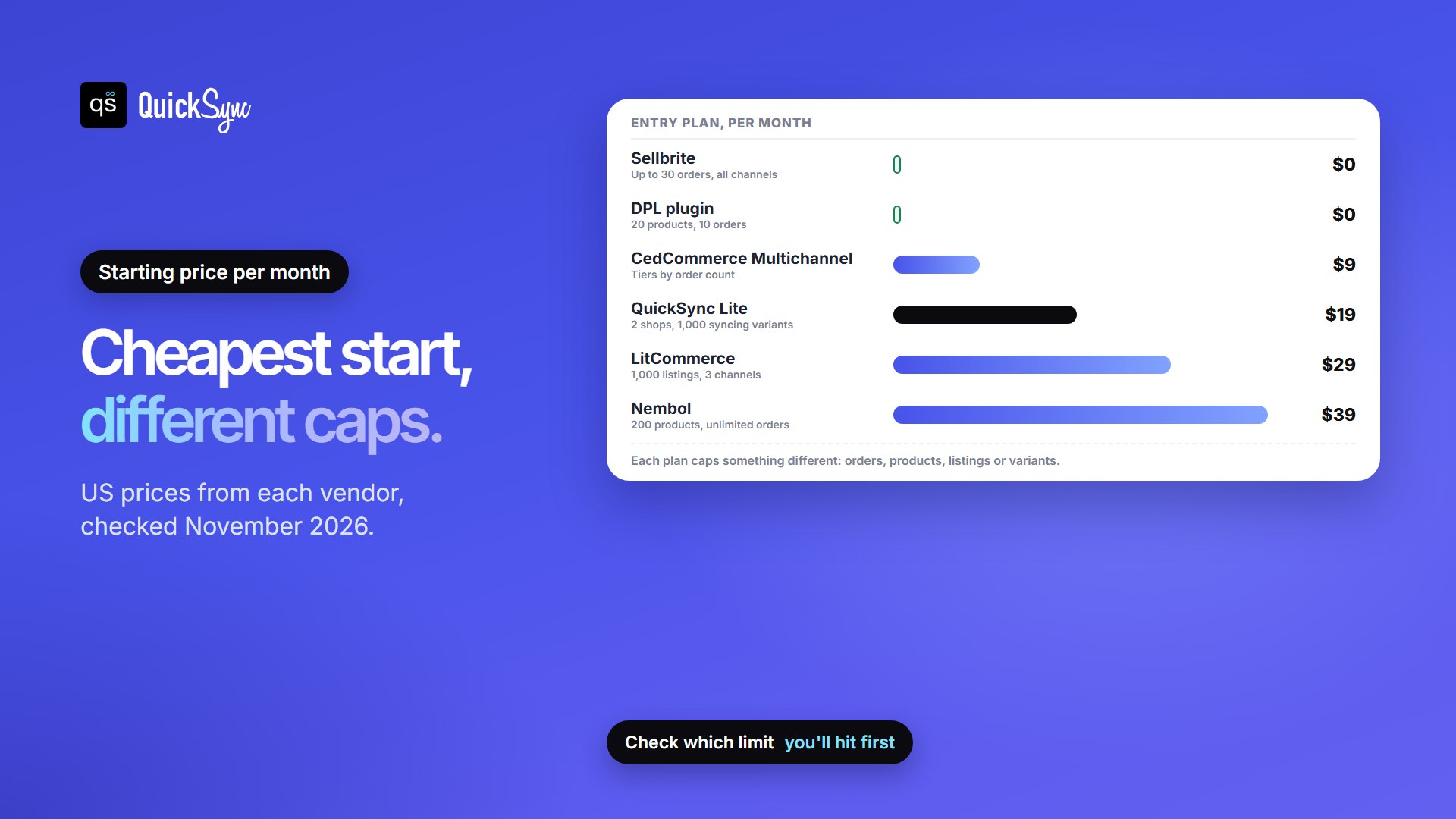
| Tool | You pay by | Entry plan limit |
|---|---|---|
| QuickSync | Plan tier | Lite, $19/mo: two shops, up to 1,000 actively syncing variants |
| DPL | Free tier, then a Pro license | Free: 20 product uploads and 10 orders; Pro price isn’t listed on the plugin page |
| LitCommerce | Listings and channels | $29/mo: 1,000 listings, 3 channels, unlimited orders |
| Multichannel for WooCommerce | Orders | From $9/mo, monthly or yearly, tiers by order count |
| Sellbrite | Orders on all channels | Free: 30 orders/mo; then $29 (100), $79 (500), $179 (2,000) |
| Nembol | Products | $39/mo: 200 products, unlimited orders; 25% off yearly |
1. WooCommerce Etsy Integration by QuickSync
QuickSync is a hosted app, also listed on the WooCommerce Marketplace as QuickSync for Etsy. It matches products and variants by SKU and keeps their stock in sync both ways. You choose which products to sync. It can also copy products from Etsy to WooCommerce, or from WooCommerce to Etsy, with photos, prices and variants, and link existing products that share a SKU.
Best for: sellers who want one stock count across both shops, with Etsy checked every few minutes.
- Price: Lite $19/mo for two shops and up to 1,000 actively syncing variants, with inventory sync. Pro, at $29/mo, adds product syncing (edit titles, descriptions, photos and prices in your main store and QuickSync updates the other) and order syncing. Ultra, at $69/mo, adds price rules, such as charging 10% more on Etsy. 14-day free trial, no card.
- Sync: Etsy stock every 2 minutes and Etsy orders every 5.
- Orders: on Pro and above, choose WooCommerce as your fulfillment store and eligible Etsy orders create a copy there. The original stays in Etsy.
- Watch for: on Lite, Etsy orders stay in Etsy. Each WooCommerce store syncs as one stock location. Standard simple and variable products work, but products built by other plugins may not.
2. Etsy Integration For WooCommerce by DPL
Digital Product Labs, the team behind ExportFeed, publishes this plugin on WordPress.org. It uploads products or whole categories to Etsy, imports Etsy listings into WooCommerce, and syncs stock and orders, so you can manage Etsy orders inside WooCommerce.
Best for: trying a full plugin for free on a small catalog.
- Price: free for 20 product uploads and 10 orders. Beyond that you need a Pro license, and the plugin page doesn’t list its price.
- Rating: 4 out of 5 from 42 reviews, 900+ active installs, updated in the last month.
- Watch for: 8 of the 42 reviews are one-star. Test it on the free tier with a few products before you rely on it.
3. LitCommerce

LitCommerce is a hosted multichannel lister. Connect WooCommerce, list products to Etsy with templates, and turn on Order Sync to bring Etsy orders into WooCommerce. Every plan includes at least 3 channels, so it suits sellers planning eBay or Amazon next. Selling on Amazon as well? See the best WooCommerce Amazon integration plugins.
Best for: listing your WooCommerce catalog on Etsy and other marketplaces from one place.
- Price: from $29/mo for 1,000 listings, 3 channels and unlimited orders. 7-day free trial.
- Sync: inventory, price and order import every 15 minutes, according to its pricing page.
- Watch for: 15 minutes is a long window for single, one-of-a-kind items.
4. CedCommerce

CedCommerce’s Multichannel for WooCommerce covers Etsy, Amazon, eBay and Walmart in one plugin, with a single dashboard for orders and sales data. You pay by monthly order volume instead of a yearly license.
Best for: the lowest paid price, if you’ll also sell on Amazon, eBay or Walmart.
- Price: from $9/mo, billed monthly or yearly by order count. 7-day free trial.
- Rating: 3.5 from 33 reviews, 1,000+ active installs.
- Watch for: the lowest rating of the plugins here. One reviewer lost most of the 7-day trial waiting for setup help.
5. Sellbrite

Sellbrite, owned by GoDaddy, imports your WooCommerce products, lists them on Etsy, Amazon, eBay, Walmart and others, and syncs stock by rules you set. Orders from every channel land in Sellbrite, where you can print shipping labels.
Best for: small sellers who want a free start and plan to add marketplaces.
- Price: free up to 30 orders a month. Then $29 (100 orders), $79 (500) or $179 (2,000). Amazon FBA orders don’t count toward the limit. 14-day trial of all features.
- Watch for: the order limit counts orders from every connected channel, including WooCommerce. Go over it and you move up a plan automatically. The sync interval isn’t published.
6. Nembol
Nembol imports your active listings, lets you publish them to other channels, and aligns stock “at every sale”. With “Import updates from Etsy” on, edits you make on Etsy carry over to your other channels.
Best for: cross-listing a lot of orders on a small catalog, since pricing is by product count.
- Price: $39/mo for 200 products, $49 for 2,000, $79 for 5,000 and $129 for 15,000. Orders and variants are unlimited, and paying yearly saves 25%. 14-day free trial.
- Watch for: transferring orders for fulfillment starts on the $49 plan.
How to Import Etsy Listings into WooCommerce
Etsy doesn’t make its own WooCommerce plugin, so you have two routes.
- Use a plugin or app that imports. DPL, QuickSync, LitCommerce and Nembol can all bring Etsy listings across, which is the quickest route for a catalog with variations. QuickSync copies photos, prices and variants, and links products that already exist in WooCommerce by SKU instead of duplicating them.
- Move a CSV by hand. In Etsy, go to Shop Manager, then Settings, Options and Download Data, and click Download CSV. The file covers active listings, with titles, descriptions, prices, quantities, tags, materials, image URLs and SKUs. Variations aren’t in it. Load the file with WooCommerce’s product importer (Products, then Import), match Etsy’s columns to WooCommerce’s fields, then add sizes and colors yourself.
Either way, sort out SKUs first. Etsy SKUs can be up to 32 characters, so keep yours to 32 or fewer, and give every listing its own. Sync tools match on SKU, and QuickSync won’t sync two Etsy listings that share one until you separate them. Our guide to what a SKU is has naming tips.
Which WooCommerce Etsy Integration Should You Choose?
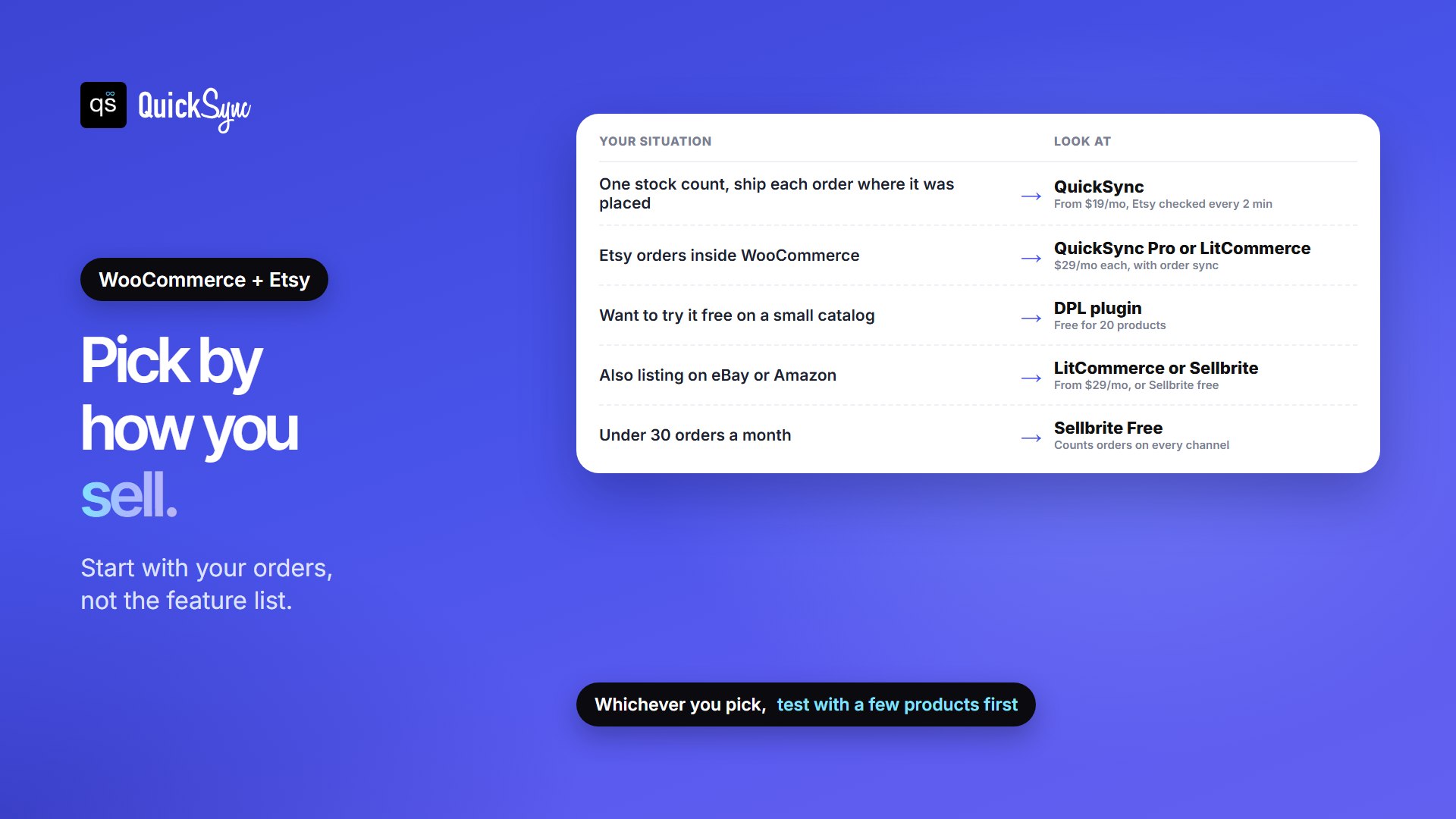
- One stock count with short Etsy checks: QuickSync, from $19/mo, or $29/mo on Pro if you also want Etsy orders copied into WooCommerce.
- Want to try it free on a small catalog: DPL’s plugin, up to 20 products.
- Etsy is one of several marketplaces you’ll list on: LitCommerce, or Sellbrite if you’re under 30 orders a month.
- Lots of orders on a small catalog: Nembol, which doesn’t charge by order.
Whatever you choose, start with a handful of products, sell one through each shop and check that both counts drop. For more on keeping counts right, see our Etsy inventory management guide. If you also sell on Shopify, we compared the best Shopify Etsy integration apps too.
FAQs
More guides: WooCommerce inventory sync, the best crosslisting apps, Etsy fees, and our WooCommerce and Etsy integration pages.