Does Clover Have an Online Store? Yes, Clover has an online store. It’s called Clover Online Store: a website you build from your Clover dashboard that sells the same items as your register, with pickup, local delivery, and, on Clover’s latest pricing, nationwide shipping. Older forum threads that say Clover’s online store no longer exists are out of date.
Whether it’s the right way for you to sell online depends on two things: which Clover plan you’re on, and whether you already sell somewhere else, like Shopify, WooCommerce, Wix, Etsy or eBay. This guide covers the four ways a Clover shop can sell online, what each one syncs, and what it costs. The Clover details come from Clover’s own pricing and help pages, checked in November 2026.
Does Clover Have an Online Store? In Short
Yes, but the Clover Online Store is included with the Retail Growth plan ($84.95 a month). On Starter and Essentials, it’s an add-on at best, and Clover doesn’t publish the price. If you already have a Shopify, WooCommerce or Wix store, or you sell on marketplaces, keep that store and connect it to Clover with a stock sync app instead.
The 4 Ways to Sell Online with Clover
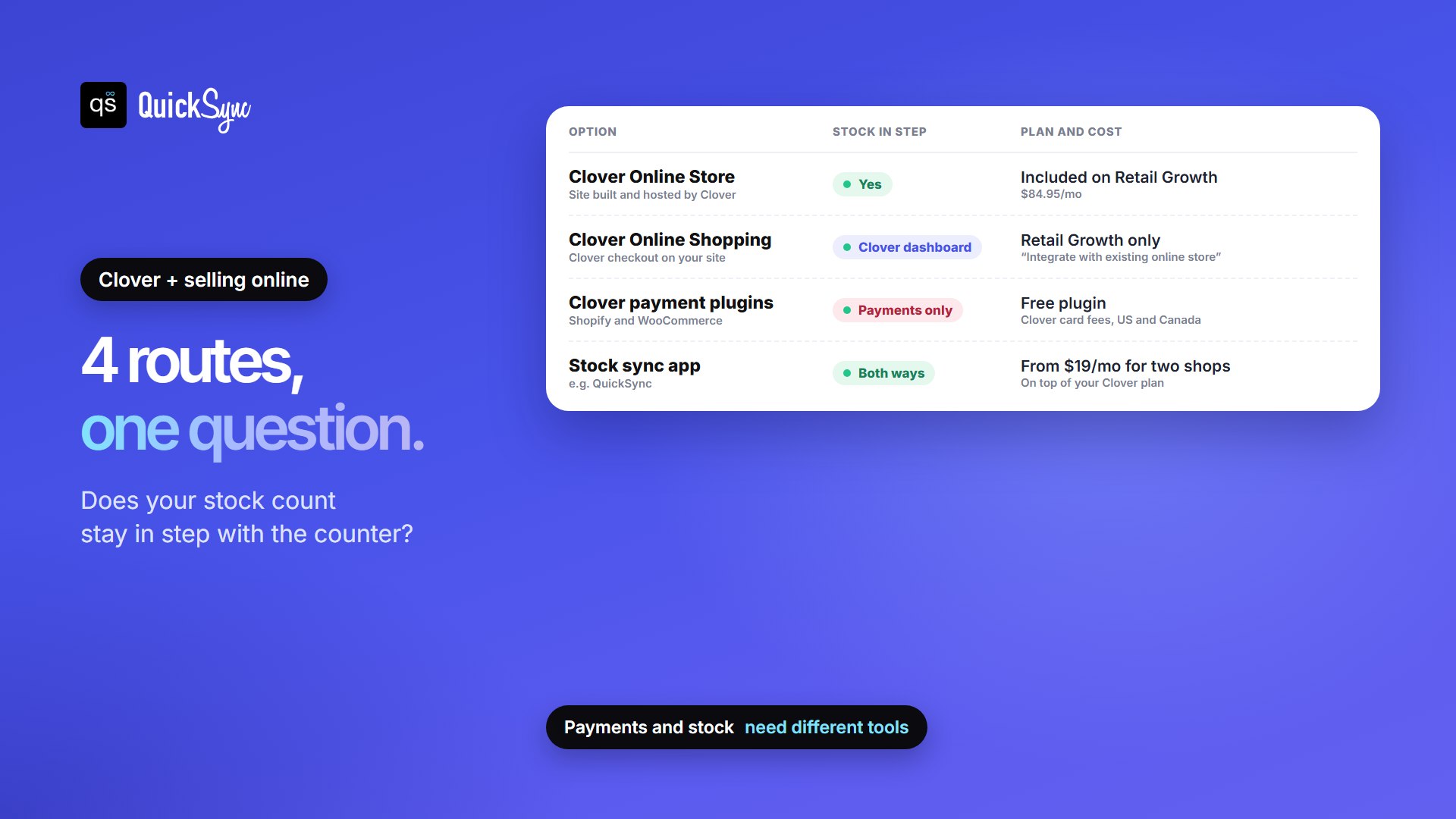
Clover gives you two options inside its dashboard and two that work with a store you already run. The big difference between them is whether your stock count stays in sync with your counter.
| Options | What it is | Stock stays in sync with Clover? | Plan and cost |
|---|---|---|---|
| Clover Online Store | A website Clover builds and hosts for you | Yes, Clover syncs it | Included on Retail Growth ($84.95/mo). Add-on or not offered on other plans |
| Clover Online Shopping | A Clover checkout added to the website you already have | Sales show in your Clover dashboard | “Integrate with existing online store” is included on Retail Growth only |
| Clover payment plugins | Clover takes the card payment at your Shopify or WooCommerce checkout | No, payments only | Free plugins; Clover’s card fees apply; US and Canada |
| A stock sync app | Connects your existing store or marketplaces to Clover | Yes, both ways | The app’s fee is on top of your Clover plan. QuickSync starts at $19/mo for two shops |
What Can You Do with Clover’s Built-In Online Store?
Clover Online Store is Clover’s own webstore. You start from a template, customize it with AI prompts, and your Clover items become your online products. Here’s what Clover lists on its eCommerce page:
- One stock count. In Clover’s words, “Inventory updates automatically across your website and physical store locations.”
- Pickup, delivery and shipping. Customers choose at checkout. Clover lists nationwide shipping with built-in labels, at $0.25 per label, and state tax calculation. You can handle returns and request label refunds from the same dashboard.
- Card and wallet payments. Credit cards, debit cards and digital wallets.
- Your own address. A Clover-hosted subdomain is included, or you can pick your own domain.
- Basic search settings. You can add SEO information for each site, and Clover says its sites include tools for search engines and AI search.
Setup happens in your Clover dashboard: Settings > View all settings > Business operations > Online shopping. You confirm your address, fulfillment options, and online hours, design the site, then select Publish.
Two things to check first. Clover’s setup guide warns: “Once you select an online website option, you cannot undo this action.” So decide between Online Store and Online Shopping before you click. And shipping is the newest part of the product. The same guide still describes pickup and DoorDash Drive delivery only, so confirm that shipping shows up on your account before you promise it to customers.
Which Clover Plans Include the Online Store
This is the part to check before anything else. Clover’s help center says its online retail website is “for businesses on the Retail Growth plan only,” and Clover’s own pricing pages agree that Retail Growth is the plan that includes it.
| Clover plan | Monthly software fee | Online store | Tracks stock by item |
|---|---|---|---|
| Starter | $0 | Not included on the retail price list; “Optional add-on” on the Mini price list | No |
| Essentials | $29.95 | “Optional add-on”, price not published | Yes |
| Retail Growth | $84.95 | Included, with nationwide shipping and tax calculation | Yes |
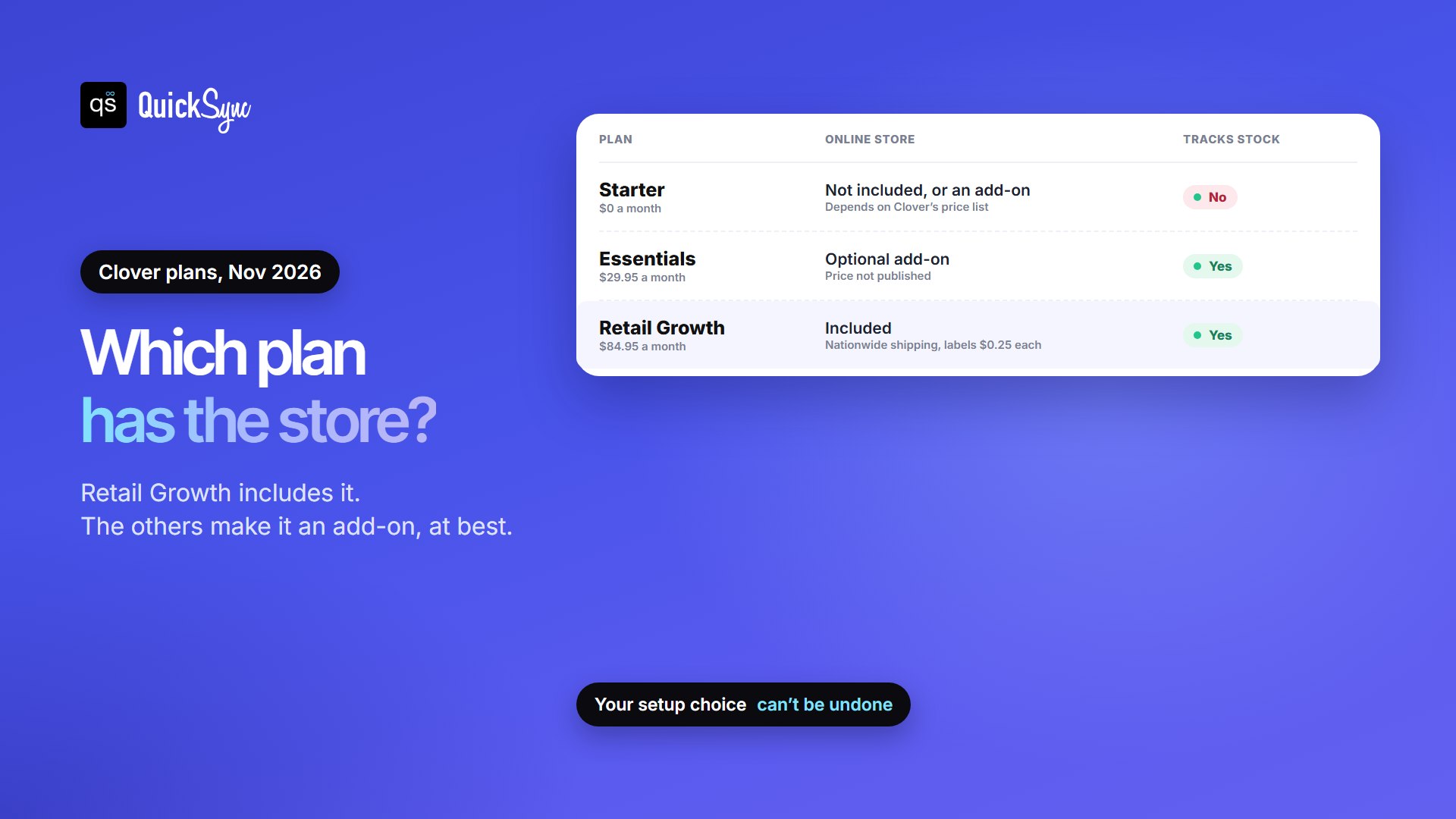
On fees, Clover lists 3.5% + 10¢ for cards typed in rather than tapped, on every plan. Ask Clover to confirm the rate for webstore orders on your account. Our Clover fees and pricing guide has the full breakdown, including when Retail Growth pays for itself.
Where Clover’s Online Store Stops
For a local shop that wants a simple site on Clover, it’s a tidy setup. It’s worth knowing the limits of Clover Online Store before you commit:
- It costs a plan upgrade. If you’re on Starter or Essentials, the full version means moving to Retail Growth at $84.95 a month, or paying for an add-on Clover doesn’t price publicly.
- The site is simple by design. You get a homepage banner, an About Us page, an item template and up to 5 categories in your navigation. It isn’t a full storefront builder like Shopify or WooCommerce.
- It doesn’t reach marketplaces. Clover’s online store pages don’t mention Etsy, eBay, Amazon or TikTok Shop. If you sell there too, those sales won’t lower your Clover count without an app. Our Clover POS review covers this in more detail.
- Your choice is permanent. As above, Clover says you can’t undo the Online Store or Online Shopping choice.
What If You Already Sell on Shopify, WooCommerce, or Wix?
Then you probably don’t want to rebuild your store inside Clover. You have two separate things to connect: payments and stock. They need different tools.
Payments: Clover’s free plugins
Clover makes free payment plugins for Shopify and WooCommerce, for merchants in the US and Canada. They let Clover process the card payment at your online checkout, so online and counter payments run through one Clover merchant account.
- Shopify: the “Clover Payments” app is free and takes cards, Apple Pay and Google Pay. Several Shopify stores can connect to one Clover merchant account, but one Shopify store can’t connect to more than one. Clover’s documentation says it’s for merchants who don’t use surcharging, and to void orders in Shopify because the plugin “is not two-way compatible.”
- WooCommerce: “Clover Payments for WooCommerce” is free and handles card payments, refunds, voids, Apple Pay and pay-now links. You don’t need a Clover device to use it.
What these plugins don’t do is move products or stock. A sale on your Shopify store won’t lower the count on your Clover register, and a sale at the counter won’t lower Shopify. That’s how a shop ends up selling its last unit twice.
Clover POS Inventory Integration: Best Available Apps Compared
To keep one stock count across Clover and your website, you need an app that reads sales on both sides and updates the other. On the Clover App Market, the main ones for online stores are:
| App | Online stores named in its listing | Clover App Market rating |
|---|---|---|
| QuickSync | Shopify, WooCommerce, Wix (plus QuickBooks Online) | 4.94 (586 reviews) |
| Real-Time Inventory Sync (SKU IQ) | Shopify, WooCommerce, Wix, BigCommerce, Squarespace | 4.59 (159) |
| Kosmos eSync | Shopify, WooCommerce, BigCommerce | 4.51 (40) |
QuickSync matches products by SKU and keeps stock in sync both ways: sell on Clover and your other shops update, and the other way round. It also connects Clover with Squarespace and with marketplaces, including Etsy, eBay, Amazon and TikTok Shop, which matters if your website isn’t your only other channel.
Lite costs $19 a month for two shops and 1,000 items, and Pro at $29 adds listing and order sync. Two limits to know: Clover has no field for a tracking number, so tracking stays in your online store, and items without a SKU are left out and shown to you as unmatched. Our guide to what a SKU is helps if your Clover items don’t have SKUs yet.
One requirement applies to every sync app: Clover has to be counting your stock. Clover’s Mini price list shows “Track stock for items” as not included on Starter and included on Essentials, so a free-plan shop needs to upgrade before any app can sync its stock.
For a side-by-side look at the Shopify options, see our roundup of the best Shopify Clover integration apps. If you’re on WooCommerce, see how to connect WooCommerce and Clover.
Can Clover Handle Your Restaurant’s Online Orders?
If you run a restaurant, the product you want is different. Clover Online Ordering gives you an ordering page built from your Clover menu. Clover says “We’ll automatically build your online ordering page,” you manage one menu for dine-in and online orders, and you promote the page on your website and social media.
Clover says it processes these orders “with no extra fees,” and the service needs a Clover device connected to a printer. Start from Clover’s online ordering page for current setup and fees. The rest of this guide is about retail shops selling products.
Which Option Is Right for You?
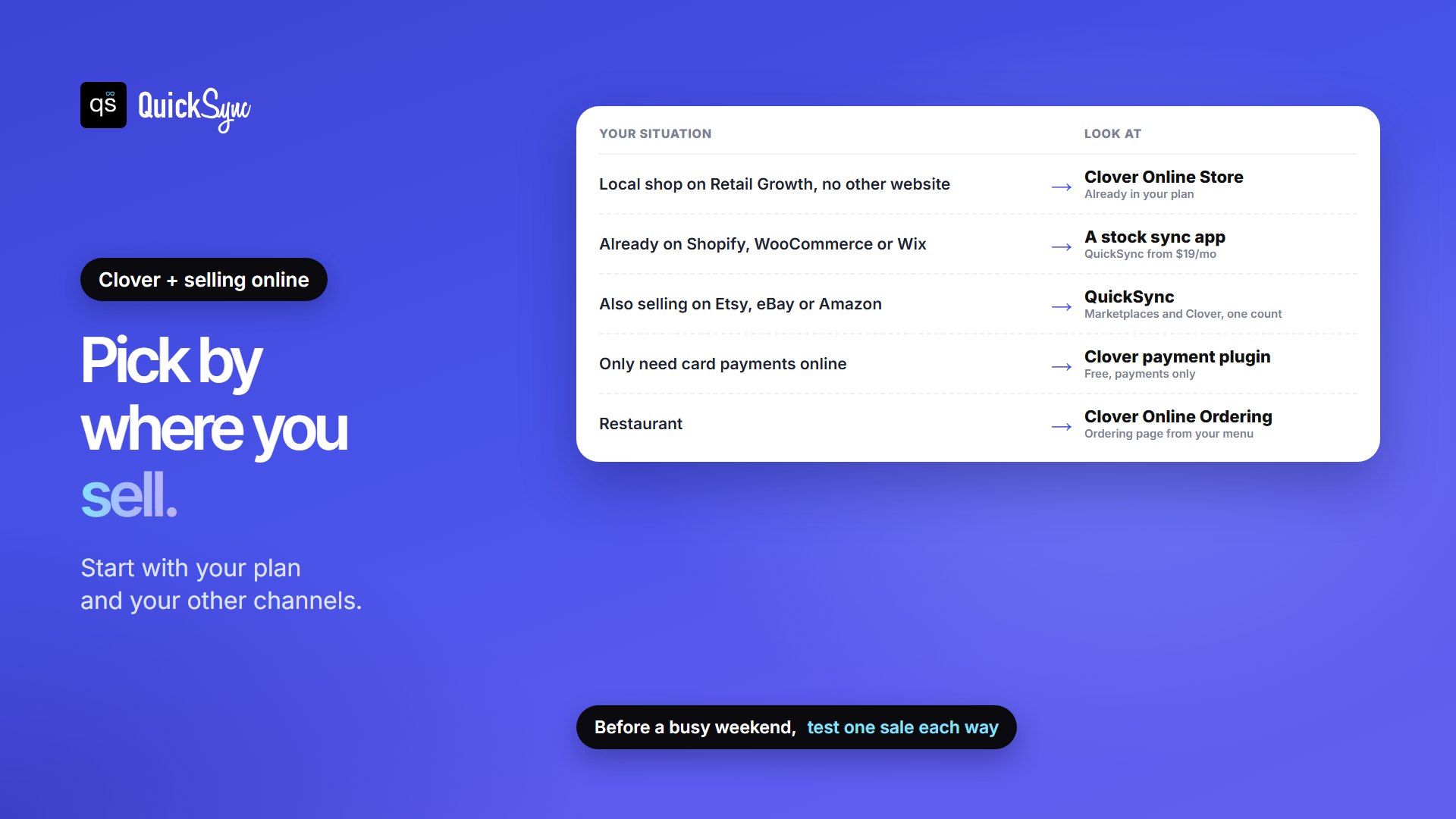
- A local shop on Retail Growth with no other website: Clover Online Store. It’s already in your plan.
- You already run Shopify, WooCommerce or Wix: keep your store and add a stock sync app. Add Clover’s payment plugin too if you want one merchant account.
- You also sell on Etsy, eBay, Amazon or TikTok Shop: a sync app that covers marketplaces, such as QuickSync.
- You only need to take card payments online: Clover’s free plugin for Shopify or WooCommerce.
- You’re a restaurant: Clover Online Ordering.
Whichever route you take, test it before a busy weekend: sell one item online and check that your Clover count drops, then sell one at the counter and check your website.
FAQs
More guides: Clover vs Square, Shopify vs Clover, Clover inventory management, the best Clover App Market apps, and our Clover integration page.