Clover vs Square POS, both run a till, take cards and give you a way to sell online. The difference shows up in three places: what a card payment costs, what you pay for hardware up front, and how well each one handles sales that don’t happen at the counter. This guide compares them on all three, with the fees worked out on real sale sizes, so you can pick the one that fits how you sell.
In short: Clover charges less per sale at the counter, and its hardware is built for busy shops and restaurants. Square is cheaper to start, never ties you to a contract, and includes an online store on its free plan. If most of your sales are in person, Clover usually comes out ahead. If a real share of your sales is online, Square usually does. Neither one connects to Etsy, eBay or Amazon on its own, and that’s where most sellers end up needing a third tool.
Already selling on Shopify, Etsy or eBay as well? Skip to how to keep stock in sync with either POS.
Clover vs Square at a glance
| Clover | Square | |
|---|---|---|
| Monthly software | $29.95 to $129.85, by plan and business type, or a bundle with hardware from $40 | $0 (Free), $49 (Plus) or $149 (Premium), per location |
| In-store card rate | 2.3% + 10¢ to 2.6% + 10¢ | 2.4% + 15¢ to 2.6% + 15¢ |
| Online card rate | 3.5% + 10¢ | 2.9% + 30¢ (Plus, Premium) or 3.3% + 30¢ (Free) |
| Keyed-in card rate | 3.5% + 10¢ | 3.5% + 15¢ |
| Cheapest way in | Clover Compact, $349 | Square Reader, $59, on the free plan |
| Countertop system | Station Duo, $1,899 | Square Register, $899 |
| Online store | Clover Online Store (pickup and local delivery) | Square Online, included on the free plan |
| Contract | Depends on where you buy; some offers need a 3-year processing agreement | None; cancel any time |
| Best for | Busy counters, restaurants, high in-store volume | New shops, mixed online and in-store sales |
Clover vs Square fees
Card fees are where most of the money goes, so look past the headline rate. Both charge a percentage plus a fixed amount per payment. Clover’s fixed part is 10¢. Square’s is 15¢ in store and 30¢ online. On small sales, that fixed part matters more than the percentage. Our guide to Square fees breaks down every Square rate by plan.
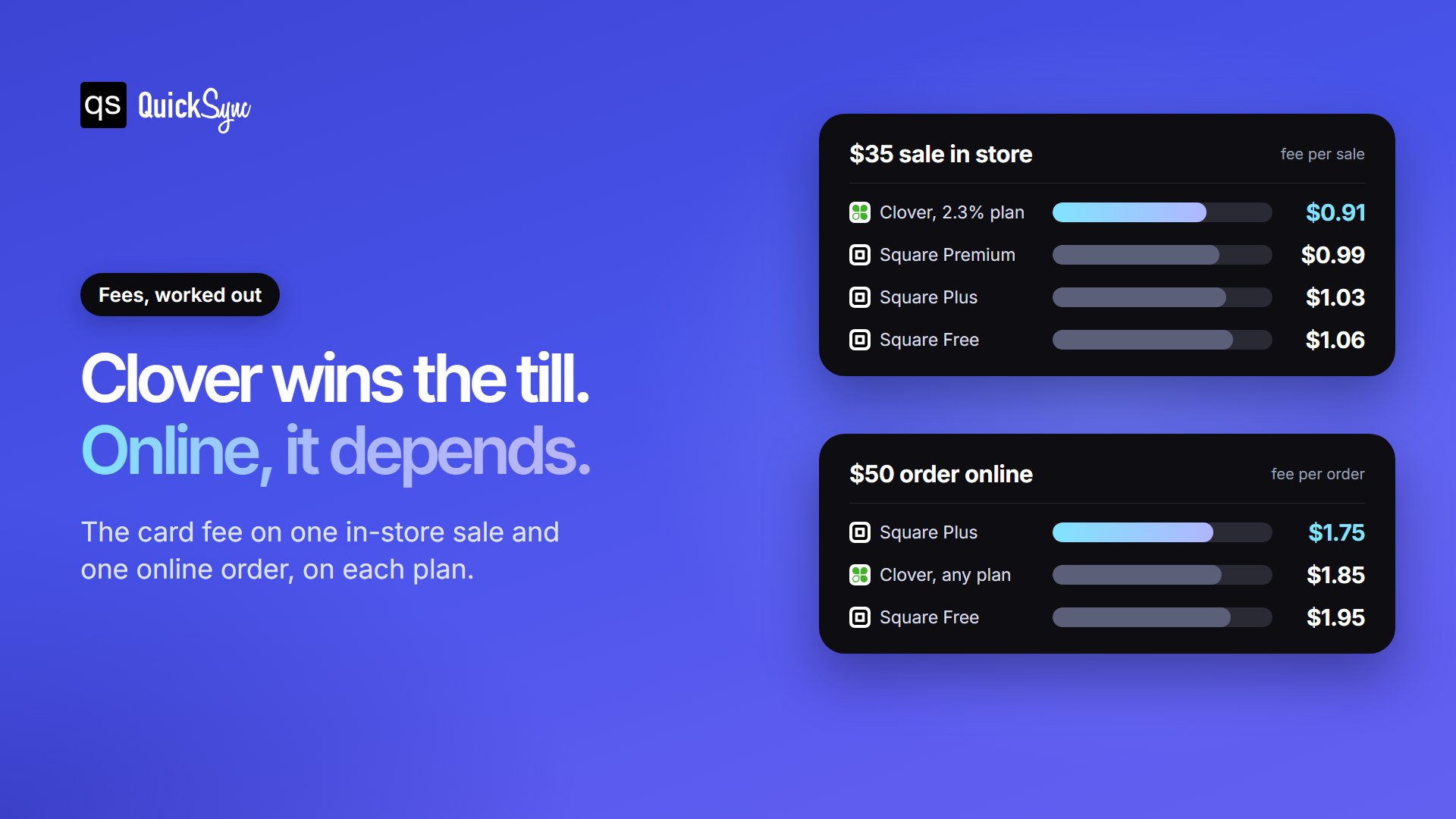
In store, Clover is cheaper. On a $35 sale, Clover’s 2.3% rate costs you $0.91. Square costs $0.99 on Premium, $1.03 on Plus and $1.06 on Free. Even Clover’s highest in-store rate, 2.6% + 10¢ ($1.01), beats Square Free, because of the lower fixed fee.
Online, it depends on the plan. Clover charges 3.5% + 10¢ on every online and keyed-in payment. On a $50 order that’s $1.85. Square Plus and Premium charge $1.75, and Square Free charges $1.95. Clover beats Square Free on online orders under $100 and loses above that.
What a month costs
Per-sale fees are only half of it, because the paid plans add a monthly charge. Here’s a shop taking $10,000 a month: $7,000 at the counter across 200 sales, and $3,000 online across 60 orders.
| Plan | Card fees | Software | Total a month |
|---|---|---|---|
| Square Free | $329 | $0 | $329 |
| Clover Essentials (2.5% + 10¢) | $306 | $29.95 | $336 |
| Square Plus | $310 | $49 | $359 |
| Clover Growth (2.3% + 10¢) | $292 | $84.95 | $377 |
| Square Premium | $303 | $149 | $452 |
At this size, Square Free is the cheapest at $329, with Clover Essentials $7 behind. The higher plans cost more in total, because the monthly fee is bigger than what they save on card fees. Square Plus, for example, saves this shop about $19 a month in fees against a $49 charge, so it only pays for itself at roughly two and a half times these sales. Most shops move to a paid plan for its features, such as deeper inventory tools, staff permissions and loyalty, rather than for the rate.
One thing to check with Clover: it’s sold on clover.com and through banks and resellers, and they don’t all charge the same. Ask for the processing rates, the monthly fee and any early termination fee in writing before you sign. Square publishes one set of rates for everyone. Our Clover fees and pricing guide lists every plan rate and hardware price. Our Clover POS review covers the contract questions to ask before you sign.
Want to run your own numbers for Square? Our free Square fee calculator works out the fees by plan and channel.
Hardware: what you pay up front
Square is the cheaper way to start. The Square Reader is $59 and works with your phone or tablet. Square Stand, which turns an iPad into a till, is $149. Square Terminal is $299, Square Handheld is $399, and the full countertop Square Register is $899.
Clover costs more but is built heavier. Clover Compact is $349, the handheld Clover Flex is $749, Clover Mini is $849, and the countertop Station Duo is $1,899. Clover also lets you roll hardware and software into one monthly payment over 36 months. That lowers the starting cost, but you pay more over the three years than you would buying outright.
Both lock their hardware to their own payments. Clover devices only work with Clover’s processing (Clover is owned by Fiserv), and Square devices only work with Square. If you switch, you replace the hardware too.
Selling online with Clover vs Square
This is the biggest difference between the two.
Square Online comes with every Square account, including the free plan. You get a website builder and options for shipping, pickup and local delivery. It shares one catalogue with your till, so an item sold at the counter comes off the website too. Connecting your own domain needs Square Plus, which also adds more design control. For a shop that wants a simple website without paying for a second platform, this is the main reason to pick Square.
Clover offers the Clover Online Store, a website you set up from the Clover dashboard. Orders are fulfilled by in-store pickup or, in some areas, local delivery through DoorDash Drive. Restaurants get a separate online ordering product. Retailers who want a fuller store, with shipping, themes and apps, usually pair Clover with Shopify, Wix or WooCommerce. Clover’s own route for that is the SKU IQ add-on. If it doesn’t suit you, see our SKU IQ alternatives.
Neither one sells on marketplaces
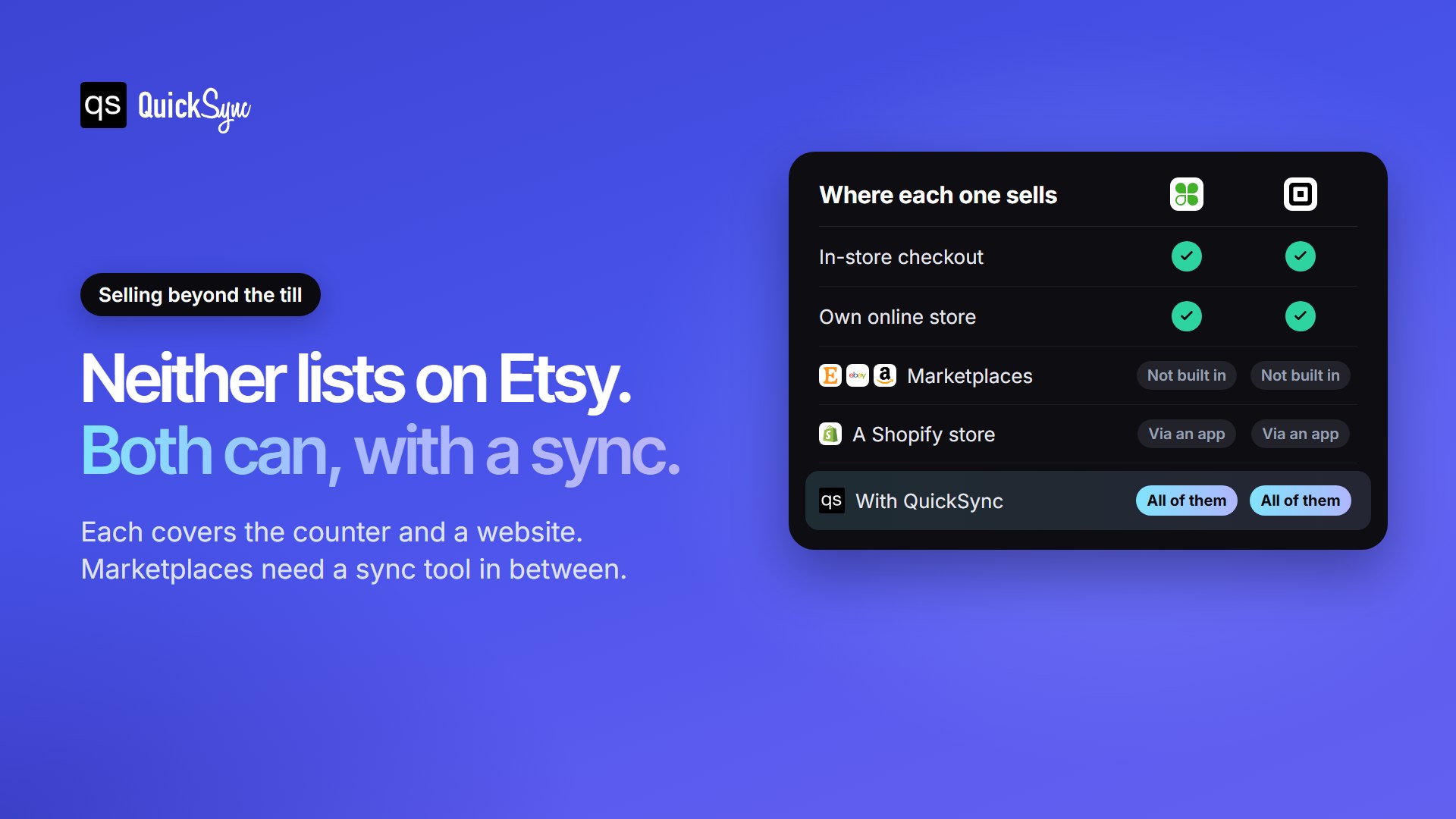
Neither Clover nor Square has a built-in connection to Etsy, eBay or Amazon. If you sell the same stock in your shop and on a marketplace, every sale in one place has to come off the count in the other. Done by hand, that works until a busy Saturday, when an online buyer pays for the last item a customer just carried to the counter. Then you’re refunding an order and taking a hit on your seller rating.
That gap is what QuickSync fills, and it works the same whichever POS you choose. Connect Clover or Square to your other shops, and a sale in any one of them updates the stock in the rest:
| If you also sell on | With Clover | With Square |
|---|---|---|
| Shopify | Shopify Clover integration | Shopify Square integration |
| Etsy | Etsy Clover integration | Square Etsy integration |
| eBay | eBay Clover integration | Square eBay integration |
| TikTok Shop | TikTok Shop Clover integration | Square TikTok Shop integration |
| WooCommerce | WooCommerce Clover integration | WooCommerce Square integration |
Stock syncs both ways, and products are matched by SKU, so a catalogue that already exists on both sides links up instead of doubling. QuickSync can also copy listings, prices and photos across, and bring marketplace orders in so your counter can pack them. Plans start at $19 a month for two connected shops, with listing and order sync from $29.
Inventory and day-to-day use
Both track stock per item and per variation, and both handle more than one location. The differences are in depth and cost.
- Clover includes inventory tracking on its retail plans, and the top retail plan adds purchase orders and supplier management. The App Market adds more, though many apps carry their own monthly fee. Our guide to Clover inventory management covers the setup.
- Square includes basic stock tracking on the free plan, with more advanced item settings on Plus. It’s the easier of the two to learn.
- Separate accounts, such as two shops with different owners, need a sync tool on either system. See syncing multiple Clover accounts and syncing multiple Square accounts.
Both connect to QuickBooks for your accounting. Clover offers its own Accounting Sync on some plans, plus several apps; compare them in our best Clover QuickBooks integration apps guide. For Square, see the best Square QuickBooks integration apps.
Clover vs Square: pros and cons
| Pros | Cons | |
|---|---|---|
| Clover | Lower in-store fees; sturdy hardware for busy counters; strong restaurant tools; a large app store | High upfront hardware cost; prices and contracts vary by seller; 3.5% online rate; many apps cost extra |
| Square | Free plan and $59 reader; no contract; online store included; one public price list | Higher fixed fee per sale; paid plans charged per location; custom domain needs Plus; Square can pause payouts while it reviews payments it flags as unusual |
Clover vs Square: which should you choose?
- Choose Clover if most of your sales happen at a counter, you take a lot of card payments a day, or you run a restaurant. The lower in-store rate adds up, and the hardware is built for heavy use.
- Choose Square if you’re starting out, want no contract and a low setup cost, or sell a real share online. The free plan and Square Online cover a lot before you pay anything monthly.
- Either way, if you also sell on Shopify, Etsy, eBay or TikTok Shop, plan how the stock will stay in sync. That decision affects your day-to-day more than a tenth of a percent on the card rate. For Clover and Shopify, our guide to the best Shopify Clover integration apps compares the options.
Switching between Clover and Square
Moving from one to the other doesn’t mean typing your catalogue out again. Connect both to QuickSync, let it copy your products across, and keep stock matched while you change over. Listings copied onto Clover wait for you to review them before they go live. Keep SKUs under 80 characters, since that’s Square’s limit (Clover allows 100). Some sellers run both for good, with Clover at one location and Square at another, and use the Square Clover integration to keep one stock count. Start 14-day trial.
FAQs
Running Clover or Square alongside an online shop or marketplace? Start 14-day trial or book a walkthrough.