
You sell handmade or vintage goods, and you’re deciding where your shop should live. Etsy puts you in front of buyers who are already searching. WooCommerce turns a WordPress site into a store that’s fully yours. On a $40 sale, Etsy keeps about $4.25 in fees. WooCommerce with WooPayments keeps $1.46, but you pay for hosting every month.
This Etsy vs WooCommerce guide compares the two on cost, getting buyers and control. It works out how many orders it takes before your own store becomes cheaper, shows how to move your Etsy listings over, and explains how to sell on both without selling the same item twice.
Etsy vs WooCommerce at a Glance
Etsy is a marketplace: no monthly cost and built-in shoppers, but about 10.6% in fees on a $40 order. WooCommerce is a free WordPress plugin: 2.9% + 30¢ per card payment with WooPayments, but you pay for hosting, run the site yourself and bring every visitor. Choose Etsy to find buyers, WooCommerce to own your store, or use both.
| Etsy | WooCommerce | |
|---|---|---|
| What it is | An online marketplace for handmade, vintage and creative goods | A free ecommerce plugin that turns a WordPress site into a store |
| Built-in shoppers | Yes, buyers search Etsy for products | No, every visitor comes from you |
| Monthly cost | $0 (Etsy Plus is an optional $10) | Hosting, which WooCommerce puts at $25–$350 a month for most stores |
| Listing fee | $0.20 per listing, every 4 months | None |
| Per-sale fees | 6.5% transaction fee + 3% + 25¢ processing | 2.9% + 30¢ with WooPayments (US cards) |
| Ad fees | Offsite Ads: 15%, or 12% for bigger shops, on orders from Etsy’s ads | None, unless you buy your own ads |
| What you can sell | Items you made, designed, handpicked or sourced | Any product type, within your payment provider’s rules |
| Design control | Limited: your shop uses Etsy’s layout | Full: any WordPress theme, page and blog |
| Your own domain | No, your shop lives on etsy.com | Yes |
| Who runs the tech | Etsy | You: hosting, updates, plugins and backups |
| Best for | New sellers who need buyers | Sellers with their own audience who want control |
What Etsy and WooCommerce Actually Are
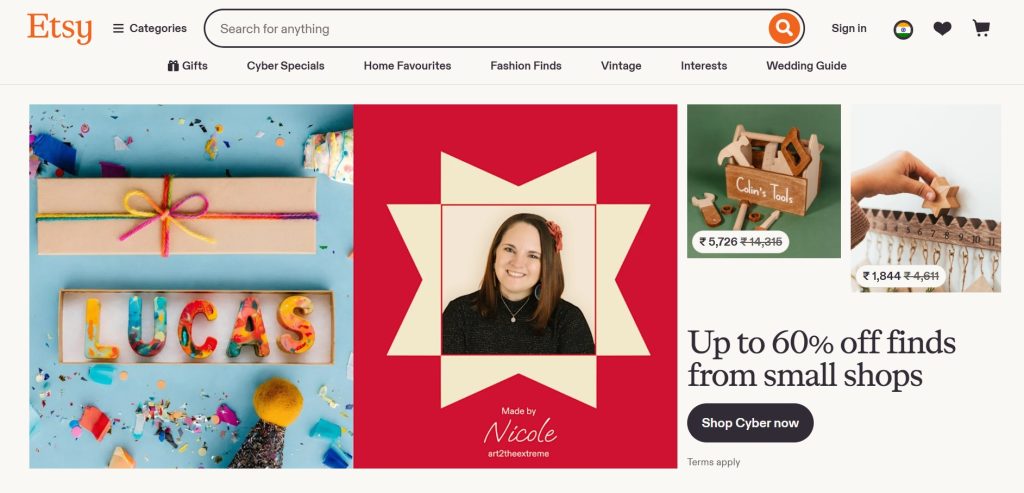
Etsy is a marketplace. You list items on etsy.com, and shoppers find them through Etsy’s search, its ads and its app. Etsy also sets the rules on what you can sell: everything must be made, designed, handpicked or sourced by you, and reselling mass-produced items isn’t allowed, apart from limited exceptions. Vintage items must be at least 20 years old, and craft supplies are welcome too.
WooCommerce is a free, open-source plugin for WordPress. Install it on a WordPress site and you have an online store with your own domain, design and checkout. WooCommerce doesn’t limit what kind of products you sell, though your payment provider has its own rules.
“Free” needs a footnote. The plugin costs nothing, but a WooCommerce store still needs hosting and a domain, and many stores add paid extensions. A WooCommerce store also sits on its own: nobody browses every WooCommerce store in one place, so it only gets the visitors you send to it.
Etsy vs WooCommerce Fees
Etsy has no monthly fee. You pay per listing and per sale:
- Listing fee: $0.20 per listing. Listings last 4 months, and multi-quantity listings renew for another $0.20 each time an item sells.
- Transaction fee: 6.5% of the item price plus delivery and gift wrap.
- Payment processing (US): 3% + $0.25 per order, on the total including delivery and tax.
- Offsite Ads: 15% of orders that come from Etsy’s ads on other sites, or 12% once your shop passes $10,000 in sales over a year, capped at $100 per order. Shops under $10,000 can opt out; above it, you can’t.
WooCommerce charges no platform fee and takes no share of your sales. Your costs come from the pieces you choose:
| Cost | What WooCommerce says |
|---|---|
| WooCommerce itself | Free, with no monthly subscription |
| Hosting | $25–$350 a month for most stores, rising with traffic |
| Extensions | $29–$299 a year per extension, only if you add them |
| Payments | Only your payment provider’s processing fees |
| Domain | Extra, from your registrar or host |
You can use any payment provider with WooCommerce. If you use WooCommerce’s own, WooPayments, these are the US rates:
| Payment type | WooPayments fee |
|---|---|
| Cards, Apple Pay and Google Pay | 2.9% + 30¢ |
| Card issued outside the US | +1.5% |
| Currency conversion | +1% |
| Affirm or Afterpay | 6% + 30¢ |
| Klarna | 5.99% + 30¢ |
| Dispute | $15, refunded if you win |
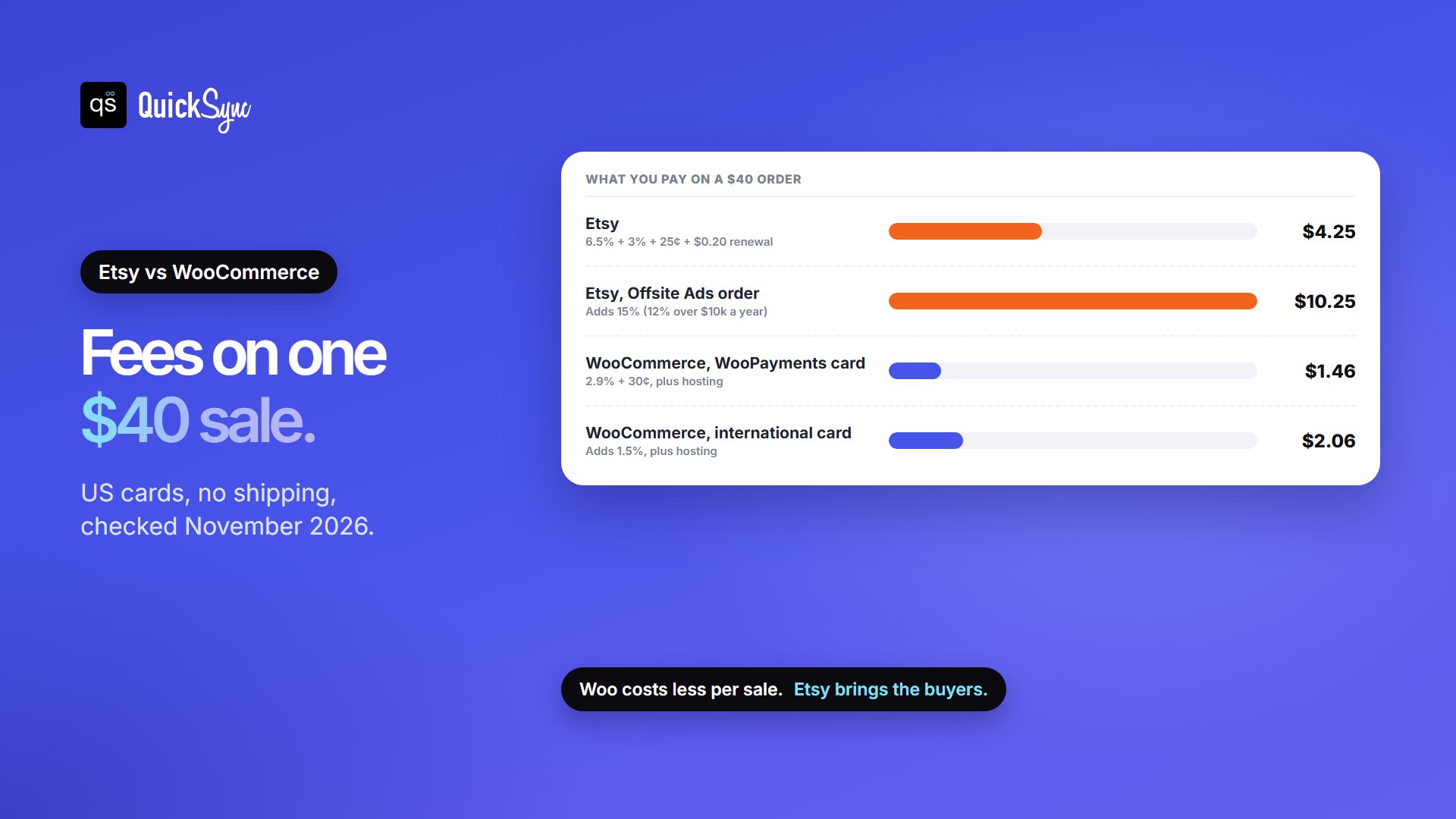
Here’s what that means on one $40 sale with free shipping and a US card:
| Where the $40 sale happens | Fees | Share of the sale |
|---|---|---|
| Etsy | $2.60 (6.5%) + $1.45 (3% + 25¢) + $0.20 renewal = $4.25 | 10.6% |
| Etsy, from an Offsite Ad | $4.25 + $6.00 (15%) = $10.25 | 25.6% |
| WooCommerce, WooPayments card | $1.16 + 30¢ = $1.46, plus hosting | 3.7% |
| WooCommerce, card issued outside the US | $1.46 + $0.60 (1.5%) = $2.06, plus hosting | 5.2% |
For the full list of what Etsy can charge, see our breakdown of Etsy fees.
When Does WooCommerce Become Cheaper Than Etsy?
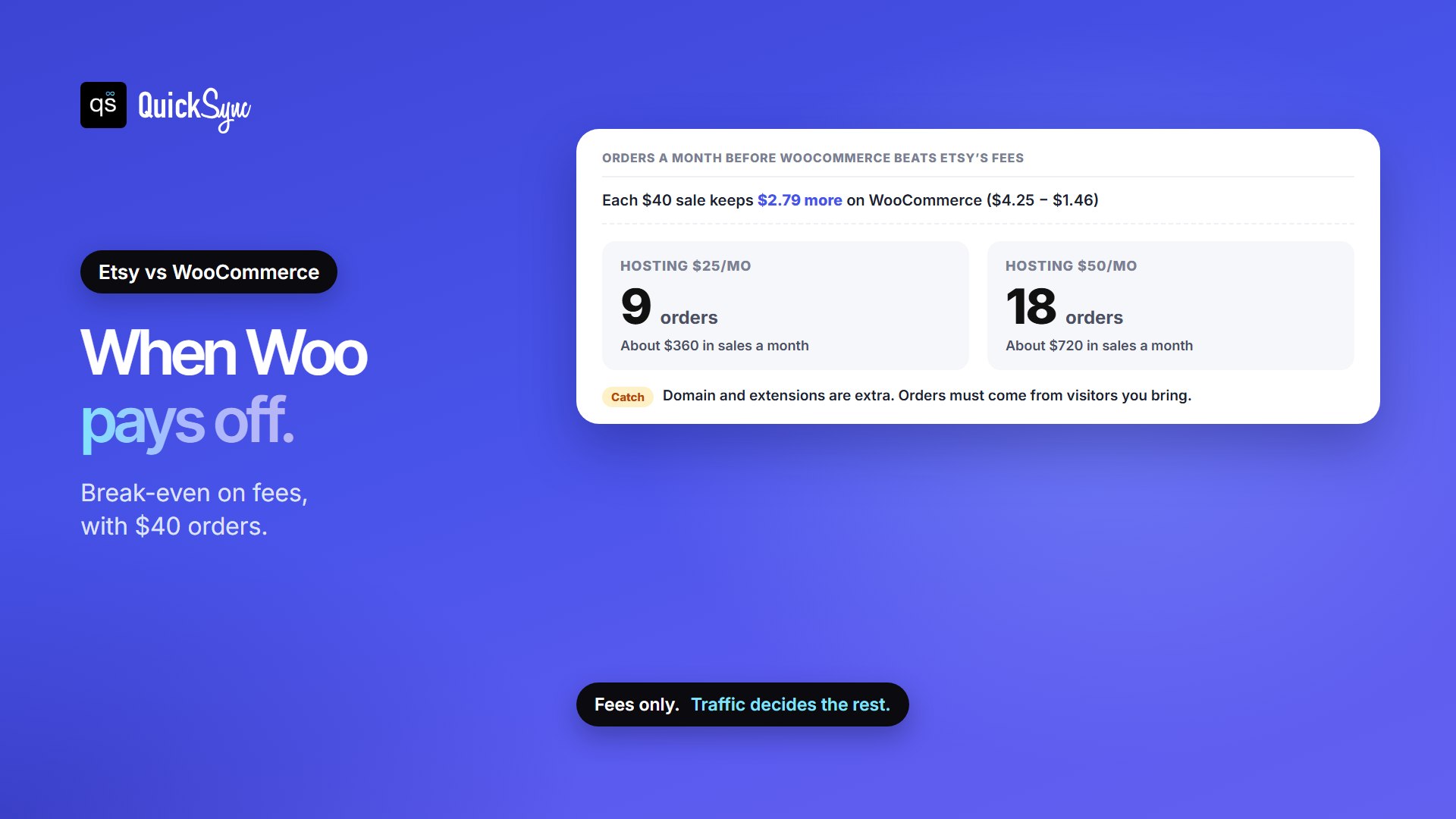
Each $40 sale on WooCommerce keeps $2.79 more than the same sale on Etsy ($4.25 minus $1.46). Hosting has to be paid back first:
- Hosting at $25 a month (the bottom of WooCommerce’s range): $25 ÷ $2.79 = 9.0, so about 9 orders, or $360 in sales a month.
- Hosting at $50 a month: $50 ÷ $2.79 = 17.9, so about 18 orders, or $720 in sales a month.
Add your domain and any paid extensions on top. Each extension adds its yearly price to the total you need to cover.
That’s fees only. The bigger question is where those 9 or 18 orders come from. On Etsy, some buyers find you who never would have otherwise. Moving them to a WooCommerce store nobody visits doesn’t save money; it loses sales.
| Your situation | What the numbers say |
|---|---|
| Under 10 orders a month, mostly found through Etsy search | Stay on Etsy. Hosting would cost more than it saves. |
| Regular orders from your own customers (Instagram, email, markets) | A WooCommerce store pays for itself on those orders. Keep Etsy for new buyers. |
| A big share of Etsy orders arrive through Offsite Ads | Each of those costs $10.25 on a $40 sale. Your own store saves more, and sooner. |
| You already run a WordPress site or blog | WooCommerce adds a store to the site you have, so the extra cost is small. |
Getting Buyers: The Real Difference
Etsy’s higher fees pay for something WooCommerce doesn’t offer: people already shopping. Someone searching Etsy for “personalized dog collar” can find you on day one. A new WooCommerce store gets nobody until you share the link or it starts ranking on Google, which can take months.
- On Etsy, buyers find you through Etsy search, Etsy Ads (which you pay for and control) and Offsite Ads (which Etsy runs and charges for when they lead to a sale).
- On WooCommerce, you bring buyers through Google, social media, email and paid ads. WordPress is built for content, so a blog that ranks for what you make is a real advantage, but the work is yours.
So the useful question isn’t “which is cheaper?”. It’s “where will my buyers come from?”
What is the Downside of Each?
Etsy’s downsides:
- Fees add up. About 10.6% on a $40 order, and 25.6% when the order came from an Offsite Ad.
- Offsite Ads become mandatory once you pass $10,000 in sales over a year.
- Strict rules on what you sell. Mass-produced resale isn’t allowed, apart from limited exceptions.
- Competition sits next to you on the same search page, and Etsy sets the layout and rules.
WooCommerce’s downsides:
- You run the site. Hosting, WordPress updates, plugin updates, security and backups are your job, or someone you pay.
- Costs vary. Your bill depends on your host and extensions rather than one fixed plan.
- No built-in shoppers. Every visitor is one you found.
- More setup than opening an Etsy shop.
Moving From Etsy to WooCommerce
If you’re bringing your Etsy listings to a WooCommerce store, you have three options:
- A spreadsheet, for free. In Etsy, go to Shop Manager > Settings > Options > Download Data and download the CSV. It includes each active listing’s title, description, price, quantity, tags, materials, image links and SKU. WooCommerce has a built-in importer under Products > All Products > Import, but it expects its own column format, so you’ll need to rearrange the file first. Etsy’s list of fields doesn’t include variations, so check those by hand, and test a few products before importing everything.
- An import plugin. DPL’s free Etsy Integration for WooCommerce plugin, for example, imports Etsy listings into WooCommerce, with a limit of 20 products on its free tier.
- A sync app. QuickSync can copy products from Etsy to WooCommerce with photos, prices and variants, then keep their stock matched.
Whichever route you take, give each item the same SKU in both shops and keep it to 32 characters or fewer, Etsy’s limit. Matching SKUs are what let you keep selling on both afterwards.
Using Etsy and WooCommerce Together
For many sellers, the answer to “Etsy or WooCommerce?” is both: Etsy for new buyers, a WooCommerce store for your brand, your blog and repeat customers. The catch is stock. A one-of-a-kind piece listed in both places can sell twice.
Etsy and WooCommerce don’t connect on their own, so you need a WooCommerce Etsy integration plugin or app. They differ in two ways: how often they check Etsy for sales, and whether your Etsy orders end up inside WooCommerce. Our comparison of the best WooCommerce Etsy integration plugins covers six options side by side.
With QuickSync, a WooCommerce sale reaches Etsy as it happens, and Etsy is checked for changes every 2 minutes. Products match by SKU, and QuickSync turns on WooCommerce’s Stock management when it writes a count. When an Etsy listing sells out, QuickSync turns it off, so it can’t sell twice. Stock sync is on every plan; product and order syncing start on Pro. Our guide to Etsy inventory management covers the manual options too.
What about Shopify?
Shopify is the other common choice for a store of your own. It’s hosted for you, so there’s less to maintain than WooCommerce, but you pay a monthly plan. See our comparisons of Shopify vs WooCommerce and Shopify vs Etsy.
Which Should You Choose?
The WooCommerce vs Etsy choice comes down to where your buyers are today and how much of the store you want to run yourself:
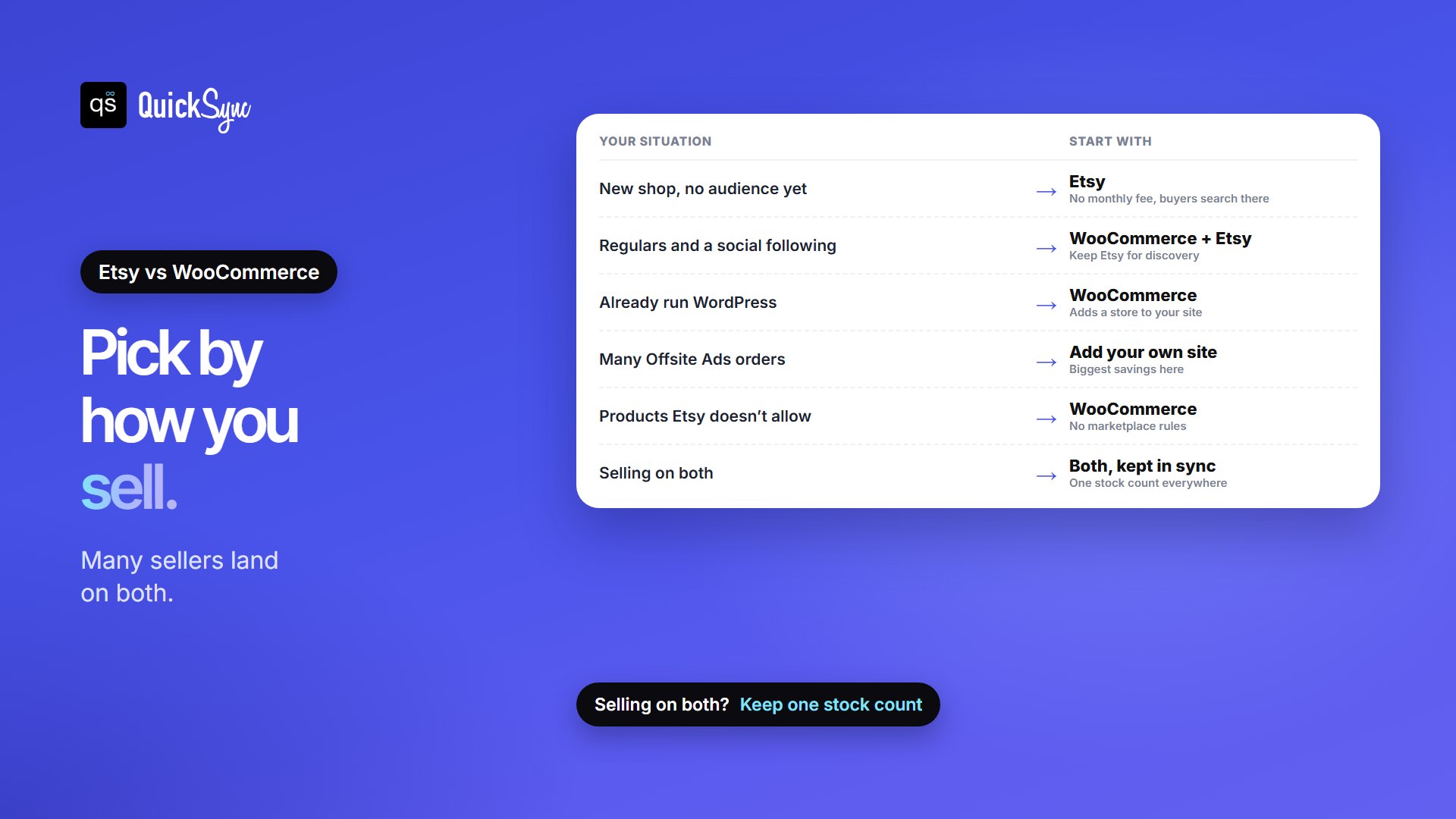
- New shop, no audience yet: start on Etsy. No monthly cost, and the fees buy you buyers.
- You have regulars or a social following: add a WooCommerce store and keep Etsy for discovery.
- You already run a WordPress site or blog: WooCommerce adds a store to it.
- You sell products Etsy doesn’t allow, such as resold mass-produced goods: WooCommerce.
- Many of your Etsy orders come through Offsite Ads: your own store saves the most here.
- You sell on both: keep one stock count with a sync app, so nothing sells twice.
Comparing other options too? See Etsy vs Wix, Etsy vs Squarespace, Etsy vs Square and our list of Etsy alternatives.
FAQs
More for Etsy sellers: how to link your Etsy shop to TikTok and Etsy vacation mode.