Getting your products in front of thousands of shoppers during Black Friday is every Amazon seller’s goal. But when almost every seller is offering a discount, how do you make your products stand out? Amazon Lightning Deals can help by giving your products a dedicated Deals badge and greater visibility on Amazon’s Today’s Deals page for up to 12 hours.
However, more visibility doesn’t always mean more profit. With Black Friday 2026 deal fees of $100 plus 1.5% of deal sales, mandatory discounts, and strict eligibility requirements, sellers need to plan carefully before committing to a deal. A sudden surge in orders can also lead to stockouts and overselling, especially when selling across multiple platforms.
This guide explains how Amazon Lightning Deals work for sellers in 2026: who can run one, what it costs, how to create one, whether you can still get one for Black Friday, and how to keep your stock right while the deal runs. Every rule here comes from Amazon’s Seller Central help pages, checked in November 2026.
What is an Amazon Lightning Deal?
According to Amazon’s deals guide, a Lightning Deal is “a time-bound, promotional offer where a product receives special merchandising such as a Deals badge for a limited number of hours, usually 4 to 12, as determined by us.”
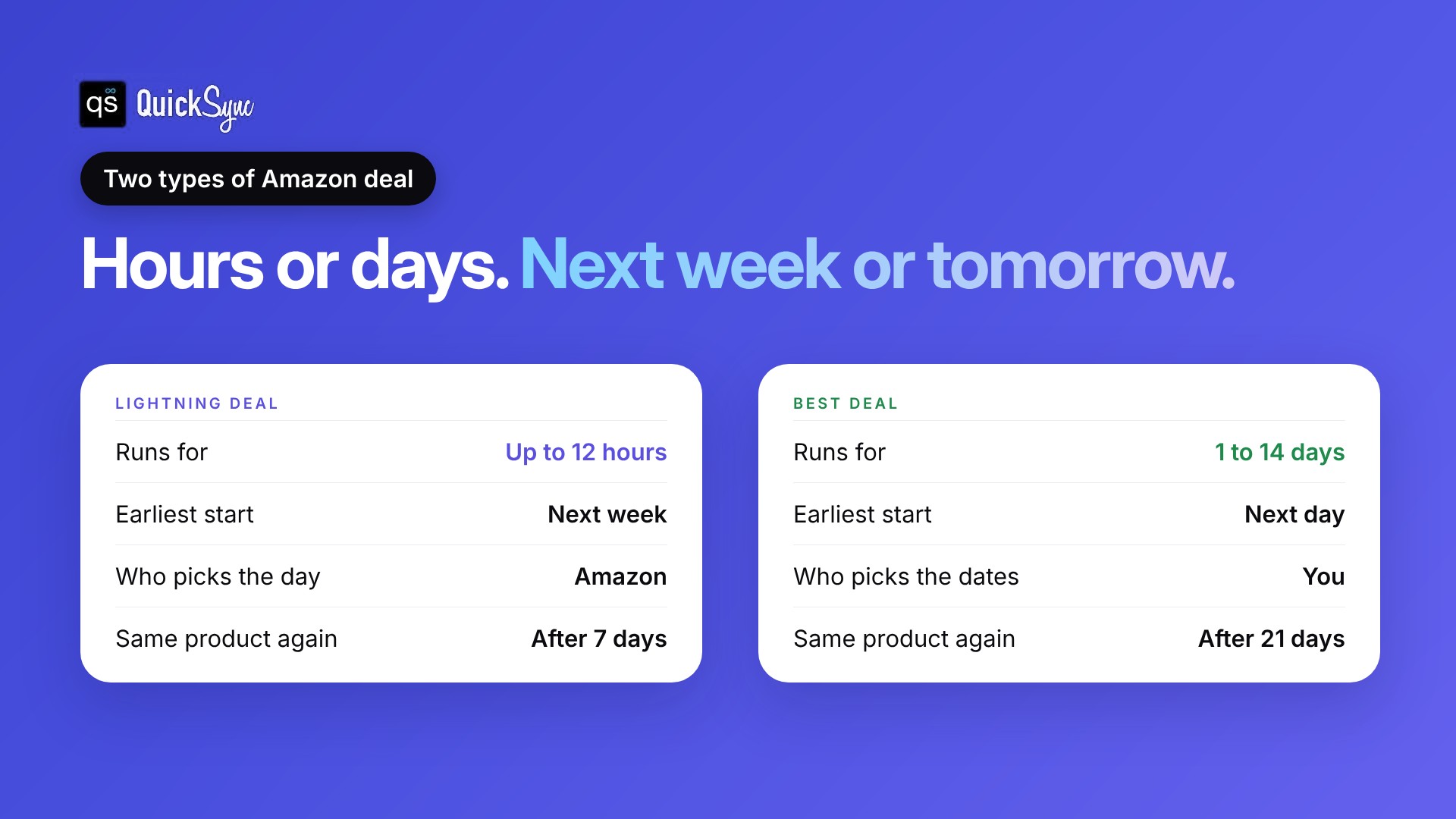
Amazon offers sellers two types of deals. The other is a Best Deal, which runs for days instead of hours.
| Lightning Deal | Best Deal | |
|---|---|---|
| How long it runs | Up to 12 hours, on a day Amazon picks in your chosen week | 1 to 14 days, starting at midnight |
| Earliest start | As soon as next week | As soon as the next day |
| Same product again | Not within 7 days | Not within 21 days |
| Badge | Deals badge | Deals badge |
Both are created from the Deals dashboard in Seller Central. You choose the week. For a Lightning Deal, Amazon chooses the day and time.
Who can run a Lightning Deal?
Amazon Deals is an invite-only program. You can’t request a deal for any product you like. New to Seller Central? Start with our guide to what Amazon Seller Central is. Eligible products appear in the Eligible ASINs section of your Deals dashboard, and that list refreshes every week.
Your account must:
- be a Professional selling account
- have an overall seller rating of at least 3.5 stars
- not be in vacation mode, or you won’t see deal recommendations
Your product must:
- have a sales history on Amazon and at least a 4-star rating
- be in new condition
- have a validated reference price, so Amazon can show a real discount
- include as many variations as possible. For clothing and shoes, at least 65% of variations
If you ship the orders yourself, you also need a late shipment rate of 4% or less, an order defect rate of 1% or less, a pre-fulfillment cancellation rate of 0.5% or less, and free shipping on the deal item. FBA offers are allowed too.
If none of your products are eligible, Amazon suggests using coupons or price discounts instead.
How much do Amazon Lightning Deals cost?
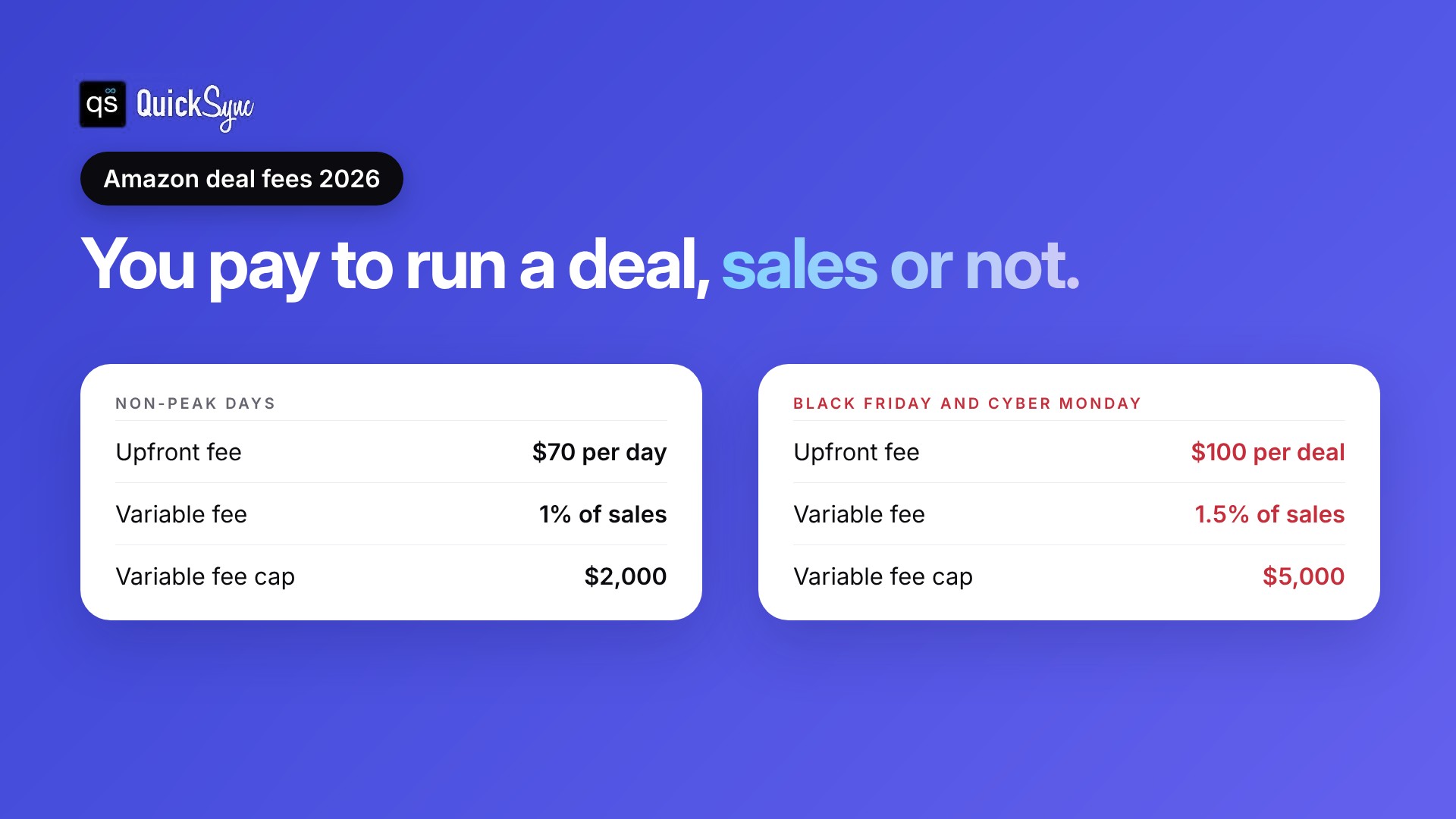
Every deal has a fee, and you pay the upfront part even if the deal sells nothing. According to Amazon’s deal fees page, the 2026 fees are:
| Non-peak days | Black Friday and Cyber Monday | |
|---|---|---|
| Upfront fee | $70 per day | $100 per deal |
| Variable fee | 1% of deal sales | 1.5% of deal sales |
| Variable fee cap | $2,000 | $5,000 |
Here’s what that means for a Black Friday deal. If your deal sells $3,000 worth of product, you pay the $100 upfront fee plus $45 (1.5% of $3,000), so $145 in total.
A few fee rules worth knowing:
- The variable fee is based on the deal price the customer paid.
- You pay the full fee if you cancel a deal while it’s running. Cancel before it starts and you pay nothing.
- Deal fees aren’t refunded if a customer returns the item.
- Running a deal and a coupon on the same product means separate fees for each.
Before you submit, work out your profit at the deal price after your usual Amazon fees and the deal fee.
Selling the same products on another channel too? Jump to keeping stock right during a deal.
How to create a Lightning Deal on Amazon

According to Amazon’s create a deal guide, here’s how to set one up:
- Open the Deals dashboard. In Seller Central, open the Deals dashboard and click Create a new deal.
- Pick a product. Choose an eligible product from your recommendations and click Select.
- Choose the store and week. Pick the Amazon store, then the week you want. For Black Friday or Cyber Monday, pick the event in the Schedule box if it’s listed.
- Set the deal price. Your price must be at or below the Max Price Amazon shows. Amazon works this out from your reference price, recent prices and the lowest price from other sellers.
- Set the deal quantity. Choose a fixed number of units, or commit all your in-stock units.
- Check the fee and submit. The fee shows when you pick the schedule. Review it, then click Submit deal.
You can also create deals in bulk. Download your recommendations as a spreadsheet from the Deals dashboard, fill in the schedule and price, then upload it.
Can you still get a Lightning Deal for Black Friday 2026?
For most sellers, probably not this year. Black Friday 2026 is on Friday, November 27, and Cyber Monday is on November 30. A few rules make a last-minute Lightning Deal hard:
- A new Lightning Deal can start next week at the earliest, according to Amazon. Best Deals can start the next day.
- Event deals aren’t guaranteed. According to Amazon’s deals for events page, Amazon can’t guarantee your deal will be picked for an event. It favors deals with a large available quantity.
- Amazon confirms the date and time at least one week before an event deal runs. If your deal isn’t selected for the event, it runs during the week instead.
If you missed the Black Friday window, you still have options this week:
| Option | Best for |
|---|---|
| Best Deal | A Deals badge for 1 to 14 days. It can start the next day, if your product is eligible |
| Coupon or price discount | Products that aren’t eligible for deals, which Amazon suggests instead |
| Lightning Deal | Planning ahead for December or Prime Day. It can start next week at the earliest |
Some eligible products can also run as Prime Exclusive Deals, which give the deal price to Prime members only. According to Amazon, you’ll see “Prime customers” in the Eligible audiences column of the Deals dashboard if a product qualifies.
Deal quantity and overselling
This is the part of Lightning Deals that catches out sellers who sell on more than one channel.
When you create a deal, Amazon commits units to it. According to Amazon’s create a deal guide:
- By default, all your in-stock units are committed to the deal.
- The deal switches off at 90% of the committed units. Commit 100 units and Amazon starts switching the deal off after 90 sell.
- The quantity isn’t a hard limit. Because of system delays, Amazon says you can sell more than the committed units if a deal gets a lot of orders in a short time.
- You need the stock at least seven days before the deal date.
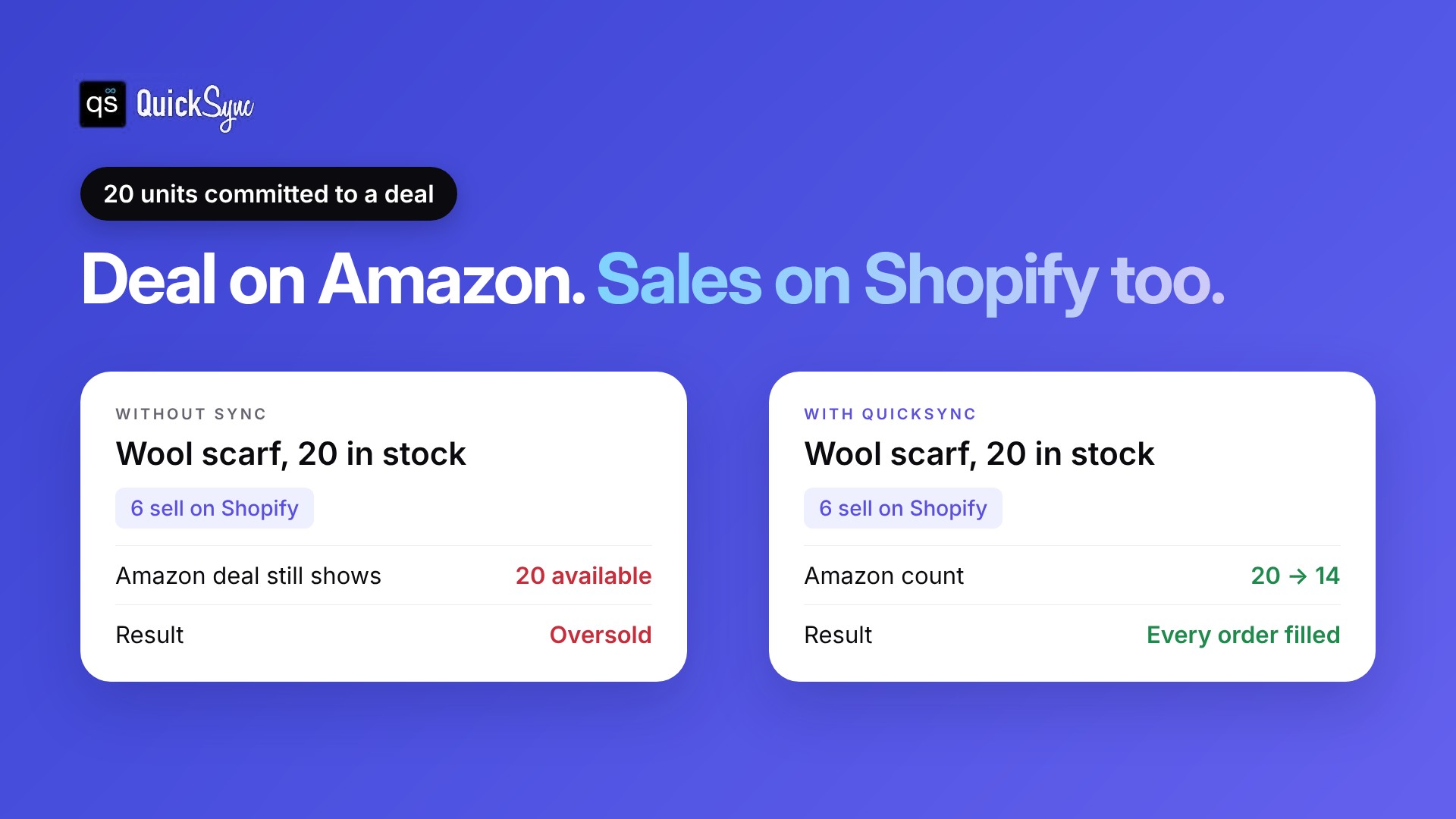
Now picture a seller who ships their own orders and sells the same product on Shopify. They have 20 units and commit all of them to a Black Friday Lightning Deal. During the deal, 6 sell on Shopify. Amazon still thinks there are 20, and keeps selling. By the time the deal stops, the seller has more orders than units.
Closing the Amazon listing isn’t a safe fix. Amazon says that changing a deal product to Closed in Manage Inventory cancels the deal, and you’ll pay the full fee if it was already running.
A multichannel selling tool stops this. For more on the causes, see our guide on how to prevent overselling. QuickSync keeps stock, listings, prices and orders in step across Amazon and your other channels. According to QuickSync’s Amazon page:
- Stock, both ways for items you ship. A sale on Shopify, eBay or Etsy lowers your Amazon count, and an Amazon deal sale lowers the count everywhere else.
- FBA items. QuickSync sends your count to Amazon. Stock in Amazon’s warehouses keeps its own count, which Amazon owns. Read more in our guide to what Amazon FBA is.
- Orders. Your Amazon orders arrive in QuickSync with your other channels’ orders.
- Channels. Amazon connects to Shopify, eBay, Etsy, TikTok Shop, WooCommerce, Square, Clover, Squarespace, Wix and Lightspeed.
Pricing: Lite costs $19 a month for two shops and up to 1,000 items, with stock sync and unlimited orders. Pro costs $29 a month and adds product and order sync. Every trial is 14 days with no card. See the QuickSync pricing page.
Tip: If you also sell on your own site, set a fixed deal quantity instead of “all in-stock”. That keeps some units for your other channels, and stock sync keeps the counts right on both sides.
Lightning Deal rules that catch sellers out
Once your deal is submitted, a few rules can get it canceled or suppressed:
- Don’t raise your price. You can’t raise the price while a deal runs. If you lower your normal price before the deal, you may need to lower the deal price too.
- Discounts stack. Amazon combines a deal with any coupon or promotion running on the same product. A 20% deal plus a 5% promotion on a $100 item takes $25 off.
- Fix errors early. Errors must be fixed 25 hours before the deal starts, or Amazon may cancel it, according to Amazon’s troubleshooting page. Check for “Needs Attention” alerts in the Deals dashboard.
- Don’t add new variations. Adding child ASINs after you submit can get the deal suppressed or canceled.
- Use clean images. Deal images come from your listing. They must be on a white background, with no added text, logos or watermarks.
- A deal doesn’t guarantee the Featured Offer. If another seller wins it, your deal may not show. Amazon suggests lowering your deal price to improve your chances.
For a full plan for the weekend, including shipping and returns, see our BFCM checklist for multichannel sellers.
Final thoughts
Amazon Lightning Deals put your products in front of shoppers who are already looking for deals. They’re invite-only, they cost $100 plus 1.5% of sales during Black Friday and Cyber Monday, and Amazon decides exactly when they run.
If you’ve already got a Black Friday deal scheduled, check the Deals dashboard for alerts, keep your price where it is and make sure the stock is there. If you missed the window, use a Best Deal, coupon or price discount this week and plan Lightning Deals for December.
And if you sell the same products anywhere else, connect your channels before the deal starts. A deal can sell fast, and one shared stock count is what stops a good Black Friday turning into canceled orders.