Square says 2.6% + 15¢. Then your deposit lands, and the fees on it don’t match.
That’s because 2.6% + 15¢ is only one line on Square’s price list. The same $100 sale can cost you anywhere from $2.75 to $4.25 on Square’s Free plan, depending on whether the customer tapped a card, paid online, had their card keyed in, or used a card from outside the US. Add a monthly plan per location, instant transfers and refunds, and the real cost gets hard to see.
This guide puts all Square fees in one place: the 2026 rates for each plan, what Square takes from a $100 sale, when Square Plus or Premium actually pays for itself, and how to pay less. Every rate was checked on Square’s fees page and help center on 28 October 2026. These are US rates.
Square Fees Overview: At a Glance
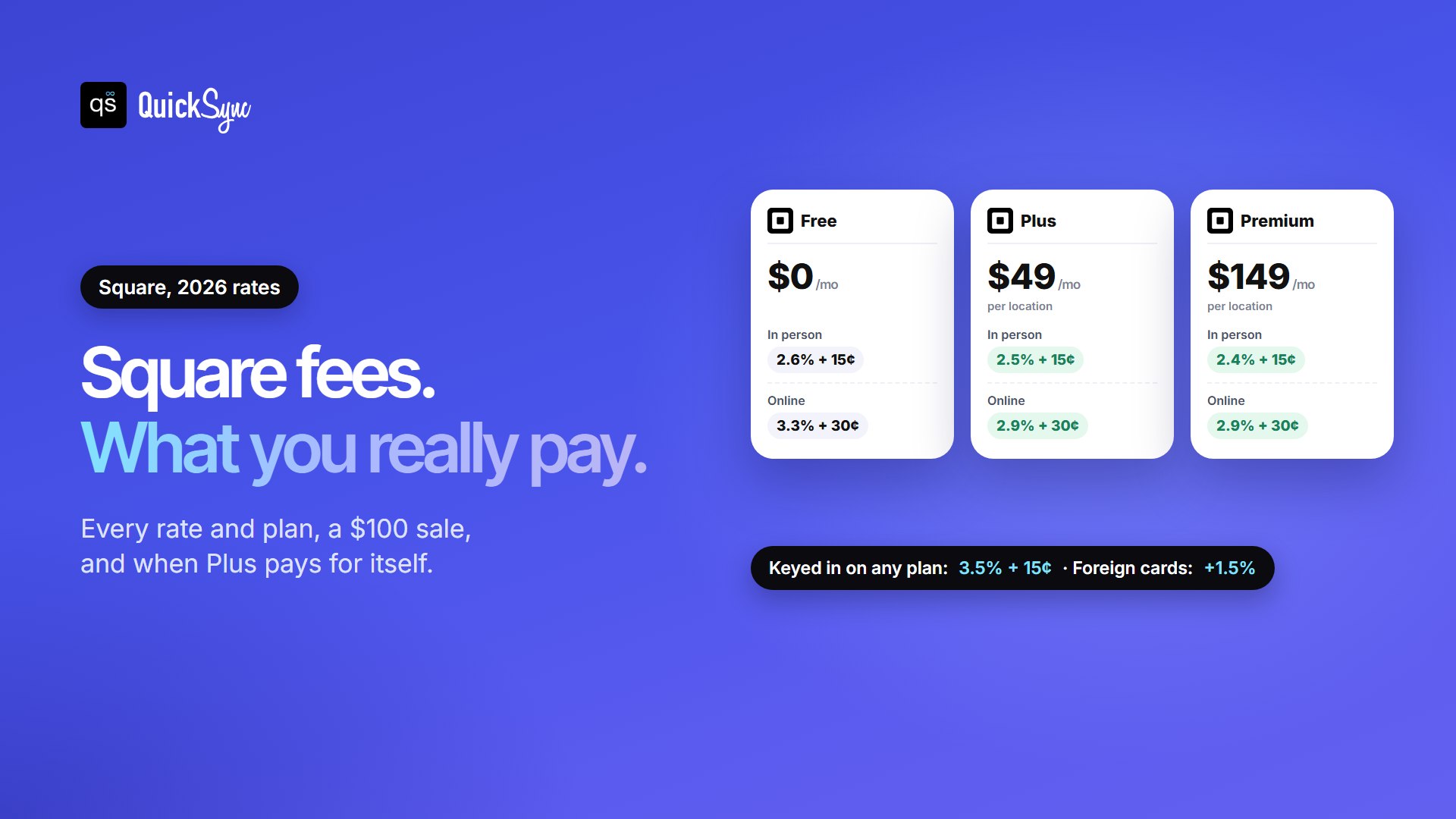
On Square’s Free plan, you pay 2.6% + 15¢ for in-person card payments, 3.3% + 30¢ for online and invoice payments, and 3.5% + 15¢ for keyed-in cards. Square Plus ($49 a month per location) and Premium ($149 a month per location) lower the in-person and online rates. Cash and checks are free.
Square has four plans:
- Square Free: $0 a month. You only pay when you take a card payment.
- Square Plus: $49 a month per location. Lower card rates, plus advanced point-of-sale features, loyalty, marketing and staff scheduling.
- Square Premium: $149 a month per location. The lowest published card rates.
- Square Pro: custom pricing for businesses that process more than $250,000 a year. You talk to Square’s team to qualify.
Plus and Premium both come with a 30-day free trial, and Square says you can cancel or switch plans at any time. Visa, Mastercard, American Express, and Discover all cost the same to accept.
Square Processing Fees by Plan in 2026
Here is every published US rate, side by side:
| How the customer pays | Free | Plus | Premium |
|---|---|---|---|
| Tap, dip or swipe (in person) | 2.6% + 15¢ | 2.5% + 15¢ | 2.4% + 15¢ |
| Online checkout or invoice | 3.3% + 30¢ | 2.9% + 30¢ | 2.9% + 30¢ |
| Online through Square’s Payments API | 2.9% + 30¢ | 2.9% + 30¢ | 2.9% + 30¢ |
| Keyed in or card on file | 3.5% + 15¢ | 3.5% + 15¢ | 3.5% + 15¢ |
| ACH bank transfer on an invoice | 1%, $1 minimum | 1%, $1 minimum, $10 cap | 1%, $1 minimum, $10 cap |
| ACH bank transfer through the API | 1%, $1 minimum, $5 cap | 1%, $1 minimum, $5 cap | 1%, $1 minimum, $5 cap |
| Afterpay | 6% + 30¢ | 6% + 30¢ | 6% + 30¢ |
| Cash App (Neighborhoods) | 1% | 1% | 1% |
| Loading a gift card | 2.5% | 2.5% | 0% |
| Card issued outside the US | +1.5% | +1.5% | +1.5% |
| Cash or check | Free | Free | Free |
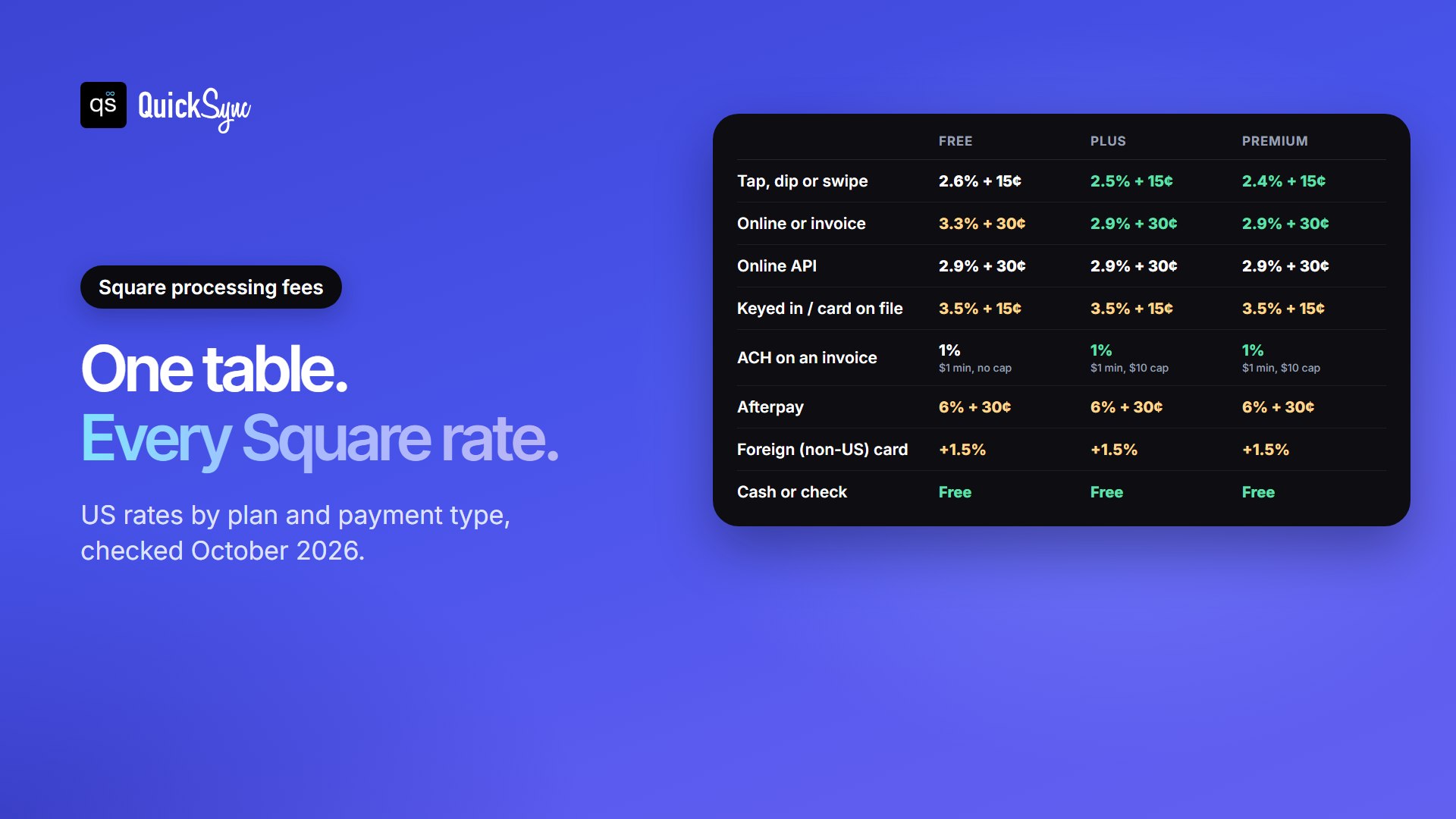
Three things stand out. The online rate on the Free plan (3.3% + 30¢) is the one several ranking guides still get wrong: they quote 2.9% + 30¢, which is now the Plus and Premium rate. Keyed-in payments cost 3.5% + 15¢ on every plan, so upgrading doesn’t help there. And if you’re on an older Square plan, such as a product-specific subscription you signed up for before the current plans, your rates may differ. Check them under Pricing & Subscriptions in your Square Dashboard.
Want to run your own numbers? Our free Square fee calculator works out the fee and your take-home amount for any sale and plan.
What Square Takes from a $100 Sale
Here is the same $100 sale, paid four different ways, on each plan:
| $100 sale paid by | Free | Plus | Premium |
|---|---|---|---|
| Tap, dip or swipe | $2.75 (you keep $97.25) | $2.65 | $2.55 |
| Online checkout or invoice | $3.60 (you keep $96.40) | $3.20 | $3.20 |
| Keyed in or card on file | $3.65 (you keep $96.35) | $3.65 | $3.65 |
| Foreign card, in person | $4.25 (you keep $95.75) | $4.15 | $4.05 |
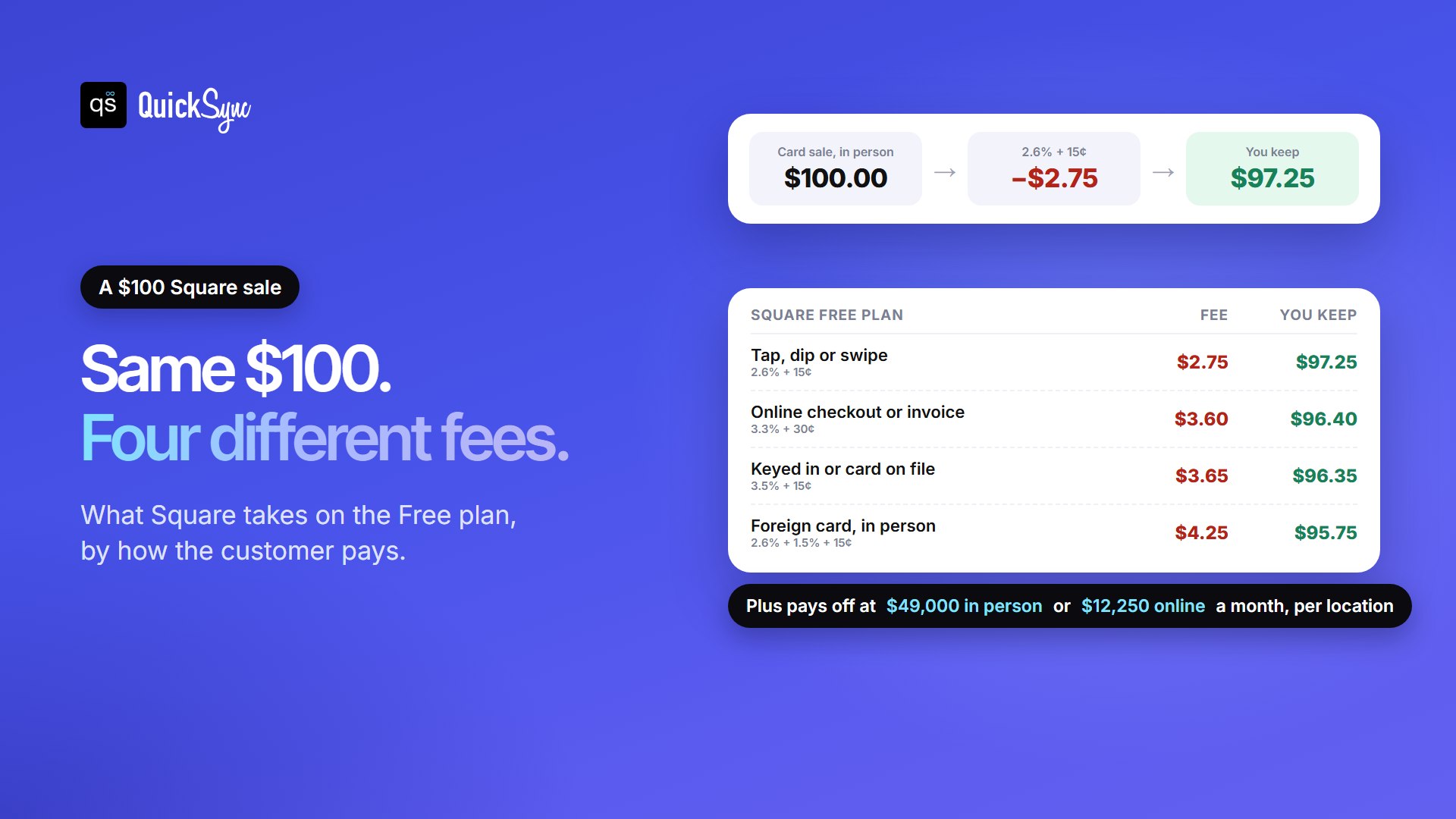
The fixed part of the fee matters more on small sales. A $5 coffee paid by tap costs 13¢ plus 15¢, so 28¢, which is 5.6% of the sale. A $10 sale costs 41¢, or 4.1%. If most of your sales are small, the 15¢ hits harder than the percentage.
Square Free vs Plus vs Premium Plans: When Does Upgrading Pay Off?
Plus costs $49 a month per location and saves 0.1% on in-person cards and 0.4% on online and invoice payments. So it pays for itself, on rates alone, once one location takes about:
- $49,000 a month in in-person card sales ($49 ÷ 0.1%), or
- $12,250 a month in online and invoice card payments ($49 ÷ 0.4%).
Most shops sell both ways, so add the two savings together. For example, a shop that takes $20,000 in person and $5,000 online in a month saves $20 + $20 = $40, which is less than $49. On rates alone, Free is still cheaper for that shop.
Premium costs $100 more than Plus and only saves another 0.1% in person, with no further online saving. That takes about $100,000 a month in in-person card sales per location to cover. Compared with Free, Premium breaks even at about $74,500 a month in person or $37,250 online.
Two things to keep in mind:
- The fee is per location. Two shops on Plus cost $98 a month, so each one has to clear the break-even on its own. If you run several locations or accounts, our guide to connecting multiple Square accounts explains the options.
- Rates aren’t the only reason to upgrade. Plus adds advanced point-of-sale tools for retail, food and appointments, a loyalty program, email and text marketing (the first 500 texts are free, then 3¢ each) and staff scheduling. If you’d pay for those anyway, Plus can make sense well below the break-even.
Why You were Charged More Than 2.6%
If a fee looks too high, it’s almost always due to one of these reason: Our Square for Retail review covers what each plan adds for shops.
- The payment was online or on an invoice. On Free, that’s 3.3% + 30¢, not 2.6% + 15¢.
- The card was keyed in or saved on file. That’s 3.5% + 15¢ on every plan, including phone orders.
- The card was issued outside the US. Square adds 1.5% on top of the normal rate.
- The customer paid with Afterpay. That’s 6% + 30¢, and Square says Afterpay rates don’t vary by plan.
- The sale was small. The fixed 15¢ or 30¢ makes the effective percentage higher.
Your Square Dashboard shows the fee on each payment, so you can match any charge to the rows above.
Other Square Fees to Know
- Instant transfers: 1.95% of the transfer, on top of processing fees, and you need at least $25 in your balance. Without it, your money arrives the next business day at no extra cost: payments taken before 5 PM PT land the next business day, and transfers aren’t sent on Saturdays.
- Refunds: Square doesn’t charge a refund fee, but it keeps the original processing fee. Your customer gets their full payment back, and you lose the fee. This has applied to existing US sellers since 11 April 2023.
- Chargebacks: Square lists chargebacks and dispute management among the things it doesn’t charge for.
- ACH caps: On Plus and Premium, an ACH invoice payment costs 1% but never more than $10. On Free, there’s no cap.
- Subscriptions are per location: Plus and Premium are billed for each location that uses them.
How to Lower Your Square Fees
- Take cards in person where you can. A tap costs 2.6% + 15¢ on Free. Keying in the same card costs 3.5% + 15¢. For repeat phone orders, send an invoice or payment link so the customer pays online instead.
- Use ACH for big invoices. On Plus or Premium, a $5,000 invoice paid by bank transfer costs $10. Paid by card online, it costs $145.30.
- Pick the plan per location. Run the break-even above for each shop, not for the business as a whole.
- Skip instant transfers unless you need the cash today. On $2,000, an instant transfer costs $39. Waiting for the next-business-day transfer costs nothing extra.
- Be careful with Afterpay. At 6% + 30¢, it’s worth it only if it lifts your order size or conversion enough to cover the extra.
- Cut avoidable refunds. Since the fee isn’t returned, clear product details and an exchange option save money on every return.
- Price it in, or surcharge where it’s allowed. See the next section.
Can You Pass Square Fees on to Customers?
Sometimes. Square has a card surcharge feature for US sellers, currently in open beta, with strict limits:
- Credit cards only. Debit cards, ACH, tips, offline payments and split payments can’t be surcharged.
- Capped at 3%, and never more than your actual cost of accepting the card. Some states set a lower cap.
- Not allowed at all for businesses in Connecticut, Maine, Massachusetts or Puerto Rico. California, Colorado, Florida, Kansas, New York, Oklahoma and Texas have extra rules.
- In-person and invoices only. It works in Square’s point-of-sale apps and Square Invoices, but not on Square Online website sales, Kiosk or Virtual Terminal.
- You must display surcharge notices at your business, and printed receipts carry a surcharge notice too.
Square says it’s your responsibility to follow local rules, so check yours before you turn it on. The simpler option for most shops is to build the fee into your prices.
Square fees vs Clover
Clover is the POS most often compared with Square. On the plans each company publishes on its own site:
| Factors | Square | Clover |
|---|---|---|
| Lowest monthly plan | Free, $0 | Starter, $0 |
| In person on the $0 plan | 2.6% + 15¢ | 2.6% + 10¢ |
| Keyed in on the $0 plan | 3.5% + 15¢ | 3.5% + 10¢ |
| Lowest in-person rate shown | 2.4% + 15¢ (Premium, $149 a month) | 2.3% + 10¢ (Retail Growth, $84.95 a month) |
Clover’s fixed fee is 5¢ lower, which adds up on small sales. Square’s Free plan needs no hardware purchase, and you can take payments by invoice, payment link or Tap to Pay on a phone. For the full picture, read our Clover vs Square comparison and our breakdown of Clover fees and pricing. If you’re weighing Square against an online-first platform, see Shopify vs Square. Comparing more than these two? Our guide to Square alternatives compares seven POS systems by your reason for switching.
Selling on Square and Online Marketplaces
Many Square sellers don’t sell online through Square at all. They list on Etsy, eBay, TikTok Shop or Shopify, where the buyers already are. There, the marketplace charges its own fees instead of Square’s online rate. TikTok Shop, for example, takes a 6% referral fee on most categories.
The bigger cost is usually stock, not fees. When the same item is for sale in your shop and online, it can sell twice. Then you refund one buyer, and Square keeps the processing fee. Or you cancel a marketplace order, which can hurt your seller rating.
QuickSync links your Square item library with Etsy, eBay, TikTok Shop, Shopify and WooCommerce. It matches each item by SKU and updates stock on every channel when something sells. You keep one stock count whether the sale happens at the counter or online. Our guide to Square inventory management covers how to set up your item library first.
FAQs
More guides for Square sellers: Square inventory management, the best POS systems for small businesses and the best Square QuickBooks integration apps.