Plenty of Square for Retail guides still describe it as an $89-a-month add-on. That’s no longer how Square sells it. Square’s retail tools now come with every Square plan, including the free one.
The product itself has held up well. Square’s retail app is rated 4.7 out of 5 from about 14,000 ratings on the App Store. What changed is how you pay for it, and which features sit behind which plan.
This Square for Retail review covers what you get on Square Free, Plus and Premium, what it really costs, the pros and cons, and who should pick a different POS. Prices and features were checked on Square’s retail pricing page on 28 October 2026. These are US prices. Thinking of leaving Square instead? Our Square alternatives guide compares seven other POS systems.
Square for Retail: In short
Square for Retail is Square’s point of sale for shops. It’s free to start, with barcode scanning, stock tracking and an online store. Square Plus ($49 a month per location) adds purchase orders and cost reports, and Premium ($149) adds transfers between stores. It suits small, counter-first shops best.
| Best for | Single shops and small groups of stores that sell mostly in person |
| Price | $0, $49 or $149 a month per location, plus card fees |
| Card rate in person | 2.6% + 15¢ on Free, down to 2.4% + 15¢ on Premium |
| Standout | A full retail register at $0, and an app rated 4.7 from about 14,000 ratings |
| Watch out for | Per-location pricing, transfers only on Premium, and no built-in sync with Etsy, eBay, Amazon or TikTok Shop |
What is Square for Retail in 2026?
Square for Retail is the version of Square’s point of sale built for shops. The app, called Square: Retail Point of Sale, is free to download. It’s designed around a search-and-scan checkout: you build a cart by typing a product name or scanning a barcode, instead of tapping item tiles like a café would.
The big change is the pricing. Square used to sell a separate Square for Retail Plus subscription, which it raised to $89 a month per location for new subscribers in November 2023. Today, Square’s retail pricing page says you get retail features with any Square plan: Free, Plus, Premium or Pro.
If you subscribed to the old Retail Plus plan, check what you’re paying under Pricing & Subscriptions in your Square Dashboard. One seller on the Square Seller Community reported still being billed $89, and a Square moderator replied that Square Plus should be $49 a month per location.
Square for Retail pricing: Free vs Plus vs Premium
Each plan adds a layer of retail tools on top of the one before it:
| Plan | Monthly price | What it adds for retail | In-person card rate | Online card rate |
|---|---|---|---|---|
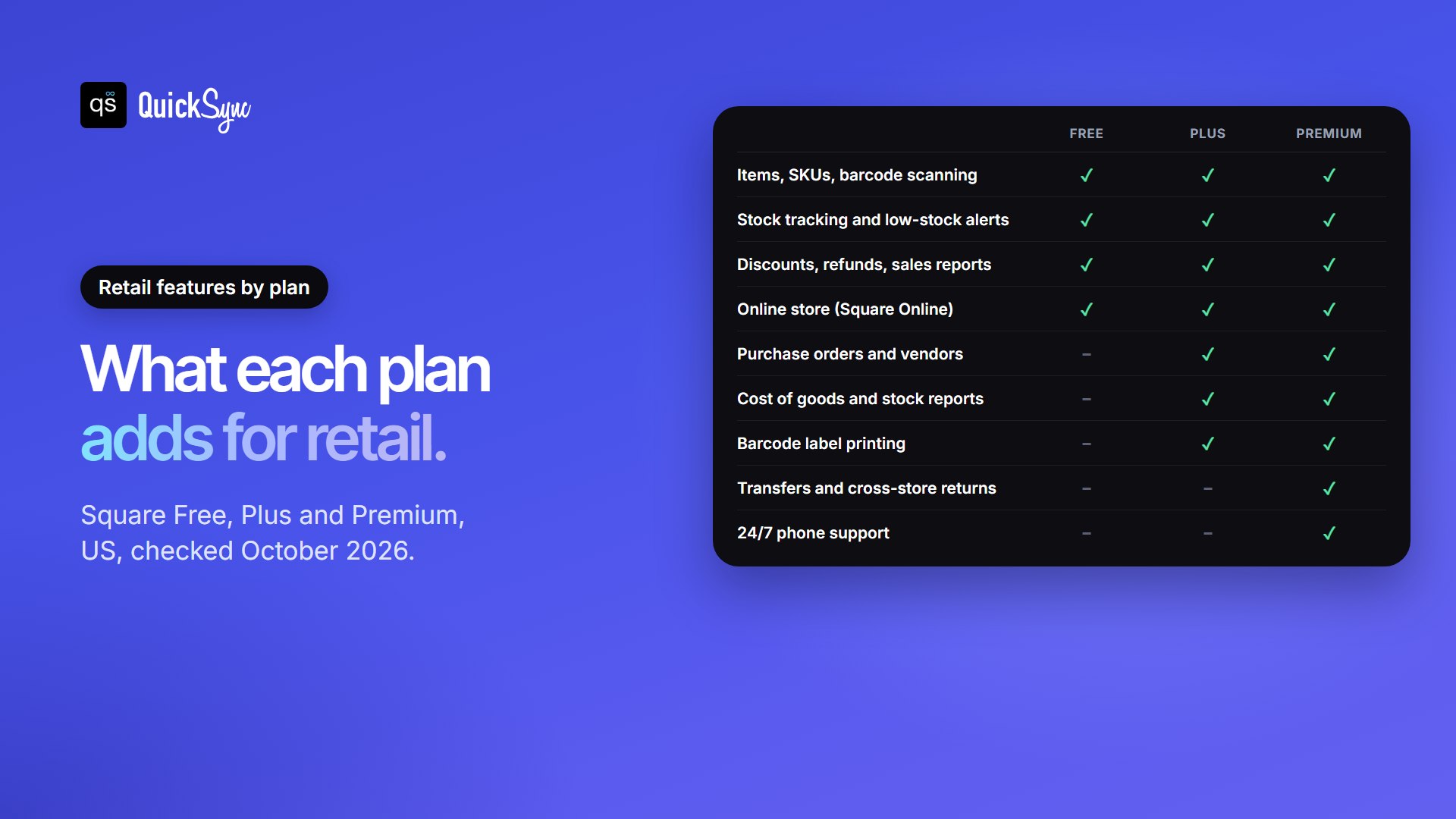
| Square Free | $0 | Items and SKUs created automatically, discounts and refunds, sales reports, stock tracking, low-stock alerts, an online store | 2.6% + 15¢ | 3.3% + 30¢ |
| Square Plus | $49 per location | Inventory management and stock intake, vendors and purchase orders, cost of goods and inventory reports, barcode label printing | 2.5% + 15¢ | 2.9% + 30¢ |
| Square Premium | $149 per location | Cross-location returns and fulfilment, transfer orders, 24/7 phone support | 2.4% + 15¢ | 2.9% + 30¢ |
| Square Pro | Custom | For businesses that process more than $250,000 a year | Custom | |
Plus and Premium both come with a 30-day free trial, and you can switch plans at any time. Here is what a year costs before card fees:
- One shop on Free: $0 a month.
- One shop on Plus: $49 a month, or $588 a year.
- Three shops on Plus: $147 a month.
- Three shops on Premium: $447 a month, or $5,364 a year.
Card fees usually cost more than the plan. Our guide to Square fees shows every rate, what Square takes from a $100 sale, and the sales level where Plus pays for itself.
Inside Square for Retail: The Features That Matter
Checkout built for shops
You add items by searching or scanning a barcode, and the app handles exchanges and returns at the register. It takes cards, Afterpay and Tap to Pay on iPhone, and Square says deposits can reach your bank as soon as the next business day.
Inventory
Every plan tracks stock per item and variation, lowers it with each sale, imports items in bulk from a spreadsheet, and emails low-stock alerts. Plus adds the buying side: vendor profiles, purchase orders, stock intake, barcode label printing and cost reports. Premium adds transfers between stores. Our guide to Square inventory management goes through each tool and how to set it up.
Reports
Free gives you sales reports. Plus adds cost of goods sold and inventory reports, which show your real margin on each item and how fast stock moves. For most shops, these reports are the best reason to upgrade.
Customers, loyalty and staff
The app builds a customer profile from each sale and lets you group customers, for example by how often they visit. Plus adds a loyalty program, email and text marketing (the first 500 texts are free, then 3¢ each) and staff scheduling. Staff can have their own logins and permissions, and clock in and out at the register.
Selling online
Square Free includes a basic online store through Square Online, and it shares the same item library as your register. When something sells online, the register’s stock goes down too. Online card payments cost 3.3% + 30¢ on Free and 2.9% + 30¢ on Plus or Premium.
Hardware: What You Need and What it Costs
You don’t have to buy Square hardware to start. The retail app runs on an iPhone, iPad or Android device. If you want a dedicated setup, Square sells:
| Device | Price | Good for |
|---|---|---|
| Square Reader for contactless and chip | $59 | Taking cards with your own phone or tablet |
| Square Stand | $149 | Turning an iPad into a counter register |
| Square Terminal | $299 | An all-in-one card machine with a receipt printer |
| Square Handheld | $399 | Checkout and stock checks on the shop floor |
| Square Register | $899 | A full counter setup with a customer-facing screen |
A barcode scanner is worth adding if you sell more than a few dozen products. Scanning is faster than searching and cuts mistakes at the register.
Square for Retail Pros and Cons
Pros
- A real retail register for $0. Barcode scanning, stock tracking, low-stock alerts and an online store on the free plan.
- Easy for staff. The app is rated 4.7 from about 14,000 App Store ratings, and new staff can learn the search-and-scan checkout quickly.
- Pay as you grow. Add purchase orders and cost reports with Plus only when you need them, location by location.
- Flexible hardware. Start with your own phone or tablet and a $59 reader.
- Online store included, sharing stock with your register.
Cons
- Per-location pricing. Plus and Premium are charged for each location, so costs climb with every store.
- Transfers sit on Premium. Moving stock between stores, and returns across locations, need the $149 plan at each location.
- Higher online rate on Free. 3.3% + 30¢ for online payments, compared with 2.9% + 30¢ on the paid plans.
- Keyed-in cards cost 3.5% + 15¢ on every plan.
- It only counts Square’s sales. Square has no built-in stock sync with Etsy, eBay, Amazon or TikTok Shop.
Who Square For Retail is (and isn’t) For
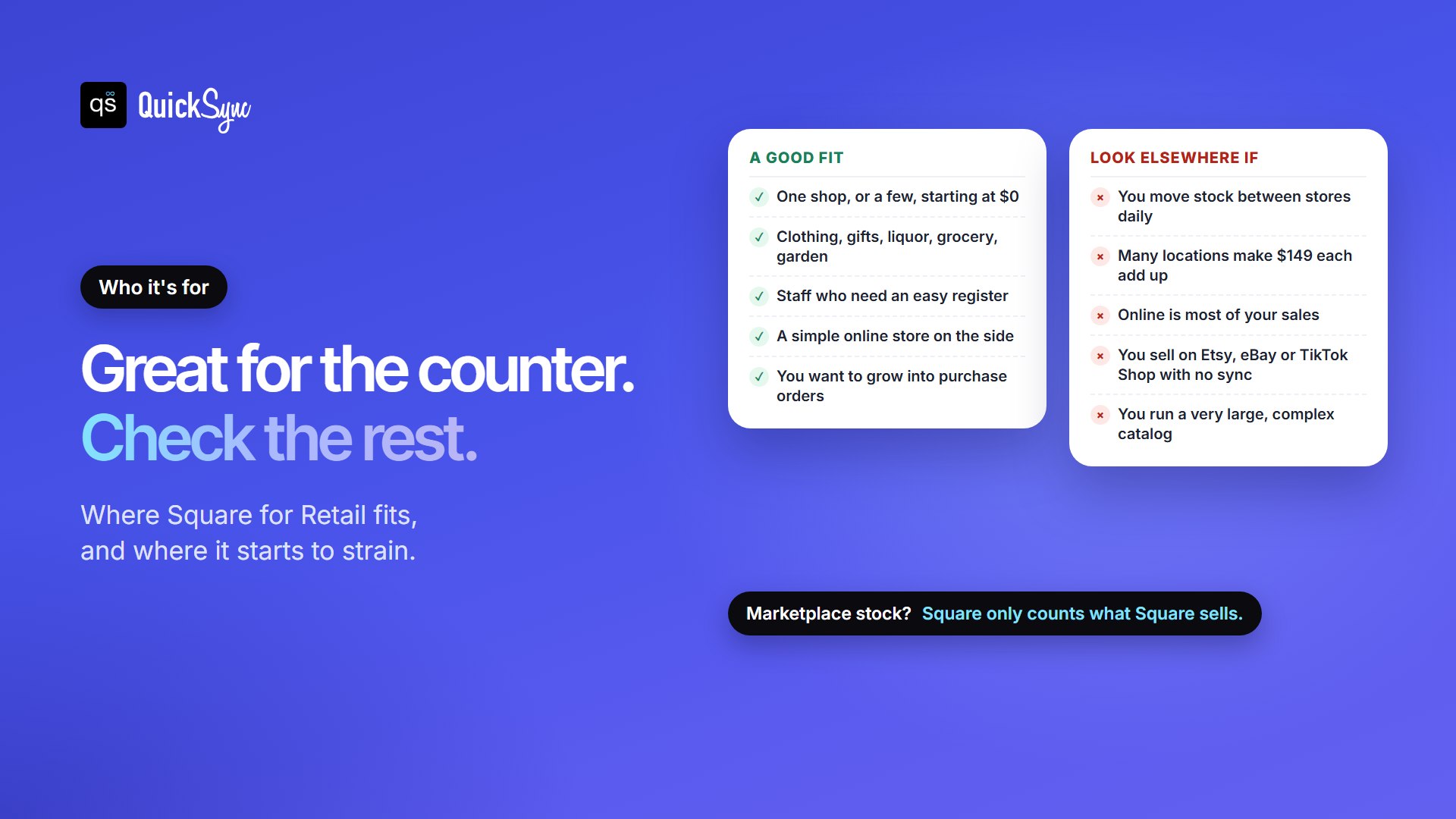
It’s a good fit if you run one shop or a small group of stores and most of your sales happen at the counter. Square itself targets clothing, home and gift, wine and liquor, grocery and garden shops. It also suits new shops that want to start at $0 and add purchase orders later.
Look elsewhere if you move stock between many stores every day (that needs Premium at every location), if online is most of your sales (Shopify is built online-first), or if your catalog is very large and complex, where Lightspeed Retail is designed for heavier inventory.
Square for Retail vs Shopify POS, Clover and Lightspeed
| Factors | Square for Retail | Shopify POS | Clover | Lightspeed Retail |
|---|---|---|---|---|
| Lowest software price | $0 (Free) | From $39 a month (Shopify Basic) | $0 (Starter) | $89 a month, billed yearly |
| Advanced retail plan | $49 or $149 a month per location | POS Pro, $89 a month per location | Retail Growth, $84.95 a month | $149 or $289 a month, billed yearly |
| Best for | Counter-first shops starting small | Shops where online comes first | Busy counters that want Clover’s own hardware | Big catalogs and many locations |
For the full detail, read Shopify vs Square, Clover vs Square and our roundup of the best POS systems for small businesses.
Selling in Your Shop and on Online Marketplaces
Square keeps its own count right. A sale at the register or on Square Online lowers the same stock number. But many shops also list on Etsy, eBay, Amazon or TikTok Shop, and those sales happen outside Square. Sell the last unit at the counter, and the marketplace listing stays live until someone changes it by hand. If it sells there too, you have to cancel the order and refund the buyer.
QuickSync connects your Square item library with Etsy, eBay, Amazon, TikTok Shop, Shopify and WooCommerce. It matches products by SKU and updates stock on every channel when something sells. If you run more than one Square account, see our guide to syncing multiple Square accounts.
FAQs
More guides for Square sellers: Square fees, Square inventory management and managing multiple Square store locations.