You’re taking two weeks off. You switch on Etsy vacation mode and assume the shop is frozen until you get back. It isn’t. Auto-renewing listings can still bill you, the 4-month listing expiry clock keeps counting down, Star Seller keeps scoring your replies, and any orders placed before you left still need to ship.
This guide covers how to turn vacation mode on and off, what it pauses, what keeps running, the lighter alternatives, and what to do if Etsy put your shop in vacation mode itself. Every Etsy rule here comes from Etsy’s own help pages, mainly How to Manage Vacation Mode for Your Shop, checked in November 2026. On Etsy’s UK site, the same setting is called Holiday mode.
What is Etsy Vacation Mode?
Etsy vacation mode is a shop setting that temporarily stops new orders. While it’s on, your listings are hidden from search and can’t be bought, but buyers can still visit your shop and message you. It has no end date: it stays on until you turn it off, and you still have to ship open orders and answer messages.
Etsy says sellers typically use it when they’re traveling, sick or handling an emergency, or need time to catch up on orders. It’s a pause, not a shutdown, so your listings, reviews and shop stay in place for when you return.
How to Put Your Etsy Shop on Vacation Mode
On Etsy.com:
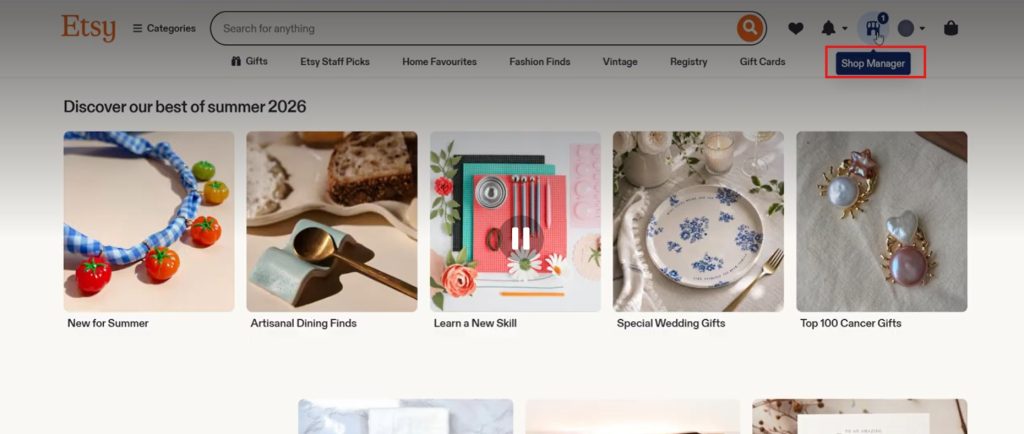
First of all, log in to your Etsy account and then go to Shop Manager.
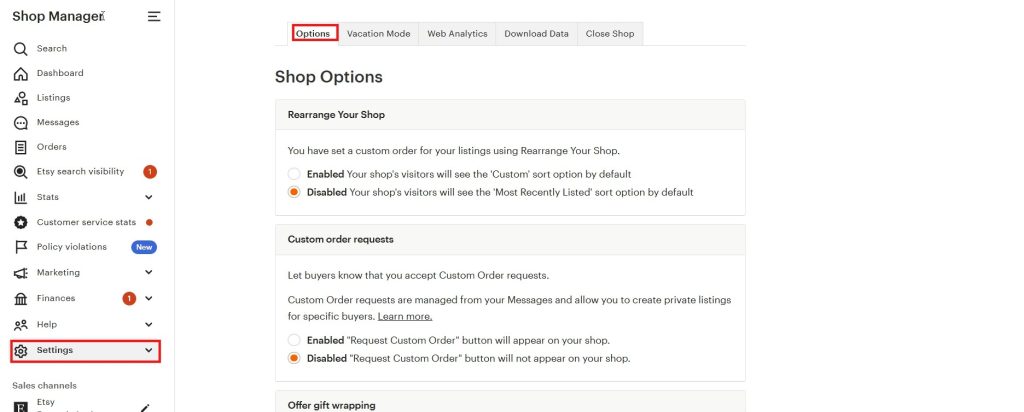
After that, go to the left-side menu and select Settings, then Options.
After that you need to open the Vacation Mode tab and toggle it on.
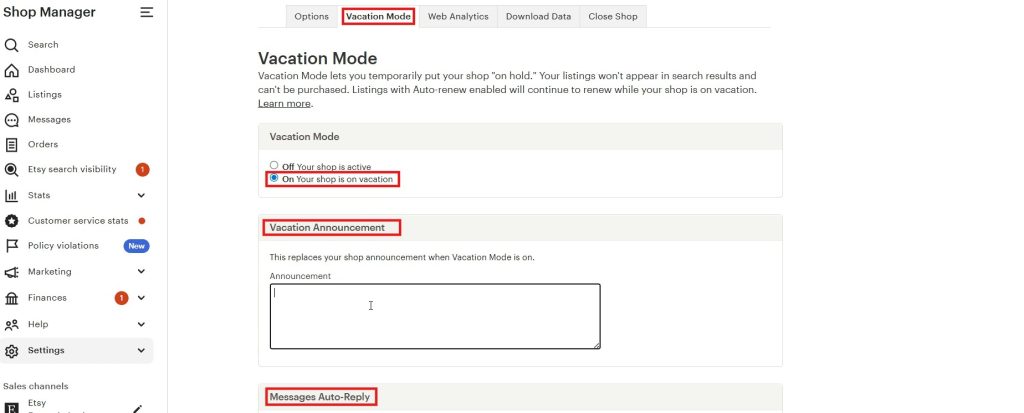
And lastly, just click on the Save option.
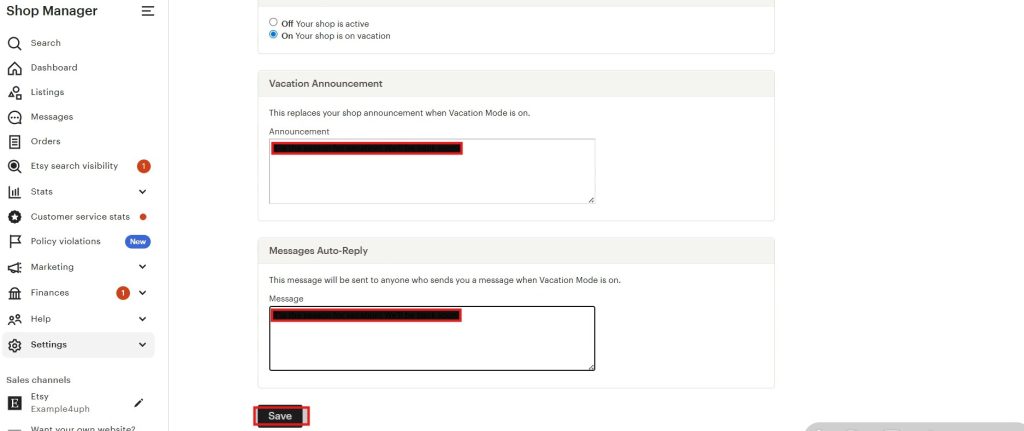
In the Etsy Seller app: open the app, tap More, choose Vacation Mode under Shop Settings, and slide the toggle on.
How to turn off vacation mode on Etsy
Go back to the same place, Shop Manager > Settings > Options > Vacation Mode, toggle it Off and select Save. In the app, slide the toggle off. Etsy says your listings become visible again “usually within minutes.” If there’s no option to turn it off, Etsy put the shop in vacation mode, not you. Skip to that section below.
Set a Vacation Announcement and Auto-reply
Both are optional, but set them. The Vacation Announcement shows at the top of your shop homepage as a “Note from the shop owner”, replacing your normal announcement. The Messages Auto-Reply goes to anyone who messages you while vacation mode is on, and replaces any other auto-reply you have running.
To add them on Etsy.com, open the same Vacation Mode tab, fill in the Vacation Announcement and Messages Auto-Reply fields, and select Save. In the app, the fields are called Shop announcement and Auto-reply. If you leave a field blank, it isn’t used.
The auto-reply matters for Star Seller. Vacation mode doesn’t pause Star Seller evaluation, and unanswered messages count against your response rate. Auto-replies count as responses, so one short message protects the score while you’re away.
Three examples you can adapt:
- Short trip: “Thanks for visiting! The shop is closed for a short break until 5 January. Choose the option on this page to get an email when we reopen.”
- Illness or emergency: “We’re taking a little time away for a family matter. Open orders are still being looked after. New orders open again soon, and we’ll reply to messages as quickly as we can.”
- Catching up: “We’ve paused new orders for a few days so every order already placed ships on time. Back on 12 March. Thank you for your patience!”
One rule to know: Etsy doesn’t allow your announcement or auto-reply to send buyers to buy from your own website. That breaks its Off-Platform Transactions policy, so keep both messages about the break itself.
What Happens While Your Shop Is on Vacation
Some things pause. Others carry on as normal. Here’s Etsy’s own breakdown:
| Paused or limited | What happens |
|---|---|
| Search | Listings and Etsy Ads don’t appear in search. Your shop may still show for an exact shop-name search. |
| Shop homepage | Listings are hidden. Buyers see your vacation announcement, About section, past reviews and any Star Seller badges, and can still contact or follow you. |
| Listing pages | Direct links show “Item unavailable”. Photos, description and price are hidden. |
| Etsy Ads | Campaigns pause automatically and charges don’t accrue. Your settings come back when you turn vacation mode off. |
| Offsite Ads | Charges don’t accrue. |
| Still active | What happens |
|---|---|
| Orders and cases | You can refund, cancel and print labels, and you’re still responsible for completing open orders and resolving cases. |
| Messages | You can send and receive messages, and buyers expect replies. |
| Listings | You can edit and create listings. Existing ones still show as Active in Shop Manager, and new ones save as drafts. |
| Star Seller | Evaluation doesn’t pause. It’s still based on your last 3 months, and earned badges stay visible. |
| Shop Manager | You can see stats and change most settings, including payment details, sales and your About section. |
Fees That Keep Running on Vacation Mode
Etsy is direct about this: “Vacation Mode does not exempt you from monthly billing.” Fees you built up before the break are still due on the first of the month, and some new ones can appear while you’re away:
| Charge or clock | During vacation mode | What to do |
|---|---|---|
| Auto-renew fees | Listings set to auto-renew that expire during the break renew, and you’re charged the renewal fee | Turn auto-renew off on listings that would expire while you’re away |
| Listing expiry | Listings not on auto-renew expire after 4 months, and the countdown keeps running | Check for expired listings when you return |
| Etsy Plus | The monthly fee continues, and unused listing and Ads credits expire at the end of the billing cycle | Cancel Etsy Plus for a long break if you won’t use it |
| Pattern | Billing continues. Your Pattern site is paused and shows your vacation announcement | Turn Pattern off separately if you don’t need it |
| New draft listings | No listing fee until you publish them after you return | Nothing; create drafts freely |
One more catch: if your account becomes overdue while vacation mode is on, Etsy makes you pay the outstanding balance before you can reopen. Settle your bill before you leave, or check it the day you’re back. Our breakdown of Etsy fees explains the regular charges.
Does Vacation Mode Hurt Your Etsy Shop?
Your listings come back quickly, but there’s no promise about where they rank. In Etsy’s words: “Search performance may change after a period of inactivity and can vary as buyers start interacting with your listings again.” Some sellers report slower sales for a while after a long break. Etsy publishes no figures on how much or for how long, so treat any specific number you read elsewhere with caution.
Star Seller is the other risk. Because evaluation keeps running, unanswered messages and late shipments on open orders can still cost you the badge. An auto-reply and shipping everything before you leave cover most of it.
That’s why many sellers only use vacation mode when nobody can ship at all, and use something lighter for shorter breaks.
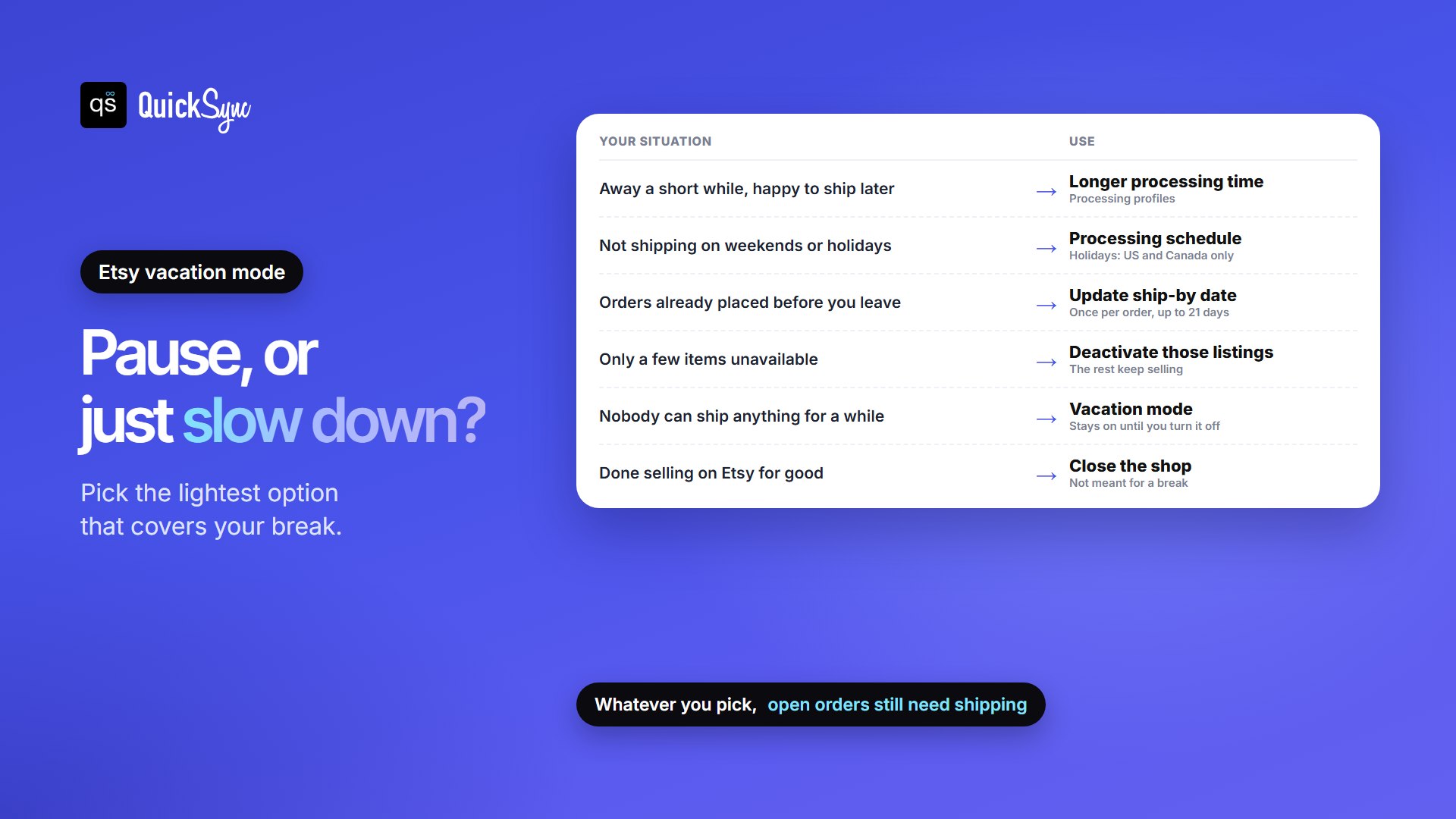
Alternatives to Etsy Vacation Mode
| Option | What it does | Best for |
|---|---|---|
| Longer processing time | Set a longer time in your processing profiles (Shop Manager > Shipping settings > Your processing profiles). Listings stay on sale with later ship-by dates | Short breaks when buyers don’t mind waiting |
| Order processing schedule | Choose which days you process orders, including weekends, and in the US and Canada which holidays. Days you remove don’t count toward processing time | Holidays and long weekends |
| Update ship-by date | Push back the ship-by date on an existing order once, before the original date passes, by up to 21 days. Etsy sends the buyer an updated delivery estimate | Orders placed just before you leave |
| Deactivate some listings | Take selected listings off sale from the Listings page in Shop Manager, while the rest keep selling | When only some items can’t be made or shipped |
| Vacation mode | Stops all new orders until you turn it off | Breaks when nobody can ship |
| Close the shop | Closes the shop entirely | Leaving Etsy, not taking a break |
Two things to know. Processing time starts the day after an order is placed, and it also affects when a buyer can open a case and leave a review. And if you update a ship-by date on an existing order, Etsy asks you to confirm the new date with the buyer first.
What to Do if Etsy Put Your Shop on Vacation Mode?
If you didn’t switch it on and can’t switch it off, Etsy did, and it usually means there’s an account issue to fix. According to Etsy’s help page on this, common reasons are:
- Missing or outdated taxpayer information
- Payoneer verification issues
- Policy violations or issues with listings
- Account security concerns
- A high case rate, or falling below Etsy’s customer service standards
- Location-based restrictions
A few things work differently from the version you turn on yourself. Active Etsy Plus and Pattern subscriptions are paused and not billed, and auto-renewing listings aren’t charged. Your Star Seller badges are hidden while the shop is paused, and you may lose them permanently if you break a policy or your shop falls below the eligibility thresholds during the pause. Open orders, cases and messages are still your responsibility.
To get it lifted:
- Read Etsy’s email about your shop status and follow its directions.
- Check Shop Manager for a red or yellow alert banner and complete any required actions.
- Open your Finances page and fix any errors in your legal, taxpayer or bank details. If they’re pending verification, vacation mode may stay on until Etsy finishes the review.
- Check your customer service stats and clear delayed shipments, open cases or order issues.
- If you use Payoneer, make sure your details match your Etsy account and finish any pending tasks there. Etsy says suspensions are typically lifted within 24 to 48 hours after a Payoneer issue is resolved.
In most cases Etsy turns vacation mode off on its own once the issue is fixed. If it stays on and your shop is eligible, you’ll see an option to appeal through Etsy’s Appeals Center.
Before You Go, and When You Come Back
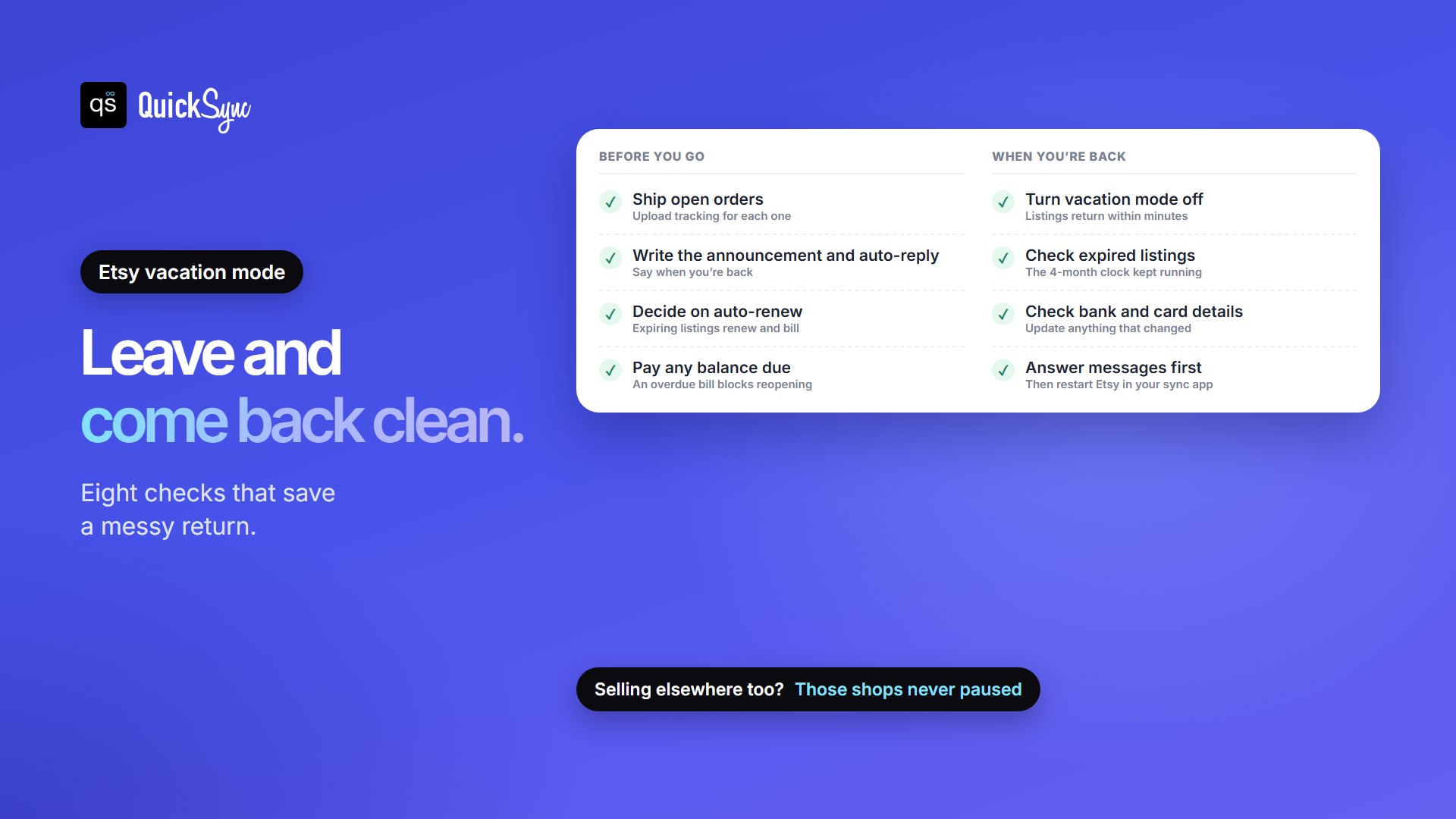
Before you go:
- Ship every open order and add tracking. For orders you can’t ship in time, agree a new date with the buyer and update the ship-by date.
- Write your announcement and auto-reply with the date you’re back.
- Decide on auto-renew for listings that would expire while you’re away.
- Pay any balance due, so an overdue bill can’t block your return.
- Turn vacation mode on.
When you’re back:
- Turn vacation mode off. Listings return to search, usually within minutes.
- Check for expired listings, since the 4-month clock kept running, and for any inactive ones.
- Check your bank and card details. Etsy’s guide to returning after a break also suggests reading any emails Etsy sent while you were away.
- Answer messages first, then publish any drafts you made during the break.
If a buyer needs to cancel while you’re catching up, our guide to cancelling an Etsy order as a seller walks through it.
Selling on More Than Etsy?
Vacation mode only pauses Etsy. If the same stock is also listed on eBay, Shopify, Square or TikTok Shop, those shops keep selling, and you can come home to orders you can’t ship. Each platform pauses differently. eBay has Time Away, with limits of 15 days if you keep selling and 30 days if you pause, and Shopify has no vacation setting at all.
Our guide to eBay vacation mode covers both, with a table for each channel.
Either pause every channel, or leave the others open and keep one stock count across them. If you use QuickSync to sync Etsy with your other shops, here’s what happens during the break:
- Etsy pauses in QuickSync, too. If Etsy blocks an update because your shop is on vacation, QuickSync pauses the Etsy store and emails you if email notifications are on. While it’s paused, QuickSync doesn’t check Etsy for stock or orders.
- Restarting takes two steps. Turn vacation mode off in Etsy first. Then, in QuickSync, click Manage on the Etsy card, open Review settings, and turn off the Vacation mode on switch. If Etsy still shows the shop on vacation, QuickSync tells you. After that, check your Etsy counts against your other shops.
- Only the Etsy store pauses. Your other connected shops keep syncing with each other, so a sale on eBay, Shopify or Square still comes off the channels you left open.
- Sold-out listings stay off. If every variation of an Etsy listing reaches 0, QuickSync switches the listing to inactive, and it stays off after you restock until you turn it back on in Etsy. Our stock at zero docs explain why.
Our guide to Etsy inventory management covers keeping Etsy stock accurate the rest of the year.
FAQs
More for Etsy sellers: how to open an Etsy shop, how to add your Etsy link to TikTok and Etsy alternatives.