Etsy Plus costs $10 a month, and Etsy gives you $8 of it back in credits. That sounds like a bargain until you notice the credits expire at the end of every cycle, and a shop that lists a few items a month won’t use them all.
Is Etsy Plus worth it? It is if you create or renew at least 15 listings a month and already run Etsy Ads, because the credits then cover $8 of the $10 fee and the extra tools cost you about $2. If you list a few items a month and don’t advertise, you’re paying $9 to $10 a month mostly for shop design and unlimited keyword research, and most new sellers are better off waiting.
This guide uses only what Etsy’s own Help Center says Etsy Plus includes, checked on 24 November 2026. Several popular guides still list perks Etsy no longer mentions, so we’ve called those out too.
What is Etsy Plus?
Etsy Plus is an optional subscription for Etsy sellers. Etsy describes it as “a subscription package of advanced seller tools and services.” It costs $10 USD a month, taken from your Etsy payment account balance, and you can cancel any time. Shops that don’t subscribe are on Etsy Standard, which is free.
Here’s everything it includes today, and what each part is worth in dollars:
| What you get | What it does | Worth per month |
|---|---|---|
| 15 listing credits | Covers the $0.20 fee for creating or renewing 15 listings | Up to $3.00 |
| $5 Etsy Ads credit | Pays for ads on Etsy, shown on your Etsy Ads page | Up to $5.00 |
| Unlimited Marketplace Insights | Search real Etsy keyword data as often as you like (free shops get 15 searches a week) | No cash value |
| Restock requests | Shoppers can join a waitlist for sold-out items and get an email when you restock | No cash value |
| Advanced shop customization | Carousel and collage banners, a larger featured layout and a custom color theme | No cash value |
The credits reset at the start of each monthly cycle. Etsy is clear that they “don’t roll over month-to-month and will expire if they’re not used.” That one rule decides whether Etsy Plus is worth it for you.
Etsy Plus vs Etsy Standard
| Feature | Etsy Standard (free) | Etsy Plus ($10/month) |
|---|---|---|
| Listing fee | $0.20 per listing or renewal | First 15 a month covered by credits |
| Etsy Ads | Pay for every ad | $5 credit each month |
| Marketplace Insights | 15 keyword searches a week | Unlimited searches |
| Restock requests | Not available | Waitlist and email alerts on sold-out items |
| Shop banner | Mini or big banner | Adds carousel (up to 4 images) and collage banners |
| Featured listings | 4 equal tiles | Adds a mixed grid: 1 large and 4 small |
| Color theme | Default | Custom theme based on your banner and shop icon |
| Transaction and processing fees | Same | Same |
Etsy Plus doesn’t change what you pay per sale. The 6.5% transaction fee, payment processing and Offsite Ads fees are the same on both. Our breakdown of what Etsy takes from a $50 sale covers those.
Each Etsy Plus perk, and who it helps
15 listing credits: worth $3 if you use them
Every Etsy listing costs $0.20 to publish and $0.20 each time it renews. Etsy Plus gives you 15 credits a month for creating or renewing listings, so the most they can save is $3.00.
A shop that publishes 5 new items and renews 10 sold ones in a month uses all 15. A shop that adds 3 new items a month uses 3, worth $0.60, and the other 12 expire.
$5 Etsy Ads credit: only useful if you already advertise
The minimum Etsy Ads budget is $1 a day, so $5 covers about five days at the lowest setting. It won’t tell you much about whether ads work for your shop. If you already spend on Etsy Ads, though, it’s a straight $5 off your bill each month. If you don’t, it expires unused. Etsy’s guide to setting up an Etsy Ads campaign explains the budget settings.
Unlimited Marketplace Insights: the most underrated perk
Marketplace Insights shows real Etsy search data: how many times a keyword was searched in the last 30 days, how many listings compete for it, related terms and trends. You’ll find it under Shop Manager > Stats > Marketplace Insights, on desktop or mobile web.
Every seller gets 15 searches a week for free. Etsy Plus removes the cap, and Etsy says subscribers “will get access to more exclusive features in the future.” Fifteen searches is enough to check a handful of listings. It isn’t enough to rework the titles and tags across a 100-listing shop, and that’s where unlimited searches earn their keep.
At least one of the top-ranking reviews of Etsy Plus doesn’t mention Marketplace Insights at all, even though it’s the one perk that can help buyers find you.
Restock requests: a waitlist for sold-out items
With restock requests on, a shopper who finds a sold-out listing (through a direct link or your Sold Items page) can click Let me know when it’s back. When you restock, Etsy emails them. It works per variation too: a sold-out size shows “Sold out, waitlist available.”
There’s a rule most guides skip. Etsy says: “You can’t manually mark listings as sold out. The inventory of the listing must be depleted through sales.” Deactivating a listing doesn’t make it sold out, so it won’t collect restock requests. That matters if you sell the same items somewhere else, and we cover it below.
To turn restock requests on for many listings at once:
- Go to Shop Manager > Listings.
- Select the active or sold-out listings you want.
- Choose Editing options > Edit restock request option.
- Select Yes, then Apply.
To see which items people are waiting for, filter Listings by Listings with restock requests. Requests also show in your dashboard’s Recent activity tab.
Advanced shop customization: nice to have
Etsy Plus adds a carousel banner (up to 4 images, each at least 1200 × 300 px, each linking to a listing or section), a collage banner of 2 to 4 images, a mixed featured grid and a custom color theme. These make your Shop Home look more like a brand site. Etsy doesn’t say they affect where your listings appear in search.
One catch: if you cancel, the Plus-only design is removed at the end of your cycle, and Etsy doesn’t keep the banner images. If you subscribe again later, you’ll upload them again.
Perks other guides mention that Etsy no longer lists
If you’ve read other reviews, you may have seen a 50% domain discount through Hover, discounts on custom packaging, 30% off printed materials, or an Adobe Express Premium trial. None of these appears on Etsy’s Etsy Plus Help page as of 24 November 2026.
Before you subscribe, check Shop Manager > Settings > Your subscription for the current list. Until you see an offer there, leave it out of the math.
Is Etsy Plus worth it? The math
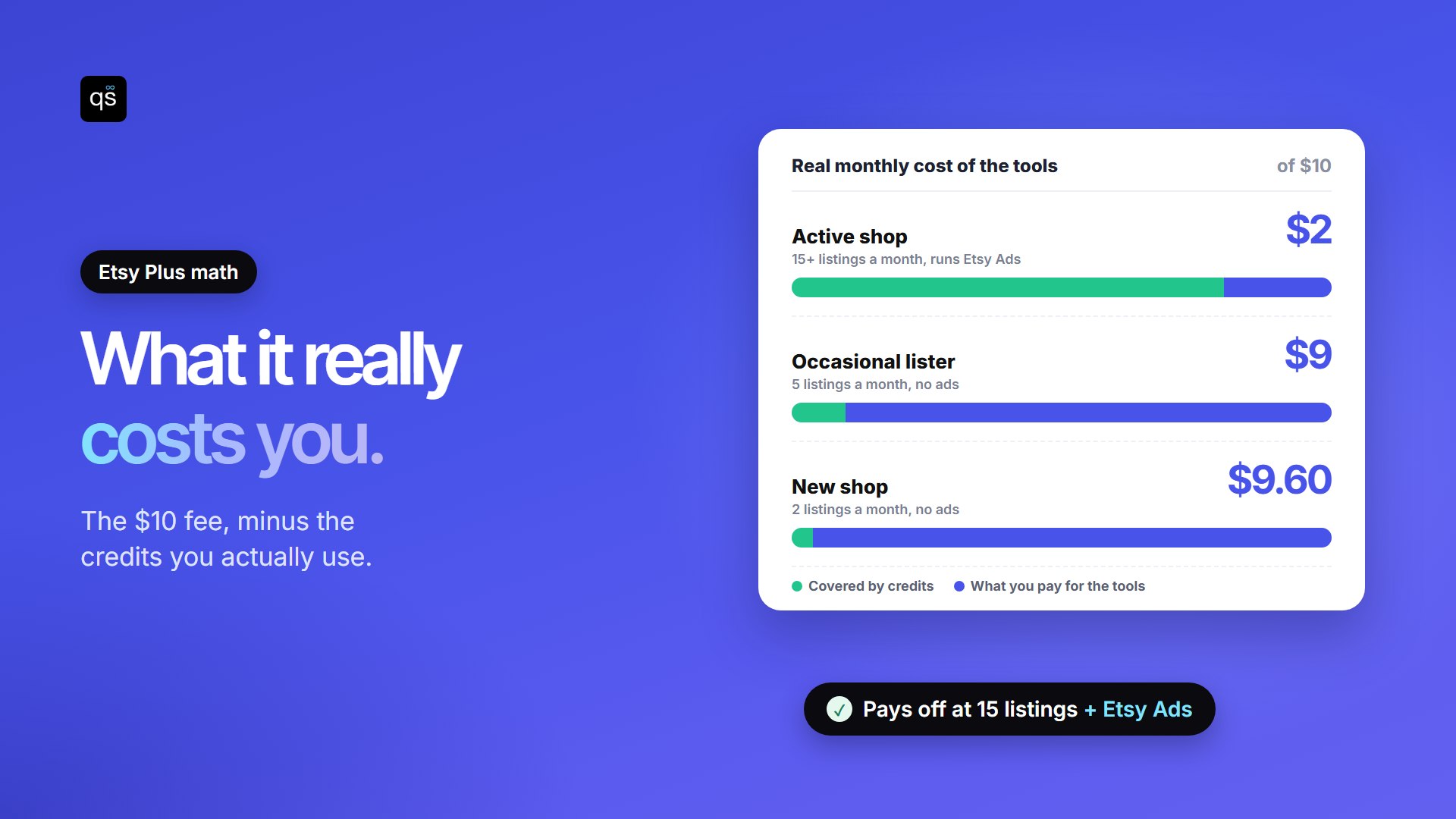
Start with the cash value of the credits you’d actually use, then subtract it from $10. What’s left is the real price of the tools.
| Seller | Listing credits used | Ads credit used | Credits worth | Real cost of the tools |
|---|---|---|---|---|
| Active shop: 15+ new or renewed listings a month, runs Etsy Ads | 15 ($3.00) | $5.00 | $8.00 | $2 a month |
| Occasional lister: 5 listings a month, no ads | 5 ($1.00) | $0 | $1.00 | $9 a month |
| New shop: 2 listings a month, no ads | 2 ($0.40) | $0 | $0.40 | $9.60 a month |
The rule of thumb: Etsy Plus pays for itself in credits only when you use most of the 15 listing credits and already run Etsy Ads. Otherwise, ask yourself whether unlimited Insights, restock alerts and a nicer Shop Home are worth $9 to $10 a month to you.
An example: a candle maker renews 10 sold-out scents and adds 5 new ones each month. That’s 15 renewals and new listings, $3.00 in credits. They also run Etsy Ads at $3 a day for the holiday season, so the $5 credit is used too. Their tools cost $2 a month, and the restock waitlist on their seasonal scents is close to free.
Who should get Etsy Plus
- Active shops that list and renew a lot. If you publish or renew 15 or more listings a month, the credits are worth the full $3.
- Sellers already running Etsy Ads. The $5 credit comes straight off a bill you’d pay anyway.
- Makers who sell out and restock. Small-batch makers, vintage sellers with repeat finds, and seasonal products get a ready-made waitlist.
- Shops reworking their SEO. If you’re rewriting titles and tags across dozens of listings, 15 Insights searches a week will slow you down.
- Brand-focused shops. If customers land on your Shop Home from Instagram or TikTok, the carousel banner and featured grid help it look like a store, not a list.
When Etsy Plus isn’t worth it
- New shops with a few listings. You’ll use a handful of credits, and the $10 is better spent on photos or a small ad test. Our guide to opening an Etsy shop covers what matters first.
- Shops that list rarely and don’t advertise. You’re paying $9 to $10 a month for tools you may not open.
- One-of-a-kind sellers. If every item is unique, restock requests have nothing to restock.
- Anyone hoping it boosts search ranking. Etsy doesn’t say Etsy Plus affects where your listings appear in search.
Does Etsy Plus help sales?
Not directly. Etsy doesn’t say Etsy Plus changes your search ranking, and the shop design perks only affect people already on your Shop Home. It can help indirectly in three ways:
- Better keywords. Unlimited Insights lets you match titles and tags to what buyers actually search for.
- A list of buyers waiting. Restock requests turn a sold-out page into a waitlist instead of a dead end.
- Lower costs. Credits trim your listing and ad spend, if you use them.
If you want more traffic, promotion outside Etsy usually does more than a subscription. See how to add your Etsy link to TikTok or our guide to promoting your Etsy shop on social media.
Restock requests when you sell on more than one channel
Here’s where the “sold out through sales” rule bites. Say you sell the same mug on Etsy, Shopify and a craft-fair card reader. The waitlist only builds if Etsy itself shows the listing as sold out.
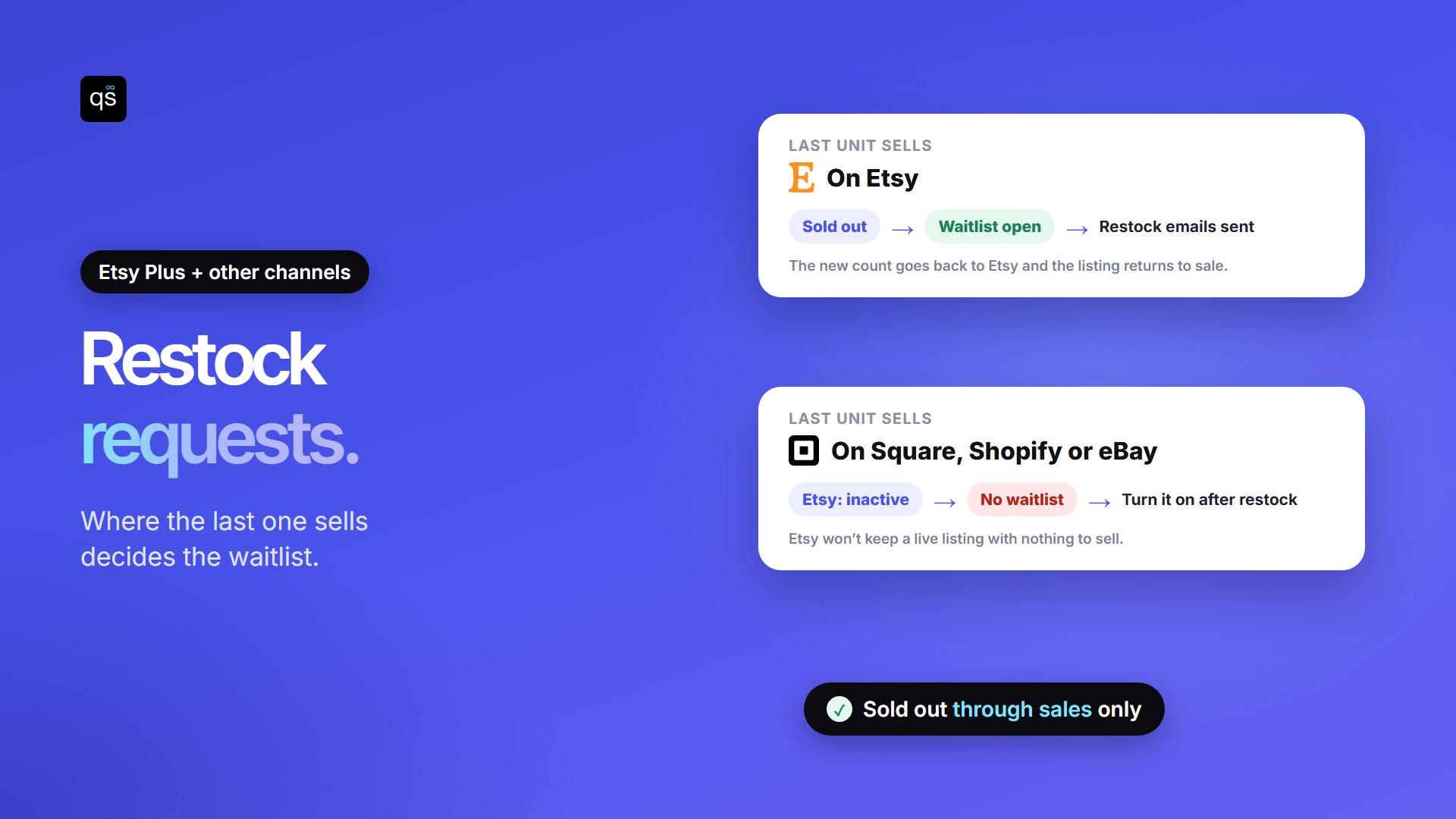
If you use QuickSync to keep one stock count across channels, here’s exactly what happens:
| Where the last unit sells | What your Etsy listing shows | Restock waitlist? | When you restock |
|---|---|---|---|
| On Etsy | Sold out | Yes | QuickSync sends the new count and the listing goes back on sale, so Etsy can email the waitlist |
| Anywhere else (Shopify, Square, TikTok Shop, eBay) | Inactive, because Etsy won’t keep a live listing with nothing to sell | No | QuickSync updates the count, then you turn the listing back on in Etsy |
So restock requests work best for items that mostly sell on Etsy. For items that sell everywhere, the bigger win is not selling the last one twice. QuickSync checks Etsy for stock changes every 2 minutes and updates your other channels, and when only some variations run out, those options drop to 0 while the listing stays on sale. Our guide to Etsy inventory management goes deeper.
One more link with Etsy Plus: listings QuickSync creates on Etsy have Etsy’s auto-renew on, and Etsy charges $0.20 for each. Etsy Plus credits cover creating or renewing listings, so they can cover up to 15 of those fees a month.
How to test Etsy Plus in one month
You can cancel any time and keep access until the end of the cycle, so the cheapest way to decide is to try it for one cycle with a plan:
- Day 1: turn on restock requests for every listing that can sell out.
- Week 1: run Marketplace Insights on your 10 best sellers and update their titles and tags.
- Through the month: use your 15 listing credits on new listings and renewals, and spend the $5 Ads credit on your best seller.
- Before the cycle ends: check how many restock requests you collected, how many credits you used, and whether views on the updated listings went up in Stats.
- Decide: if you used most credits or built a real waitlist, keep it. If not, cancel before the next cycle.
How to sign up for Etsy Plus, and how to cancel
To sign up:
- On Etsy.com, go to Shop Manager.
- Select Settings, then Your subscription.
- Select Upgrade under Etsy Plus, then Confirm.
To cancel: go to Your subscription in Shop Manager. You keep Etsy Plus until the end of the current cycle, and the dashboard shows your last day. After that your shop returns to Etsy Standard and the $10 fee stops.
Taking a break? If you turn on vacation mode yourself, the Etsy Plus fee keeps running and unused credits still expire. If Etsy puts your shop on vacation, Etsy Plus is paused and not billed. Our Etsy vacation mode guide lists everything else that keeps running.
FAQs
More for Etsy sellers: Etsy alternatives, Etsy inventory management and our Etsy integration.