Most Shopify sellers who use QuickBooks start with Intuit’s own connector. It’s free, and with 3,338 reviews on its Shopify App Store listing, it’s the most popular option by far.
Then month-end arrives, and some find it records sales differently from what they expected. Their accountant wants clean payouts. Their stock count wants every order. Many apps are built for one of those jobs, not both.
The fix is choosing an app built for the job you actually need. This guide compares six Shopify QuickBooks integration apps on price, what they write into your books and what they do with your stock. Every rating and price was read from each app’s own listing on 15 October 2026. QuickSync is one of the six, and each section says where that app is the better pick, ours included.
First, decide: payouts or orders?
Before comparing apps, it would be better to know the two ways they get Shopify into QuickBooks. The choice matters more than any feature list.
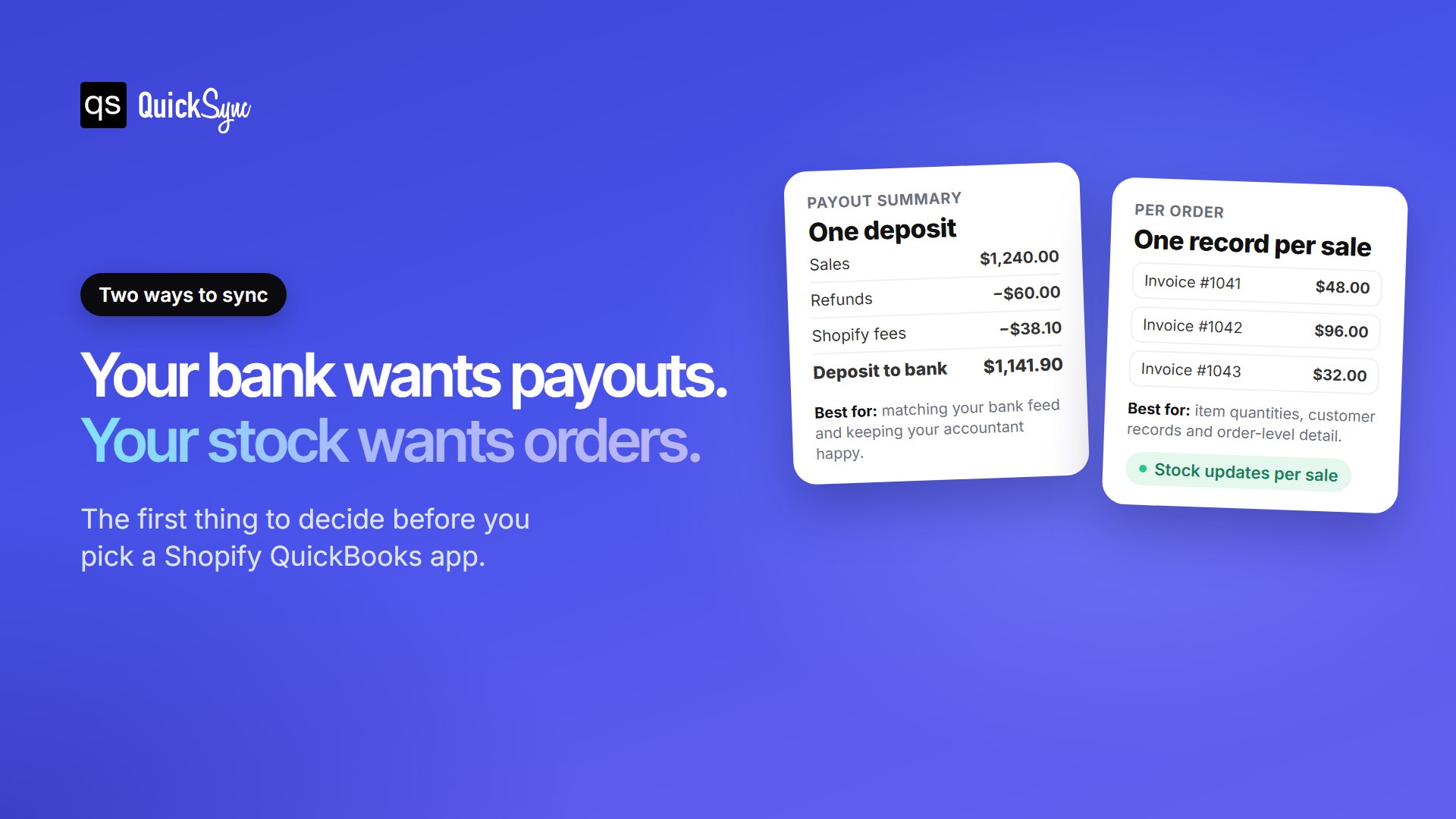
Payout-based apps group your sales, refunds and Shopify fees around each payout, so the total matches the deposit in your bank. Intuit’s own app works this way, according to its connector guide. Each sale becomes a sales receipt and each fee an expense. The payout becomes a deposit you match in your bank feed. Accountants like this, because each deposit in the bank feed has one matching record.
Order-based apps write each Shopify sale into QuickBooks as its own record, with the customer and the items sold. That keeps item quantities and customer history accurate. It suits sellers who track stock in QuickBooks or need order-level detail.
Some apps offer both. Not sure which you need? Ask your accountant one question: “Do you want each sale, or each payout?” Our guide on how to reconcile Shopify in QuickBooks explains the payout side in detail.
Six Shopify QuickBooks integration apps at a glance
| App | From | Rating (reviews) | Records sales as | Best for |
|---|---|---|---|---|
| QuickSync | $19/mo for two shops | 4.9 | One invoice per order | Stock across Shopify and other shops |
| QuickBooks Online by Intuit | Free to install | 4.6 | Sales receipts and fees, grouped by payout | A free starting point |
| A2X | $29/mo for 200 orders | 4.9 | Payout summaries | Accountant-ready books |
| Synder | $65/mo | 4.8 | Daily summary or each sale | A choice of summary or detail |
| Webgility | $79/mo for 300 orders | 4.9 | Each order, with payouts matched | Higher volumes and QuickBooks Desktop |
| Bold QuickBooks Sync Pro | $19.99/mo for 200 orders | 3.2 | Orders and refunds, plus payout fees | A low price, if the reviews don’t worry you |
QuickSync
QuickSync is the order-based option for sellers who don’t only sell on Shopify. Each Shopify sale lands in QuickBooks as its own invoice, matched to the customer by name or email. As items sell, QuickSync sets the quantity on hand on the matching QuickBooks item. The same plan can connect Etsy, eBay, Amazon, TikTok Shop, Square, Clover and more, so every channel’s sales reach the same books. It costs $19 a month for two connected shops, after a 14-day trial with no card.
Where it falls short: QuickSync doesn’t reconcile payouts or post Shopify fees, so it won’t match your bank deposits on its own. Products also match by SKU, and QuickBooks allows 100 characters where Shopify allows 255. Keep SKUs under 100 characters on both sides, or longer ones stop matching.
QuickBooks Online by Intuit
Intuit’s own connector is free to install and has the most reviews by a wide margin, at 4.6 stars across 3,338. It links your sales, refunds and fees to each payout, maps sales tax, and matches products to existing QuickBooks items by SKU and name. Its listing also says it keeps item quantities and costs in sync as you sell.
There are limits worth knowing. According to Intuit’s guide, products it can’t match aren’t created for you, so you add them by hand. It imports history from up to one year back, and the first import can take anywhere from 10 minutes to three hours. Start here if your books are simple and you only sell on Shopify.
A2X
A2X is built for one job: clean payout records your accountant can reconcile. It has 4.9 stars across 360 reviews and sorts every Shopify transaction into summaries by payout, split into sales, fees, taxes and refunds. Plans start at $29 a month for 200 orders. Cost of goods sold tracking starts on the $45 plan, which covers 500 orders. Every plan has a 30-day free trial.
A2X is built for your books, not your shelves. It doesn’t create a record for each order, and it won’t keep item counts in step with Shopify. Pick it if reconciliation is the problem you’re solving.
Synder
Synder gives you the choice A2X doesn’t: a daily summary, or a record for each sale. It has 4.8 stars across 222 reviews and matches payouts to your bank feed automatically. The catch is price. Plans start at $65 a month, and cost of goods tracking needs the $129 plan. There’s a 15-day free trial on each plan.
Webgility
Webgility is built for busier stores. Its QuickBooks Online app has 4.9 stars across 915 reviews and syncs orders, taxes, inventory, refunds and payouts. Plans start at $79 a month for 300 orders, with $15 for every extra 500. It’s also the clearest choice for QuickBooks Desktop, through a separate Desktop app that starts at $139 a month.
For a small shop, those prices add up fast. It pays off once your order volume makes manual fixes expensive.
Bold QuickBooks Sync Pro
Bold QuickBooks Sync Pro is one of the cheaper order-based options. It exports orders, refunds, and Shopify Payments fees, and syncs products and inventory. Plans start at $19.99 a month for 200 orders, with a flat $59.99 plan for unlimited orders.
Read the reviews before you install. It has 3.2 stars across 168 reviews, and 32% of those are one star. Its listing also isn’t clear about whether it targets QuickBooks Online or Desktop, so confirm with Bold first.
Which Shopify QuickBooks app should you choose?
- Choose QuickSync if you sell on Shopify and other channels and want every order and item count in QuickBooks.
- Choose Intuit’s connector if you only sell on Shopify, your books are simple and you want to start free.
- Choose A2X if your accountant reconciles by payout and you want the cleanest books.
- Choose Synder if you want the option of per-sale detail and can carry the higher price.
- Choose Webgility if you have high order volumes or use QuickBooks Desktop.
One warning: If you combine two apps, such as a payout app for your bank and QuickSync for orders. Only one of them should record your sales. If both do, your revenue gets counted twice. Agree with your accountant which records count as income before you connect the second app.
Selling on more than Shopify?
Most of the apps above treat Shopify as your only shop. Once you also sell on Etsy, eBay or in person, QuickBooks needs those sales too, and your stock needs to stay right everywhere. QuickSync connects each of them to QuickBooks, including Etsy, eBay, Amazon, TikTok Shop, Square and Clover. Our step-by-step guide on how to sync Shopify and QuickBooks walks through the setup.