You’ve picked a Squarespace template, added your first products and you’re ready to launch. Then you reach Squarespace’s pricing page and see four plans, two prices for each, and a list of fees that only makes sense once you start selling.
That’s where most sellers get caught out. The monthly plan price is the number everyone compares, but it’s only part of what you pay. On Squarespace’s cheapest plan, a 2% transaction fee comes out of every online sale. For a shop selling $2,000 a month, that’s $40 a month, more than double the $19 plan itself, before card fees.
This guide breaks down Squarespace pricing and the real cost of Squarespace for 2026, from a seller’s point of view. You’ll see what each plan costs, what you pay on every sale, and which plan works out cheapest at your level of sales. All prices come from Squarespace’s pricing page, checked in November 2026.
How much does Squarespace cost?
Squarespace costs $19 to $99 a month on yearly billing, or $25 to $139 a month on monthly billing. How much Squarespace is for you depends on which of the four plans you choose. Every plan includes hosting, templates and unlimited products.
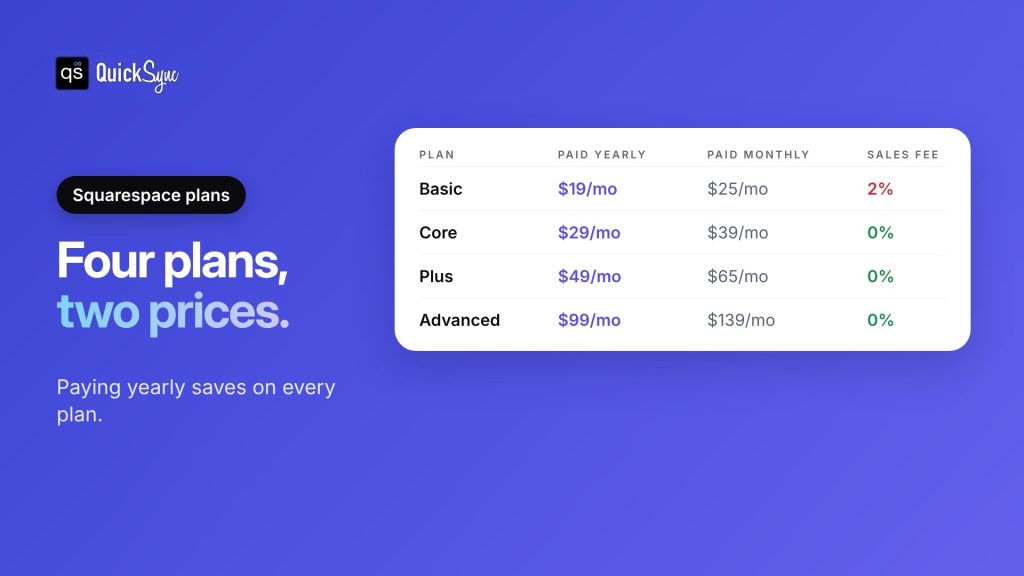
| Plan | Paid yearly | Paid monthly | Online store transaction fee |
|---|---|---|---|
| Basic | $19 a month | $25 a month | 2% |
| Core | $29 a month | $39 a month | 0% |
| Plus | $49 a month | $65 a month | 0% |
| Advanced | $99 a month | $139 a month | 0% |
Squarespace says you can “pay annually to save up to 36%.” Yearly plans also include a free custom domain for the first year. After that, the domain renews at the standard rate.
Squarespace fees for selling
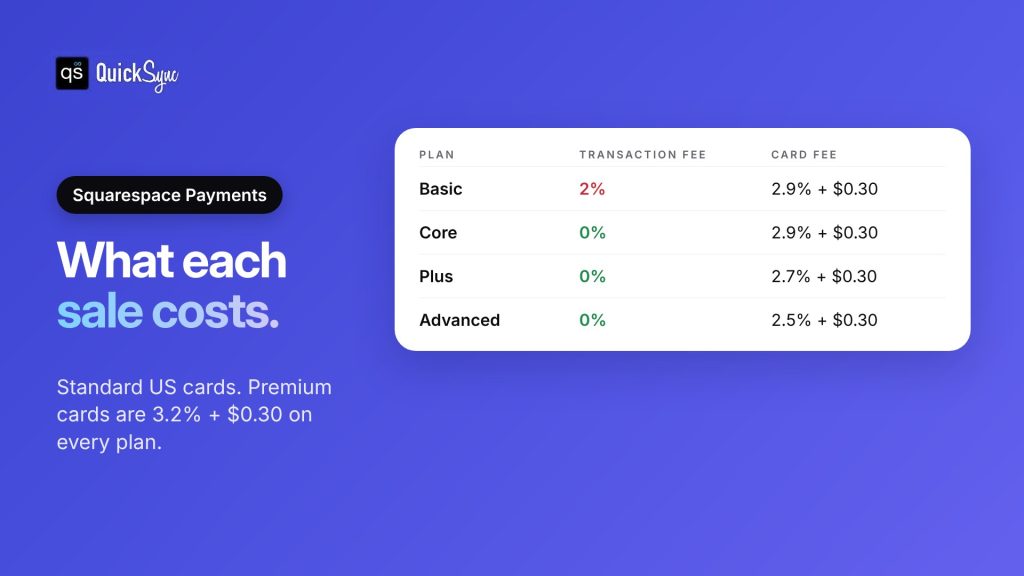
Selling on Squarespace has three layers of fees: the plan, the transaction fee and the card processing fee.
1. Transaction fee. Basic charges 2% on every online store sale. Core, Plus and Advanced charge 0%.
2. Card processing fee. With Squarespace Payments, standard cards cost:
| Plan | Standard cards | Premium cards | ACH bank payments |
|---|---|---|---|
| Basic | 2.9% + $0.30 | 3.2% + $0.30 | 1.5% |
| Core | 2.9% + $0.30 | 3.2% + $0.30 | 1% (max $10) |
| Plus | 2.7% + $0.30 | 3.2% + $0.30 | 1% (max $10) |
| Advanced | 2.5% + $0.30 | 3.2% + $0.30 | 1% (max $10) |
You can also take payments through Stripe or PayPal instead. Their own rates apply.
3. Smaller fees. A few other charges can apply, according to Squarespace’s pricing page:
- International cards add 1.5%, and currency conversion adds 1%.
- Automated taxes and shipping on Core cost up to 0.15%, capped at $0.99. It’s 0.10% on Plus and 0.05% on Advanced. Basic doesn’t include them.
- Digital content and memberships, like courses or paid members’ areas, carry their own fee: 7% on Basic, 5% on Core, 1% on Plus and 0% on Advanced.
Want to see which plan fits your sales? Jump to the Basic vs Core example.
What each Squarespace plan includes
All four plans include unlimited products, gift cards, invoices, subscriptions, abandoned cart recovery and Printful print-on-demand. The differences are in fees and selling tools.
Basic ($19 a month, yearly) is the cheapest way to sell on Squarespace. It doesn’t include automated taxes and shipping, discount codes, payment plans, shipping labels, carrier-calculated shipping, Google Shopping or ecommerce analytics. And you pay the 2% transaction fee.
The Squarespace Core plan ($29 a month, yearly) is the plan Squarespace recommends. It drops the transaction fee to 0% and adds automated taxes and shipping, discounts, payment plans, Google Shopping, shipping labels and carrier-calculated shipping.
Plus ($49 a month, yearly) lowers the standard card rate to 2.7% + $0.30. It adds quantity limits per order and a reserved cart with a countdown timer, useful for limited drops.
Advanced ($99 a month, yearly) has the lowest card rate, 2.5% + $0.30, and a checkout built for high traffic. It also has no fee on digital content and memberships.
Basic vs Core: which costs less?
Basic looks cheaper, but its 2% transaction fee adds up fast. Here’s a shop selling $2,000 a month online, from 40 orders of $50, on yearly billing.
| Cost | Basic | Core |
|---|---|---|
| Plan (yearly billing) | $19 | $29 |
| Transaction fee | 2% of $2,000 = $40 | $0 |
| Card fees (2.9% + $0.30 × 40 orders) | $70 | $70 |
| Total for the month | $129 | $99 |
Core saves this shop $30 a month, or $360 a year.
The break-even point is simple. Core costs $10 more a month than Basic, and the 2% fee costs $10 at $500 in sales. So:
- Under $500 a month in online sales: Basic is cheaper.
- Over $500 a month: Core is cheaper, and you get the extra selling tools too.
On monthly billing, the gap between plans is $14, so the break-even point is $700 a month.
Does Squarespace have a free plan?
No. Squarespace has no free plan. It offers a 14-day free trial with no credit card required, and you need a paid plan to publish your site after that.
If you want to sell for free, Squarespace isn’t the right fit. Square’s Free plan, for example, has no monthly fee. See our guide to the best places to sell online for other options.
Which Squarespace plan should you choose?
| If you… | Choose |
|---|---|
| Have a portfolio or service site with a few sales | Basic |
| Sell physical products and make over $500 a month online | Core |
| Run limited drops or need quantity limits per order | Plus |
| Sell at high volume, or sell courses and memberships | Advanced |
For most product sellers, Core is the right starting point. The 0% transaction fee and the shipping tools pay for the extra $10 once you’re making regular sales.
Comparing Squarespace with other platforms? See our Shopify vs Squarespace, Wix vs Squarespace and Etsy vs Squarespace guides.
Selling beyond your Squarespace site
Many Squarespace sellers also sell on Etsy, eBay, Amazon or at markets with Square. It’s a good way to reach buyers who’d never find your site. But each channel keeps its own stock count, and Squarespace doesn’t know what sold elsewhere.
That’s where a multichannel selling tool helps. QuickSync connects Squarespace to Etsy, eBay, Amazon, TikTok Shop, Shopify, WooCommerce, Wix, Square, Clover and Lightspeed. According to QuickSync’s Squarespace page, it handles:
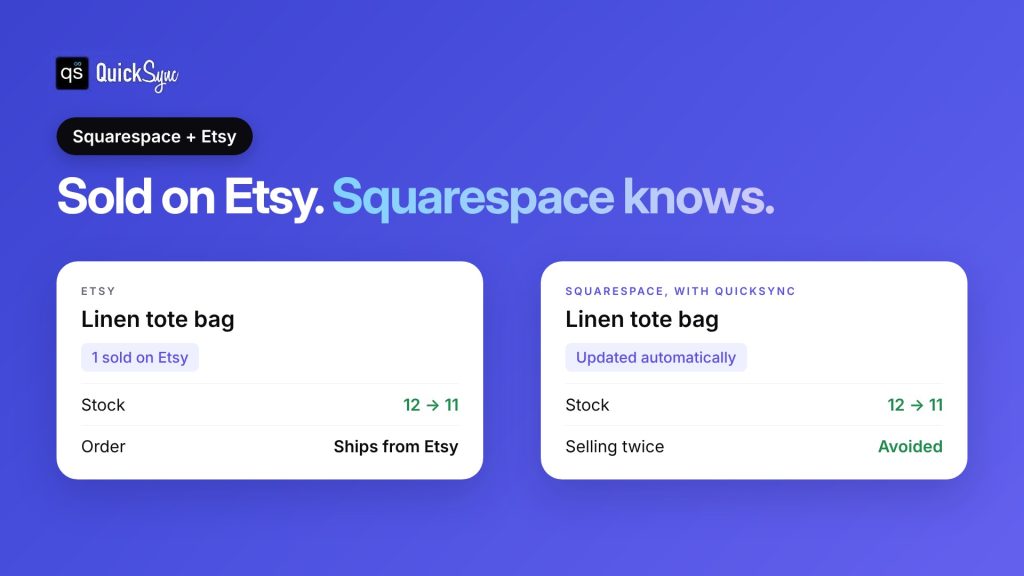
- Stock, both ways. A sale on Squarespace lowers the count on your other shops, and a sale elsewhere lowers it on Squarespace. QuickSync checks for changes every couple of minutes.
- Products and listings. Connecting imports your Squarespace catalogue. QuickSync can create and update listings on your other channels, with photos, sizes and colours. On Pro, it keeps them in step with your main store.
- Orders. On Pro, Squarespace orders come into QuickSync with your other orders, and tracking numbers added there are sent back to the Squarespace order.
- Price rules. On Ultra, set a different price per channel, for example to cover Etsy’s fees.
Plans start at $19 a month for two shops and up to 1,000 items, with stock sync and unlimited orders. Pro costs $29 a month and adds listings and orders. See the QuickSync pricing page.
Good to know: QuickSync doesn’t create orders from other channels inside Squarespace. Each order stays on the channel where it was placed.
How to lower your Squarespace costs
A few changes can cut what you pay each month:
- Pay yearly. Every plan is cheaper on yearly billing, and you get a free domain for the first year.
- Move off Basic once you sell regularly. Above $500 a month in online sales, Core costs less overall.
- Use Squarespace Payments on Plus or Advanced. The card rate drops to 2.7% or 2.5%, which matters at higher volume.
- Watch international orders. Cards from outside the US add 1.5%, and currency conversion adds 1%. Price those orders to cover it.
Final thoughts
Squarespace pricing looks simple: four plans from $19 to $99 a month on yearly billing. The real cost depends on how much you sell. Basic’s 2% transaction fee makes it the most expensive plan for most shops making regular sales, and card fees apply on every plan.
If you sell physical products, start on Core and pay yearly. Check your card fees each month, and move up to Plus or Advanced only when lower card rates or their extra tools pay for the difference. Plus costs $20 a month more than Core on yearly billing, and its card rate is 0.2% lower. That saves $20 for every $10,000 you sell, so Plus only pays for itself on card fees once you sell more than $10,000 a month online.
And if your Squarespace store is doing well, the next step is usually a second channel. Etsy, eBay or a market stall can bring in buyers your site never reaches, as long as your stock stays in step.