QuickSync copies a product into another store by creating a new listing there, with its title, description, photos, variants, price, SKU and stock. You can export Shopify products to Etsy, Etsy products to Shopify, or copy between any two of your stores. The one exception is Amazon: we don’t create listings there.
Copying works on every plan. Keeping the copies up to date is product syncing, which needs Pro and above. The app calls this exporting.
We only create what’s missing. If a store already has a product with the same SKU, we link the two.
What we copy
We build each listing from your source store’s product.
- Details. We copy the title, description, photos, price, weight, tags and barcode. We send each store the ones we can write there.
- Variants. We copy every variant that has a SKU, with its options, such as size and colour.
- Stock. We start the new listing at your source store’s count. From then on, it syncs like any matched product.
Some things we leave behind. Collections, metafields and discount codes don’t copy, and videos and SEO titles need Ultra and above. What product syncing changes lists every field, store by store.
Before you copy
Some stores won’t take a listing until they know how to ship it. Setup asks for these as Review settings once you click Continue with 2 stores. To change them later, go to Settings, then Stores, click Manage on the store and open Review settings.
| Copying to | What to set up first |
|---|---|
| Etsy | A shipping profile, a return policy and a processing profile. Every new listing gets your default category. See the Etsy guide. |
| eBay | A fulfillment, return and payment policy, and an item location. We ask eBay to pick each category from the product title, and use your default category if it can’t. A product with no photos goes up with a placeholder picture. See eBay business policies. |
| TikTok Shop | A default category, a default package weight and size, and a default size chart if your category needs one. Every product needs at least one photo. See the TikTok Shop guide. |
| Squarespace | A default store page, picked under Default category. New products go on it. See store pages. |
| Shopify, WooCommerce, Wix, Square, Clover, Lightspeed | Nothing extra. |
| Amazon | We don’t create Amazon listings. With Amazon, we send stock out and bring orders in. See the Amazon guide. |
Then check your source store.
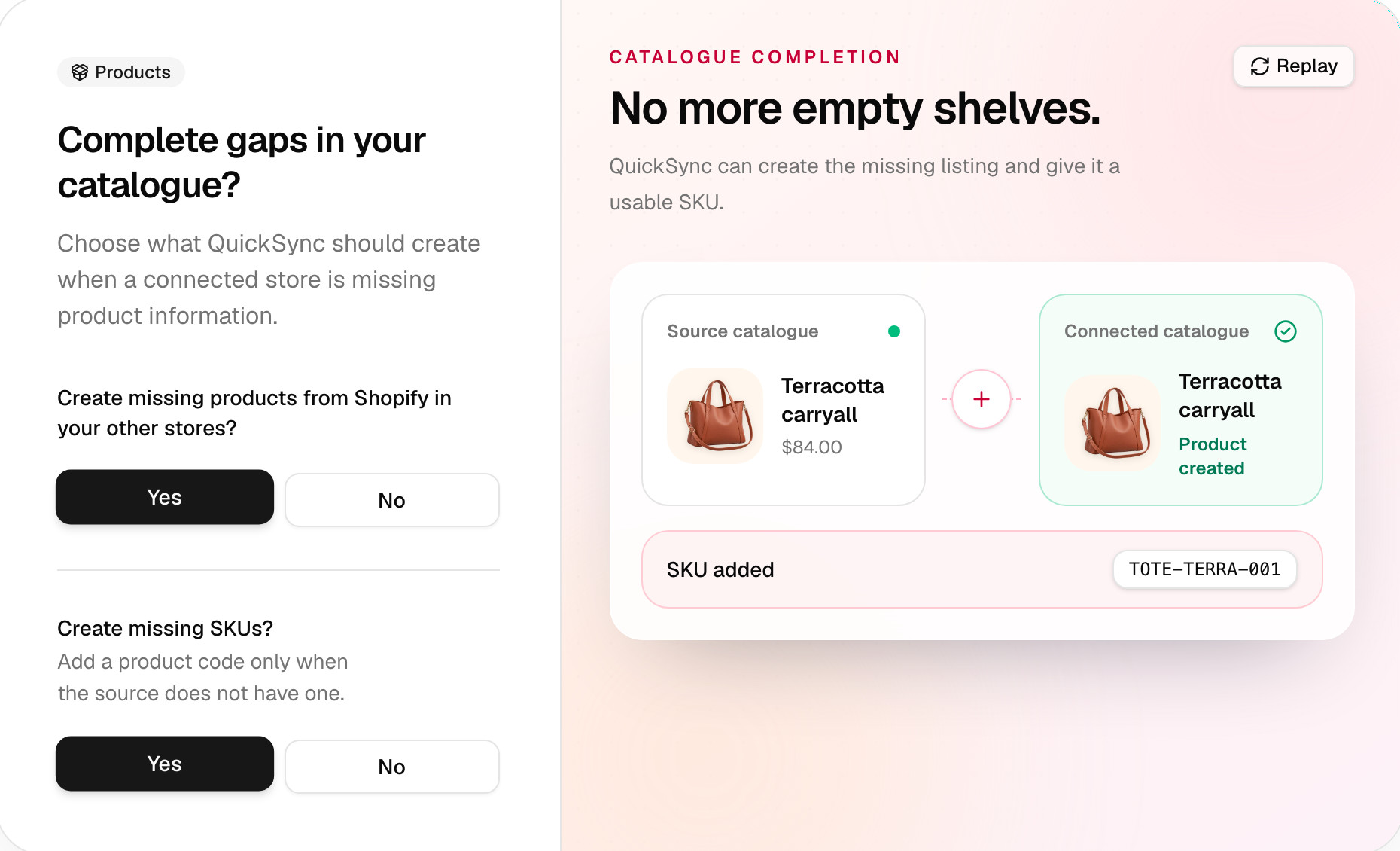
- SKUs. We copy only variants with a SKU, and we skip a SKU that two variants share. Answer Yes to Create missing SKUs? in setup, and we’ll add one where it’s missing.
- Filters. The store’s Product status filter lets Active and Draft products through unless you change it. Only products in stock skips anything at zero. You’ll find both on the store’s General tab.
- Currency. We copy a price as the same number. If your stores sell in different currencies, turn on currency conversion first (Ultra and above). Otherwise £20 on Shopify arrives on Etsy as $20.
Copy in setup
The copy starts when you finish setup.
- Screen 5 asks Create missing products from Shopify in your other stores? Answer Yes. The store it names is your source: your main store if product syncing is on, and otherwise the store with the correct stock.
- Answer Yes to Create missing SKUs? if some products have no code. Without one, a product doesn’t copy.
- If a store you’re copying to has drafts, setup asks Add new products as drafts? See Drafts.
- If you’re copying to Etsy or eBay, check the estimate. Then tick I accept these estimated listing fees.
- Press Start syncing on the last screen.
To copy only some products, pick Choose products on screen 4 and tick them. That’s also your sync list, so only those products sync from then on.
Copy from the Products page
A product that’s in only one store shows No match found under Needs attention. There are three ways to copy it.
- Everything. Click Sync products, and setup opens again with your saved answers. Answer Yes on the gaps screen, then press Start syncing.
- A batch. Click QuickFix on the Needs attention card. It groups products by issue, and for No match found it offers Export Product. Click Apply 1 fix. To copy a few, tick them in the Needs attention tab first, then click QuickFix in the bar that appears.
- One product. Click it, open Sync verdict and click Export Product.
QuickFix copies the other way too. A product missing from your main store shows Product unavailable in Master Store, and Add to Master Store & Sync creates it there.
Turning on product syncing also copies. We create whatever your other stores are missing, then keep every matched product updated. After that, when you add a product to your main store, we create it in your other stores too, if it has a SKU and you sync all products.
Drafts
Four stores can hold a copy as a draft. Shopify, WooCommerce, Etsy and TikTok Shop keep a draft hidden from shoppers until it’s published. Answer Yes to Add new products as drafts? in setup, or switch on Create as draft in the Product syncing window. QuickFix follows the same setting.
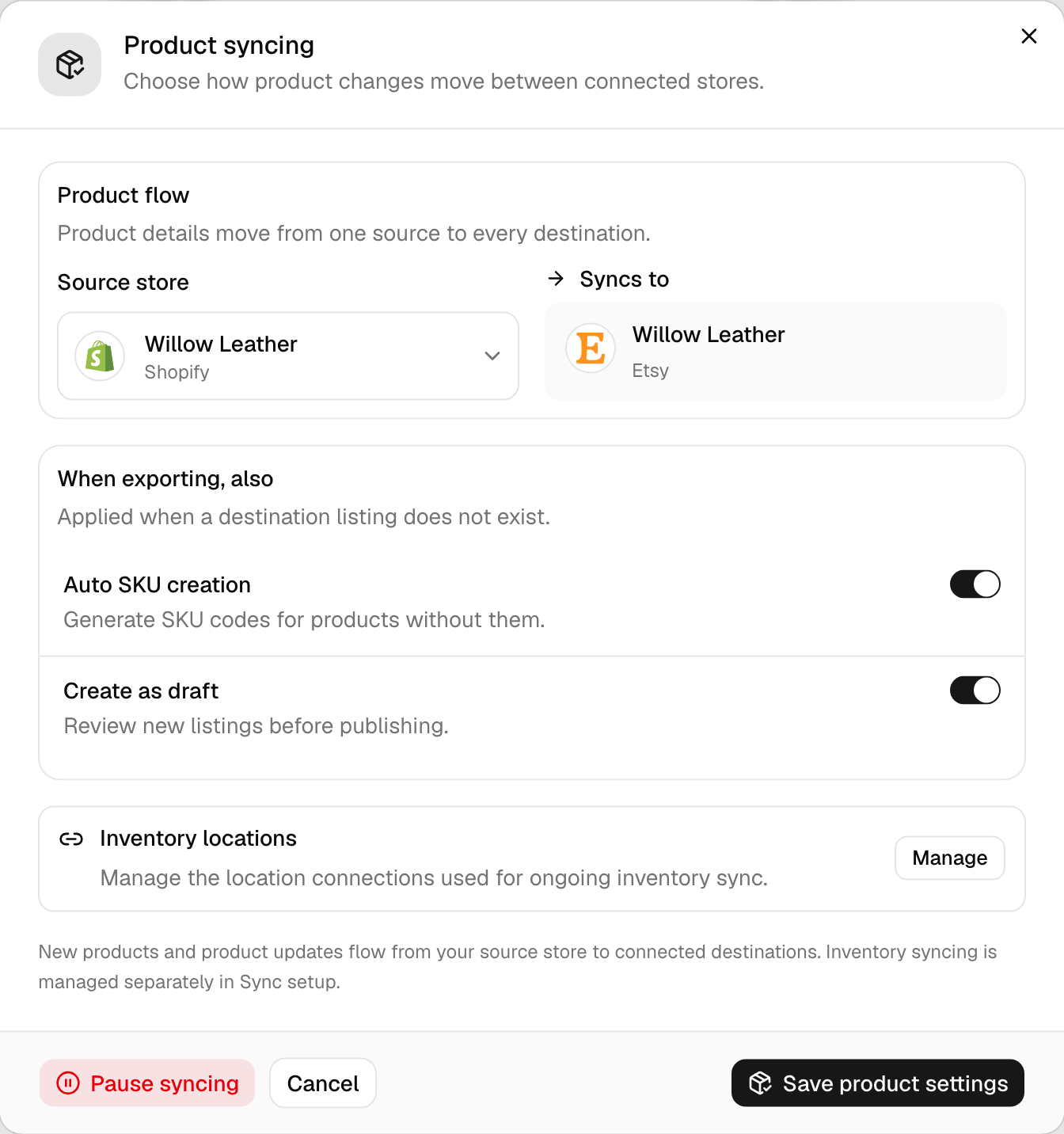
We apply the draft setting only when we create a listing. After that, it’s up to the store.
- Etsy and TikTok Shop. We leave the listing a draft until you publish it there.
- Shopify and WooCommerce. The listing takes your main store’s status at the product’s next update. If it’s active there, it goes live.
- Square, Clover and Lightspeed. They don’t have drafts. A product that’s a draft in your source store arrives there ready to sell.
Etsy needs a photo to publish. A copy without one stays a draft until the product has one.
Etsy and eBay fees
Etsy and eBay can charge for each new listing, the same as when you list by hand. Before we create listings there, setup and the Product syncing window show Estimated marketplace fees. You tick I accept these estimated listing fees to go on. The switch on the Product Syncing card doesn’t ask.
- The estimate. We count $0.20 per new Etsy listing and $0.35 per new eBay listing. We leave out products the store already has under the same SKU. The marketplace sets the real fee, and Etsy’s rates are on its fees page.
- QuickFix. It asks once per store. Tick Accept marketplace listing fees in its window, or click Accept fees and continue for a single product.
- Drafts. With drafts on, setup and the Product syncing window skip the fee step, because a draft isn’t live yet. QuickFix still asks for eBay.
Limits
- TikTok Shop. TikTok lets new sellers add 100 products a day. When a copy reaches that, we stop TikTok copies for the day and email you. TikTok’s daily listing limit covers what you can do.
- Etsy option groups. An Etsy listing holds two. With three, we merge two into one, such as Size / Colour, if together they make 70 combinations or fewer. With four or more, we stop and show Etsy could not map this product’s options.
- Etsy values. Etsy takes 70 values per option group and 400 combinations per listing. Past that, we stop and show Too many variant options for Etsy.
- Other stores. Shopify takes 3 option groups. WooCommerce and TikTok Shop take 100 variants, and Square takes 250. We don’t copy a product over a cap. It shows under Needs attention as Rejected by the other store.
- Stopping. Once a copy starts, you can’t stop it from the app. If you started one by mistake, contact support straight away.
Check the copies
- Open Products. Copied products move to Syncing. Anything that didn’t copy stays under Needs attention with its reason, such as eBay business policies required. What each product status means has the fix.
- If you chose drafts, find them in the other store. Publish the ones you’re happy with.
- Open a few listings and check the price, photos and category. We let eBay and TikTok Shop pick categories for new listings, and Etsy gets your default one.
- Fix anything that failed. After the same failure 5 times, we stop retrying that product in that store. Once you’ve fixed the cause, run QuickFix or edit the product in your source store, and we’ll try again.
Common questions
How do I export Shopify products to Etsy?
Connect both stores, then open the Etsy store’s Review settings and pick a shipping profile, a return policy and a processing profile. In setup, answer Yes to Create missing products from Shopify in your other stores. Accept the estimated Etsy fees or choose drafts, and press Start syncing. Copying works on every plan. Keeping the Etsy listings updated needs product syncing, on Pro and above.
Why can’t I see my copied products on Etsy?
They’re most likely drafts. An Etsy copy stays a draft when you chose drafts, when the product’s a draft in your source store, or when it has no photo, so look in your Etsy drafts first. If it isn’t there either, we didn’t copy it. Open Needs attention on the QuickSync Products page. Its status names the reason, such as a missing shipping profile.
Will QuickSync create duplicate listings?
Not for products whose SKUs match. Before we create anything, we look for the same SKU in the other store and link the two if we find it. A different SKU counts as a different product, so TSHIRT-1 on Shopify and TSHIRT_1 on Etsy would give you a second listing. Make the SKUs identical first, and we’ll link them.
Can I copy only some products?
Yes. In setup, pick Choose products and tick the ones you want, which also limits syncing to those products. After setup, open the Needs attention tab on the Products page, tick the products that show No match found and click QuickFix. It shows what it’ll do, Export Product, and nothing runs until you apply it.
Who pays the Etsy and eBay listing fees?
You do, to Etsy or eBay, the same as when you list by hand. We don’t charge per listing. Setup, Sync products, the Product syncing window and QuickFix show an estimate first: $0.20 for each new Etsy listing and $0.35 for each new eBay listing, leaving out products the store already has. You accept it before they list. The switch on the Product Syncing card doesn’t ask. Etsy drafts skip the step, because a draft isn’t live yet.
Next step
To see which details each store takes, read What product syncing changes. If products still show No match found after a copy, What each product status means has the fix.