Etsy and Squarespace both let you sell what you make, but they solve different problems. Etsy hands you shoppers who are already searching. Squarespace hands you a store that is entirely yours, and leaves the shoppers to you.
That difference shows up in the fees. On a $40 sale, Etsy takes about $4.25. Squarespace Core takes $1.46, plus $29 a month whether you sell anything or not. Which one costs less depends on how many orders you can bring in yourself.
This guide compares Etsy vs Squarespace on fees, getting buyers, branding and selling in person. It shows when Squarespace actually becomes cheaper, and how to run both without selling the same item twice. Fees are US rates from Etsy’s and Squarespace’s own policy pages, checked in November 2026.
Etsy vs Squarespace at a Glance
Choose Etsy if you’re starting out and want buyers without building an audience first. You pay nothing monthly, only fees on each listing and sale. Choose Squarespace if you want your own brand, your own customer list and lower fees per order, and you can drive your own traffic. Many sellers use both: Etsy to be found, and Squarespace to build a store they own.
| Key-Points | Etsy | Squarespace |
|---|---|---|
| What it is | A marketplace for handmade, vintage and craft goods | A website builder with an online store |
| Built-in shoppers | Yes, people search Etsy to buy | No, you bring every visitor |
| Monthly cost | $0 (Etsy Plus is optional at $10) | From $19 (Basic) or $29 (Core), billed yearly |
| Fees on each sale | 6.5% transaction fee, plus 3% + $0.25 payment processing | 2.9% + $0.30 card processing; Basic adds a 2% fee |
| Listing fee | $0.20 per listing, renewed every 4 months or after each sale | None |
| Advertising fees | Offsite Ads: 12% or 15% of an order Etsy’s ads bring in | None; you pay for your own marketing |
| Design control | Etsy’s shop layout, with your banner, logo and sections | Full templates, drag-and-drop editor and CSS |
| Your own domain | No | Yes, free for the first year on annual plans |
| Best for | New sellers, testing products, handmade and vintage | Brands with an audience, repeat buyers, higher volume |
Etsy vs Squarespace: What’s the Difference?
Etsy is a marketplace. Your shop sits alongside millions of other listings, and shoppers find you through Etsy search, Etsy Ads and Etsy’s own advertising elsewhere. Etsy handles checkout and payments. In return, it takes a fee on almost everything: listing, selling, processing and, sometimes, the ads that brought the buyer.
Squarespace is a website builder. You get a domain, templates and a full online store, and you keep the customer relationship. Nobody browses Squarespace looking for things to buy, though. Every visitor comes from your social media, your email list, Google or your ads.
So the real question isn’t which platform is better. It’s whether you need someone else’s shoppers, or whether you already have your own.
Etsy vs Squarespace Fees Comparison
Etsy fees
| Fee | Amount (US sellers) | Charged on |
|---|---|---|
| Listing fee | $0.20 | Each listing, renewed every 4 months; multi-quantity listings renew after each sale |
| Transaction fee | 6.5% | Item price plus shipping and gift wrap |
| Payment processing | 3% + $0.25 | The full order, including shipping and tax |
| Offsite Ads | 15%, or 12% once your shop passes $10,000 in yearly sales | Orders from Etsy’s ads on other sites, capped at $100 per order |
| Etsy Ads | Your daily budget | Optional ads inside Etsy |
| Etsy Plus | $10 a month | Optional; includes 15 listing credits and $5 in Etsy Ads credits each month |
Offsite Ads catch many sellers out. If a shopper clicks one of Etsy’s ads on another site and orders within 30 days, Etsy charges the ad fee on that whole order. Shops under $10,000 a year can opt out. Once you pass $10,000, you pay 12% for the life of the shop and can no longer opt out. Our Etsy fees guide covers the rest, including currency conversion.
Squarespace fees
| Plan | Billed yearly | Billed monthly | Transaction fee | Card rate (Squarespace Payments) | Digital products fee |
|---|---|---|---|---|---|
| Basic | $19/mo | $25/mo | 2% | 2.9% + 30¢ | 7% |
| Core | $29/mo | $39/mo | 0% | 2.9% + 30¢ | 5% |
| Plus | $49/mo | $65/mo | 0% | 2.7% + 30¢ | 1% |
| Advanced | $99/mo | $139/mo | 0% | 2.5% + 30¢ | 0% |
Squarespace’s fees are simpler, but don’t believe the “zero transaction fees” line you’ll see in some comparisons. Basic still charges 2% on store sales. Core is the cheapest plan with no transaction fee.
What a $40 sale would cost on each platform
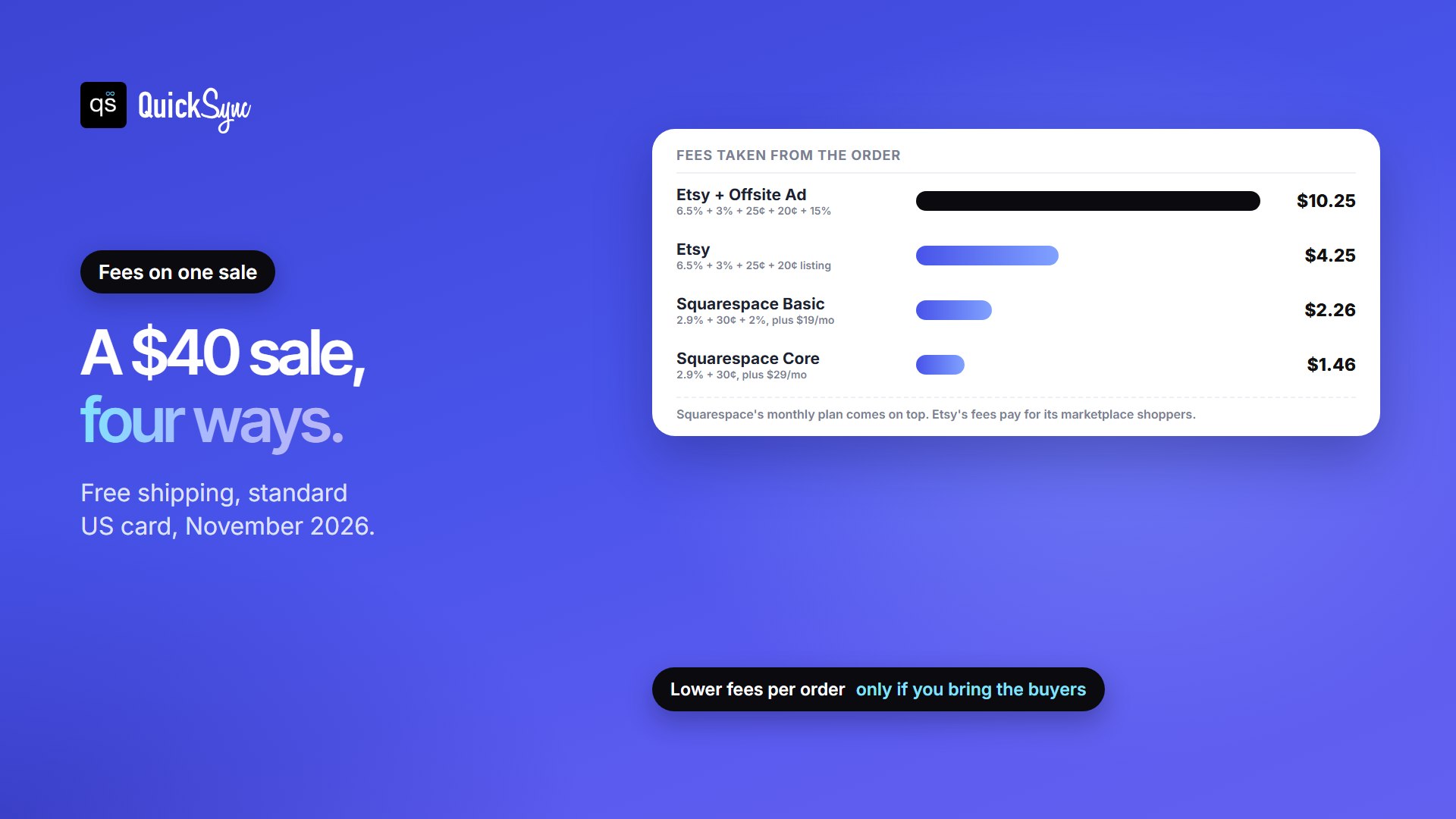
Take a $40 item with free shipping, paid with a standard US card:
| Platform | Fees on the order | You keep |
|---|---|---|
| Etsy | $2.60 transaction + $1.45 processing + $0.20 listing = $4.25 | $35.75 |
| Etsy, order from an Offsite Ad (15%) | $4.25 + $6.00 ad fee = $10.25 | $29.75 |
| Squarespace Basic | $1.46 processing + $0.80 transaction = $2.26, plus the plan | $37.74 before the plan |
| Squarespace Core | $1.46 processing = $1.46, plus the plan | $38.54 before the plan |
Shipping widens the gap. Etsy’s 6.5% also applies to what you charge for shipping. Squarespace charges only card processing on it.
When Does Squarespace Become Cheaper Than Etsy?
Squarespace’s monthly fee is a fixed cost, and Etsy’s fees grow with every order. With $40 orders, here’s the monthly total on each:
| Orders a month | Etsy | Squarespace Basic | Squarespace Core |
|---|---|---|---|
| 5 | $21 | $30 | $36 |
| 10 | $43 | $42 | $44 |
| 20 | $85 | $64 | $58 |
| 50 | $213 | $132 | $102 |
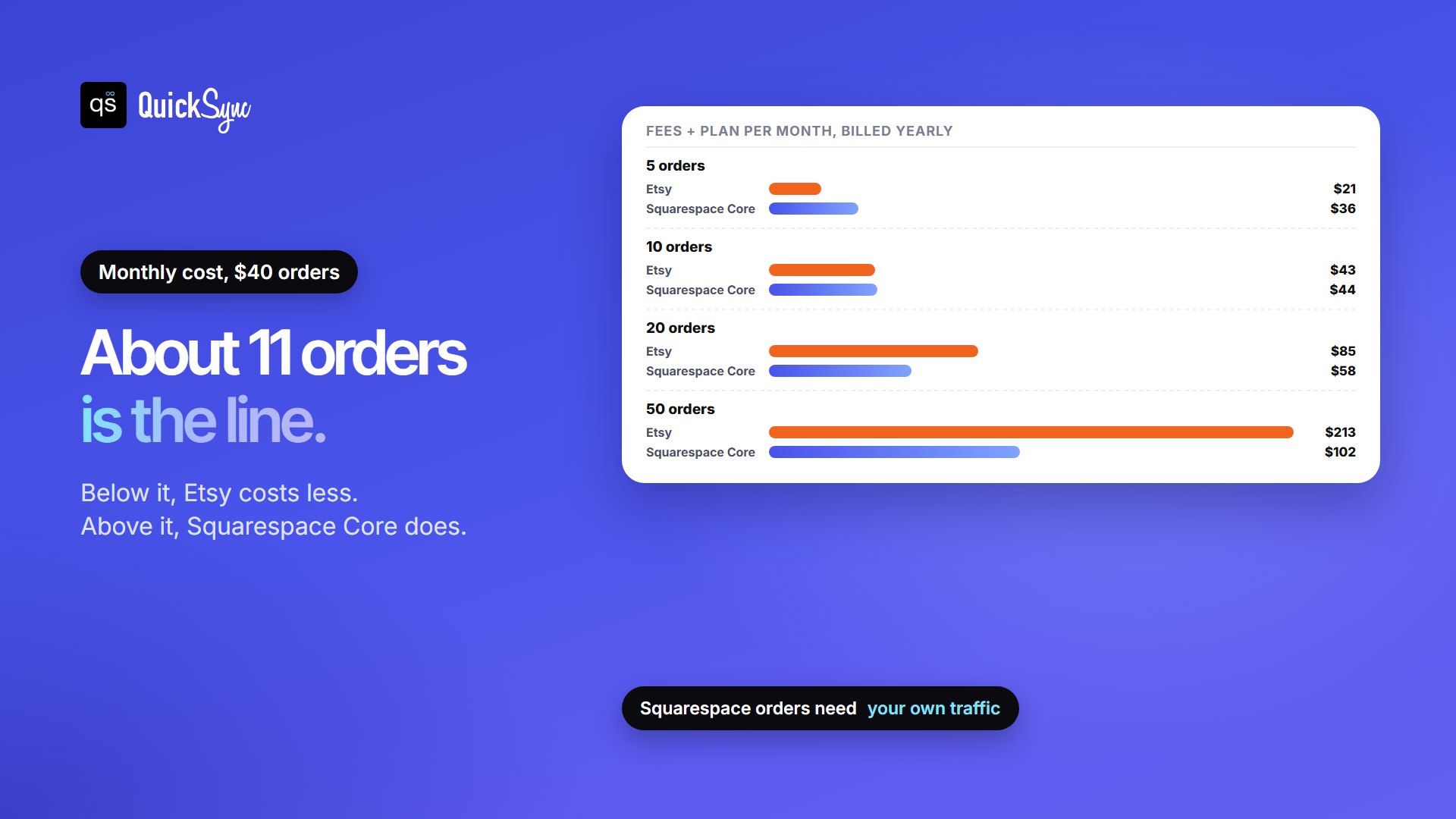
On fees alone, Squarespace Basic is cheaper than Etsy from about 10 orders a month, and Core from about 11. Core beats Basic from about 13 orders. Any order that comes from an Etsy Offsite Ad pulls the break-even point lower.
Here’s the catch most comparisons skip: those Squarespace orders only happen if you bring the shoppers yourself. Etsy’s fees pay for its marketplace traffic. On Squarespace, you pay for traffic in time or money, through social posts, email, Google and ads. If your website gets five orders a month while Etsy gets you fifty, Etsy is the better deal, even at 10% a sale.
One more lever if you already have followers: Etsy’s Share & Save program gives you 4% back on orders that come through your own shop links. It cuts Etsy’s cost on the buyers you bring yourself. Our guide to linking your Etsy shop to TikTok shows how it works.
Getting buyers
This is Etsy’s biggest advantage. Shoppers come to Etsy to buy handmade, vintage and craft items, and a well-titled, well-tagged listing can be found in Etsy search from the day it goes live. You can add Etsy Ads to show up higher in Etsy search, and Etsy also advertises listings on other sites through Offsite Ads.
Squarespace gives you the tools to attract buyers, but not the buyers. Every plan includes SEO tools, abandoned cart recovery, customer accounts, newsletter signup blocks and product promotion on Facebook and Instagram. Core adds Google Shopping and discount codes. Squarespace also offers its own Email Campaigns tool. Those tools only pay off once people are visiting your site.
Branding, design and owning your customers
On Etsy, your shop follows Etsy’s layout. You choose your banner, logo, photos, shop sections and policies, and that’s about it. Etsy shows similar items from other sellers around your listings, and buyers may remember that they bought “on Etsy” rather than from you.
Squarespace is the opposite. Its templates, drag-and-drop editor and CSS editing let you build a site that looks like your brand, with your own domain. Customers can create accounts, and you can collect emails for repeat sales. If you want a business that doesn’t depend on one marketplace’s fees and rules, that ownership is the main reason to have your own site. For other builders, see Wix vs Squarespace.
Digital products and selling in person
- Digital downloads. Etsy charges its usual listing, transaction and processing fees on digital items. Squarespace adds a separate digital products fee on top of card processing: 7% on Basic, 5% on Core, 1% on Plus and 0% on Advanced. If you sell mainly digital files, compare carefully: on every plan except Advanced, the digital fee is higher than the fee on physical products.
- Selling in person. Both work with a Square card reader. Etsy can sync your listings with Square, and in-person sales through Square skip Etsy’s 6.5% and Etsy’s processing fee, though Square’s processing applies. Squarespace’s point of sale runs in the Squarespace app with a Square Reader, for US sellers.
If you sell at markets, see our guide to Square vs Squarespace and how QuickSync can keep Square and Etsy in sync. We also compared the apps that sync Square and Etsy, and when Etsy’s free sync is enough.
How About Using Etsy and Squarespace together?
You don’t have to choose one. A common setup is to keep Etsy for discovery, so new shoppers find you there, and build Squarespace as your own store for repeat buyers, your email list and your best margins.
The hard part is stock. Squarespace can import your Etsy products, but its own help page calls it “a one-time import, not a sync,” and adds, “It’s not possible to sync your inventories across both stores.” Sell your last mug on Etsy, and Squarespace still shows one in stock until you change it by hand.
If you sell a few one-of-a-kind items a week, updating both shops by hand works. Once you have several best-sellers or busy weekends, a sync app keeps one count. With QuickSync, setup takes a few minutes:
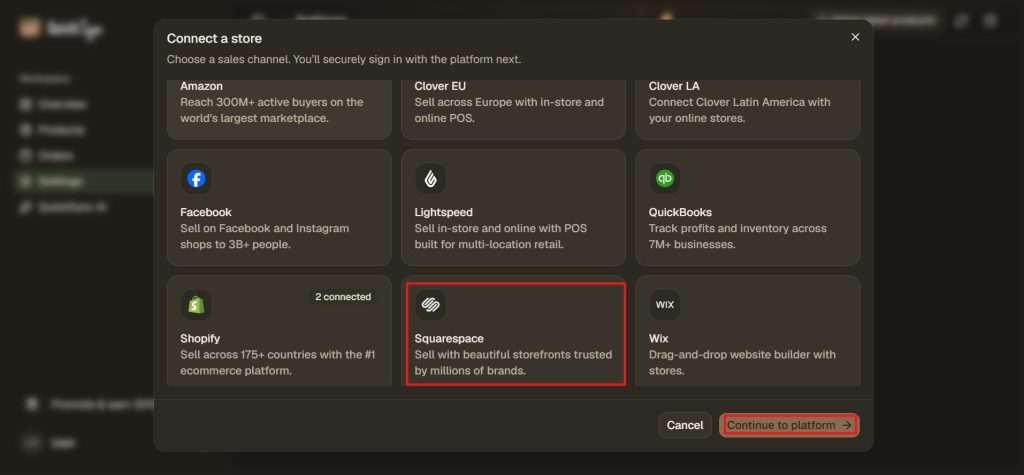
- Connect Squarespace by creating an API key in Squarespace and pasting it into QuickSync.
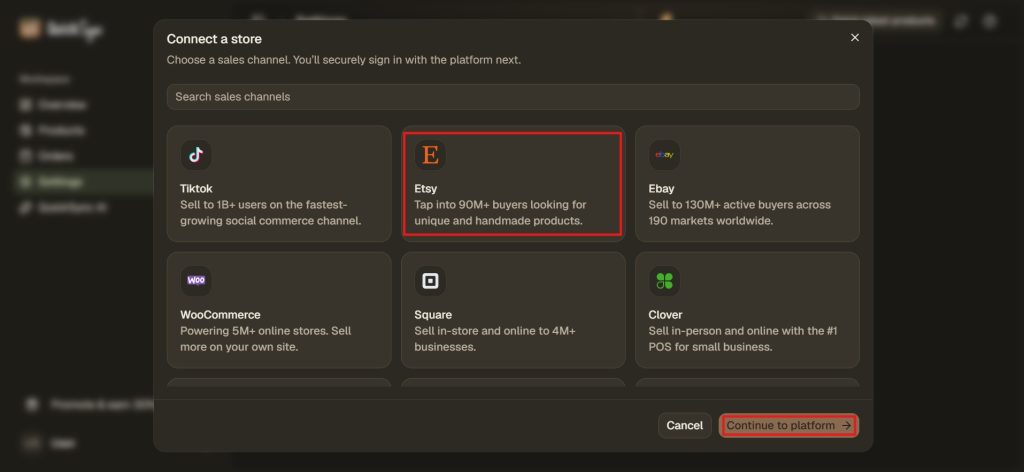
- Connect Etsy by approving QuickSync for the shop you want.
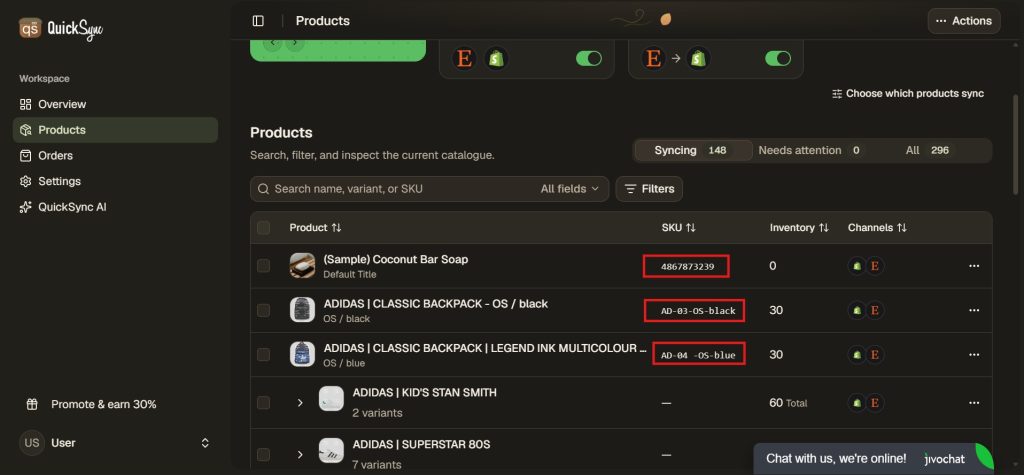
- Match products by SKU. Etsy accepts SKUs of up to 32 characters and Squarespace up to 60, so keep yours to 32 or fewer. Give every listing its own SKU. QuickSync can’t sync two Etsy listings that share one.
- Choose which shop holds the right count and what you want to sync, like product sync, inventory sync, or order sync. You can also go with selective sync or choose all products to sync in one go and simply then start syncing.
From then on, a sale in either shop lowers the stock in the other. Squarespace reports orders the moment they’re placed. QuickSync checks Etsy stock every 2 minutes and Etsy orders every 5. If the same item is close to selling out in both places at once, keep one or two spares on your fastest sellers to cover that short gap. For more ways to keep counts right, see our Etsy inventory management guide.
How to Move From Etsy to Squarespace
Whether you’re leaving Etsy or adding a website, getting your products across takes an afternoon:
- Download your Etsy listings. In Etsy, go to Shop Manager, then Settings, Options and Download Data, and click Download CSV. The file covers your active listings, with titles, descriptions, prices, quantities, tags, materials, image URLs and SKUs. Variations aren’t in that list, so plan to add sizes and colors yourself.
- Get Squarespace’s template. In your Squarespace Products panel, click Import, then Download CSV template. Copy your Etsy details into its columns. Each product can have up to three option names and 250 variants.
- Import and check. A version 7.1 site imports up to 10,000 products at once. Check every product afterwards, including photos and prices.
- Keep Etsy running while your site grows. Add your website under “Around the web” in your Etsy shop, as Squarespace’s help suggests, and point your social bios and emails to your new store.
- Keep stock in sync for as long as both shops are open, by hand or with a sync app.
What about Shopify?
Shopify is the other common choice. Like Squarespace, it’s your own store with no built-in shoppers, but it’s built around selling first, with more sales channel apps and costs to match. See Shopify vs Etsy and Shopify vs Squarespace for those comparisons. If you’re weighing more marketplaces, our list of Etsy alternatives compares their fees.
Etsy or Squarespace: Which Should You Choose?
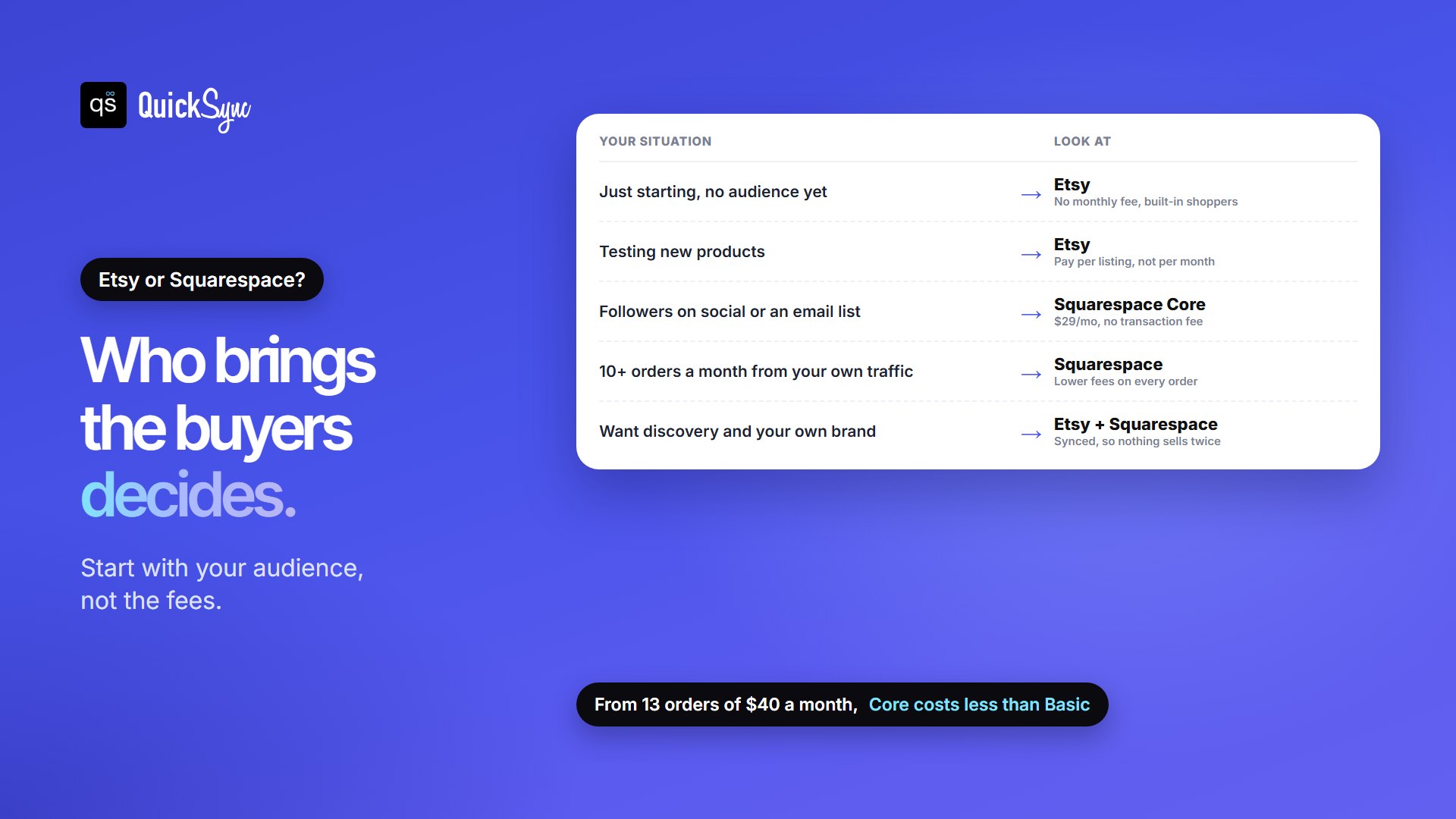
- Choose Etsy if you’re starting out, don’t have an audience yet, or want to test what sells before paying a monthly fee.
- Choose Squarespace if you already have followers or an email list, sell a steady 10 or more orders a month from your own traffic, or want a brand that doesn’t depend on a marketplace. Start on Core.
- Use both if you want Etsy’s shoppers and your own store. Keep one stock count so nothing sells twice.
New to Etsy? Our guide to opening an Etsy shop walks through setup.
FAQs
More guides: Etsy fees, what a SKU is, and our Etsy and Squarespace integration pages.