An Etsy listing only knows about Etsy sales. Sell your last ceramic mug at a Saturday market or on your Shopify store, and Etsy keeps showing it in stock until someone changes the number. The next Etsy buyer pays for a mug you no longer have.
Etsy had 5.8 million active sellers at the end of September 2026, according to its latest quarterly filing. Every one of them who also sells at markets, on their own site or on another marketplace faces the same gap.
The fix is a simple system, set up once. This guide to Etsy inventory management shows what Etsy tracks for you, how quantity changes your fees, how to set up SKUs, and three ways to keep Etsy stock right: Etsy alone, a spreadsheet, or an app that syncs it for you.
What is Etsy Inventory Management: At a Glance
Etsy inventory management means keeping the quantity on every Etsy listing and variation equal to what you can actually ship. Etsy tracks quantity per listing or per variation and shows an option as sold out at zero, but it can’t see sales you make anywhere else. If you only sell on Etsy, its built-in tools and a SKU on every item are enough. If you also sell on Shopify, eBay, TikTok Shop or at markets, you need a spreadsheet routine or an app that syncs stock automatically.
| Your situation | What works | Cost |
|---|---|---|
| Etsy only, small catalogue | Etsy’s quantity and SKU fields | Free |
| Etsy plus the odd market stall | A spreadsheet and a weekly check | Free, plus your time |
| Etsy plus Shopify, eBay, TikTok Shop or a POS | A stock sync app | From $19 a month (QuickSync, two shops) |
| You make products and track raw materials | Maker inventory software, such as Stocksmith (formerly Craftybase) | From $41 a month |
What Etsy’s Built-in Inventory Tools Do
Etsy gives you more than a single quantity box. Here’s what you can do in Shop Manager today, according to Etsy’s help center.
- Quantity per listing. Enter how many you have for sale when you create or edit a listing.
- Quantity, price and SKU per variation. Etsy lets you add variations for up to 3 item attributes, such as size, color and material. Toggle on quantity and SKU, and each option gets its own count and code.
- Sold out at zero. Set an option’s quantity to 0 and it shows as sold out on the listing page.
- A SKU field. Etsy describes it as a custom code to help you keep track of your inventory.
- A listing CSV. In Shop Manager, go to Settings, then Options, then Download Data. The file lists title, price, quantity, tags and SKUs for your active listings.
- Restock requests. On Etsy Plus, shoppers can ask to be emailed when a sold-out item is back.
There are limits. Listings with 3 variation types can have up to 2,500 option combinations, and 1 or 2 types up to 4,900. Unique prices, SKUs and quantities only work for up to 400 combinations.
What Etsy doesn’t do matters just as much. It keeps one count per variation, with no separate stock locations. It doesn’t know about your other channels. And it doesn’t track the supplies you make things from, or what each item costs you.
How Quantity Changes Your Etsy Fees
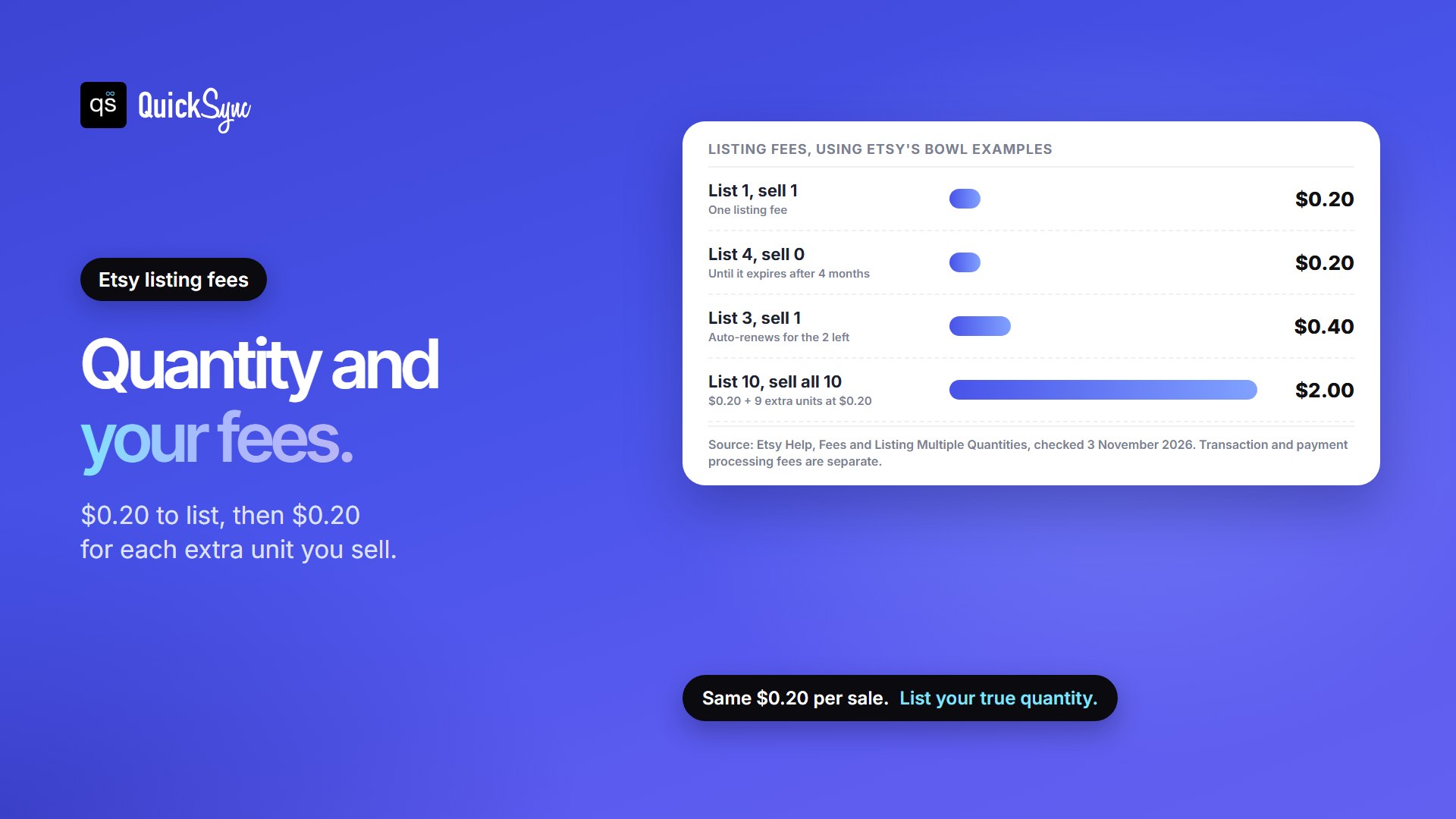
Before you set quantities, know how Etsy charges for them. Creating or renewing a listing costs $0.20, and editing a listing is free. With a quantity above 1, Etsy charges for the extra units only when they sell.
| What you list and sell | Listing fees | Why |
|---|---|---|
| List 1 bowl, it sells | $0.20 | One listing fee |
| List 3 bowls, sell 1 | $0.40 | The listing auto-renews for the 2 left, at $0.20 |
| List 10 bowls, sell all 10 | $2.00 | $0.20 to list, then $0.20 for each of the 9 extra sold |
| List 4 bowls, none sell | $0.20 | Plus $0.20 if you renew after 4 months |
Once everything sells, you’ve paid $0.20 per unit either way. The auto-renewal just charges for the next unit up front. One listing with a real quantity is still the better setup, because a renewed listing keeps its views, favorites and web address.
Etsy’s own advice is to list the true number you have in stock. For made-to-order items, list only what you can make within your production time. For every fee beyond listings, see our Etsy fees guide or the Etsy fee calculator.
Set up SKUs Before Anything Else
A SKU is the code that tells you, a spreadsheet or an app which item sold. Without one, “Tote bag, natural, large” on Etsy and “Large natural tote” on Shopify look like two different products. With the same SKU on both, they’re clearly one.
A good SKU is short and readable. TOTE-NAT-LG says product, color and size. Follow five rules:
- One SKU per variation, not one per listing. A tote in 3 sizes needs 3 codes.
- Use each code once in your shop, drafts and inactive listings included. A sync tool can’t tell two listings with one code apart.
- Use the same code on every channel that sells the item.
- Keep it to 32 characters or fewer. That’s Etsy’s SKU limit, far shorter than eBay’s 50 or Shopify’s 255.
- Watch capitals and spaces. Sync tools such as QuickSync treat ABC-1 and abc-1 as different codes.
To add one in Etsy, open Shop Manager, edit the listing and fill in SKU. For a listing with variations, turn SKUs on for the variations and give each option its own. Our guide to what a SKU is covers naming in more depth, and the free SKU generator builds codes for you.
Three ways to Manage Etsy Inventory
The right method of managing inventory of Etsy depends on how many places you sell, not on how many products you have.
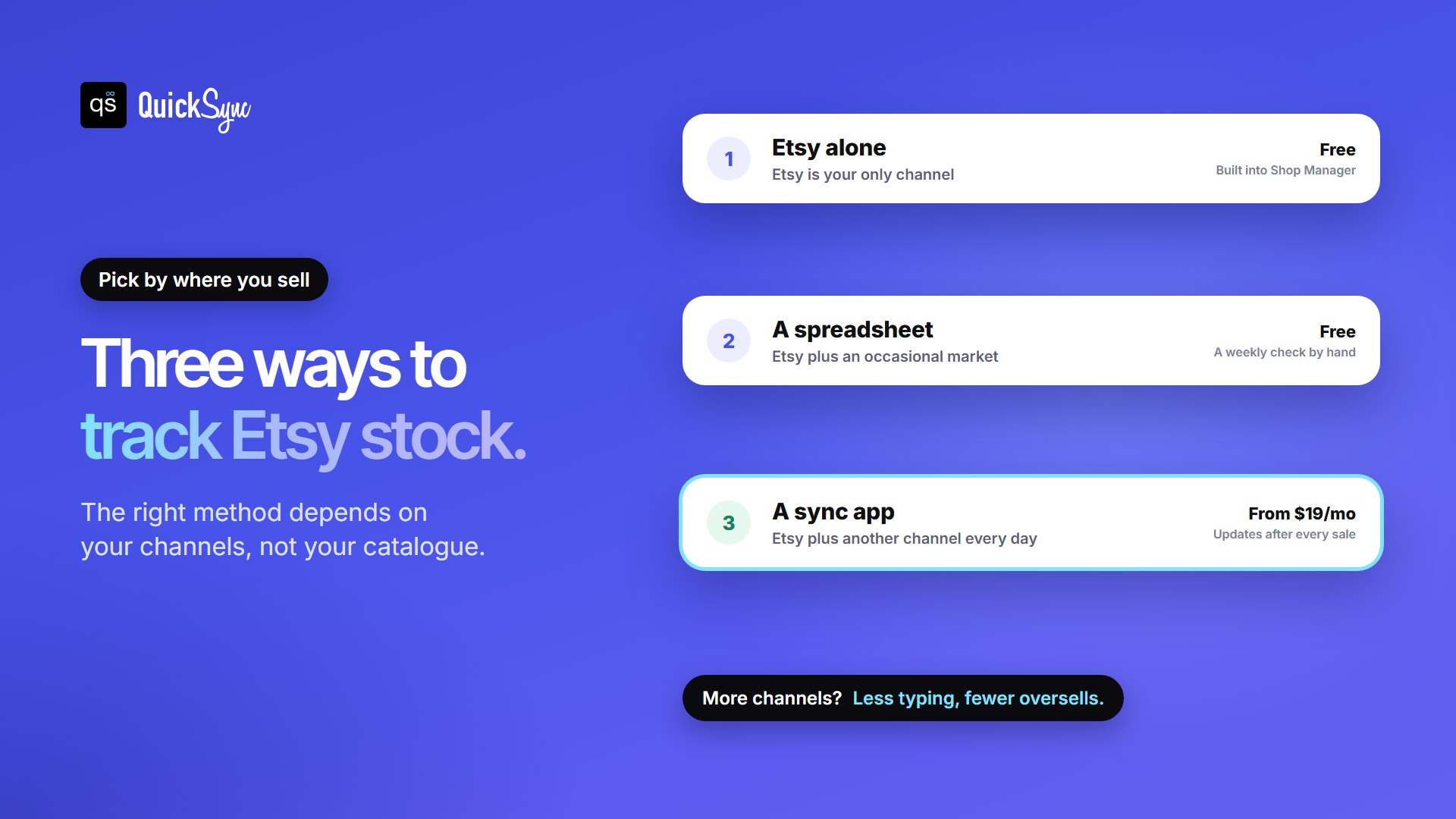
1. Etsy alone: when Etsy is your only channel
If every sale happens on Etsy, Etsy already keeps count. Each order lowers the quantity, and an option at zero shows as sold out. Your job is to set real quantities, add SKUs and restock before popular options run out.
Check your listing quantities in Shop Manager once a week. Anything down to 1 or 2 goes on your reorder or make-more list.
2. An Etsy inventory spreadsheet: Etsy plus occasional sales elsewhere
A spreadsheet works when your second channel is slow, such as a monthly craft fair. Keep one row per SKU and one column per place you sell.
| SKU | Product | On hand | Etsy qty | Market qty | Make or reorder at | Unit cost |
|---|---|---|---|---|---|---|
| MUG-CRM | Enamel mug, cream | 7 | 7 | 0 | 3 | $6.40 |
| TOTE-NAT-LG | Tote bag, natural, large | 12 | 10 | 2 | 5 | $4.10 |
| EAR-SLV-01 | Silver hoop earrings | 1 | 1 | 0 | 0 (one of a kind) | $11.00 |
Run the same four steps every week:
- Download your listing CSV from Etsy (Settings, Options, Download Data).
- Paste the quantity and SKU columns next to your sheet and look up any differences.
- Take off everything you sold elsewhere since the last check.
- Type the corrected quantities back into Etsy, one listing at a time.
The catch is step 4, and the gap between checks. Etsy’s help page describes downloading listing data, not uploading it, so every correction is manual. Any sale between checks can oversell. Our free inventory spreadsheet template gives you a ready-made sheet.
3. A sync app: Etsy plus another channel every day
Once a second channel sells every day, manual updates stop being realistic. A sync app watches each shop, matches items by SKU and changes the count everywhere after each sale. You still own the numbers. The app just copies them faster than you can.
Etsy Inventory Sync Software Compared
“Etsy inventory software” covers two different jobs. Sync tools keep counts equal across channels. Maker tools track materials, recipes and costs, and some also sync. So ensure to pick the one that fits your needs.
| Option | Price | Syncs stock with other channels | Tracks materials and costs | Best for |
|---|---|---|---|---|
| Etsy Integration by QuickSync | $19/mo for two shops and 1,000 items; $29 with listing and order sync | Yes, automatically | No | Etsy plus Shopify, eBay, TikTok Shop, Amazon or a POS |
| Etsy’s built-in tools | Free | No | No | Etsy-only shops |
| Spreadsheet plus Etsy CSV | Free | By hand | If you add columns | A slow second channel |
| Stocksmith (formerly Craftybase) | Studio $41/mo; automatic stock sync from Business at $199/mo, or $166/mo billed yearly | Manual on Indie, automatic from Business | Yes, with recipes, batches and cost of goods | Makers who buy supplies and produce in batches |
| Shopify Marketplace Connect | Free for 50 synced orders a month, then 1% of sales, capped at $99/mo | Not for Etsy: it no longer accepts new Etsy connections | No | Amazon, eBay and Walmart from Shopify |
Where each one wins:
- Stocksmith is the better choice if you make your products. It knows that one candle uses wax, a wick and a jar, and what that costs. QuickSync doesn’t track materials at all.
- QuickSync is an affordable and reliable choice if your products are finished goods and the problem is keeping several shops in sync. It prices on catalogue size and connected shops, never on orders.
- Etsy alone or a spreadsheet is enough while Etsy is your only busy channel.
For Shopify-specific options, see our roundup of the best Shopify Etsy integration apps.
How Etsy Stock Sync Works with Other Channels
Here’s how a sync works in practice, using QuickSync’s documented behavior with Etsy. Other tools differ in the details, so ask about each point before you choose one.
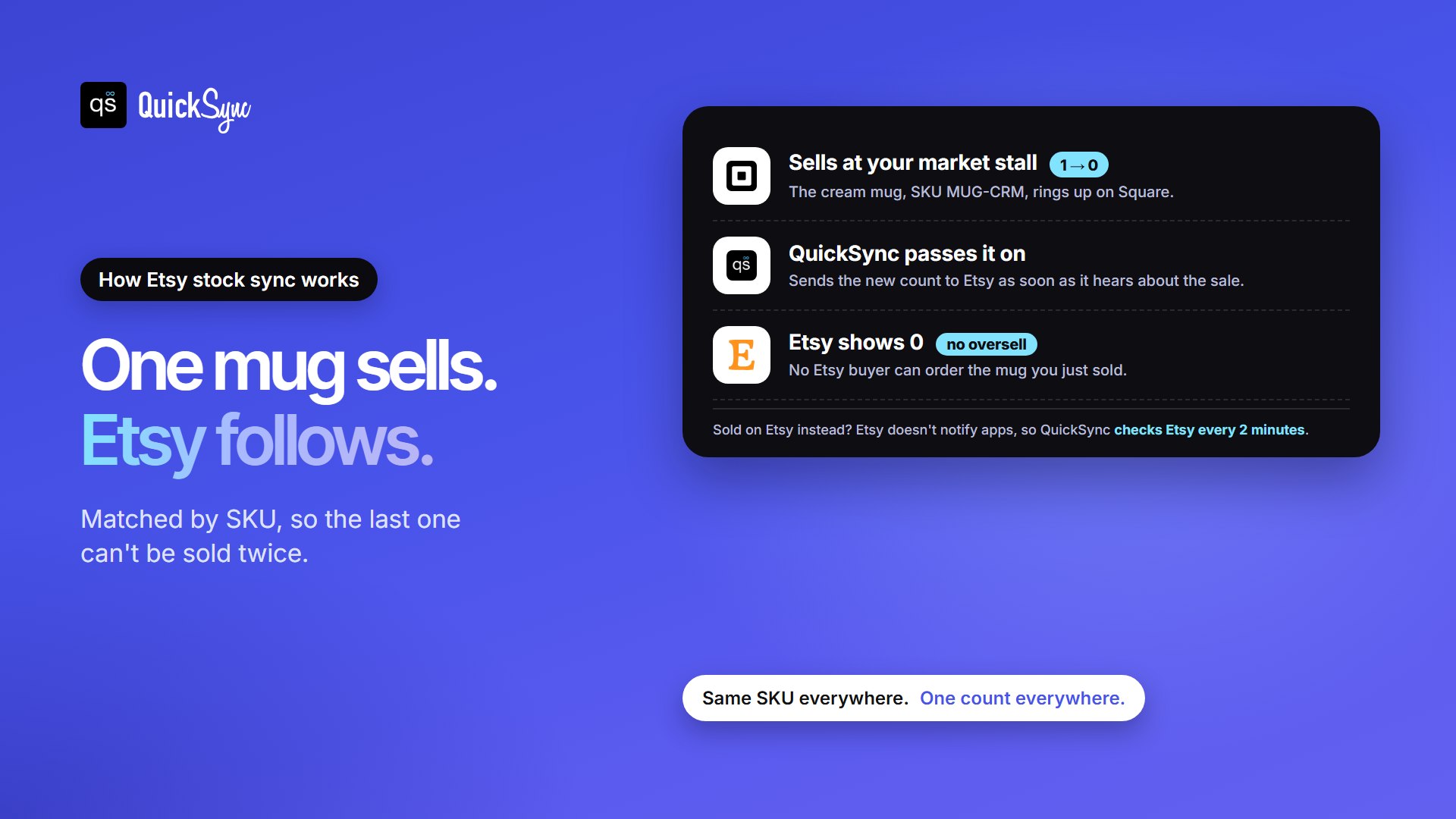
- Into Etsy: when an item sells on another channel, QuickSync sends the new count to Etsy as soon as it hears about the change.
- Out of Etsy: Etsy doesn’t tell apps when stock changes, so QuickSync checks Etsy every 2 minutes for stock and every 5 minutes for new orders.
- Matching: items match by SKU. Two Etsy listings with the same SKU are flagged and left out of sync, rather than guessing which count is right.
- At zero: Etsy won’t keep a live listing with nothing to sell. When every variation reaches 0, QuickSync makes the listing inactive. Sold-out listings go back on sale when stock returns. Inactive ones wait for you to switch them back on in Etsy.
- Locations: Etsy has one count per variation. If your other shop has several locations, Etsy gets the count from the location you connect to it.
- Variations: Etsy’s editor now allows 3 variation types, but QuickSync sends up to 2 option groups per listing. It merges a third into one option, such as Size / Material, within 70 values and 400 combinations.
- Big counts: QuickSync’s Etsy guide lists 999 as the most a variation can show, so higher counts go to Etsy as 999.
Etsy and Shopify
Shopify’s own Marketplace Connect no longer takes new Etsy connections, so Shopify sellers need a third-party app. See how the Shopify Etsy integration works, or compare the platforms in Shopify vs Etsy.
Etsy and craft fairs or a shop counter
Market sales are the easiest to forget, because they happen fast and away from your laptop. If you take payments with Square or Clover, connect the POS to Etsy. A sale at your stall then lowers the Etsy count without you touching your phone. See the Square Etsy and Clover Etsy integrations.
Etsy and other marketplaces
The same SKU rules apply to eBay, TikTok Shop, Amazon and WooCommerce. Choosing between marketplaces? Read eBay vs Etsy.
How to Set up Etsy Stock Sync using QuickSync
A basic setup takes 10 to 15 minutes. Nothing changes in your Etsy listings until you press Start syncing on the last screen.
Sign Up/Log In to QuickSync
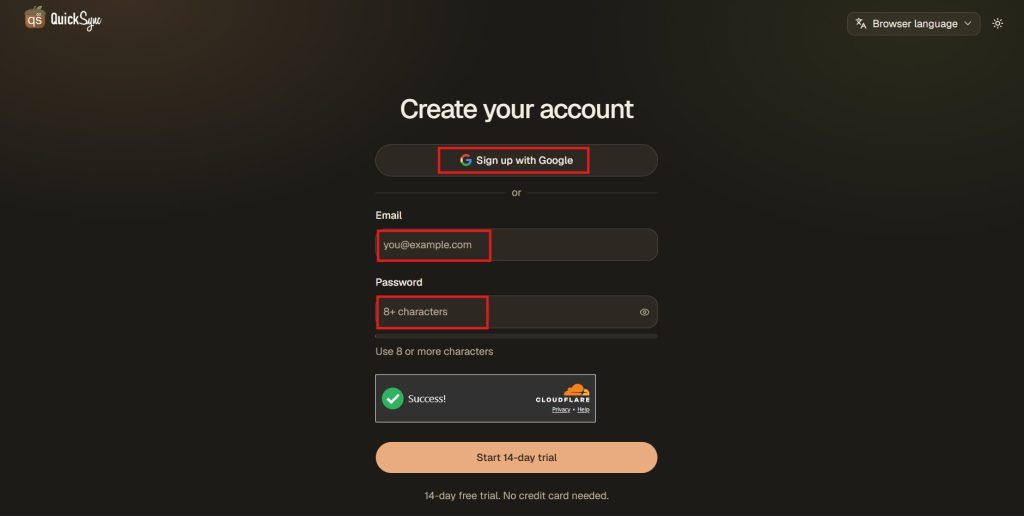
Start by signing up for QuickSync. If you already have an account, simply log in and you are ready to go. Your dashboard is where you’ll connect your Etsy and other sales channels.
Connect Your Etsy Shop
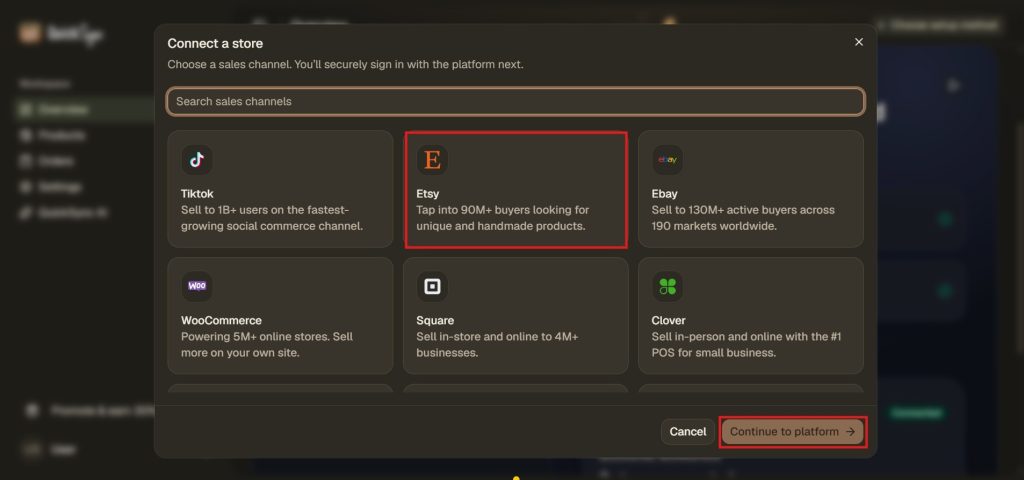
From your QuickSync dashboard, find WooCommerce and click Connect Store. Enter your store URL and authorize QuickSync to connect with your WooCommerce store.
Connect Another Sales Channel
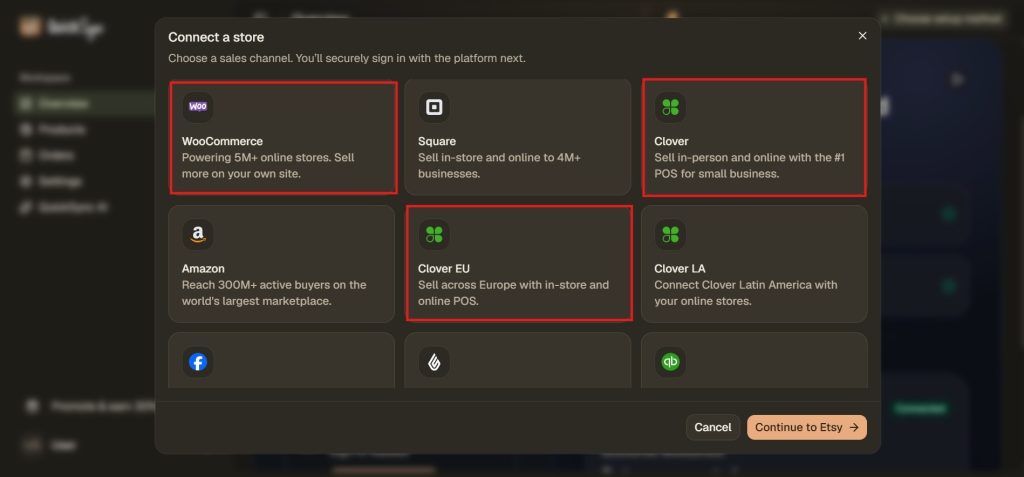
Next, connect another sales channel that you want to connect with Etsy, such as Amazon, eBay, Shopify, Clover, etc. You just simply need to select the platform from the menu you sell on and, and approve the connection.
Choose Your Sync Settings
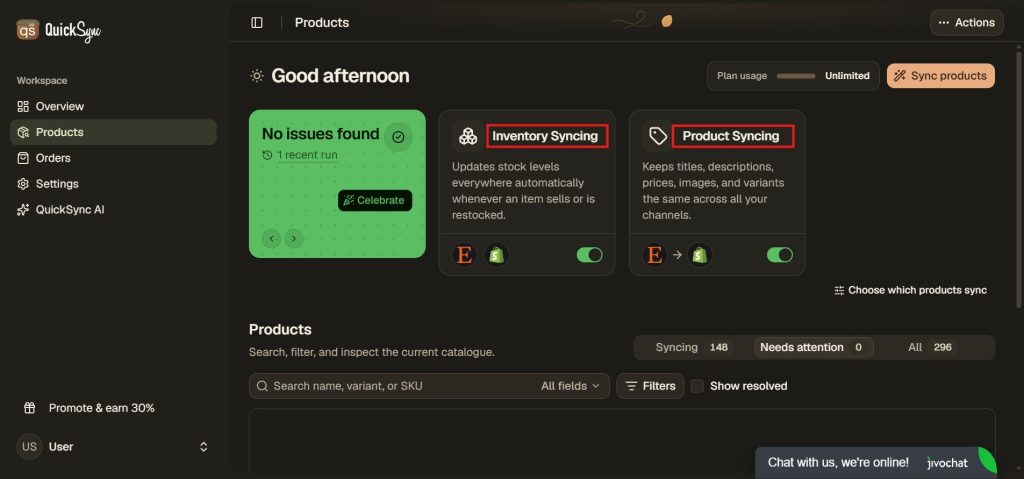
Select the products, inventory, and orders you want to sync between your Etsy shop and other sales channels. Once enabled, QuickSync keeps everything updated for you.
Stock sync works on every plan. Lite costs $19 a month for two shops and up to 1,000 items, where one item is one variation a buyer can pick. Pro, at $29, adds listing and order sync. Each extra shop adds the plan price again.
Three things to know before you connect:
- Etsy can’t be your packing store. Etsy doesn’t let apps create orders on it, so orders from your other shops are filled from the shop you ship from.
- Some US shops won’t get addresses or tracking through apps. If your shop is in the US and you first connected it to QuickSync on or after 21 October 2024, Etsy leaves the street address out of the orders it sends apps and refuses tracking from them. Mark those orders shipped in Etsy.
- New listings cost Etsy’s $0.20 fee if QuickSync creates them on Etsy, and they renew automatically. Setup shows the estimate and asks you to accept it first. Drafts cost nothing until you publish them.
The full detail is in our Etsy setup guide.
One-of-a-kind and Made-to-order items
Handmade shops often sell items that don’t fit a normal stock count. Each type needs its own setup.
- One of a kind: set the quantity to 1 and give the item its own SKU. These items carry the most overselling risk, because there’s no second one to send. If you sell them anywhere else, sync them or take them off Etsy before every market. To stop buyers seeing past pieces, go to Settings, Options, then Sold Listings, and choose to hide them.
- Made to order: the quantity is how many you can make, not how many you have. Follow Etsy’s advice and list only what you can finish within your production time. If some options take longer, Etsy lets you set a processing profile per variation.
- Personalized items: use variations for choices that change price, stock or SKU, like size or metal. Use personalization fields for custom details, like a name to engrave.
Common Etsy Inventory Mistakes and Fixes
| Mistake | What happens | Fix |
|---|---|---|
| Listing more than you have, to look busy | Buyers order stock you can’t ship, and you have to cancel | List the true quantity |
| The same SKU on two listings, drafts included | A sync tool can’t tell which one sold, so neither syncs | Give every variation its own code |
| Different SKUs for the same item on Etsy and Shopify | The two never match, and a sync set to create missing products makes a duplicate | Type the same code into both shops |
| A SKU longer than 32 characters | Etsy won’t take it. QuickSync sends a shorter code starting QS- instead | Keep codes to 32 characters in every shop |
| Domestic and global pricing on a variation listing | Etsy blocks apps from changing those variations, so QuickSync can’t update its stock | Turn that pricing off in the listing’s Price and inventory section |
| Leaving vacation mode on after a break | Etsy blocks updates. QuickSync pauses the Etsy store and emails you | Turn vacation mode off, then restart the store in QuickSync |
The Bottom Line
Good Etsy inventory management comes down to three habits: a true quantity, one SKU per variation and one count shared by every place you sell. Etsy handles the first two on its own. The third needs a routine or an app.
If Etsy is your only channel, use its built-in fields and a weekly check. If you make products from raw materials, look at maker software such as Stocksmith. If you sell finished goods on Etsy and one more channel, start a 14-day QuickSync trial, with no card needed, or book a walkthrough and we’ll connect your first two shops with you.