Wix vs Squarespace looks like a close call when you’re building a store. Both can give you a good-looking shop in an afternoon. The differences show up later, once orders start coming in: what each sale costs you, where else you can sell, and how much work it takes to keep stock right.
Fees are a good example. Take a shop selling $3,000 a month online across 60 orders. On Squarespace’s Basic plan, it pays about $184 a month in plan, card and transaction fees. On Squarespace Core or Wix Core, it pays $134. The $50 gap is a 2% transaction fee that only Squarespace Basic charges.
This guide compares Wix vs Squarespace for selling online: prices, fees, store features and the places each one lets you sell. All prices are US prices from Wix’s and Squarespace’s own pages, checked in October 2026.
Wix vs Squarespace in Short
Squarespace is the better pick for design-led brands with a simple catalogue, and its higher plans have lower card rates. Wix is the better pick if you want to sell in more places, because it connects to Amazon, eBay, TikTok and Google Shopping. For a small store, both cost the same: $29 a month for the first plan with no transaction fee.
| Factors | Wix | Squarespace |
|---|---|---|
| Cheapest plan that can sell | Core, $29/mo | Basic, $19/mo (plus a 2% fee) |
| Cheapest plan with no transaction fee | Core, $29/mo | Core, $29/mo |
| Transaction fee | None | 2% on Basic, none on Core and up |
| Online card rate | 2.9% + 30¢ | 2.9% + 30¢, falling to 2.5% + 30¢ on Advanced |
| In-person sales | Wix POS, 2.6% per card payment | Squarespace POS, on every plan |
| Product limit | 50,000 products | Unlimited |
| Abandoned cart emails | Yes | Yes, on every plan |
| Shipping labels | Yes | Core and up |
| Marketplaces | Amazon, eBay | None built in |
| Etsy | Not built in | One-time CSV import, no stock sync |
| Best for | Selling in more places | Design-led brands, simple catalogues |
Wix vs Squarespace Pricing: what Selling Actually Costs
Both let you pay yearly or monthly, and paying yearly is cheaper. The plan price is only part of the cost, though. You also pay card fees on every order, and on one Squarespace plan, a transaction fee on top.
Squarespace pricing
| Plan | Billed yearly | Billed monthly | Transaction fee | Card rate (Squarespace Payments) |
|---|---|---|---|---|
| Basic | $19/mo | $25/mo | 2% | 2.9% + 30¢ |
| Core | $29/mo | $39/mo | 0% | 2.9% + 30¢ |
| Plus | $49/mo | $65/mo | 0% | 2.7% + 30¢ |
| Advanced | $99/mo | $139/mo | 0% | 2.5% + 30¢ |
Basic is the cheapest way to sell on Squarespace, but its 2% fee applies to every store sale. Core costs $10 a month more and drops the fee, so it’s the cheaper plan once you sell more than $500 a month. Squarespace raised its yearly prices in 2026, so older guides may still show Core at $23 and Plus at $39.
Wix pricing
| Plan | Billed yearly | Can you sell? | Ecommerce tools | Storage |
|---|---|---|---|---|
| Light | $17/mo | No | None | 2 GB |
| Core | $29/mo | Yes | Basic | 50 GB |
| Business | $39/mo | Yes | Standard | 100 GB |
| Business Elite | $159/mo | Yes | Advanced | Unlimited |
Wix’s Light plan can’t take payments, so it isn’t a store plan. Selling starts on Core at $29 a month. Wix doesn’t add its own transaction fee. With Wix Payments, US card payments cost 2.9% + 30¢ online and 2.6% in person. Wix publishes one online card rate rather than a lower rate on higher plans.
What a real shop pays each month
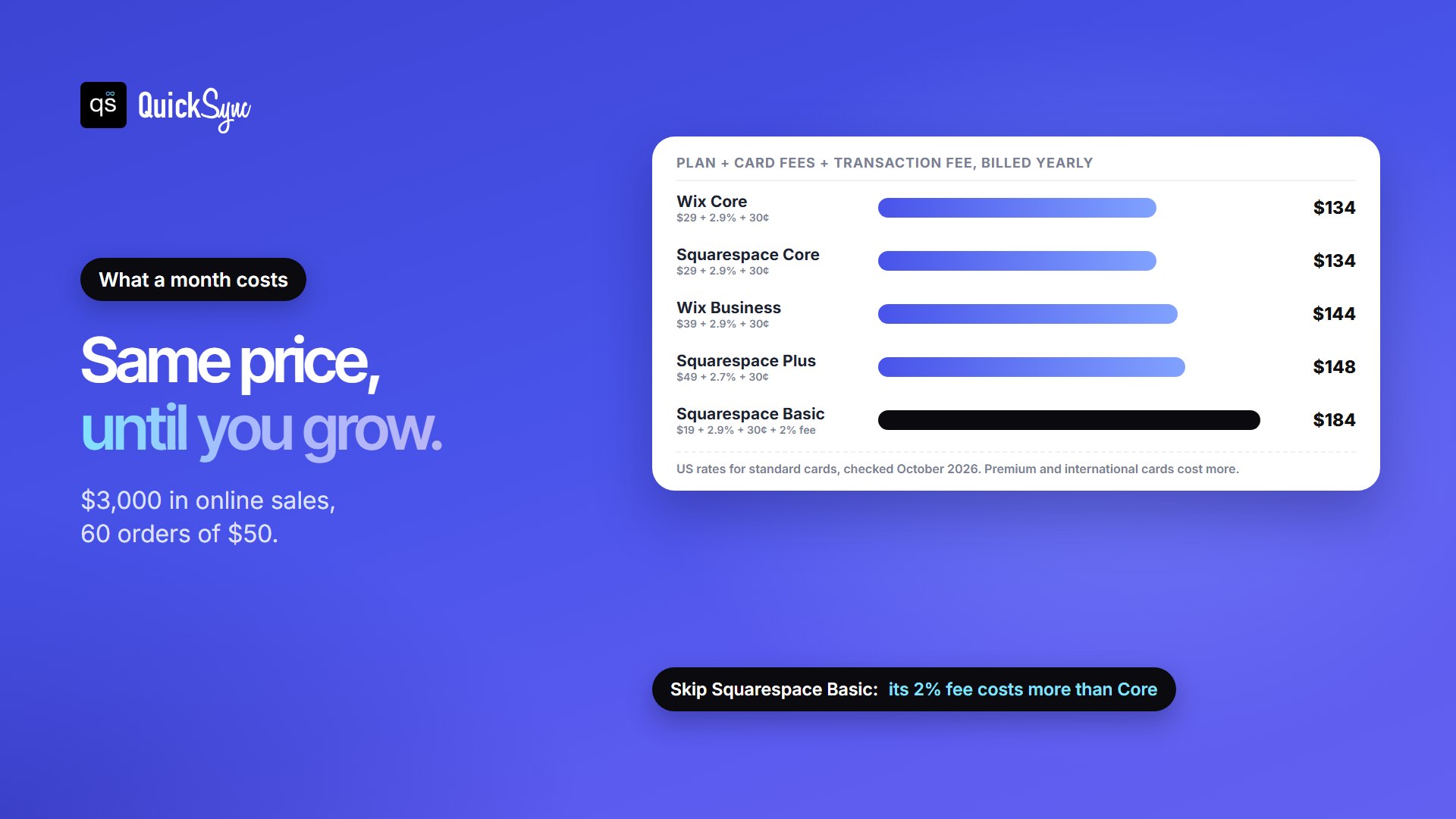
Rates are easier to compare as dollars. Here’s one month for a store selling $3,000 online across 60 orders of $50, on plans billed yearly:
| Plan | Plan fee | Card fees | Transaction fee | Total a month |
|---|---|---|---|---|
| Wix Core | $29 | $105 | $0 | $134 |
| Squarespace Core | $29 | $105 | $0 | $134 |
| Wix Business | $39 | $105 | $0 | $144 |
| Squarespace Plus | $49 | $99 | $0 | $148 |
| Squarespace Basic | $19 | $105 | $60 | $184 |
At this size, the two platforms cost the same. The gap opens up as you grow:
- Squarespace Plus saves 0.2% on card fees over Core. That covers its extra $20 a month once you take about $10,000 a month in card sales.
- Squarespace Advanced saves another 0.2%. It pays for itself over Plus at about $25,000 a month.
- At $30,000 a month across 600 orders, Squarespace Advanced costs about $1,029 a month and Wix Business about $1,089.
Wix vs Squarespace Selling Features
Both platforms cover what most small stores need. The difference is which plan unlocks what, and how far you can extend the store.
- Products. Wix allows up to 50,000 products, each with up to 1,000 variants. Squarespace allows unlimited products on every plan.
- Abandoned cart emails. Both have them. Squarespace includes them on Basic.
- Discounts. Wix offers discounts and coupons. On Squarespace, automatic discounts start on Core.
- Shipping. Wix lets you buy and print shipping labels from your dashboard, with real-time carrier rates in the US. Squarespace adds shipping labels and carrier-calculated rates from Core.
- Subscriptions. Both let you sell product subscriptions.
- Selling in person. Both have a point of sale. Wix POS costs 2.6% per in-person card payment with Wix Payments. Squarespace includes its POS on every plan.
- Dropshipping and print on demand. Wix works with Modalyst, Spocket, Printful, and Printify. Squarespace includes Printful on every plan.
In short, Squarespace puts more selling tools into its cheapest plan, while Wix gives you more ways to extend your store with apps and channels. If you already sell in a shop on Square or Clover, QuickSync can connect Wix and Square or Squarespace and Clover so both share one stock count.
Selling Beyond Your Own Site
This is where Squarespace vs Wix differs most. Wix lists Amazon, eBay, TikTok, Google Shopping, Facebook, Instagram and YouTube as sales channels you can connect from your dashboard. There are limits. On eBay, you can’t list digital products, subscriptions or products with more than 250 variants. On Amazon, each Amazon account connects to one Wix site, and your products need to match Amazon’s catalogue or go through a new listing.
Squarespace syncs products to Facebook and Instagram on every plan, and adds Google Shopping from Core. It has no built-in Amazon, eBay or Etsy channel. You can import your Etsy products once from a CSV file, but Squarespace’s own help page says, “It’s not possible to sync your inventories across both stores.”
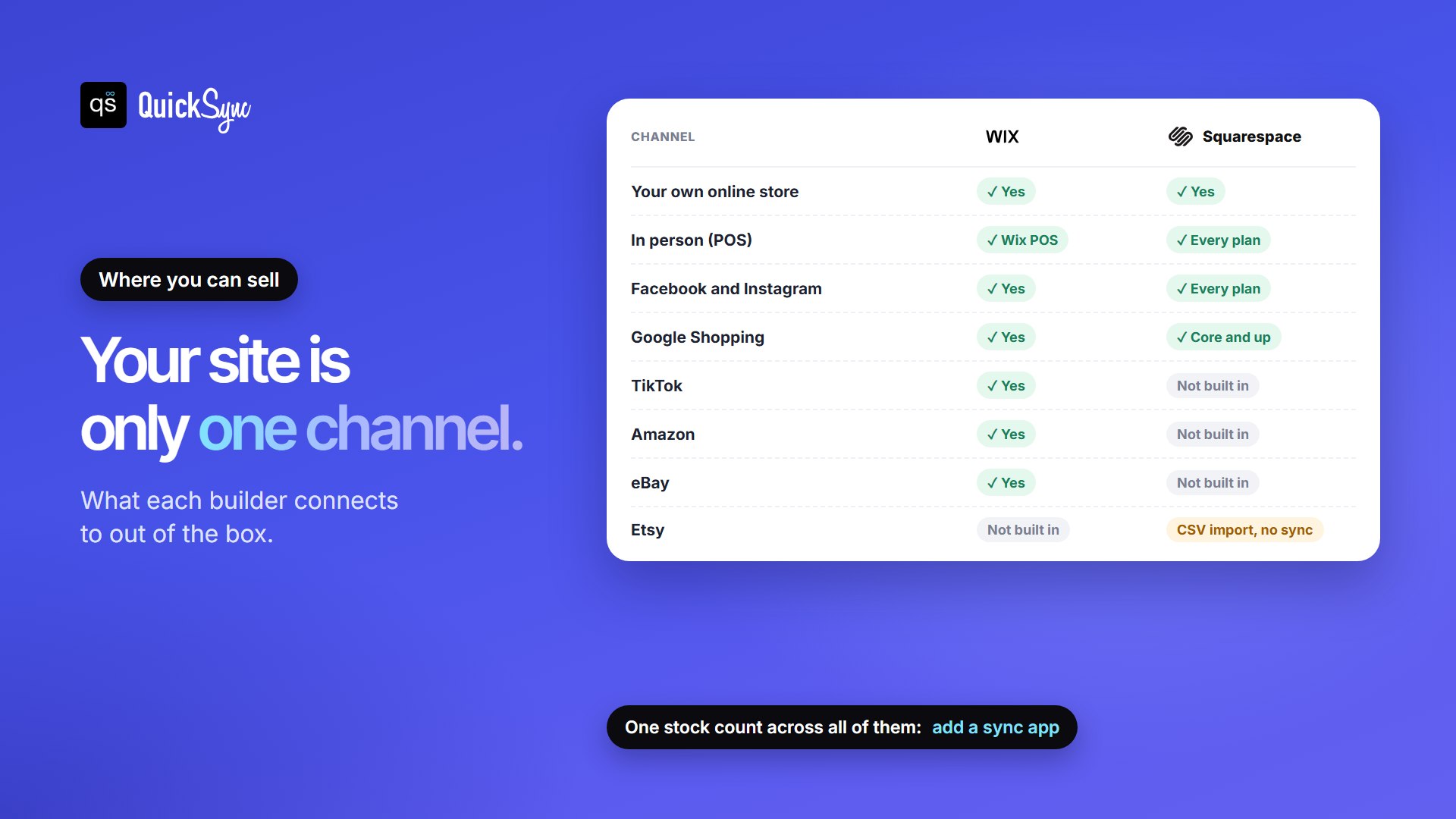
Neither platform connects to Etsy, and listing on a channel isn’t the same as keeping one stock count everywhere you sell. If you sell on Etsy, at markets or on a second marketplace, each place keeps its own count unless something syncs them. That’s when the last item sells twice.
Our step-by-step guides cover the most common pairs: Wix and Etsy, Wix and eBay, Wix and Amazon, Wix and TikTok Shop, Squarespace and Etsy, Squarespace and eBay, Squarespace and Amazon and Squarespace and TikTok Shop.
Design, Ease of use and SEO
Ease of use. Both are built for people who don’t code. Squarespace has fewer settings to learn. Wix has a bigger app market, so you can add more features, but there’s more to manage.
Design. Squarespace builds pages from structured sections, which keeps layouts tidy. Wix lets you drag elements almost anywhere, which gives you more freedom but takes more care to keep pages neat.
SEO. Both let you edit page titles, meta descriptions and URLs, and both create a sitemap for you. Neither will rank a store on its own. What ranks is useful product pages and content, so pick the editor you’ll actually keep using.
Wix or Squarespace: Which Should You Choose?
Start with how you sell, not with the headline price:
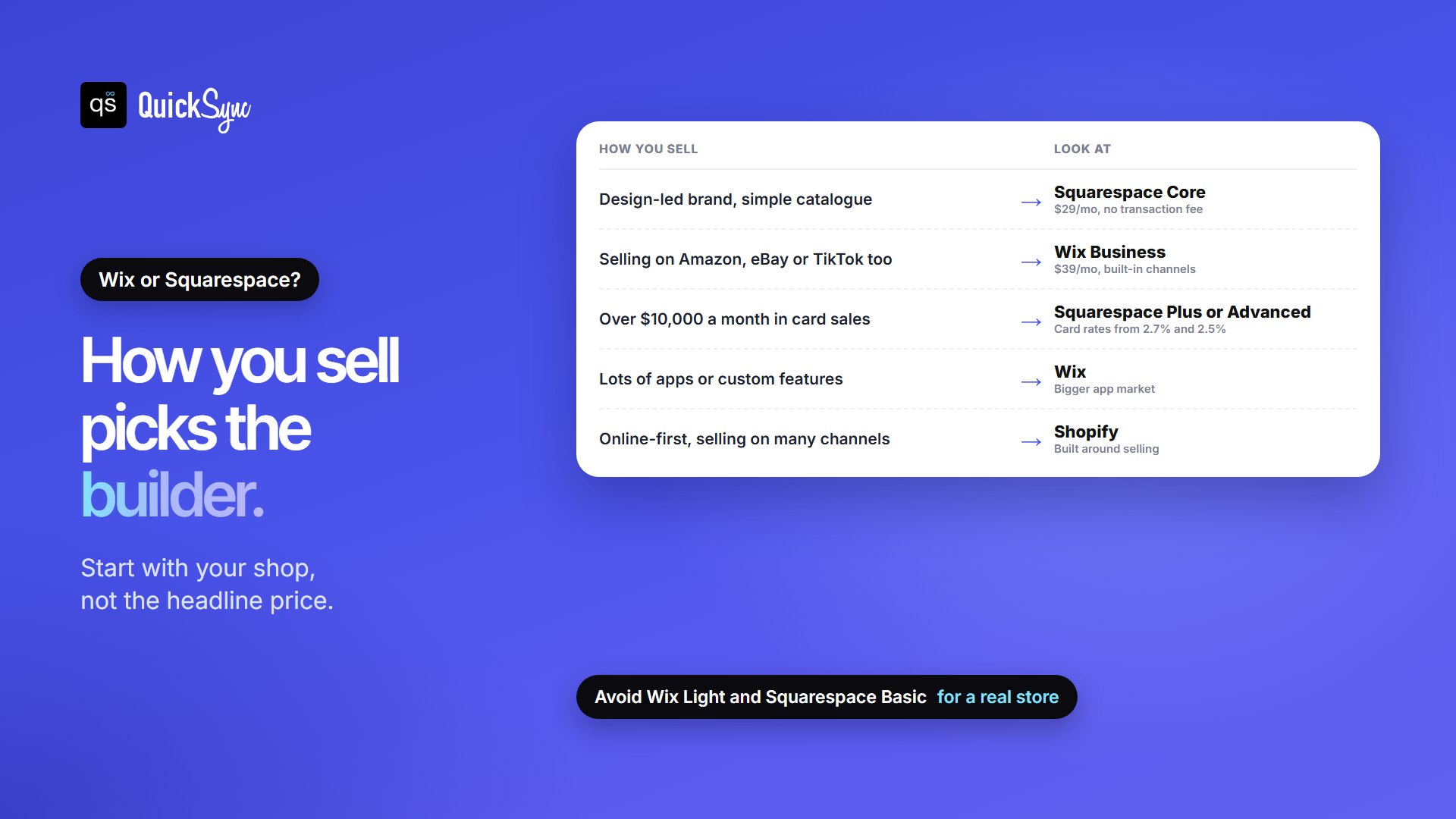
- Choose Squarespace if your brand sells on looks, your catalogue is simple, and your own site is the main place you sell. Start on Core, not Basic, so you skip the 2% fee.
- Choose Wix if you want to list on Amazon, eBay, TikTok or Google Shopping from one dashboard, or you want more apps to extend your store. Business suits most growing stores.
- At higher volume, compare Squarespace Plus and Advanced. Their lower card rates add up past about $10,000 a month.
- If online selling is your whole business and you sell on lots of channels, look at Shopify too.
Still weighing other builders? Our roundup of the best ecommerce website builders compares ten, and our guide to starting an ecommerce business covers what to set up first.
What about Shopify?
Shopify is built around selling first, while Wix and Squarespace started as website builders. It costs more, from $39 a month on Basic ($29 billed yearly), but has more selling tools and more sales channel apps. See Shopify vs Squarespace for that comparison. If you already run a Wix or Squarespace site and want Shopify’s checkout, you can connect them: see Wix and Shopify or how to connect Shopify to Squarespace.
How to Move Your Store Between Wix and Squarespace
Neither platform copies the other’s store across for you. Your products move as a CSV file, and the design has to be rebuilt.
- Export your products. Download them from Wix as a CSV file. On Squarespace, go to the Products panel and use Export all, which exports up to 10,000 products at a time.
- Match the new format. Squarespace says you may need to edit a Wix file to fit its CSV template. Wix imports up to 50,000 products from a CSV.
- Check every product after import. Some details don’t come across. Squarespace’s export leaves out reviews and variant images, for example.
- Rebuild your pages. Layouts, fonts and design don’t transfer.
- Move your domain and set up redirects from your old URLs, so links and rankings carry over. Squarespace warns that search rankings can dip at first after a move.
If you run both stores for a while during the move, keep their stock in sync so nothing oversells. QuickSync can sync Wix and Squarespace while you switch.
FAQs
More guides: Shopify vs Squarespace, does Squarespace integrate with QuickBooks, and our Wix and Squarespace integration pages.