When you sell on Squarespace, every product needs to be assigned to a Store Page before it can go live. A Store Page is a product category page on your Squarespace website. It is where your products are displayed to your customers. Without a Store Page assigned, Squarespace will not allow any new products to be created.
QuickSync handles this automatically wherever possible, so you do not have to worry about assigning a Store Page to every product manually.
How QuickSync Assigns Store Page in Squarespace? #
QuickSync assigns Store Pages to your products automatically when exporting to Squarespace. The way QuickSync assigns Store Pages in Squarespace depends on the number of Store Pages set up.
Here is exactly how QuickSync assigns the store page in Squarespace.
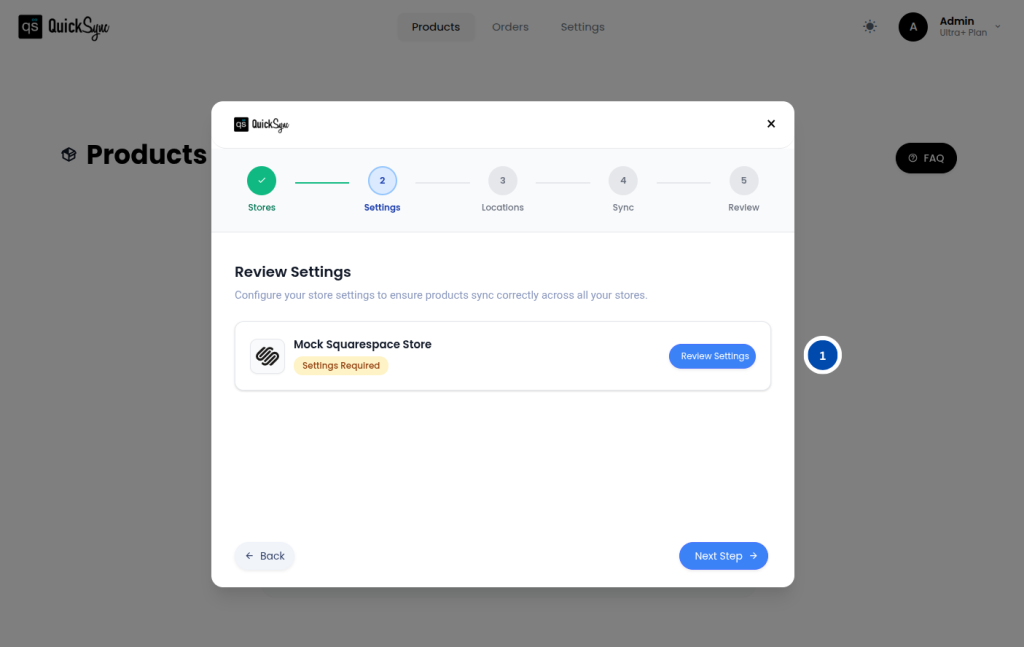
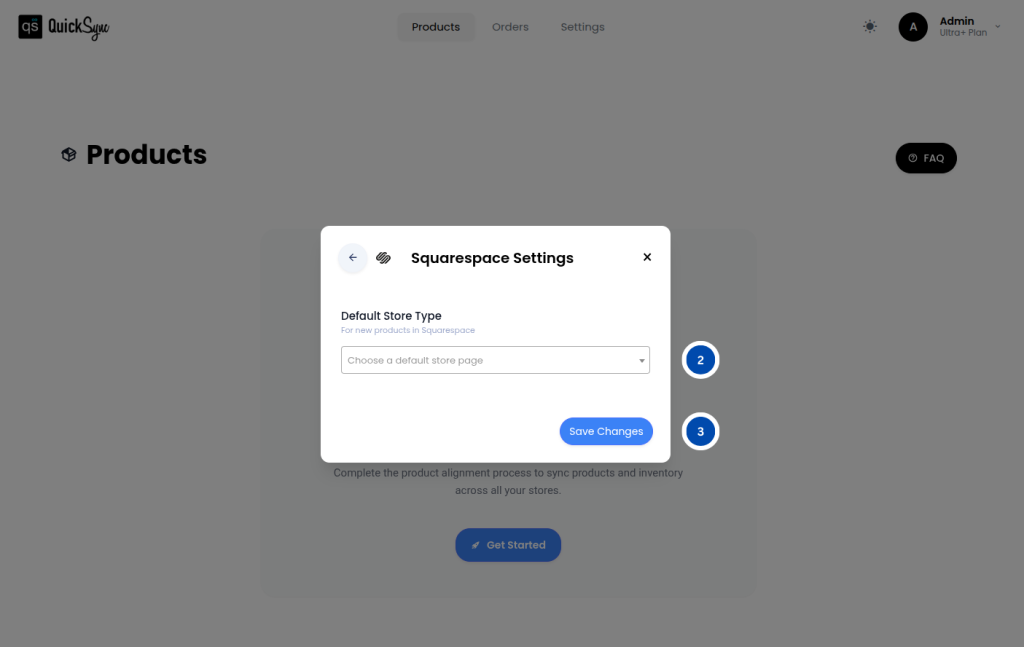
Automatic Assignment: If your Squarespace website has exactly one Store Page, QuickSync will automatically assign all new products to that page when exporting. You do not need to do anything; QuickSync takes care of assigning the store page in Squarespace automatically.
Review Settings Prompt: If your Squarespace website has no Store Pages or more than one Store Page, QuickSync will show a Review Settings pop-up after your initial data import is complete. Inside this pop-up, you will need to select a default Store Page. This chosen page will be used as the fallback category whenever QuickSync exports a product that does not already have a specific Squarespace category assigned to it.
Changing Your Default Store Page: You can update your default Store Page in Squarespace at any time from your QuickSync dashboard. To do this, go to Dashboard → Settings → Stores → Squarespace → Settings → Review Settings and select a new page.
Important Things to Keep in Mind #
- Products cannot be created in Squarespace until a default Store Page is assigned. If QuickSync shows you the Review Settings pop-up, make sure you complete this step before exporting any products
- The default Store Page only applies to products that do not already have a specific Squarespace category assigned. If a product already has a category, QuickSync will use that instead
- You can change your default Store Page in Squarespace at any time without affecting products that have already been exported
FAQs #
Q1: Why are my products not being created in Squarespace?
This usually happens because a default Store Page has not been assigned yet. If QuickSync showed you a Review Settings pop-up after your initial data import, you need to go back and select a default Store Page before any products can be exported. Go to Dashboard → Settings → Integrations → Squarespace → Settings → Default Store Page and select a page to fix this.
Q2: Can I assign products to different Store Pages on Squarespace?
Yes. The default Store Page set in QuickSync is only used as a fallback for products that do not have a specific category assigned. If your products already have a Squarespace category set, QuickSync will use that category instead of the default Store Page.


