When selling on TikTok Shop, you have two options for how your orders are fulfilled. Choosing the right fulfillment method is important because it directly affects how your orders are synced, how you print shipping labels, and whether QuickSync can manage your fulfillment workflow or not. Here is a clear breakdown of what is fulfilment by seller vs fulfilment by TikTok to help you decide which one works best for your business.
Fulfilment by Seller (Recommended) #
Fulfilment by Seller is the recommended option for QuickSync users as it gives you full control over your fulfilment process. You handle everything yourself, from printing the shipping label to packing the order and handing it over to your preferred carrier. This means you are not dependent on TikTok for any part of the fulfilment process, and QuickSync can sync and manage your orders without any limitations.
- You can print shipping labels directly from your own fulfilment store. After printing the label, you can pack your products and hand them directly to your chosen carrier by directly fulfilling from your fulfilment store.
- Orders from TikTok sync automatically to QuickSync
- You can fulfill orders directly from your QuickSync fulfilment store
- You have the freedom to choose your own shipping carrier
Fulfilment by TikTok #
Fulfilment by TikTok means TikTok handles the fulfilment process on your behalf. While this may sound convenient, it comes with limitations; you can only print shipping labels from TikTok Shop, and TikTok assigns the carrier for each shipment, so you do not get to choose your own. For QuickSync users, this option is not recommended as it restricts what QuickSync can sync and manage, including customer details and order fulfillment.
- Shipping labels can only be printed from TikTok Shop
- After printing the label, you pack your products and submit a collection request inside TikTok Shop. TikTok will then assign a carrier to pick up and deliver the package.
- This option doesn’t allow syncing customers. Customer information is masked and displayed as *****, which means QuickSync cannot sync customer details
- This option doesn’t allow you to fulfil orders directly from your QuickSync fulfillment store
How to Set Up “Fulfilment by Seller” in TikTok Shop (For US Shops) #
If your shop is in the US region, then you need to follow these steps to set up fulfilment by seller.
Step 1: Log in to your TikTok Seller Center
Step 2: Go to Seller Center > Shipping > Shipping Options
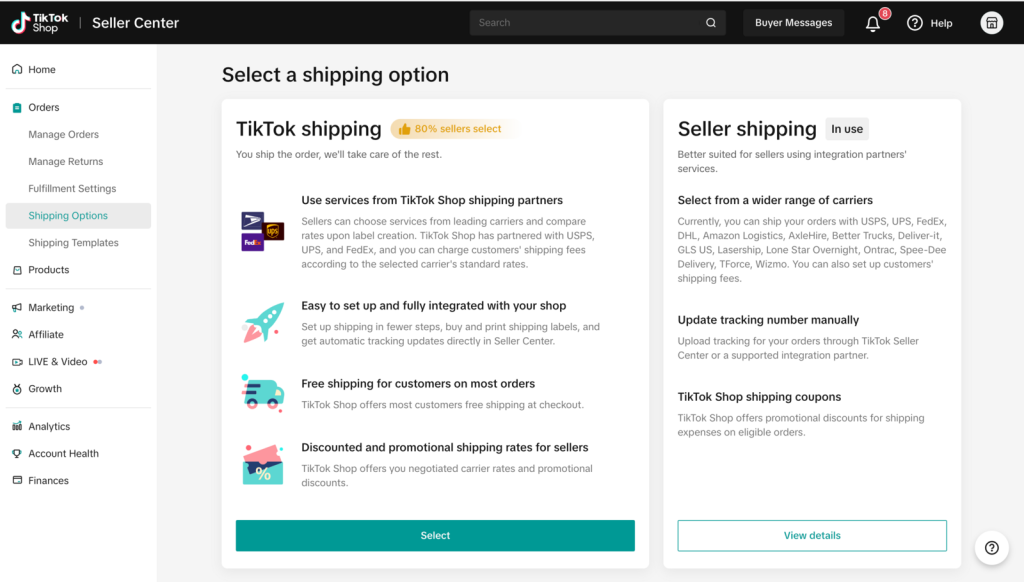
Step 3: Select Seller Shipping as your preferred option
Step 4: Save your changes
Once saved, your orders will be ready to sync with QuickSync.
How to setup “Fulfilment by Seller” (For Non-US Shops) #
If your TikTok shop is based outside the United States, follow these steps instead to set up fulfilment by seller.
Step 1: Log in to your TikTok Seller Center
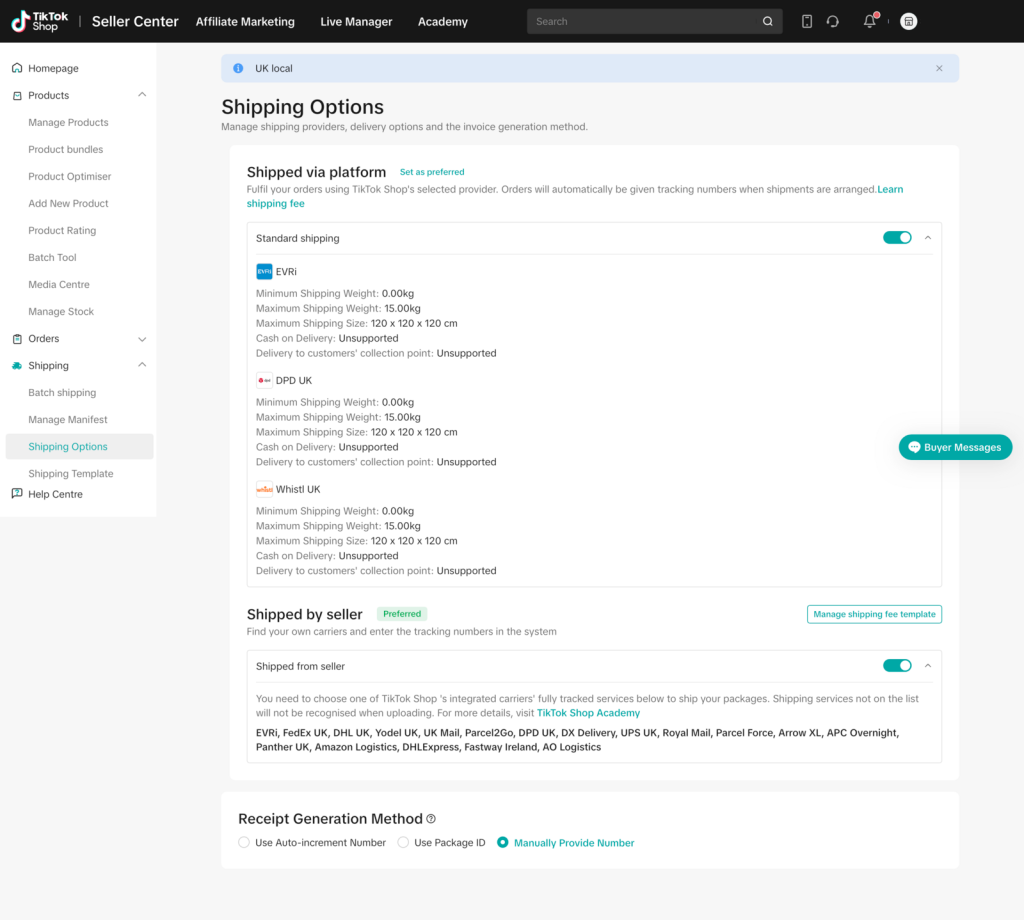
Step 2: Go to Seller Center > Shipping > Shipping Options
Step 3: Turn on the Shipped by Seller toggle
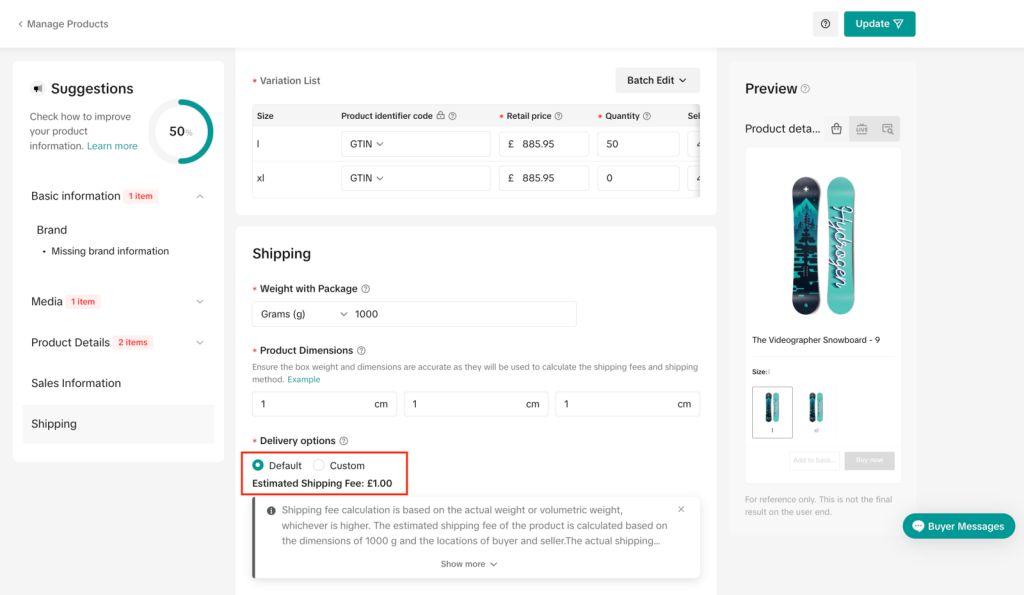
Step 4: Ensure the Sales Information of your product is correct
Step 5: Under Sales Information, confirm that the delivery option is set to either Default or Custom – Shipped by Seller
Step 6: Save your changes
Once this is done, your orders will sync smoothly with QuickSync.
Important Things to Keep in Mind #
Before you finalize your fulfilment setup, there are a couple of things you should be aware of:
- When you enable Shipped by Seller, you can only use the shipping carriers listed under the Shipped by Seller section in TikTok Seller Center. Make sure your preferred carrier is on that list before you start fulfilling orders
- Any changes you make to your shipping or delivery settings will only apply to new orders going forward. Orders that were already placed before the change will not be affected
FAQs on What is fulfilment by Seller vs fulfilment by TikTok? #
Q1: Can I switch from Fulfilment by TikTok to Fulfilment by Seller after I have already received orders?
Yes, you can switch your fulfilment method at any time from your TikTok Seller Center. Just keep in mind that the change only applies to new orders placed after the switch. Any existing orders that came in under Fulfilment by TikTok will still be processed under that method and will not be affected by the change.
Q2: Why is my customer’s address showing as ***** in QuickSync?
This happens because your fulfilment method is currently set to Fulfilment by TikTok. When TikTok manages fulfilment, it hides customer information for privacy reasons, and QuickSync is unable to access those details. To fix this, switch your fulfilment method to Fulfilment by Seller by going to Seller Center → Shipping → Shipping Options and selecting Seller Shipping or enabling the Shipped by Seller toggle depending on your region.


