Understanding QuickSync billing methods helps you know exactly how your subscription is charged, where payments are processed, and how refunds are handled. Your billing process depends on where you installed QuickSync.
This guide explains how billing works, who processes your payments, how to access invoices, and what to expect if you need a refund.
Use the QuickGuide below to quickly navigate through.
How QuickSync Billing Methods Work? #
QuickSync billing methods are determined by the platform you used to install the app.
If you signed up directly through the QuickSync website, billing is handled inside your QuickSync account. If you installed through an app marketplace like Shopify or Clover, billing is managed by that platform.
Below is a clear breakdown of how billing works:
| Installation Source | Billing Handling | Refund Handling | Refund Processing Time |
|---|---|---|---|
| QuickSync Website | via QuickSync | via QuickSync | 3-5 working days |
| Square App Store | via QuickSync | via QuickSync | 3-5 working days |
| Shopify App Store | via Shopify | via Shopify | 5-7 working days |
| WooCommerce App Store | via WooCommerce | via WooCommerce | 5-7 working days |
| Clover App Store | via Clover | via Clover | Upto 1 month |
Note: No matter which billing method you choose for QuickSync, your features and plan limits will remain the same. In other words, nothing about your plan changes. Only the payment processor handling your subscription is different.
As a result, the charge will appear on the same platform where you originally installed QuickSync.
For example: If you installed through the Shopify App Store, your charges will appear on your Shopify invoice.
If you signed up directly on the QuickSync website, billing is handled inside your QuickSync account.
How to Manage Your Subscription (Website Sign-Ups Only)? #
Note: If you signed up directly through the QuickSync website, you can manage your billing details inside your dashboard.
But if you installed via Shopify, WooCommerce, Clover, or another app store, billing changes must be made directly in that platform’s billing portal.
What You Can Manage #
If you signed up through the QuickSync website, you can:
- Update your debit or credit card details
- Edit billing information (name, email, address)
- View and download previous invoices
- Add or remove payment methods
Updating Billing Details Step-by-Step #
Step 1 #
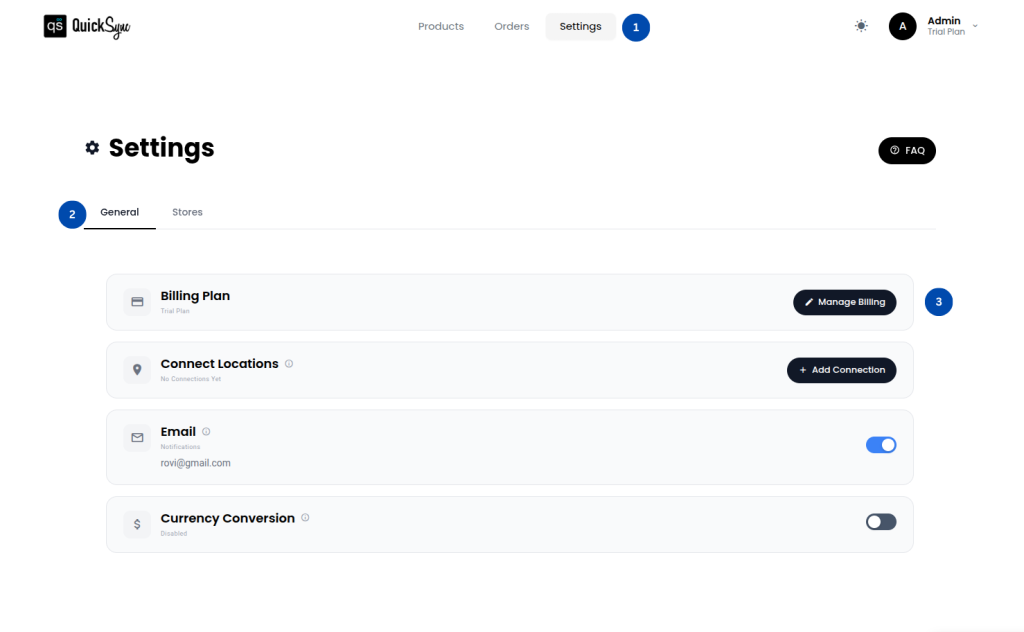
Go to Dashboard → Settings → General → Manage Billing
Step 2 #
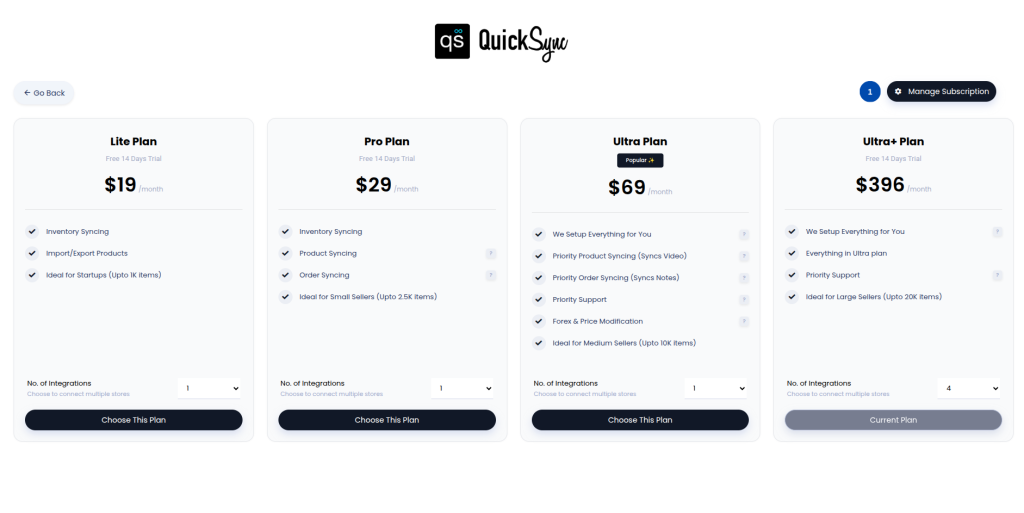
Click Manage Subscription
Step 3 #
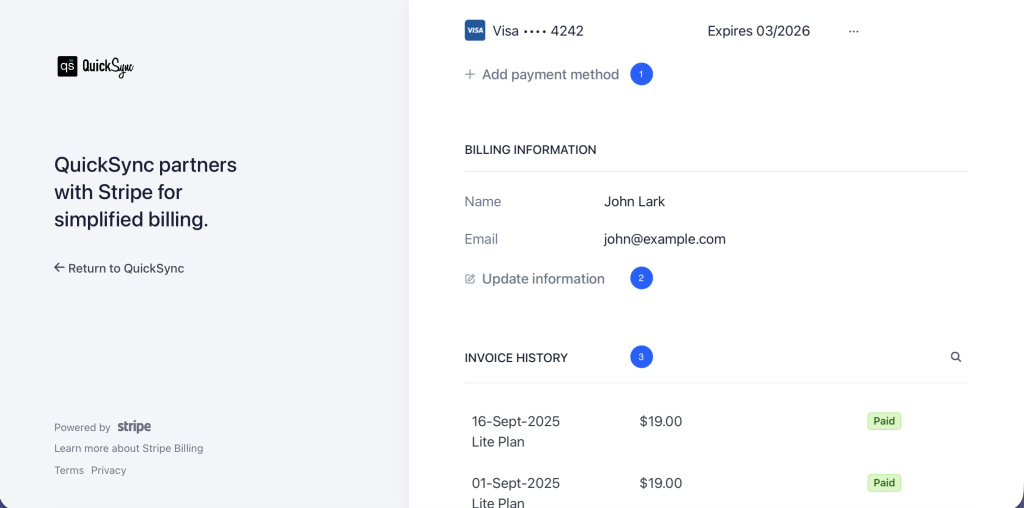
Once you scroll down, you will see some options to:
- Add or remove a payment method.
- Update billing details such as name, email, or address.
- View and download previous invoices under Invoice History.
Refund Processing & What to Expect #
Refund timelines depend on your QuickSync billing method because different payment processors follow different settlement policies.
Typical timelines:
- Website or Square billing: 3–5 business days
- Shopify or WooCommerce billing: 5–7 business days
- Clover billing: Up to 30 days
Please note:
- Processing time refers to payment processor timelines.
- Your bank may take additional time to reflect the refund.
- Refund eligibility depends on subscription terms.
Need Help With Billing? #
If you experience payment issues or have questions about QuickSync billing methods, please contact our support team with your account email and transaction details. Our team will review and assist you as quickly as possible.


