Managing inventory across multiple stores can quickly become complicated. If you sell on platforms like Shopify, WooCommerce, Etsy, eBay, or use POS systems such as Clover or Square, keeping stock levels accurate everywhere is essential.
QuickSync inventory syncing helps merchants solve these challenges by automatically syncing inventory across all connected sales channels in real time.
Whenever a product is sold, restocked, or adjusted in one store, QuickSync instantly updates the inventory levels across all connected platforms. This ensures your customers always see accurate stock availability and helps prevent overselling.
Key Benefits of QuickSync Inventory Syncing #
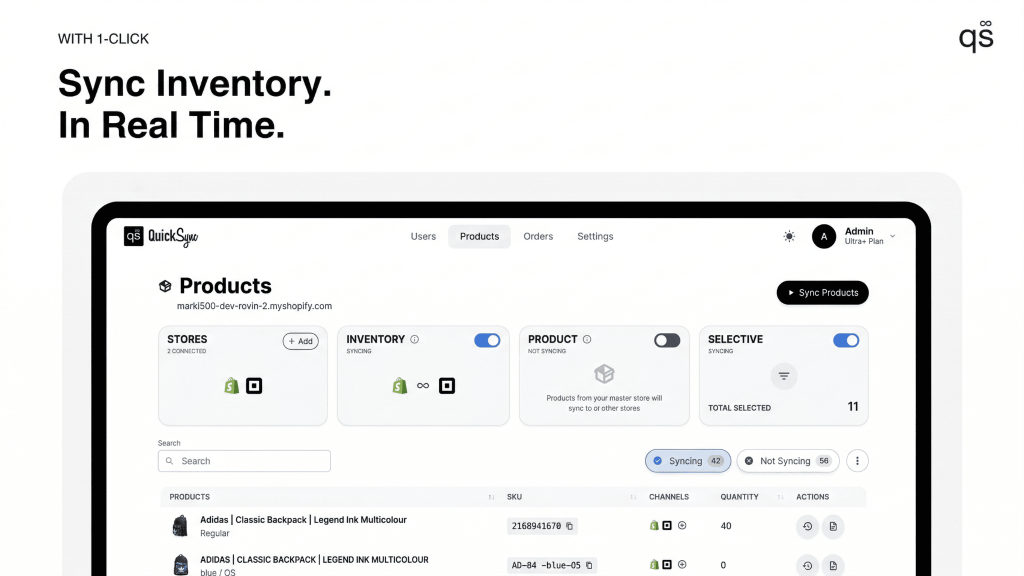
Real-Time Inventory Updates: #
QuickSync monitors inventory changes across all connected channels. When a product is sold or adjusted in one store, the stock levels update instantly everywhere.
Multichannel Inventory Management: #
QuickSync allows you to sync inventory across multiple e-commerce platforms and POS systems from a single dashboard.
Multi-Location Inventory Support: #
If your business operates multiple warehouses, retail stores, or fulfillment centers, QuickSync can track and sync inventory across each location with its location connection feature.
Overselling Protection: #
By keeping stock levels updated across all platforms, QuickSync helps prevent overselling and listing errors that can damage your reputation or lead to marketplace penalties.
How QuickSync Inventory Syncing Works #
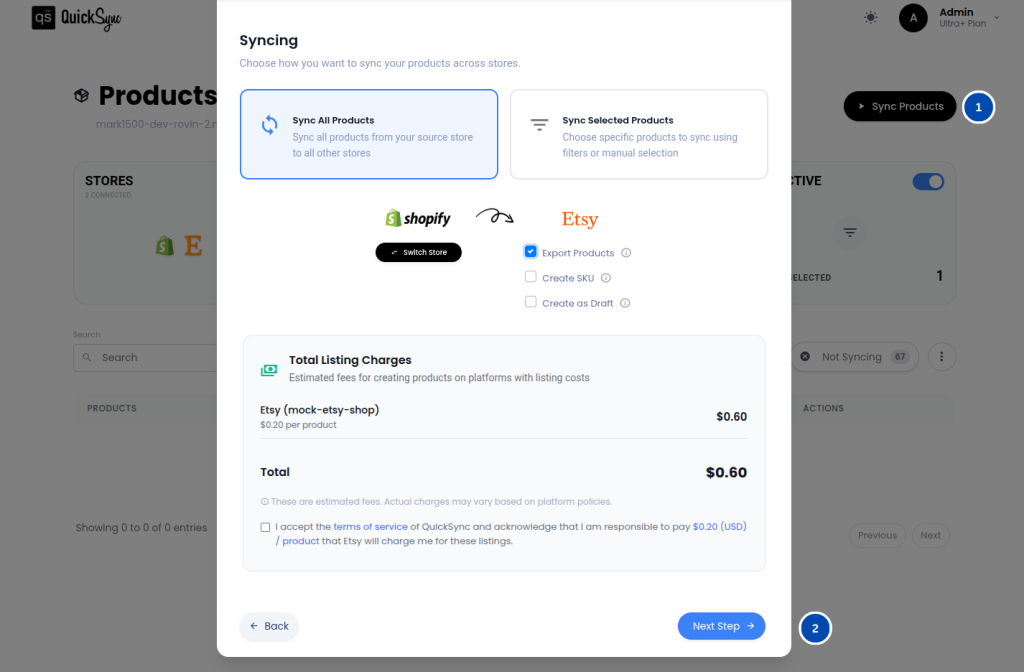
1. Connect Your Sales Channels: #
Start by connecting the stores and platforms where you sell products. QuickSync supports integrations with platforms such as:
- Shopify
- WooCommerce
- Square POS
- Clover POS
- Etsy
- eBay
Once your stores are connected, QuickSync can begin monitoring inventory changes across each channel.
2. Choose Your Source Store #
During setup, you will need to select a Source Store. The source store acts as the starting point for inventory synchronization.
If the same product exists in multiple stores with different quantities, QuickSync will use the inventory level from the source store as the baseline during the initial sync.
For example: Product A inventory before syncing:
Etsy: 10 units
Shopify: 5 units
If Etsy is selected as the Source Store, QuickSync will update Shopify’s inventory to 10 units after the initial synchronization.
This ensures that all connected channels begin with consistent inventory data.
What is a Source Store? #
A Source Store is the primary store that QuickSync uses to establish the initial inventory levels during the first sync. Once syncing is active, QuickSync monitors inventory changes across all connected stores and automatically updates the quantities everywhere. This ensures every channel always reflects the latest available stock.
Sync Options Explained #
QuickSync provides several options that give multi-channel sellers flexibility when syncing products and inventory.
Export Products (Optional): You can export selected products from the source store to other connected stores if they do not already exist there.
Create SKU Automatically (Optional): If a product in the source store does not have an SKU, QuickSync can automatically generate one during export to keep product records organized.
Create Products as Draft (Optional): When exporting products to another store, you can create them in draft mode. This prevents products from appearing live until you manually publish them.
Automatic Product Linking: If the same product already exists in multiple stores with matching SKUs, QuickSync automatically links those products together so their inventory can sync properly.
3. Start Inventory Syncing #
Once your stores are connected and your sync settings are configured, you can begin syncing inventory.
Simply click Start Syncing, and QuickSync will begin exporting products and aligning inventory across all connected channels.
During the process:
- QuickSync shows real-time progress inside the dashboard
- You will receive an email notification once syncing is complete
Important: While the initial syncing process is running, avoid editing product details directly in your stores to prevent data conflicts.
Popular Use Cases #
QuickSync inventory syncing is useful for many different types of retail businesses.
1. Pop-up Events #
- Merchants who host temporary pop-up shops can connect a POS system to their online store.
- QuickSync ensures that every sale made during the event instantly updates inventory across all online channels.
2. POS + Online Store #
- Many retailers operate both a physical store and an online shop. For example, a business may use Clover or Square POS in-store while selling online through Shopify or WooCommerce.
- QuickSync keeps inventory synchronized so that in-store sales automatically update the online store’s stock levels.
3. Online Store + Marketplace #
- Many merchants sell through their own website while also listing products on marketplaces such as Etsy or eBay.
- QuickSync updates inventory across every platform the moment a sale occurs, ensuring customers always see accurate stock availability.
4. Multiple Chains #
- Brands that operate several retail locations often struggle to maintain accurate inventory across stores.
- With QuickSync’s multi-location support, businesses can track stock levels across warehouses, retail branches, and fulfillment centers while keeping inventory synchronized everywhere.
Frequently Asked Questions #
Need Help? #
If you have any questions about inventory syncing or are experiencing inventory issues across your stores, our support team is here to help.
Contact us at support@quicksync.pro, and our team will assist you as quickly as possible with setting up or troubleshooting your QuickSync inventory synchronization.


