
TikTok only allows new sellers to create up to 100 product listings per day. This is a TikTok listing restriction that applies to all new TikTok Shop accounts and cannot be changed. If you have a large catalog, this means it can take several days before all your products are live on TikTok. Without automation, you would need to log in to QuickSync every single day and manually export the next batch of products, which is a time-consuming method.
That is exactly why we built the Auto Export Products feature. Once you turn it on, QuickSync takes care of the daily exports for you. It automatically sends up to 100 products to TikTok every day until your entire catalog is published, no manual work needed from your side.
How to bypass TikTok’s Daily Listing Limits with QuickSync’s Auto Export Product Feature #
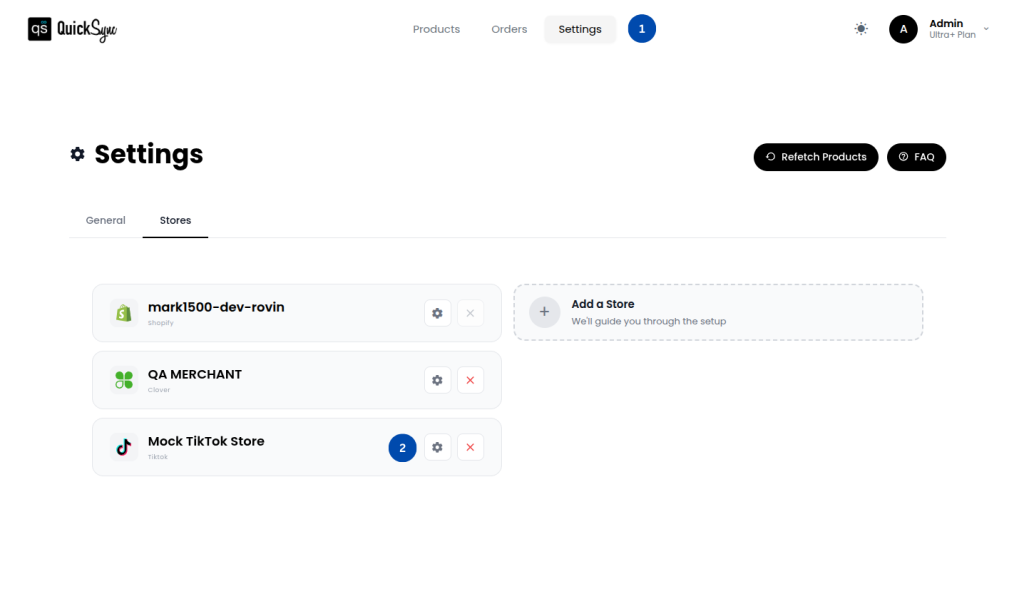
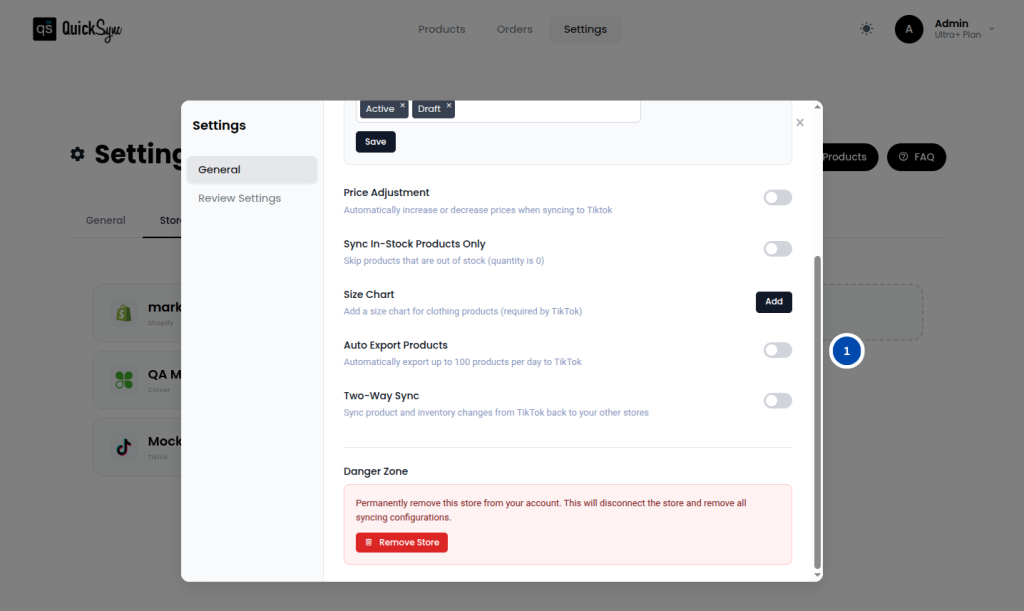
Follow these steps to turn on Auto Export Products from your QuickSync dashboard:
- Log in to your QuickSync Dashboard
- Go to Settings > Stores > TikTok > Settings. Scroll down to Auto Export Products and toggle it.
- When you enable Auto Export Products, QuickSync schedules a daily background job.
- Every 24 hours, the system checks how many products were exported the previous day.
- If your TikTok store still has products waiting to be exported, QuickSync automatically exports up to the daily TikTok limit of 100 products.
- The process repeats each day until all remaining products in your QuickSync catalog are successfully listed on TikTok.
You do not need to do anything after enabling the toggle. QuickSync runs this process quietly in the background every day until your full catalog is live.
What to Expect After Enabling Auto Export Products #
Once you have turned on the Auto Export Products toggle, here is what you can expect going forward:
- QuickSync will automatically export up to 100 products to TikTok every 24 hours
- You will be able to track the progress of your exports from your QuickSync dashboard
- If your TikTok store gets temporarily disconnected or an error occurs during the export, QuickSync will automatically retry on the next scheduled run
- Once all your products have been successfully exported, the Auto Export Products job will stop running automatically; you do not need to turn it off manually
FAQs on How to Bypass TikTok’s Daily Listing Limits #
Q1: What is the difference between a new and an old seller on TikTok?
TikTok classifies sellers based on how long their account has been active and their order history. A new seller is an account that was created within the last 90 days. An old seller is an account that is more than 90 days old and has a history of completed orders. The 100 products per day limit applies to new sellers. Once your account becomes an established seller, TikTok may increase this limit.
Q2: Not all my products are being exported every day. Why is that?
TikTok strictly enforces the 100 product daily cap for new sellers. QuickSync follows this limit and will not exceed it. If you have more than 100 products waiting to be exported, QuickSync will continue sending them in daily batches of 100 until every product in your catalog is listed on TikTok.
Q3: I turned on the Auto Export toggle, but nothing has been exported. What should I do?
There are a couple of things to check. First, make sure your TikTok store connection is still active inside QuickSync. Second, confirm that your initial product import has fully completed before expecting exports to begin. If there was an API error or your store was temporarily disconnected, QuickSync will automatically retry on the next scheduled run. If the issue continues, reach out to our support team, and we will look into it for you.
Q4: Can I increase the 100-product daily limit on TikTok?
No. The 100 products per day cap is set by TikTok and cannot be changed by QuickSync or by you as a seller. What QuickSync does is make sure that the limit is reached every single day automatically, so your catalog gets listed as quickly as possible without you having to lift a finger.