
QuickSync connects your Etsy store with all your other sales channels and keeps your listings, images, videos, inventory, and orders in sync automatically in real time. Any changes made on your connected channels are reflected on Etsy without any manual work needed. QuickSync also takes care of Etsy’s specific rules and limits in the background so your listings always stay compliant.
How to Sync Etsy Account with QuickSync? #
If you do not have a QuickSync account yet, visit quicksync.pro and click Sign Up to create one. Once your account is ready, follow these steps to connect your Etsy store:
1. Setup & Authentication #
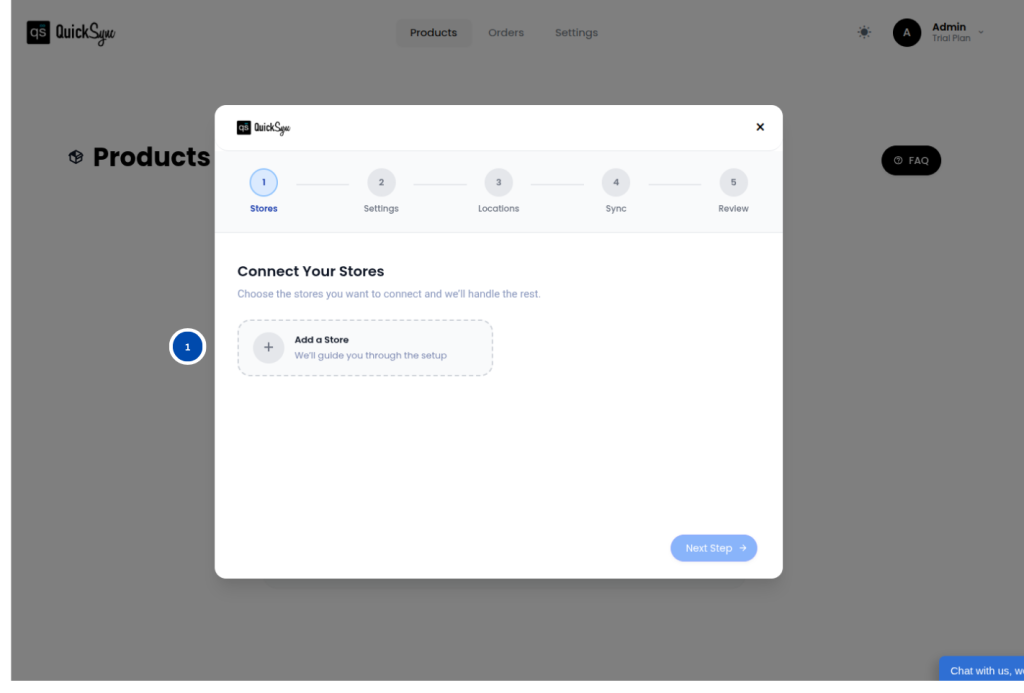
- Log in to your QuickSync Dashboard and go to Sync Products.
- Go to Store→ Add a store
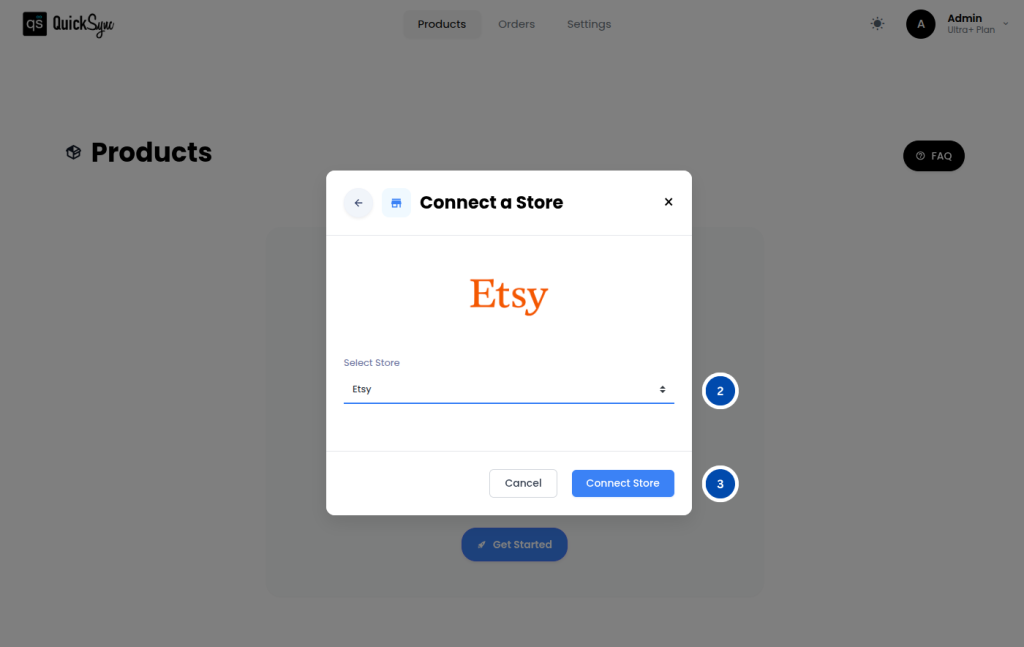
- Select Etsy
- Click Connect a Store and login to your Etsy account.
- Approve the permissions requested for shops, listings, images, videos, inventory, and orders.
- Once approved, QuickSync will automatically begin importing your shop details, categories, shipping profiles, return policies, and product catalog. You will see a progress bar in your dashboard while this is running. Wait for it to complete before moving to the next step.
2. Review Settings #
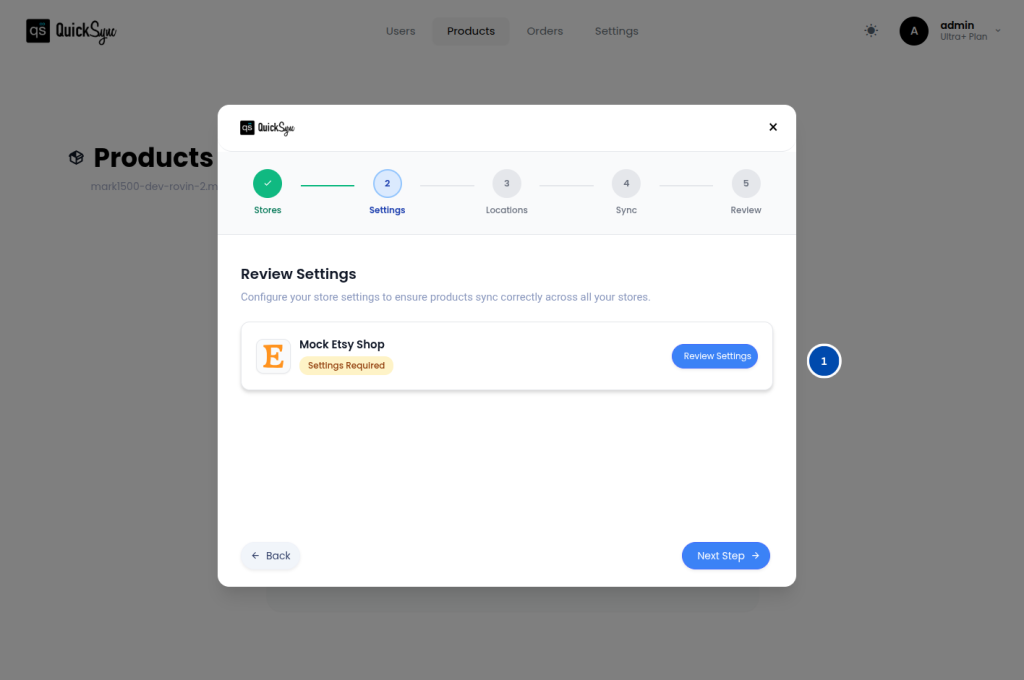
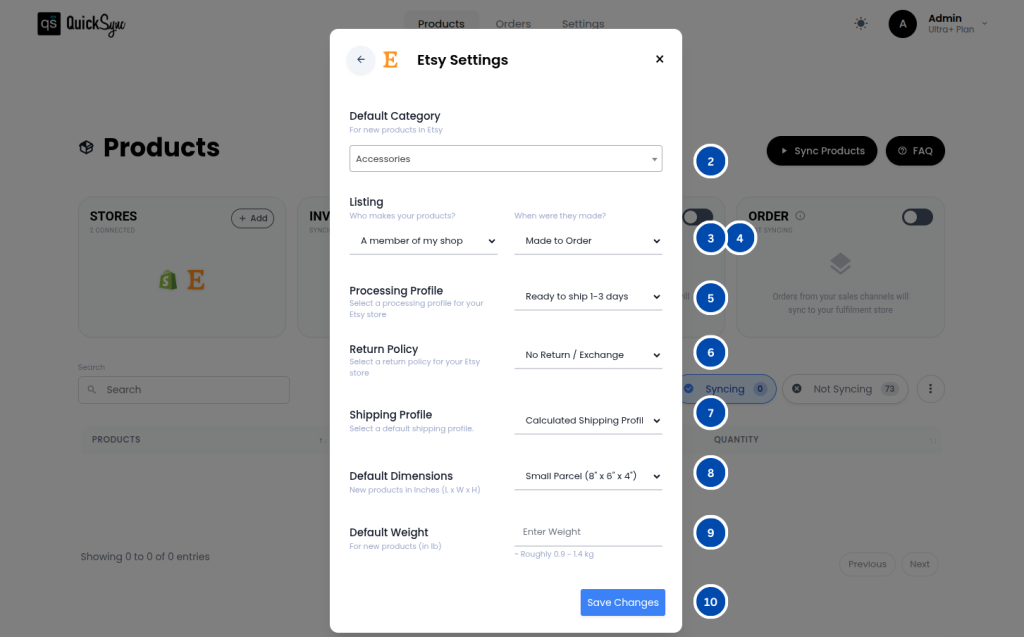
After your initial Etsy import is complete, QuickSync will display a Review Settings pop-up automatically. Take a moment to fill in each section carefully as these settings are applied to all new products you export to Etsy.
- Default Category: Choose a default category for new products.
- Listing Defaults > Who made? — pick from your Etsy-allowed options (e.g., Me or A member of my shop).
- Listing Defaults > When made? — choose a period (e.g., Made to order, 2020–2025, 2010–2019, …).
- Return Policy
- Select a return window (e.g., No returns, 7/14/30/45/60/90 days).QuickSync will fetch or create a Return Policy and attach it to new listings.
- Shipping Profile
- Pick your default Etsy Shipping Profile.
- For Fixed Shipping
- Choose Shipping Processing Time
- For Calculated Shipping
- Choose Default Dimensions
- Choose a default package size for new products in inches (L × W × H):
- Small Parcel – 8″ × 6″ × 4″
- Medium Box – 12″ × 12″ × 8″
- Large Box – 18″ × 18″ × 16″
- XL Box – 24″ × 24″ × 24″
- Custom – Enter your own Length, Width, Height (in inches)
- These are used when a product lacks dimensions. (Fields appear only if your workflow requires package data.)
- Choose a default package size for new products in inches (L × W × H):
- Choose Default Weight
- Enter the default product weight in pounds (lb) for new products.
- Min: 0.1 lb, Max: 1000 lb.
- Fixed Shipping – You set a specific flat shipping cost for the buyer, no matter where they are or how heavy the item is. For example, you charge $5 shipping for every order.
- Calculated Shipping – Etsy automatically calculates the shipping cost based on factors like buyer’s package weight, and size, so the cost varies for each order.
- Choose Default Dimensions
- Shipping Processing Time
- Set min/max handling time (in days) that Etsy shows to buyers (e.g., 2–5).
- Required by Etsy if your profile doesn’t already enforce it.
3. Features Supported #
QuickSync supports inventory sync, product sync, and order sync for your Etsy store.
Inventory Sync #
QuickSync keeps your Etsy inventory accurate across all your connected channels without any manual updates needed.
- Real-Time Inventory Sync: QuickSync syncs your inventory in real time across all connected channels, so whenever a sale happens anywhere, your Etsy stock updates instantly
- Inventory Range Support: QuickSync supports a minimum quantity of 1 and a maximum quantity of 999 per listing in line with Etsy’s inventory limits
Product Sync #
QuickSync keeps your full Etsy product catalog synced accurately and automatically so your listings are always up to date.
- Product & Variant Sync: QuickSync syncs all your product details and variant combinations up to 100 per product.
- Images: QuickSync syncs your product images to Etsy and supports up to 10 images per listing, so your products always look their best.
- Videos: QuickSync supports syncing up to 1 product video per listing to Etsy, so customers can get a better view of your product before purchasing.
- SKU Sync: QuickSync syncs all your SKUs accurately to Etsy so every product is correctly tracked and identified across all your connected channels.
Order Sync #
QuickSync brings all your incoming Etsy orders into one place so you can manage everything without switching between platforms.
- Order Routing: QuickSync automatically routes all incoming Etsy orders into your chosen fulfillment store so you can process everything from one place.
- Customer Data Access: QuickSync gives you access to customer details on Etsy orders. Please note this is only available for orders placed before September 2024 for US region buyers. There are no restrictions for non-US orders.
- Tracking & Carrier Sync: Once an order is fulfilled, QuickSync sends the tracking number and carrier name back to Etsy automatically. Please note this is only available for orders placed before September 2024 for US region buyers.
For more details, please go through the syncing reference table.
4. Special Settings / Toggles #
QuickSync includes a few additional settings for your Etsy integration that handle some of Etsy’s specific rules and restrictions automatically. Here is what each one covers:
Video Syncing #
QuickSync supports syncing product videos to Etsy. This feature is available on specific plans. Check your current plan or contact our support team to confirm if it is included.
Name & Tags Auto-Clean #
Etsy has strict rules about which characters are allowed in product titles and tags. QuickSync automatically cleans up any invalid characters when exporting your products to Etsy, for example, & is replaced with and, % is replaced with percent, and any other unsupported symbols are removed. This happens automatically in the background, so your listings always comply with Etsy’s requirements without you having to edit anything manually.
US Order Restrictions #
After September 2024, Etsy stopped sharing customer address information for orders placed by US buyers. QuickSync can still sync these orders, but customer details, including the delivery address, will not be transferred for US region orders. There are no restrictions for orders placed by buyers outside the United States.
3 Option Groups Handling #
Etsy only allows a maximum of 2 option groups per listing, for example, Size and Color. If your product has 3 option groups, QuickSync automatically combines two of them into one to stay within Etsy’s limit. For example, if your product has Color, Size, and Material, QuickSync will combine them into Color / Size and Material automatically so the export goes through without any errors.
5. Pricing & Billing #
QuickSync for Etsy integration follows the standard QuickSync subscription plans. Billing is managed through the QuickSync website. You can review or update your plan anytime from your QuickSync dashboard.
6. Change Logs #
| Date | API | Region | Notes |
|---|---|---|---|