
The Master Store acts as the single source of truth for your product data inside QuickSync. Instead of managing product details across multiple platforms, you simply choose one sales channel as the master, and QuickSync automatically distributes product updates to all your connected stores.
This means whenever you update product information in your master store, the changes are instantly reflected across every other connected sales channel.
Why it Matters #
Many merchants sell across multiple platforms, which can make it difficult to keep product information consistent everywhere. Without a centralized system, you may need to manually update product details like prices, descriptions, and images in every store separately.
The Master Store solves this problem by allowing you to manage all product updates from one central location.
- Multiple sales channels – Selling on platforms like Shopify, WooCommerce, eBay, and Etsy at the same time requires keeping product details in sync across all channels.
- POS + Online store – Retail businesses often operate both a physical store using POS systems like Clover or Square and an online store. The Master Store ensures product data stays aligned across both.
- Regional or multi-brand stores – Some businesses operate separate stores for different countries, audiences, or brands. Managing product updates centrally helps maintain consistency across all storefronts.
How the Master Store Works #
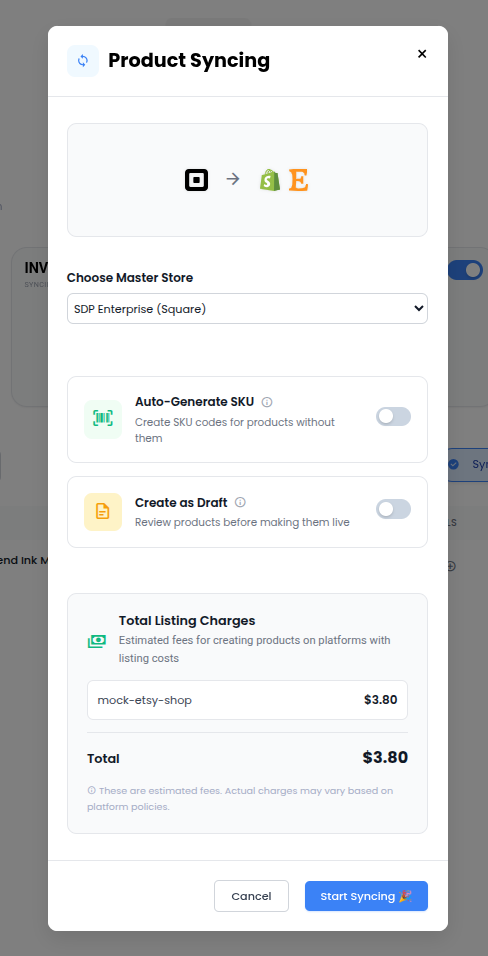
1. Choose Your Master Store: #
Inside the QuickSync dashboard, enable Product Syncing and select one of your connected sales channels as the Master Store. For example, you may choose Shopify or WooCommerce as the primary store where product updates are made.
2. Edit Products in One Place: #
Once your master store is selected, any changes you make there automatically become the primary product data.
This includes updates to:
- Product titles
- Prices
- Descriptions
- Images
- Variants
- Inventory attributes
3. Automatic Sync Across Channels: #
QuickSync automatically distributes these updates to all other connected stores. This ensures your product catalog stays accurate, consistent, and up to date across every sales channel without requiring manual edits.
Pro Tip: Use caution when enabling Product Syncing with marketplaces like Etsy or eBay that charge per listing. Adding random or unnecessary products can lead to unexpected listing fees.
Key Features #
- Single Source of Truth – Manage your entire product catalog from one central platform instead of updating multiple stores individually.
- Time Saver – Make changes once in your master store, and QuickSync automatically updates every connected store.
- Consistent Branding – Maintain the same product names, images, descriptions, and pricing across all sales platforms.
- Reduced Human Errors – Avoid mistakes that often happen when manually updating products in multiple locations.
Important Tip #
You can change your Master Store at any time. To do this, simply:
- Turn off Product Syncing
- Re-enable it
- Select a different store as the new Master Store