
A TikTok warehouse is the pickup and return address that TikTok uses to know where your products are being shipped from. TikTok requires every seller to have at least one warehouse address set up before their store can go live and start fulfilling orders. Without a warehouse address, TikTok will not be able to process shipments or calculate shipping costs for your products.
Setting up your warehouse address is a one-time step and only takes a few minutes. Once it is added to your TikTok Seller Center, you can connect it to QuickSync so your products and orders sync correctly with the right location.
How to Add Your Warehouse Address on TikTok #
Follow these steps to add your warehouse address in TikTok Seller Center:
Step 1: Go to Warehouse Settings
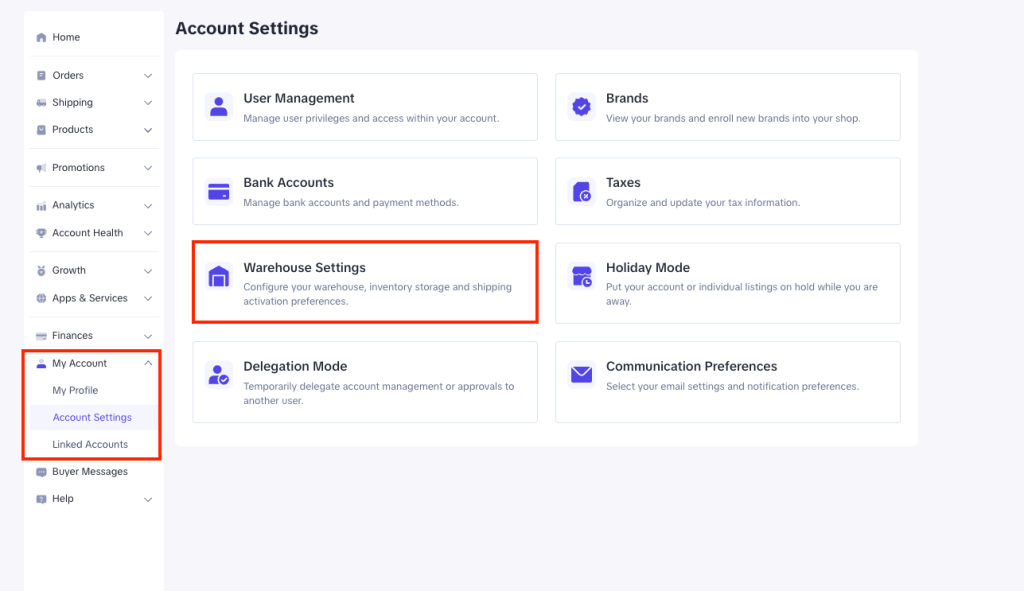
Log in to your TikTok Shop dashboard. On the left-hand side, go to My Account → Account Settings → Warehouse Settings. Add yourself as the contact person and enter your pickup and return address.
Step 2: Confirm Your Address
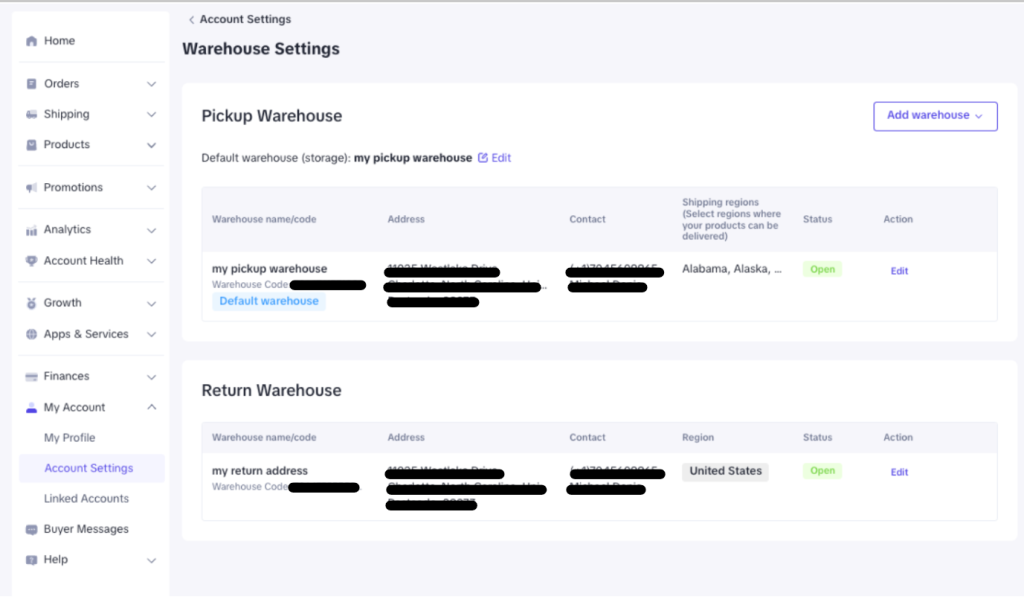
Once you have saved your details, your warehouse address will appear in the Warehouse Settings page. Make sure all the information is correct before moving to the next step.
Step 3: Sync Warehouse Data with QuickSync
After saving your warehouse address in TikTok, go to your QuickSync Dashboard → Settings → TikTok → Settings and click the Refetch Products button. This tells QuickSync to pull in your updated warehouse data so everything stays in sync.
FAQs #
Q1: What is TikTok warehouse, and why do I need one?
A TikTok warehouse is the pickup and return address linked to your TikTok Shop account. TikTok uses this address to know where your products are being shipped from and to calculate shipping costs for your orders. Every TikTok seller is required to have at least one warehouse address set up before their store can go live. Without it, TikTok will not allow you to fulfill orders or process shipments.
Q2: I added my warehouse address on TikTok, but QuickSync is not showing it. What should I do?
After adding or updating your warehouse address in TikTok Seller Center, you need to manually refresh the data inside QuickSync. Go to QuickSync Dashboard → Settings → TikTok → Settings and click the Refetch Products button. This will pull in the latest warehouse information from your TikTok account.
Q3: Can I add more than one warehouse address on TikTok?
Yes. If you have TikTok’s Multi-Warehouse feature enabled on your account, you can manage up to 20 warehouse addresses. This feature is not enabled by default and needs to be activated by your TikTok account manager. Once approved, all your warehouse locations will sync with QuickSync automatically after you click Refetch Products.