
A size chart is an image that shows customers the measurements and sizing details of your products. It helps shoppers pick the right size before placing an order. The more accurate your size chart is, the easier it is for customers to order the right size, which means fewer returns and a better shopping experience.
TikTok requires a size chart for products listed under the clothing and apparel categories. If you skip this step, your product listing may not go live or may not display properly on TikTok Shop. With QuickSync, you can upload your size chart directly from your dashboard. You do not need to log into the TikTok Seller Center separately.
How to Add Your Size Chart on TikTok Shop #
Once you have successfully integrated your TikTok shop with QuickSync, you can follow these steps to add a size chart.
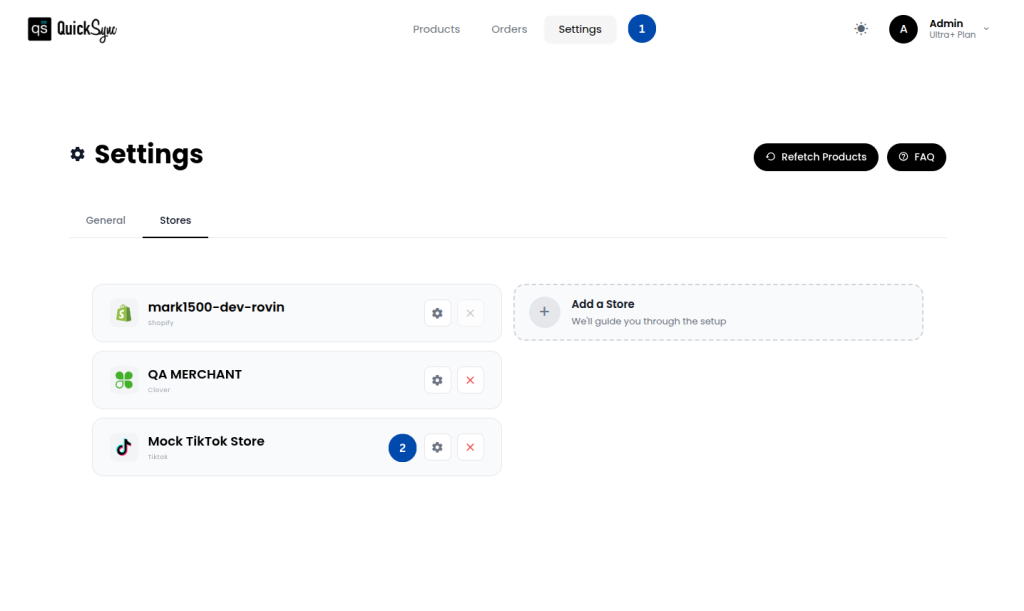
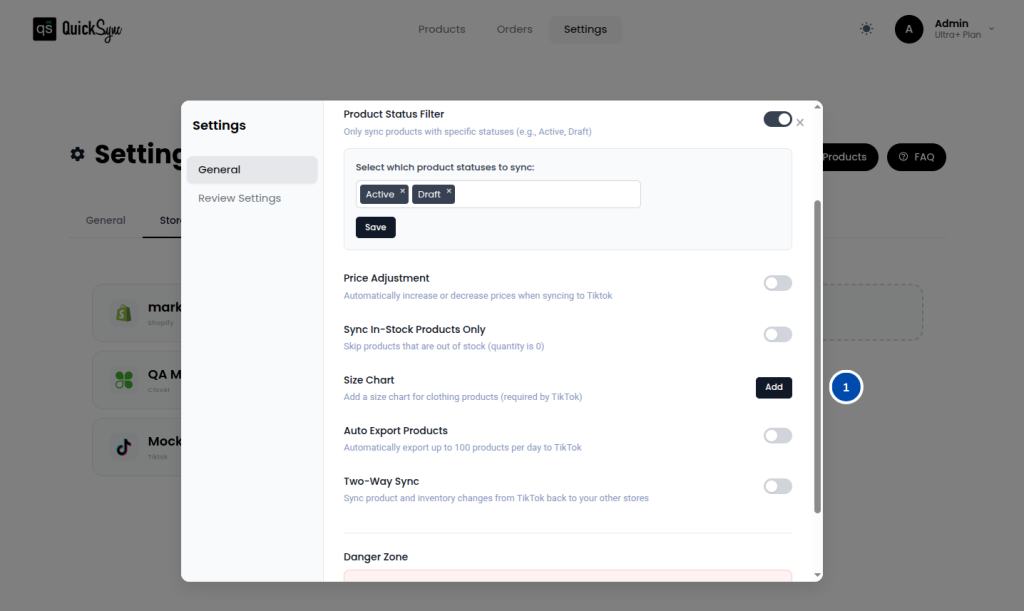
Step 1: Open the Size Chart Settings
Go to Settings → TikTok → Settings and click Add Size Chart. If you have uploaded a size chart before, you will see Update Size Chart instead.
Step 2: Upload Your Image
Upload your size chart in JPG, JPEG, or PNG format. Make sure the chart is clear and easy to read. Keep the file size under 2–3 MB for the best results.
Step 3: Save Your Chart by Clicking on Save.
QuickSync will store your size chart and attach it automatically to your product listings when you export them to TikTok.
Step 4: Update Your Chart Anytime
If you need to make changes to the size chart, open the same settings and upload a new image. Any products exported after saving will use the updated chart.
What is TikTok’s size Chart Requirement? #
Here are a few things to keep in mind when creating your size chart to make sure it meets TikTok’s standards and works well for your customers:
- Use both inches and centimeters so customers from different regions can understand it easily.
- Make sure the text in your size chart image is large enough to read on a mobile screen, since most TikTok shoppers browse on their phones.
- Keep the design clean and simple; a cluttered size chart can confuse customers more than help them.
- If you sell different types of apparel, such as tops, bottoms, and outerwear, consider creating a separate size chart for each product type.
Troubleshooting FAQs #
Q1: My size chart is not showing up on my TikTok product page. What should I do?
First, check that the product belongs to a clothing or apparel category on TikTok. TikTok only displays size charts for relevant categories, so if your product is under a different category, the chart will not appear. Also, confirm your image is in JPG, JPEG, or PNG format. If everything looks correct and the chart is still not showing, try re-exporting the product from QuickSync after confirming the size chart is saved.
Q2: I updated my size chart, but my existing TikTok listings still show the old one. Why?
Updating your size chart in QuickSync does not automatically update products that have already been exported to TikTok. The new chart will only apply to products exported after the update is saved. To show the new chart on existing listings, you will need to re-export those products from QuickSync.
Q3: My size chart upload is failing or timing out. How do I fix this?
This is usually caused by a large file size or an unstable internet connection. Here is what you can try:
- Reduce the file size and keep it under 2 to 3 MB
- Check your internet connection before uploading
- Wait a few minutes and try again
- If the issue continues, try a different browser or clear your browser cache and attempt the upload again
Please note that TikTok reviews all product listings before they go live. Make sure your size chart image is clear, accurate, and meets TikTok’s image guidelines to avoid any delays in your product approval.