
A Fulfillment Store in QuickSync is the primary store you choose to act as your central order processing hub. All orders from your connected sales channels are automatically routed to this store, allowing you to manage fulfillment from one unified location.
Instead of logging into multiple platforms, you process, ship, and update everything from a single store.
Why a Fulfillment Store Matters #
Managing multiple sales channels can quickly become overwhelming. A Fulfillment Store simplifies and centralizes your operations.
Centralized Order Management: #
Process and ship orders from one store instead of switching between platforms.
Accurate Tracking Across Channels: #
Customers receive real-time tracking updates on the original sales channel where they placed the order.
Reduced Errors During Peak Sales: #
High-volume periods such as seasonal sales and promotions become easier to manage, minimizing missed or delayed orders.
Improved Operational Efficiency: #
Your team follows one consistent workflow for all channels, saving time and reducing manual work.
How the Fulfillment Store Works #
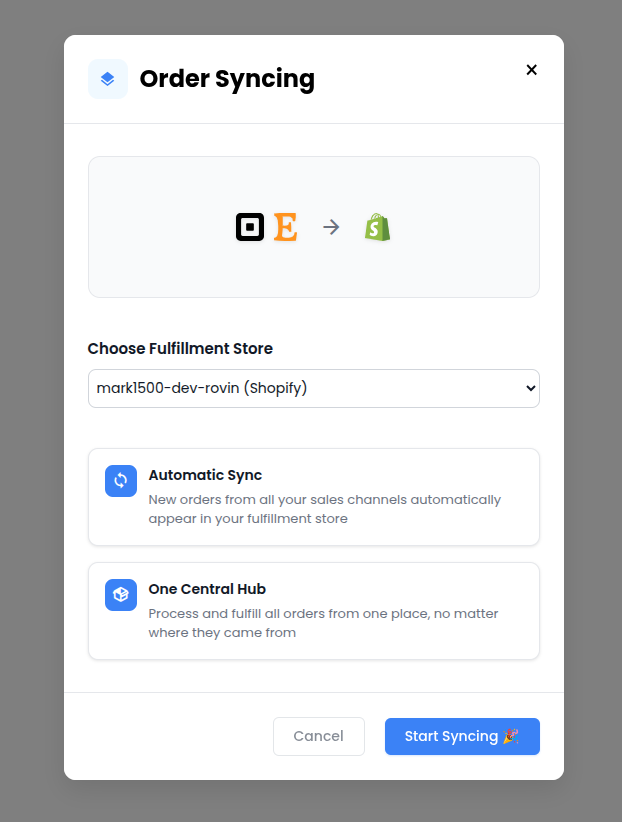
Setting up your Fulfillment Store in QuickSync is simple and takes just a few steps.
Step 1: Choose Your Fulfillment Store #
In your QuickSync dashboard, enable Order Syncing and select one of your connected sales channels, such as Shopify or WooCommerce, to act as the Fulfillment Store.
Step 2: Automatic Order Routing #
Once activated, QuickSync automatically sends all incoming orders from your connected channels to the selected Fulfillment Store.
Step 3: Sync Back Updates #
When you add tracking numbers, carrier details, or update order status in the Fulfillment Store, QuickSync pushes those updates back to the original sales channel.
Important Notes #
- Not every sales channel can be selected as a Fulfillment Store.
- Not every sales channel supports receiving tracking numbers or carrier data from a Fulfillment Store.
- Please refer to the syncing reference table to check availability for each platform.
- Only one store can act as the Fulfillment Store at a time.
Key Features of the Fulfillment Store #
- Single point of processing – Collect and manage all orders from every connected sales channel in one centralized location.
- Automatic routing – Orders placed on Shopify, Etsy, eBay, or other connected channels are instantly synced to your designated Fulfillment Store.
- Real-Time Status & tracking updates – Add tracking numbers and carrier details in the Fulfillment Store and QuickSync automatically updates the original sales channel.
- Automatic Cancellation Sync – If an order is canceled on the originating sales channel, QuickSync reflects that cancellation in the Fulfillment Store automatically.
- Flexible Configuration – You can change your Fulfillment Store anytime by disabling Order Syncing and enabling it again with a different store.