QuickSync currency conversion simplifies this process by automatically converting product prices between currencies so your stores always display accurate pricing.
Whether you sell internationally or operate stores in different regions, QuickSync ensures that product prices remain consistent and aligned with current exchange rates. This helps merchants maintain correct profit margins while providing customers with localized pricing on every platform.
With QuickSync currency conversion enabled, price updates are handled automatically without manual calculations or constant monitoring of exchange rates.
Note: This feature is only available in selected plans. Please refer pricing plans.
Why Currency Conversion Matters #
Many merchants operate stores that use different currencies. For example:
- A Shopify store selling products in USD
- A Clover POS system operating in CAD
- A marketplace like Etsy or eBay using another currency
Simply copying the same retail price across these channels can cause serious problems. Without proper currency conversion, you may:
- Display incorrect product prices in certain stores
- Lose profit margins due to inaccurate exchange rates
- Spend hours manually adjusting prices when exchange rates change
QuickSync currency conversion solves this problem automatically.
Once enabled, QuickSync converts prices between the native currencies of each connected sales channel using live exchange rates. This ensures that every store displays the correct price without requiring manual adjustments.
As a result, multichannel sellers can confidently manage international sales channels while maintaining accurate pricing everywhere.
How QuickSync Currency Conversion Works #
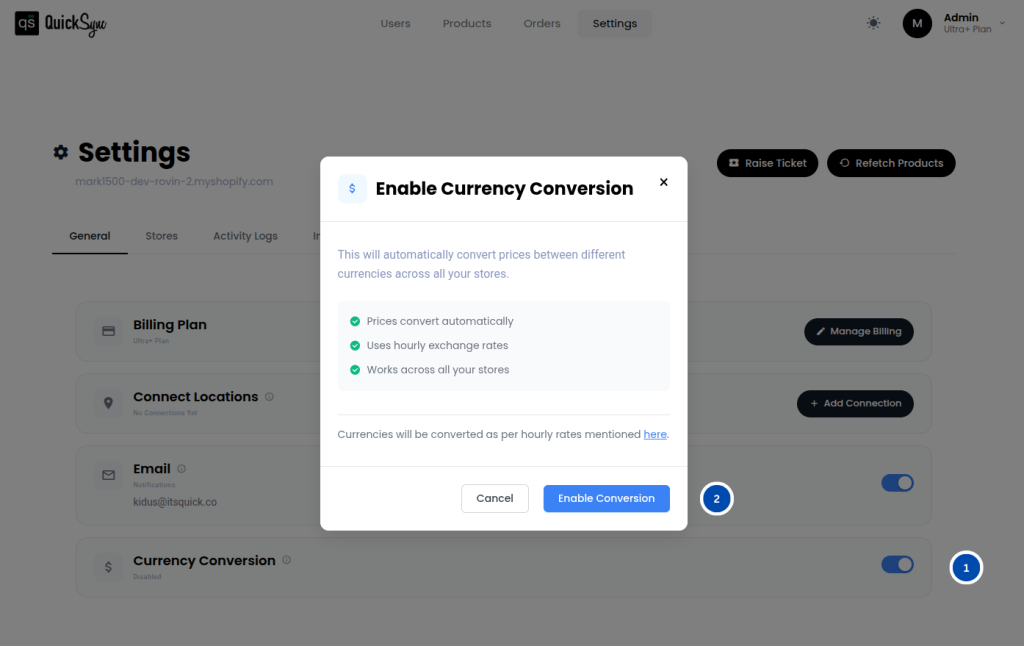
1. Enable Currency Conversion: #
To begin using QuickSync currency conversion, you first need to connect your stores and then navigate to:
QuickSync Dashboard → Settings
From there, enable the Currency Conversion option. Once activated, QuickSync automatically begins converting prices between connected sales channels that use different currencies.
2. Automatic Exchange Rate Updates: #
QuickSync retrieves live exchange rates from the Exchange Rate API and updates them automatically every hour. These frequent updates ensure that price conversions always reflect the most recent market exchange rates.
This eliminates the need for merchants to manually track currency fluctuations or adjust prices across multiple stores.
3. Automatic Price Syncing: #
When products are synced between stores using different currencies, QuickSync automatically converts prices using the latest exchange rate. Customers browsing your store will see prices displayed in the correct local currency for that sales channel.
This ensures a seamless shopping experience while maintaining accurate pricing across all connected platforms.
Key Benefits of Currency Conversion #
Real-Time Exchange Rate Updates: #
QuickSync retrieves live currency exchange rates and refreshes them every hour. This ensures your product prices remain accurate and aligned with global currency fluctuations.
Automatic Currency Conversion: #
Prices are automatically converted between your base currency and the currency used by each connected sales channel. QuickSync supports multiple currency pairs, so you can operate across global marketplaces without manual work.
Clean and Customer-Friendly Prices: #
QuickSync intelligently rounds converted prices to keep them neat and easy for customers to understand.
For example:
- If the fractional value is ≤ 0.50, the price rounds to .49
- If the fractional value is > 0.50, the price rounds to .99
This ensures your product pricing remains professional and optimized for conversions.
Reliable Fallback Protection: #
If live exchange rates are temporarily unavailable, QuickSync automatically uses the most recently stored exchange rate. This prevents interruptions in price synchronization and ensures your stores continue displaying accurate pricing.
Fully Integrated With QuickSync: #
Currency conversion works seamlessly alongside other QuickSync features, such as:
- Inventory synchronization
- Product syncing
- Order syncing
Together, these features ensure that pricing, inventory, and orders remain consistent across every connected sales channel.
Frequently Asked Questions #
Need Help? #
If you have any questions about QuickSync currency conversion or need help configuring this feature, our support team is ready to assist you.
Contact us at support@quicksync.pro, and we will help you as quickly as possible.


